


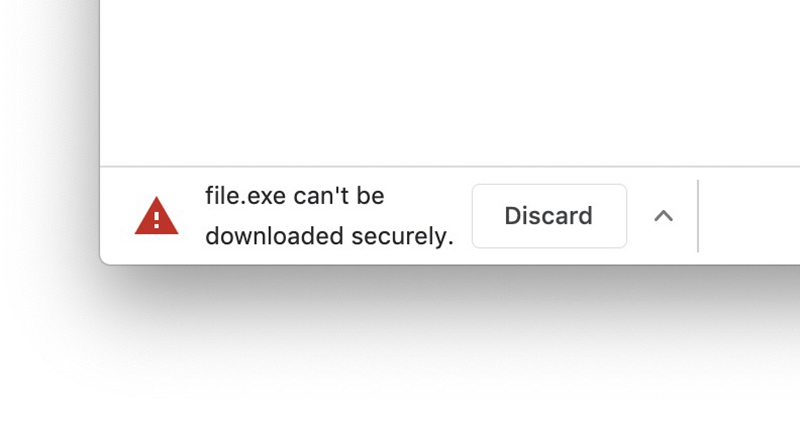
Download This seemingly simple action of downloading a file actually hides many possible security risks. In the past, we would need to rely on anti-virus software to help you who are impatient and want to download files quickly to avoid encountering unsafe download files and addresses. Recently, Google hopes to help you check it first on the Chrome browser, the outpost where most people download files. Continue reading the content of the report by veteran developer Xiu Danjile. The new version of Chrome will help you block unsafe downloads.
▲Image source: Google
Veteran users, please wait, the new version of Chrome will help you block unsafe downloads
in order to letveteran driverUsers can browse the Internet more safely and without interference. Google often introduces some very good features for the Chrome browser, such as malvertising blocking (there are alsointrusive advertising videosobstruction),Quieter Quieter modeas well asQuick muteetc., are all functions that consider users one step ahead. Now, officials are preparing to provide stronger controls on information security.
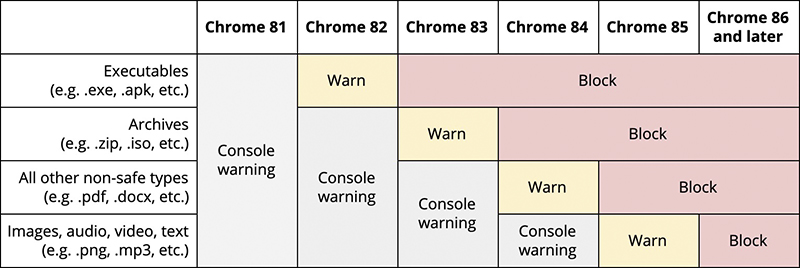
Similar to the browser’s warning blocking function that directly detects malicious links, the Chrome browser that is about to enter the 1980s has officially announced that the upcoming Chrome 81 will import files and links for “insecurely-downloaded” files and links for detection. And in a phased manner (the introduction of the ad blocking function seems to follow this rhythm), advanced warnings will be provided for executable files such as exe and apk in the Chrome 82 update expected to be provided in April; after Chrome 83, it will begin to directly block this type of files. The next few updates (to Chrome 86) will include more supported file types in the blocking function (as shown in the figure below).
▲Image source: Google
This blocking function of unsafe downloads not only targets the “files” themselves, but also prevents file privacy monitoring issues that may be phished. Google will begin to gradually import it into major browsers, so that Chrome can better ensure the security of download pages (HTTPS) and only download secure files. In short, after updating Chrome in the future, if the browser suddenly warns or blocks you when you are eager to download certain files, remember to take a closer look and think more about whether the source is trustworthy. Perhaps, Chrome can really help you prevent device poisoning or leakage of private data.
Pictures/sources cited in this article
Further reading:
iOS 13.4 public beta debuts: new mail toolbar and CarKey API in place

Source: KOCPC Chinese