


Some small functions really need to be used to realize their convenience. Apple has previously introduced the function of automatically filling in verification passwords for text messages for the new iOS system, and now it is said that Google will also begin to introduce similar functions for the Android Messages messaging application. It’s easier to keep reading! Android Messages is testing password SMS auto-fill feature. Report text.

▲Image source: Google
More convenient! Android Messages is testing password SMS auto-fill feature
In fact, Android Messages has already introduced the function of quickly copying passwords in messages, and now Google plans to further improve the experience when verifying passwords through OTP and 2FA. Instead of opening the text message and slowly copying it, according to foreign media reports, Android Messages now supports the updated text message API of Play Service, which can automatically fill in the verification password (OTP or 2FA two-stage authentication). I will teach you how to open it, etc., but whether the Android Messages app can support it depends on fate. After all, it may be an update method on the server side…
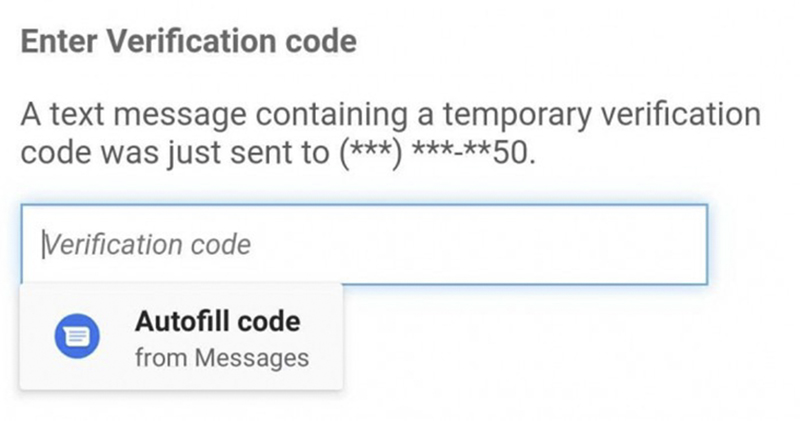
▲Image source: Android Police
This function actually sounds complicated, but it’s really simple to use. Once the “auto-fill verification code” function in the system function is enabled, and if the messaging application on your phone supports this API. As long as you need to send a verification SMS for verification when logging in or registering an account on some web pages such as Amazon, the “Autofill code/automatically fill in password” function will appear under the input field of the web page when receiving the SMS message – as shown in the picture above, click to import the password like automatically filling in the login password.
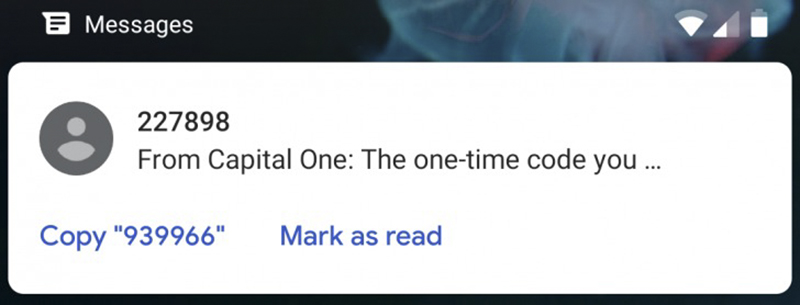
▲Picture: Android Messages actually also has the function of quickly copying the detected password (Source: Android Police).
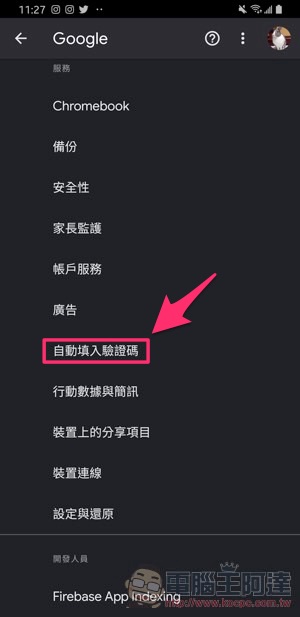
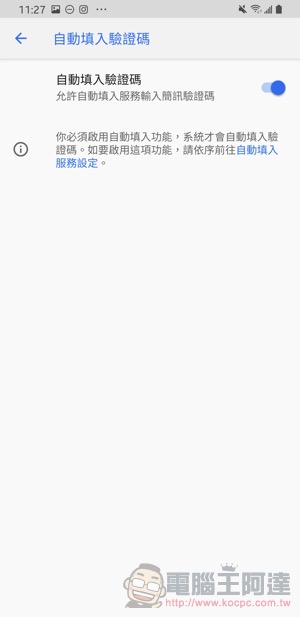
How to enable Verification code autofill
You can find the enabled function in the “Google > Autofill verification code” option in the system settings. But remember, third-party applications must also support this API to receive support:
Further reading:
iOS 13.4 public beta debuts: new mail toolbar and CarKey API in place

Source: KOCPC Chinese