


Many people are actually more accustomed to communicating in Taiwanese when chatting with family members and elders. However, when they pick up their mobile phones, they are often stuck in the dilemma of “not knowing how to type Taiwanese characters.” Either I can only use Chinese instead, or I can just use voice messages instead.TaiwaneseIn the text world, it becomes difficult to use.
In order to improve this long-standing problem, the Ministry of Education has launched a new “Taiwanese”input method”, combining standard Taiwanese Chinese characters, voice input, and mobile device usage scenarios, so that Taiwanese is not just spoken, but can actually be written down, transmitted, and seen on mobile phones.
Whether this input method is practical, who it is suitable for, and what thoughtful designs it has for actual use, I will take you step by step to understand it from the perspective of daily use.

The mobile phone can finally type “authentic Hong Kong and Taiwanese characters”! The Ministry of Education’s Taiwanese input method can be understood at once
For many Taiwanese, Taiwanese is not a “foreign language” but the most natural way of communication in daily life. But as soon as typing is involved, problems immediately arise. When sending messages to parents or grandparents, I often don’t know how to translate the familiar Taiwanese in my mind into correct and understandable text. Over time, Taiwanese language has been forced to relegate to a supporting role on mobile phones.
Depend onMinistry of EducationThe “Taiwanese Input Method” was launched to fill in this long-missing puzzle piece. This input method does not just add Taiwanese to the keyboard options, but rethinks the actual needs of Taiwanese in digital life from the perspective of “how ordinary people use mobile phones.”
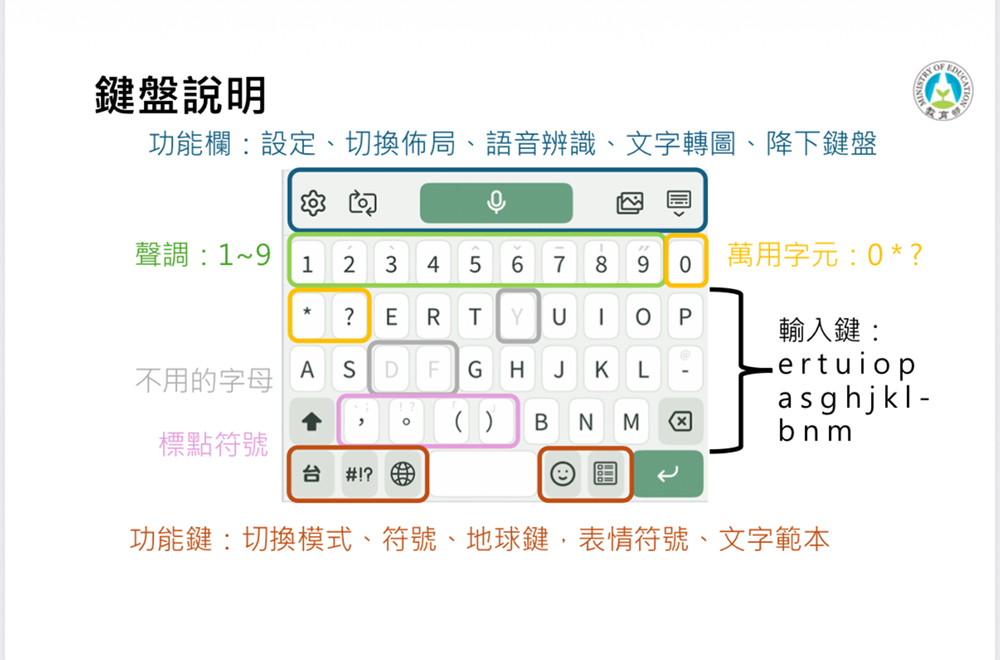
You can also type while speaking, lowering the learning threshold
For people who are not familiar with the pinyin rules, the most direct way is to “use spoken words”. The Taiwanese input method has a built-in voice input function. Just click on the microphone and speak directly in Taiwanese, and the system will automatically recognize and convert it into text. What’s even more considerate is that when the keyboard is set to different modes, the output of speech recognition will also be adjusted accordingly.
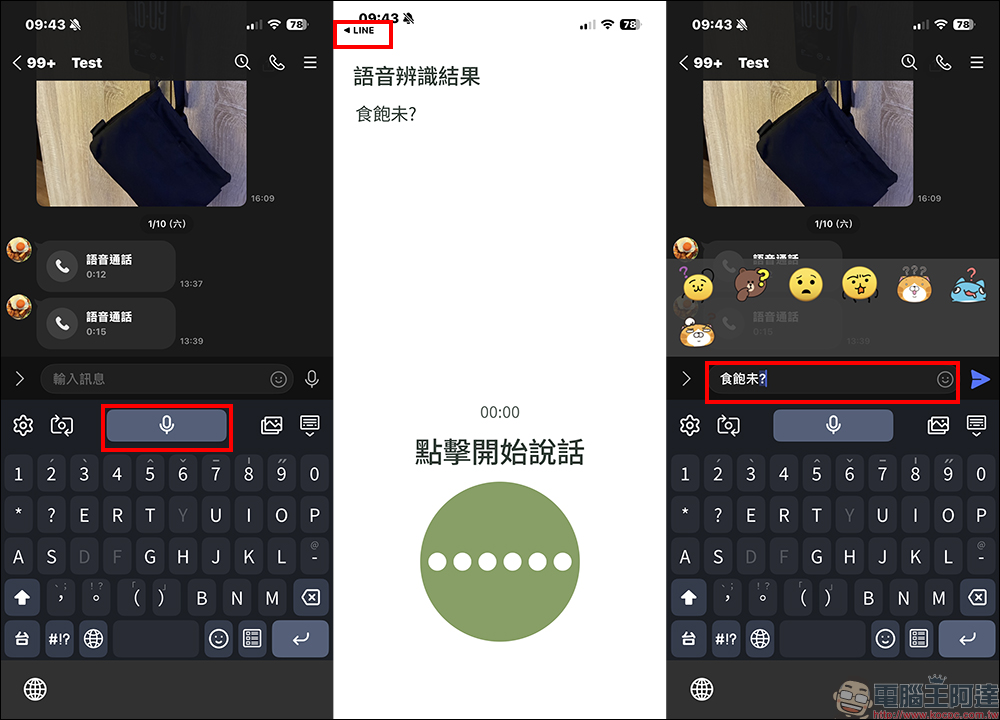
If it is in Chinese character mode, the system will directly output Taiwanese Chinese characters; if it is switched to Taiwanese mode, the corresponding Roman pinyin will be displayed. It is actually a very practical practice tool for people who are learning Taiwanese. The overall recognition accuracy is good, and it also supports continuous voice input and automatic addition of punctuation marks, which is especially friendly to the elderly or people who are not good at typing.
Pinyin, Chinese characters, and English input can be done at once
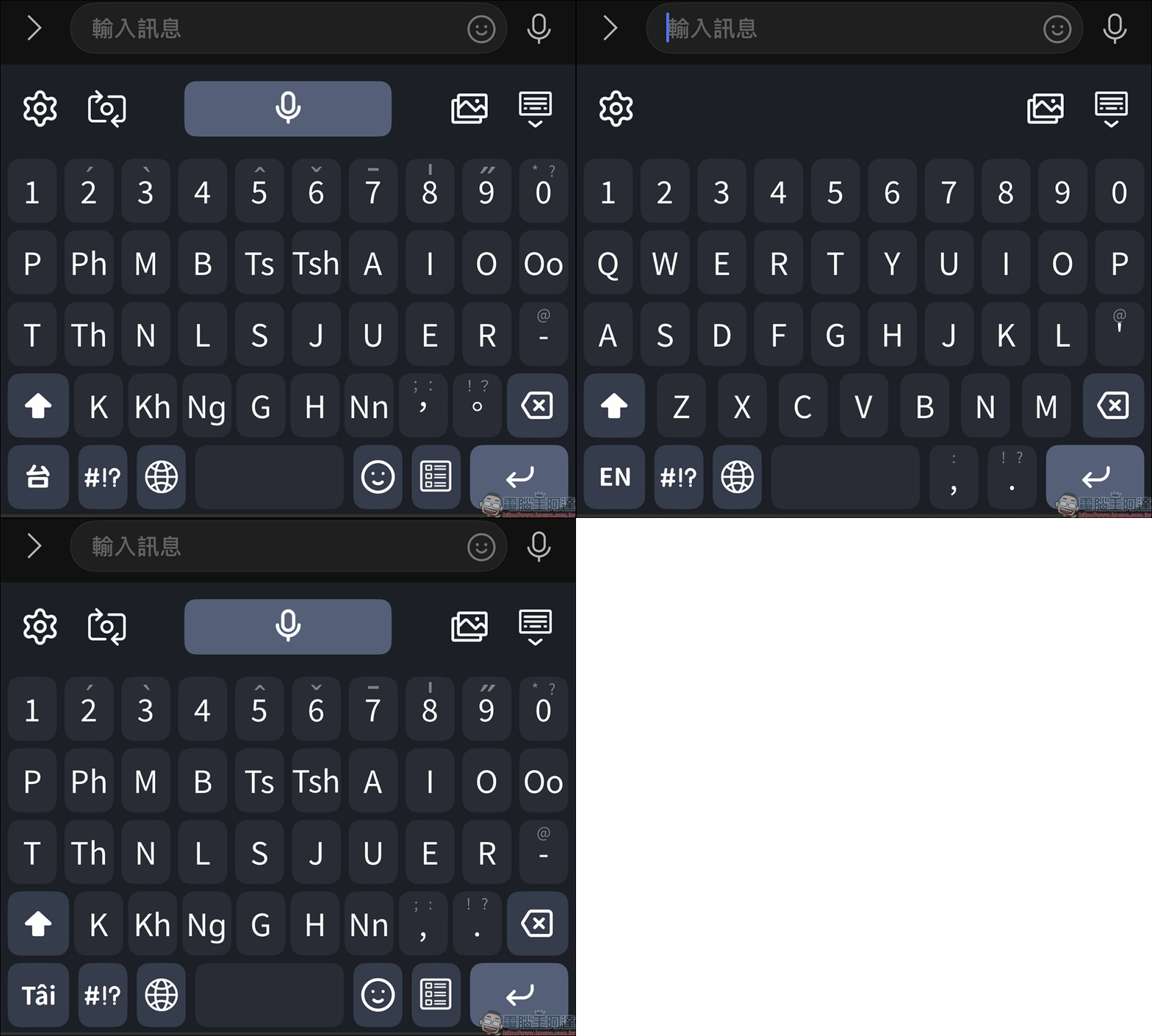
In terms of keyboard design, the Taiwanese input method provides three main input methods, namely Taiwanese Pinyin input, Taiwanese Chinese character input, and English input. You can switch between the three modes at any time. There is no need to jump back and forth from the keyboard settings, and it is quite intuitive to use.
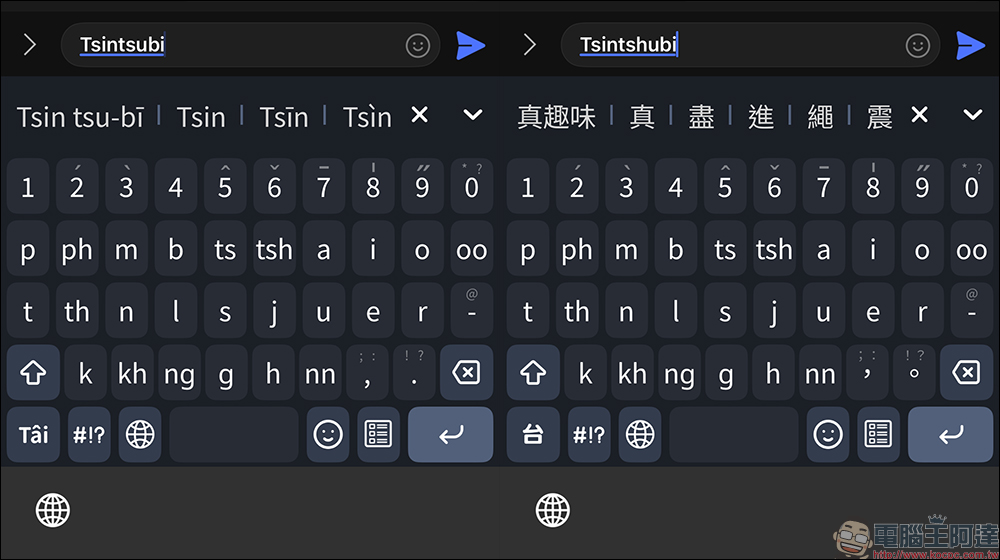
For example, if you enter the Tailuo pinyin “tsin tshù-bī”, the system will display the corresponding word “True Fun” and also display options with pinyin to facilitate users to confirm whether the pronunciation is correct. Common Taiwanese vocabulary will also appear first in the candidate words, such as sentences commonly used in daily chats. The actual input speed is actually faster than imagined.
Don’t be afraid of missing words, text can also be turned into pictures
One of the most common problems encountered by Taiwanese in the digital environment is “missing characters”. Some devices or apps do not support certain Taiwanese Chinese characters, so all the other party sees is a bunch of boxes. In order to solve this old problem, the Taiwanese input method has built-in exclusive Taiwanese Chinese character fonts, covering more than 500 commonly used Taiwanese Chinese characters.
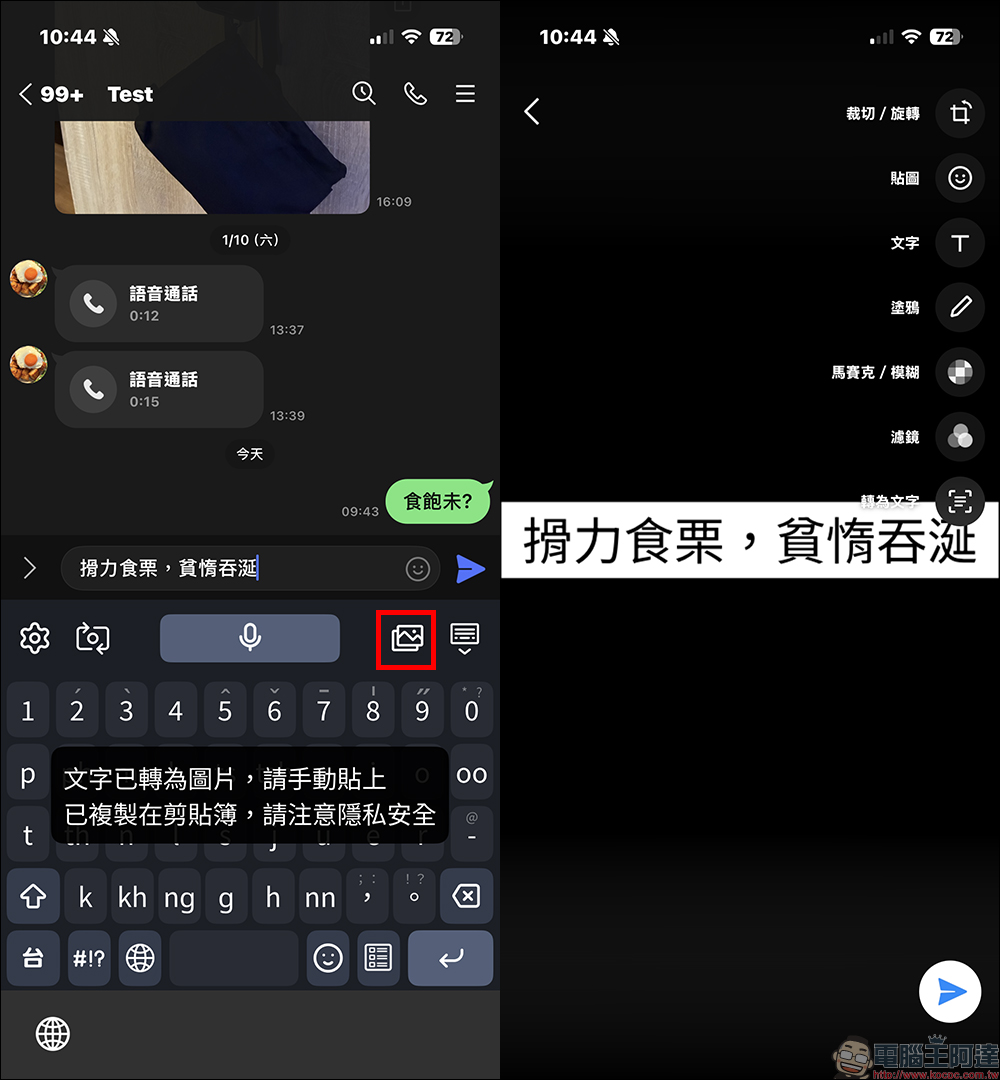
Even so, in order to ensure smooth display on any platform, the input method also adds a “text to image” function. With just one click, the entered Taiwanese text can be converted into a picture and pasted for transmission. Even if the recipient does not have the same font installed, he can still see the content completely and communication will not be interrupted.
You can also search for words and guess words. There are many practical tips.
In actual use, there are some very practical small functions that are easily overlooked. For example, the design of universal characters is very suitable for use when “you remember how to pronounce but can’t spell it completely”. When the tone is uncertain, you can use “0” instead. If you don’t know a certain pinyin letter, use “?”. If the entire paragraph in the middle is uncertain, you can also use “*” to assist in the search.
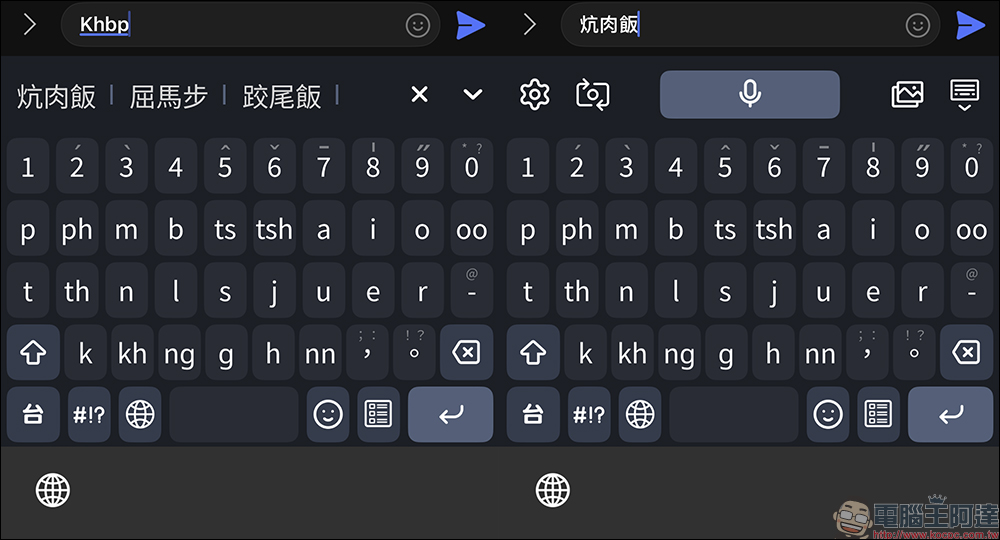
In addition, for common phrases with more than three characters, the system also supports abbreviation input. Just enter the beginning of each syllable to quickly call out the complete word. For example, input “Khbp (khòng-bah-pn̄g)” to display “Kang Pork Rice”, which is actually quite convenient for people who are familiar with Taiwanese.
System support is in place and the user experience is more complete
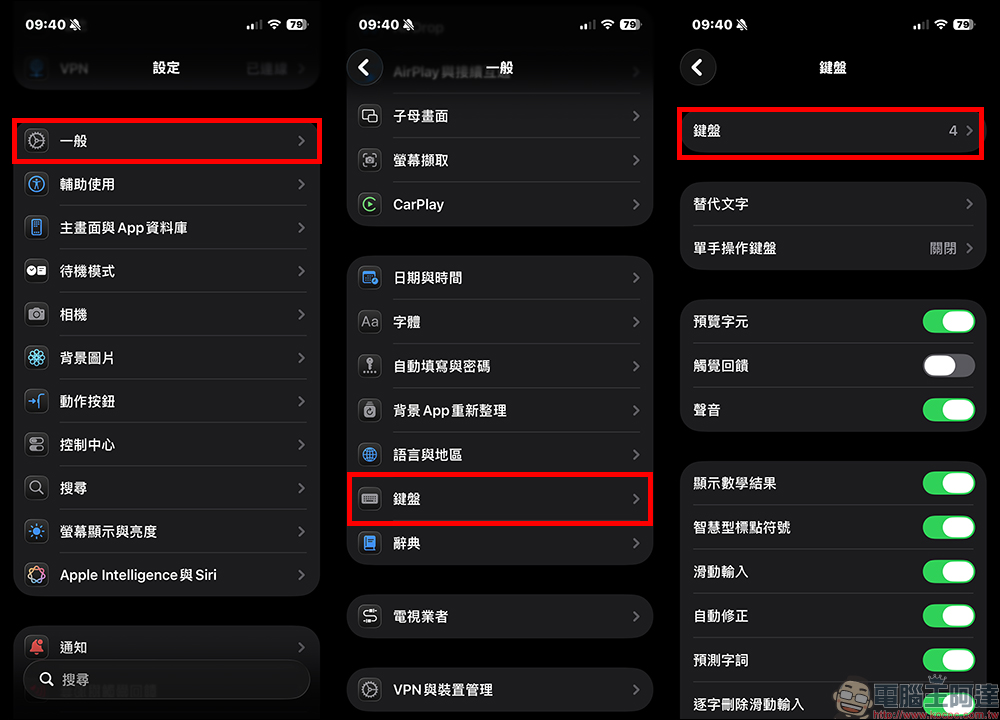
As the digitization of local languages continues to advance, related glyphs are gradually being incorporated into mainstream systems. When used together with the Taiwanese input method, both reading and writing are much smoother than in the past. To add the Taiwanese input method of the Ministry of Education to iPhone, after installing the app, go to the system “Settings” > “Keyboard” and select “Keyboard”.
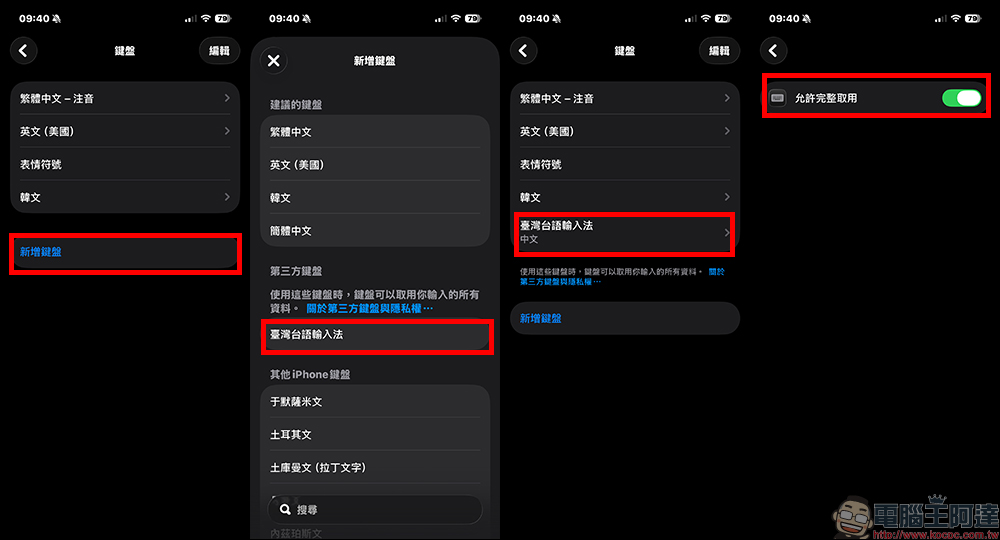
Then click “Add Keyboard” in the keyboard list, and you will see that the third-party keyboard “Taiwanese Input Method” can be added. After joining, click “Taiwanese Input Method” to turn on “Allow full access”.
In addition to iOS users, Android users can also download the “Ministry of Education Taiwanese Input Method” from the Google Play Store to use.
Ministry of Education Taiwanese Input Method
Mobile App:iOS version (App Store)|Android version (Google Play Store)
PC version:Windows version|Mac version
Further reading:
Source: KOCPC Chinese