


every day through LINE Chatting with friends and colleagues to discuss itineraries has long been a daily routine for many people, but when it comes to organizing the appointments in the chat into an itinerary, you often have to switch to anothercalendar App or re-create reminders, the process is actually quite troublesome. Now LINE has launched a new “LINE calendar” function allows users to create schedules, manage activities, and even integrate activity arrangements of different groups directly in the chat room. When planning parties, meetings or trips in the future, you may be able to complete all arrangements just in the chat window.

▲Image source: LINE
LINE’s new feature “LINE Calendar” is here! You can create itinerary in the chat room and manage cross-groups without missing a call.
LINE today announced the launch of a new “LINE Calendar” function in the messaging software, allowing users to create and manage schedules directly during chats without switching to other applications. The core concept of this feature is actually quite simple, which is to integrate “chat content” and “schedule management” in the same place.
In the past, when we discussed time in LINE, such as “dining on the evening of March 20th” or “meeting next Monday”, it was usually only part of the chat message. If you want to turn it into a real itinerary reminder, you must open other calendar apps and manually create events.
Now through the LINE calendar, the dates in the chat can be directly converted into an itinerary, making the whole process more intuitive and more in line with everyone’s daily chat habits.

▲Image source: LINE
Currently, the version corresponding to the LINE calendar function is LINE 26.3.0 or above. Android users can already experience it early after the update. The iOS version is expected to launch a support update in the near future.
Why is LINE launching a calendar feature?
In fact, many LINE users have long been accustomed to using the built-in calendar on their phones or other schedule management apps, such as Google Calendar or Apple Calendar. However, these tools are separate from LINE chat. When friends discuss dinner time in a group, or colleagues confirm meeting dates in a chat room, users often need to switch between different apps. Many people should have this experience:
- After chatting and discussing the date, I want to set up a reminder but forget the exact time.
- You will need to check the chat history again in a few days to confirm.
- You need to re-enter the information when creating an itinerary
Although these small actions are not complicated, they are actually quite time-consuming over time. The goal of LINE Calendar is to integrate these processes directly into the chat interface, allowing users to complete everything in the same place.

▲Image source: LINE
Create an itinerary with one click on the chat date
The most intuitive function of LINE calendar is to quickly create itineraries. When date text appears in the chat room, the system will automatically convert the date into a clickable link. Just click on the date to create a new itinerary directly. Another way is to long press the chat message and select “Calendar” from the pop-up menu to create the message content as an event.

▲Image source: LINE
A great advantage of this design is that it can directly turn chat content into travel records. If you need to confirm event information in the future, you can just open the calendar to see it without having to go back and search through the chat history.

▲Image source: LINE
Supports shared calendars for better management of group activities
Another important feature of LINE Calendar is the ability to create shared calendars. Itineraries created in one-on-one chat rooms or group chat rooms automatically become shared events. Participating members can view event information and track their attendance status.
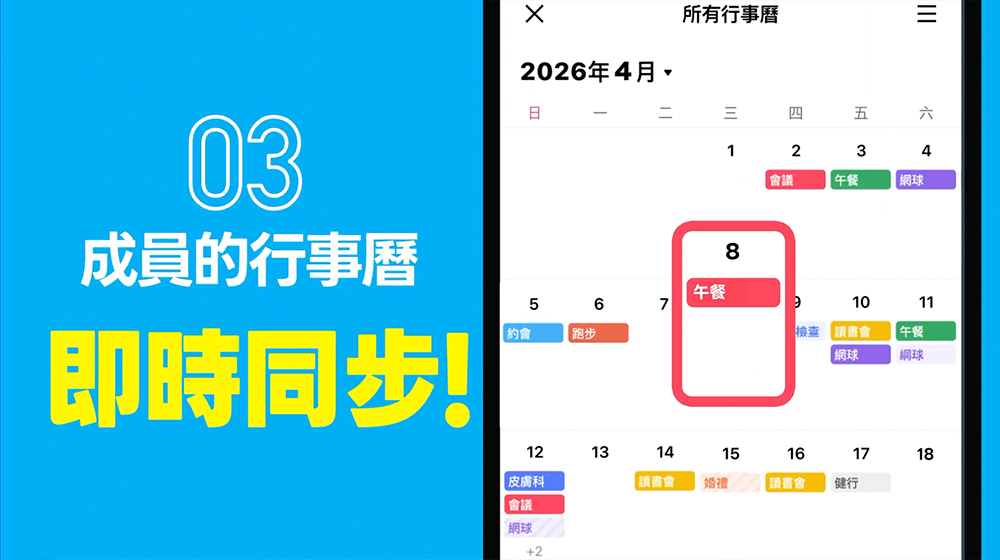
▲Image source: LINE
This feature is particularly suitable for several situations, such as:
- Friends group dinner
- family activity arrangements
- Societies
- small team meeting
In the shared calendar, each member can see the event time and can also confirm who will attend and who may be absent, making it easier for the leader to keep track of the situation when arranging activities. For people who are often responsible for making appointments for events, this function is actually very practical.
Consolidate all trips across groups
The biggest difference between LINE Calendar and the original LINE “Events” function is that it supports cross-group integration. In the past, if different groups established activities, each activity existed independently. Users must enter each group to view it. But now through LINE calendar, all schedules created in different chat rooms will be integrated and displayed in the same place.

▲Image source: LINE
In other words, whether it is a gathering with friends, a family dinner or a work meeting, it can all be viewed on the same calendar screen. For people who have a lot of schedules, this kind of integration function can greatly reduce the number of missed activities.
The system automatically reminds you, so you don’t have to notify them one by one.
In addition to creating itineraries, LINE Calendar also supports reminder notification functions. When creating an event, users can set a reminder time. When the event is about to start, the system will send a reminder notification through LINE’s Service Messages official account.

▲Image source: LINE
This means that the leader no longer needs to manually remind group members, nor does he need to worry about someone forgetting the event time. For people who frequently arrange gatherings or meetings, this feature can save a lot of time.

▲Image source: LINE
For more instructions on using LINE Calendar, please refer to LINE support。
A separate LINE calendar app will also be launched in the future
LINE also revealed its future development direction. It is expected that in July 2026, LINE will launch an independent application of “LINE Calendar” to provide more advanced functions. This independent app will be synchronized with the calendar function in the LINE App, and users can choose how to use it according to different situations. Such as creating activities in daily chats and managing complete schedules in a stand-alone app. This design is actually similar to the approach of many large services, and it also represents LINE’s hope to turn trip management into a more complete service.

▲Image source: LINE
Conclusion
As communication software gradually becomes a core tool in daily life, LINE continues to integrate more functions into the chat experience. The LINE calendar launched this time is aimed at the long-standing pain point of “separation of chat and schedule management”.
By integrating itinerary creation, reminders and group activities on the same platform, users can complete arrangements directly when discussing itineraries without having to switch between different apps. For people who often use LINE to communicate with friends and colleagues, this design is indeed more in line with actual usage habits.
If an independent calendar app is successfully launched in the future, LINE’s role in life management tools may be further expanded. For users who have long been accustomed to chatting with LINE, perhaps one day arranging activities, managing schedules, and even planning the entire rhythm of life can be done in the same app.
Further reading:
Source: KOCPC Chinese