


OpenAI recently launched a plugin system for its CLI tool “Codex,” integrating over 20 popular work platforms at once, including Gmail, Google Drive, Slack, Figma, Notion, GitHub, Cloudflare, Box, and more. OpenAI internal developer Jason Liu publicly revealed that he has already been using 58 automation functions and 30 plugins, saying “everything is automated except for brainstorming and communicating with people.”

OpenAI Codex Plugin System Officially Launches: From Coding to Full Workflow Automation
On March 26, 2026, OpenAI officially announced a plugin system for Codex. This update transforms Codex from a simple code-writing assistant into an AI agent capable of handling complete workflows.
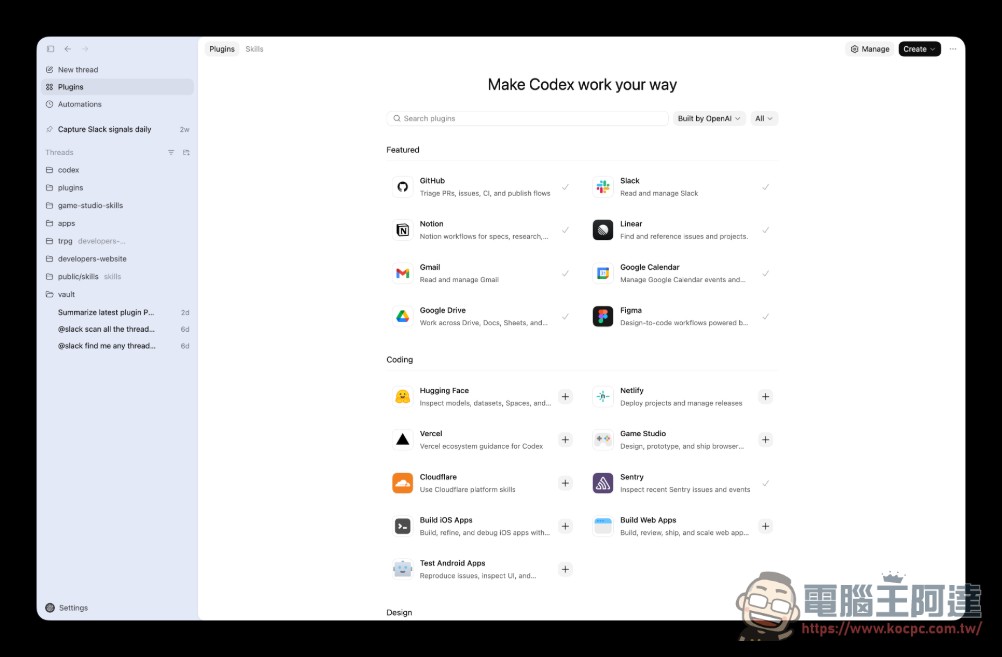
We’re rolling out plugins in Codex.
Codex now works seamlessly out of the box with the most important tools builders already use, like @SlackHQ, @Figma, @NotionHQ, @gmail, and more.https://t.co/PQDsLqHGA6 pic.twitter.com/TIbsIUAf6S
— OpenAI Developers (@OpenAIDevs) March 26, 2026
According to OpenAI Official documentNote: The plugin bundles three core capabilities into an installable package:
- SkillsFor specific work types, Codex can load reusable instructions when needed to ensure adherence to correct steps and reference materials.
- AppsConnections to tools like GitHub, Slack, and Google Drive allow Codex to read information and perform actions.
- MCP serverProvides services that give Codex access to additional tools or shared information, typically from systems outside the local project
This design is similar to ChatGPT’s integration features but more modular and powerful. Developers can not only use official plugins but also build their own plugins and distribute them through local or team marketplaces.
20+ Platform Integration: Spanning All Work Scenarios
Currently known integration platforms include:
| Category | platform | Features |
|---|---|---|
| Communication Collaboration | Gmail、Slack | Read emails, summarize channels, draft replies |
| Cloud storage | Google Drive、Box | Work across Drive, Docs, Sheets, and Slides |
| Design Collaboration | Figma | Loading and Editing Design Files |
| Knowledge Management | Notion | File Editing and Management |
| Development Tools | GitHub、Cloudflare | Code Management and Deployment |
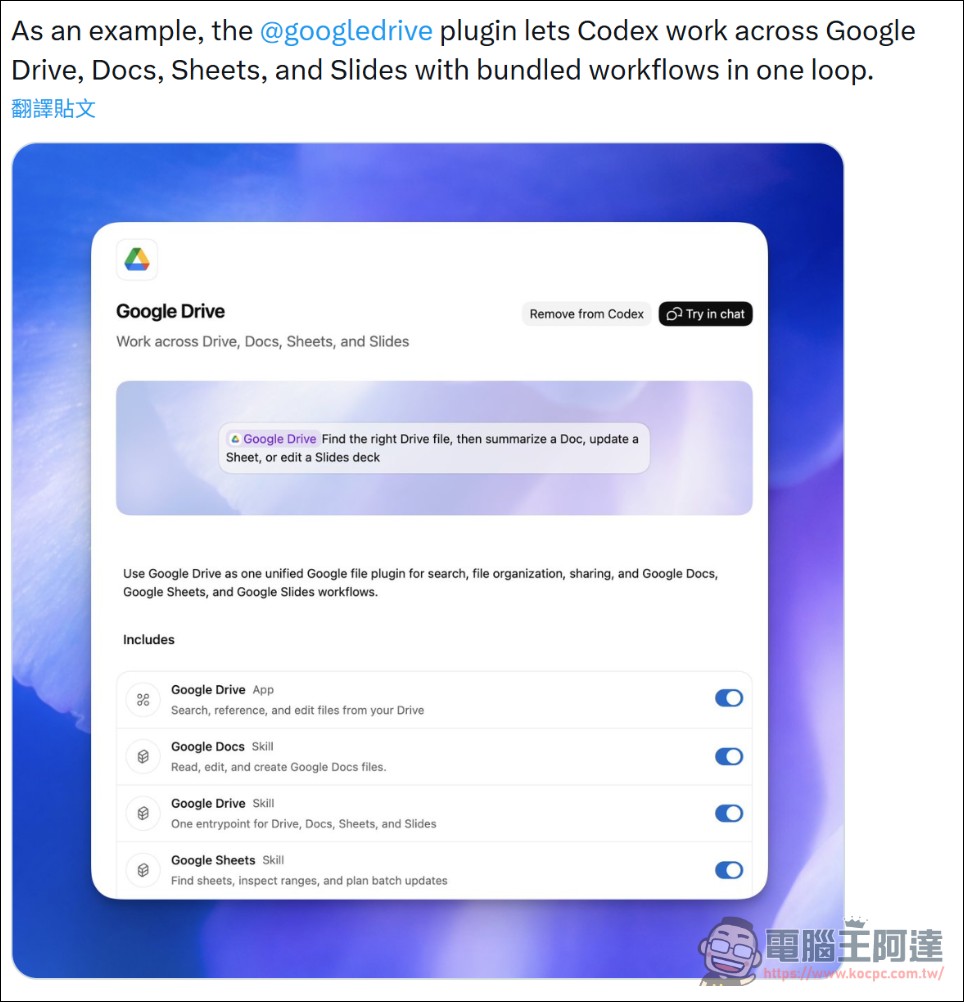
Using the Google Drive plugin as an example, Codex can work seamlessly across Google Drive, Google Docs, Google Sheets, and Google Slides within a single workflow, automatically organizing documents, aggregating data, and creating presentations. The Gmail plugin enables Codex to read and manage emails, automatically summarizing today’s unread messages and drafting replies.
OpenAI demonstrated on its official Twitter account that after installing the Google Drive plugin, Codex can “orchestrate a series of workflows across Drive, Docs, Sheets, and Slides within a single loop.” This means users only need to describe their needs in natural language, and Codex can automatically complete cross-platform operations.
Everything has been automated except communicating with people.
What stands out most is the high adoption of this system within OpenAI. Developer Jason Liu revealed on Twitter: “I heavily use plugins, currently with about 58 automation functions and 30 plugins. All my work is automated except for brainstorming ideas and communicating with people.”
Codex team member Alexander Embiricos also said: “Over the past few months, Codex has completely transformed how everyone at OpenAI works. Technical teams use it in virtually all scenarios, and now, because it can easily connect to all tools, even non-technical teams like PR and business have begun deeply integrating Codex.”
Codex team member Tibo has announced that Codex usage limits have been reset across all plans, allowing everyone to experiment with the newly launched plugins without restrictions.
Market Strategy: The Path to a Super App
This plugin release is part of OpenAI’s broader strategy, as OpenAI plans to integrate ChatGPT, Codex, and the Atlas browser into a single desktop “Super App” to further capture the enterprise customer market.
User data also shows that this strategy is working:
- Codex has more than 1.6 million weekly active users
- Mac version shatters records in first week after launch 1 million downloads
- The Windows version was just releasedfurther expand market coverage
Official has launched the Curated Directory, where developers can browse and install plugins directly in the Codex App, or run codex /plugins in the CLI to access the plugin list. A self-publishing feature is also planned, enabling developers to share their plugins with a broader community.
How to use plugins
According to the official documentation, the steps to use the plugin are quite simple:
- Browse and InstallOpen the plugins directory in the Codex App, search or browse plugins, and click Install.
- Link accountIf the plugin requires external applications, follow the prompts to connect and authenticate.
- Get startedAfter installation, you can describe tasks in natural language directly in the prompt box, such as “Summarize today’s unread Gmail emails” or “Get the latest product specifications from Google Drive”
- Specified PluginTyping the @ symbol lets you explicitly invoke a specific plugin or its capabilities
Regarding permissions management, existing approval settings continue to apply after installing plugins. Connected external services remain subject to their own authentication, privacy, and data sharing policies. Users can disable specific plugins at any time by setting enabled = false for them in ~/.codex/config.toml.
Implications for Developers and Enterprises
This update has profound implications for the software development industry and knowledge workers. The Codex plugin system dramatically lowers the barrier to automating workflows—no longer is there a need to write complex scripts or API integrations. Simply describe your requirements in natural language, and AI will automatically coordinate multiple tools to complete the task.
Furthermore, for enterprises, this means teams can build standardized workflow automations and distribute them to all members through local or team marketplaces. From code reviews and documentation updates to project management, many repetitive tasks can be delegated to AI, freeing humans to focus on more creative and strategic work. However, this also sparks discussions about how work itself is transforming. When a single developer can use 58 automation features to handle work that previously required substantial manpower, enterprises will face redefinitions in organizational structure, performance evaluation, and talent requirements.
Source: KOCPC Chinese