


With Anthropic After the release of the more powerful Opus 4.7 model, it’s believed that many people are now using this model extensively every day. And in order to help everyone better understand how to use it more efficiently, a few days ago Claude Code of Boris Cherny Also provides 6 items targeting on social media platforms Opus 4.7 Practical techniques covering permission management, workflow optimization, and model validation mechanisms, compiled below for you.

1. Auto Mode: Say Goodbye to Permission Popup Interruptions
Opus 4.7 excels at executing complex, long-running tasks, such as deep research, code refactoring, building complex features, and iterating repeatedly until performance benchmarks are met.
However, developers often had to choose between two options:
- I was watching the screen the whole time
- Use the –dangerously-skip-permissions flag to bypass permission prompts (use at your own risk)
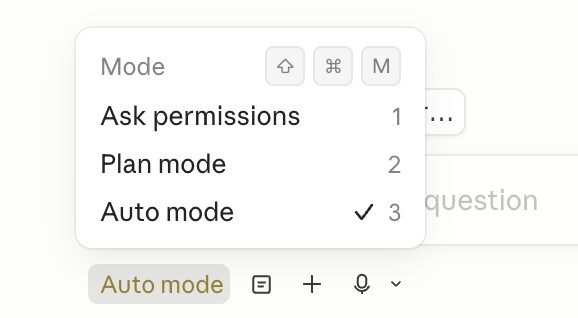
To address this situation, there is now a safer alternative: Auto Mode.
In this mode, all permission prompts are directed to a model-based classifier that determines whether the instruction can be safely executed. Once deemed safe, it’s automatically allowed through. This change means not having to watch the screen constantly, and more importantly, enables multiple Claude instances to run simultaneously. When one Claude is processing a task, the user can immediately shift their attention to the next one.
Auto Mode is now available to Opus 4.7 users on Max, Teams, and Enterprise plans. Press Shift-Tab in the CLI to enter Auto Mode, or use the dropdown menu on desktop or VSCode.
2. /fewer-permission-prompts: Intelligently Streamlined Permission Workflows
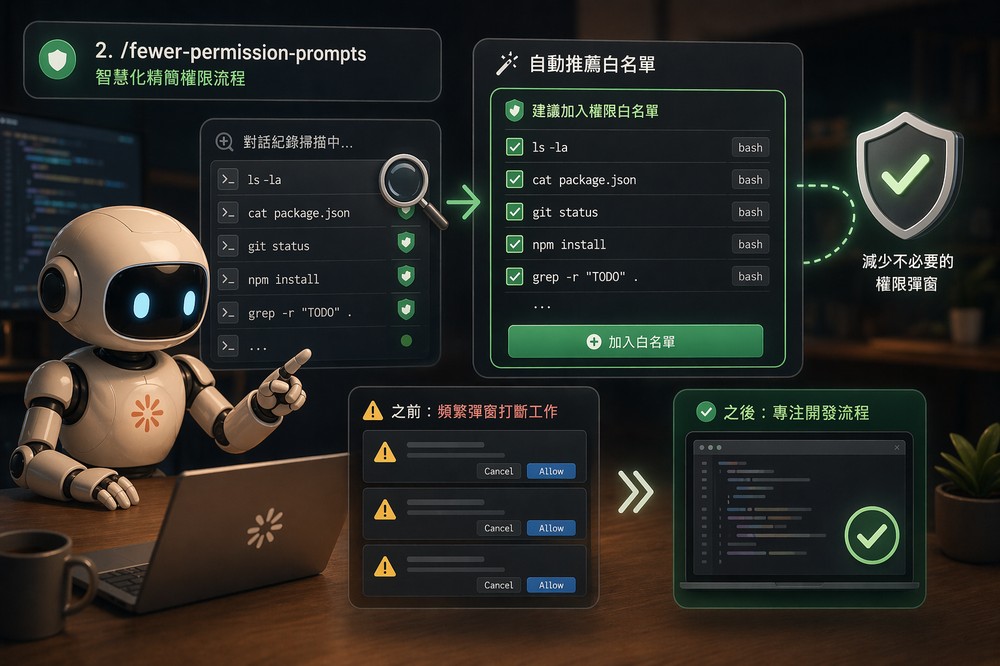
Besides Auto Mode, there is also nowBrand-new /fewer-permission-prompts skillThis tool scans the user’s past conversation history, identifies common bash and MCP commands that are actually safe but repeatedly trigger permission prompts, and automatically recommends a whitelist of commands to add.
This skill is particularly useful for users who don’t frequently use Auto Mode or who want to fine-tune permission settings for specific environments, effectively reducing how often unnecessary pop-ups interrupt daily development.
3. Recaps: The Memory Saver for Long Tasks
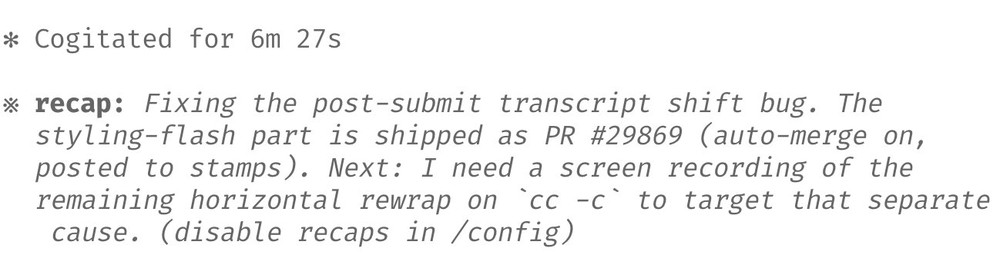
Before Opus 4.7 was released, Claude Code had already launched its Recaps (summary) feature.
The Recaps feature provides brief summaries, allowing users to instantly grasp what the agent did and what to do next. No more scrolling through lengthy history records—you can quickly get back into the task context.
4. Focus Mode: Results Only, No Process
Cherny also shared his favorite new feature: Focus Mode. This mode hides all the intermediate steps and work processes in the CLI, presenting only the final result to the user.
The model has advanced to the point where I basically trust it to execute the correct instructions and make the right modifications. I just need to look at the final results.
Users can type /focus anytime to toggle this mode on or off.
5. Effort Level: Replacing Thinking Budget with Degree of Effort
5/ Configure your effort level
Opus 4.7 uses adaptive thinking instead of thinking budgets. To tune the model to think more/less, we recommend tuning effort.
Use lower effort for faster responses and lower token usage. Use higher effort for the most intelligence and capability.… pic.twitter.com/h2gY3yQEeK
— Boris Cherny (@bcherny) April 16, 2026
Opus 4.7 introduces a new adaptive thinking mechanism, replacing the previous thinking budgets design. If you want to adjust the model’s thinking depth, the official recommendation is to configure this through effort.
- Low effort: Faster responses, lower token usage, suitable for simple tasks.
- High Effort: Provides the highest level of intelligence and processing capabilities, suitable for complex problems.
In a personal share, Cherny mentioned that he typically uses xhigh effort for most tasks, while reserving max effort only for the most challenging ones. It’s worth noting that the max level only applies to the current session and won’t carry over. Other effort levels will automatically persist to the next session.
Users can use the /effort command to set their default level.
VI. Give Claude a path for “work verification”

Finally, Cherny emphasizes this crucial technique: ensuring that Claude has a way to verify its own work.
He noted: “This has always been the key to getting 2-3x the output from Claude, and with 4.7, it’s more important than ever.”
Verification methods vary by task:
- Backend Development: Ensure Claude knows how to start your server or service for end-to-end testing.
- Frontend Development: Using the Claude Chromium Extension to Enable Claude to Control the Browser Directly
- Desktop Application: Uses computer use functionality for operational verification.
Cherny also shared his workflow: he often adds the /go command at the end of prompts, and /go is a skill that allows Claude to automatically complete the following three things:
- Conduct end-to-end self-testing using bash, a browser, or computer use.
- Execute /simplify skill to simplify code.
- Submit a Pull Request.
For long-running tasks, validation is a crucial step, so that when you come back to check after some time, you can be sure the code actually works.
Source: KOCPC Chinese