


Over the past week, have you also noticed that YouTube has been acting a little strange? If you’ve encountered issues with videos not playing on your desktop, rest assured—you’re definitely not the only one affected. Foreign media Android Police When users first try to play a video on Mac and Windows devices, even the most basic content won’t load—they simply see a message saying, “This content is unavailable. Please try again later.” To make matters worse, some users even see a message stating, “This content is not available in your country,” as if the entire platform had suddenly shut them out.
YouTube Declares War on Ad Blockers Once Again with “Content Unavailable” Message
This isn’t the first time YouTube has experienced a strange glitch like this. As far back as November 2025, a bug caused several key interface elements to disappear, leaving many users baffled. It appears the problem has resurfaced, though this time the impact is more widespread and the symptoms are even more elusive.
During testing, the international media outlet Android Police encountered playback failures in both Chrome and Firefox, but strangely enough, Safari worked perfectly fine. This raised questions about where the discrepancy might lie, and they later realized that Safari was the only browser without an ad blocker installed—a detail that may well be the key to the issue. If you search for “Content not available” on Reddit’s r/YouTube subreddit, you’ll find a large number of user complaints that have accumulated over the past week, and some users even trace similar issues back several months.PiunikaWeb We have also compiled relevant reports, which show that this is not an isolated incident, but rather a phenomenon that is gradually spreading.
“This content isn’t available, try again later.” problem
byu/Wide-Ad-8467 inyoutube
In Android Police’s tests, the same video played smoothly as soon as they switched to Safari. This contrast led them to investigate whether the issue was related to ad blockers, so they temporarily disabled uBlock. The result was almost immediate—there was no need to manually refresh the page. As soon as uBlock was disabled, YouTube automatically reloaded, and the video began playing right away. Given this rapid response, it’s hard not to suspect that YouTube is stepping up its detection and restrictions on ad blockers.
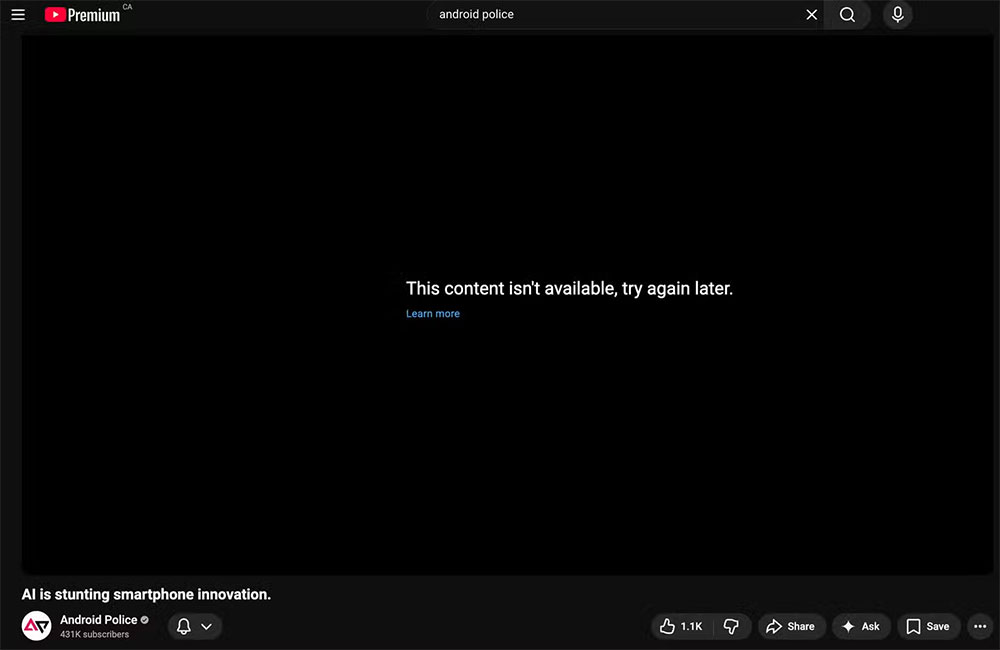
As of now, YouTube has not officially acknowledged the existence of this issue. If this is indeed part of the platform’s strategy to combat ad blockers, the company is unlikely to address it proactively—after all, such measures are typically implemented through “quiet updates.” However, if you don’t want to disable your ad blocker entirely, we’ve discovered a workaround that seems to be temporarily effective during testing: When the error message pops up, click the blue “Learn More” button at the bottom, then press the “Back” button in your browser to return to the player—the video will start playing immediately. Although this workaround isn’t very sophisticated, it at least allows you to temporarily bypass the issue.
In addition to the methods mentioned above, there are some alternative solutions that users have reported to be effective, though they may not work for everyone. These include:
- Keep refreshing the page until the video starts playing.
- Switch to an ad blocker designed specifically for YouTube that is less likely to be detected.
- Sign out and switch to another YouTube account.
- Turn off your VPN to avoid additional restrictions based on your IP location.
As it stands, this issue continues to escalate, and different users are experiencing it in varying ways. Whether or not the cause is related to ad blockers, YouTube’s behavior has certainly left many people confused. If you’re experiencing a similar issue, try the methods mentioned above, or temporarily switch to a browser without an ad blocker installed—at the very least, this should restore a normal viewing experience for the time being.
Source: KOCPC Chinese