


With the release of the Nintendo Switch 2, microSD Express memory cards have been gradually making their way into the market. Today, we’re unboxing one from [Powin Technology Powin microSD Express Memory Card 】, and this is one of them. The Switch 2 is a console that gamers have waited nearly eight years for—a remarkably long time for a console update. In addition to featuring some upgraded specifications, the Switch 2 also comes with updated requirements for its proprietary game discs and memory cards.
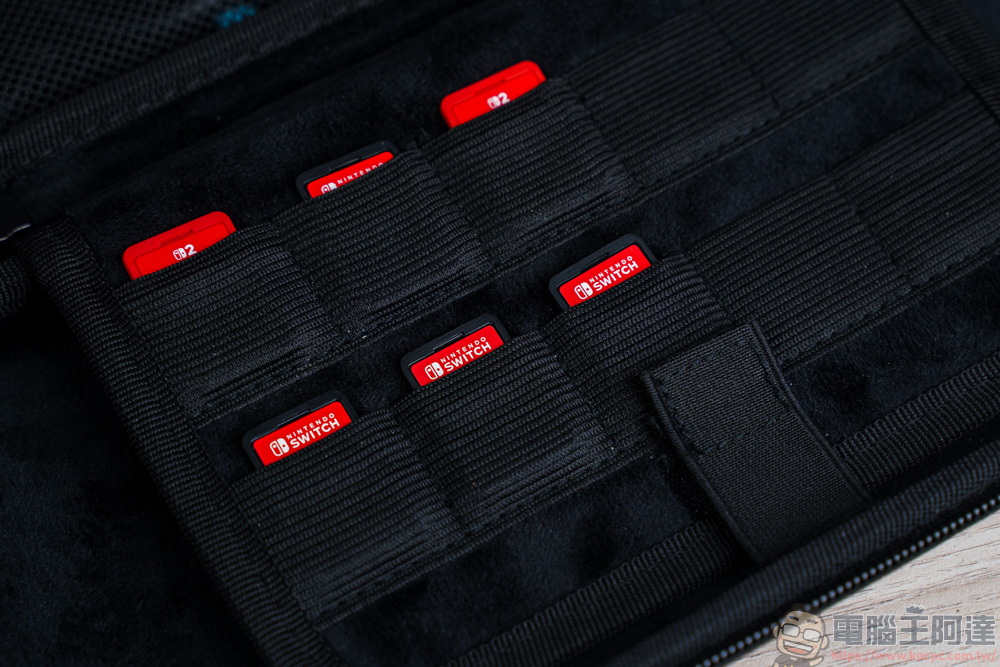
In addition to the traditional game cartridges, many manufacturers now use key cards for their new games. These cards use a serial number to download game data from the internet and save it to the console; to play the game later, you must have the card inserted. As for memory card specifications, they have been changed to microSD Express, Memory cards of this type offer better read and write performance, with maximum read speeds reaching 900MB/s, compared to UHS III’s 600MB/s It’s quite a bit faster.
However, this change in specifications has actually caused widespread frustration among many gamers, as microSD Express cards aren’t exactly affordable—a 256GB card starts at at least NT$1,500, which is nearly twice as expensive as a budget microSD card. However, since the Switch 2 is currently the only device using this standard, I suspect prices won’t drop anytime soon. Many manufacturers are now launching their own microSD Express cards, but do they all offer the same read and write speeds? In addition to introducing Powin In addition to the microSD Express memory card, we also sourced several other microSD Express memory cards available on the market to run speed tests and see if these cards actually deliver their advertised read and write speeds:
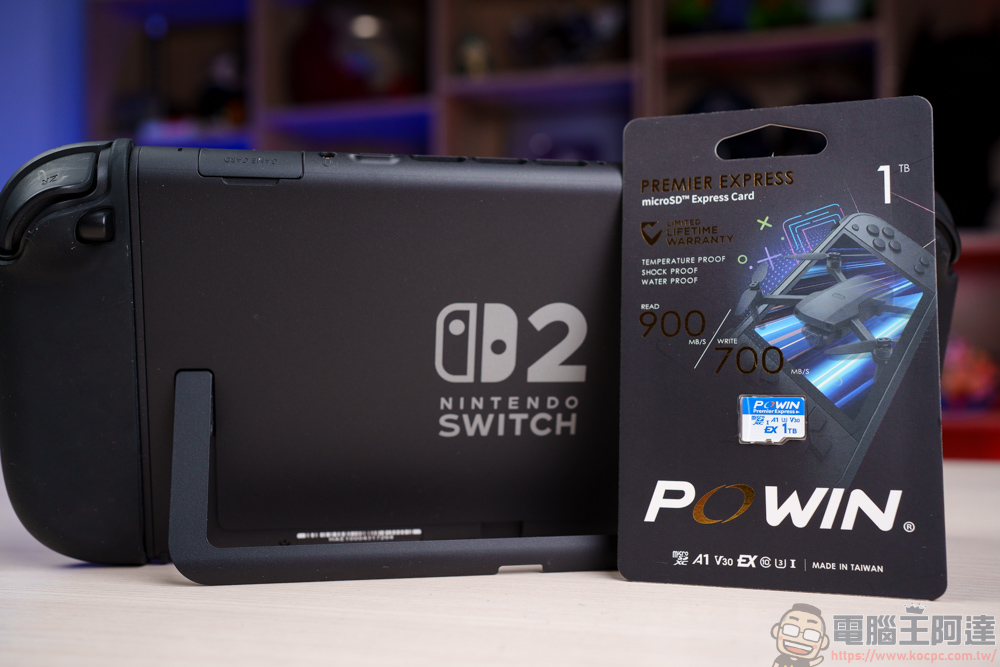
Introduction to the Powin microSD Express Memory Card
Key Features
- Ultra-Fast Transfer: With read and write speeds comparable to NVMe SSDs, it can quickly load games and store content, reaching blazing-fast speeds of up to 900 MB/s for reads and 700 MB/s for writes.
- Various Capacities: Available in 128GB, 256GB, 512GB, 1TB, and other capacities to meet a variety of needs.
- Game Optimization: Especially well-suited for devices like the Nintendo Switch 2, it improves the smoothness of gameplay in large-scale games.
- High Durability: Offers multiple layers of protection, including water resistance, resistance to high and low temperatures, antistatic properties, X-ray resistance, and shock and drop resistance.
Powin has released memory cards with capacities of 128GB, 256GB, 512GB, and 1TB for the Switch 2. Featuring PCIe Gen3x1 technology, their extremely fast read and write speeds make them virtually tailor-made for the Switch 2. Other handheld gaming consoles are likely to adopt the microSD Express standard in the future, so these memory cards won’t be limited to use on the Switch 2 alone.
Buy Powin microSD Express High-Speed Memory Cards Here
By the way, since the AI industry is booming right now, prices for memory and storage devices on the market have been rising across the board. I expect this will also affect memory card prices, so if you need one, I suggest you don’t wait—before prices go up even more:
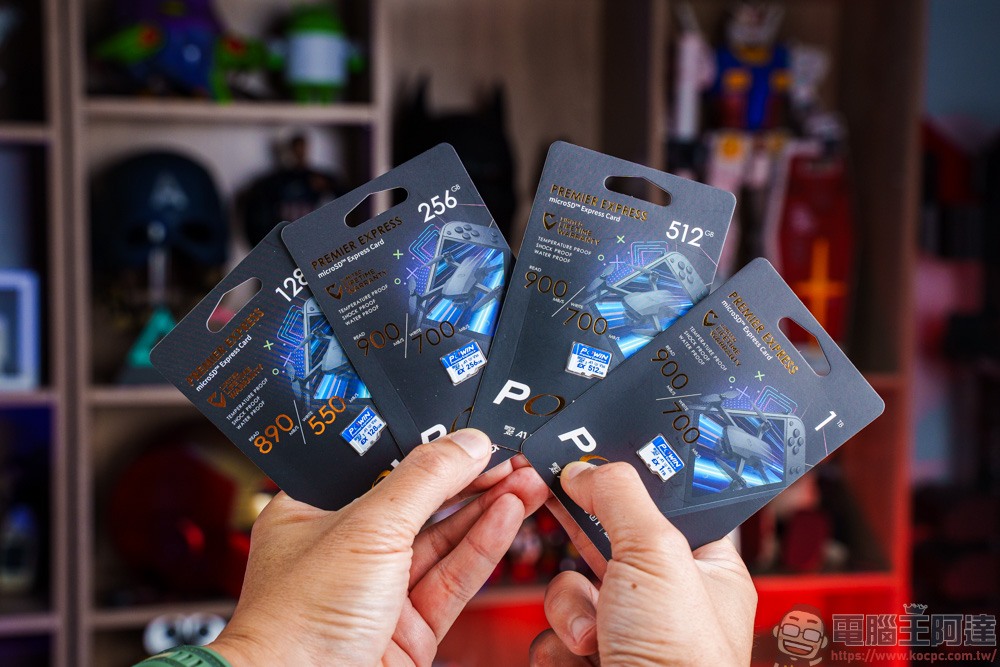
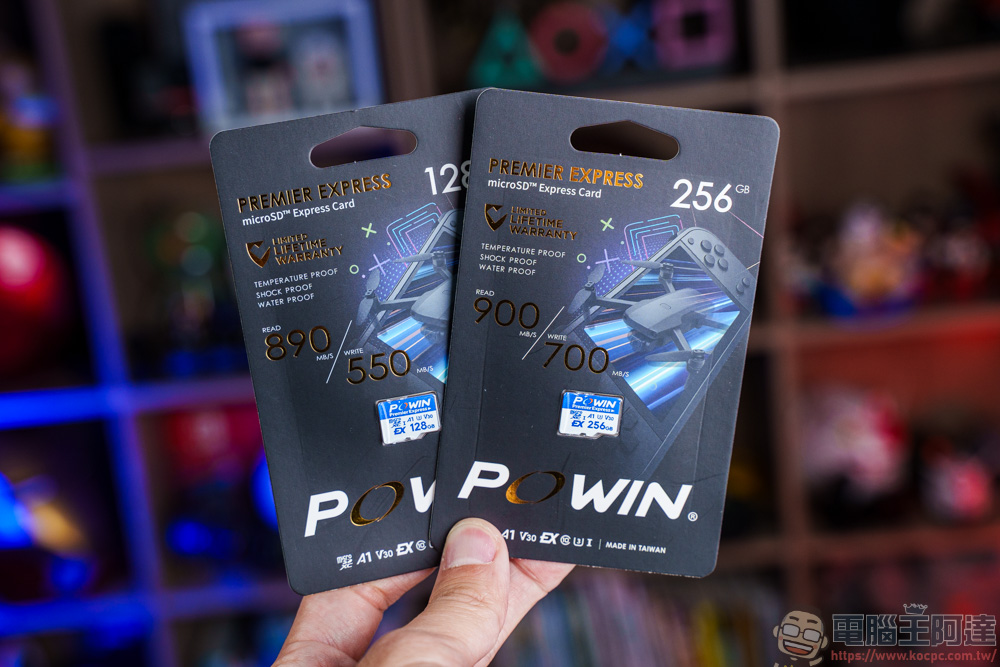
Although all of these Powin memory cards meet the microSD Express standard, their read and write speeds vary by capacity. The 128GB model has a minimum read speed of 890MB/s and a write speed of 550MB/s, while versions with capacities of 256GB or higher can reach read speeds of 900 MB/s and write speeds of 700 MB/s. However, no matter which version you choose, you’ll be able to install large AAA games and quickly save gameplay footage, significantly reducing load times and data transfer times for a smoother, more responsive gaming experience.
Unless you don’t have heavy usage needs, I’d still recommend buying a model with 256GB or more—that should provide plenty of storage space:
Why Do You Need a microSD Express Memory Card?
As everyone knows, the Switch 2 only has 256GB of storage, and if you have a lot of digital game content, 256GB will actually fill up very quickly! Not to mention that the Switch 2 will be releasing quite a few AAA titles in the near future (e.g., Monster Hunter). If you continue to store games on the console’s internal storage, just 3 to 5 AAA titles might be enough to fill it up:
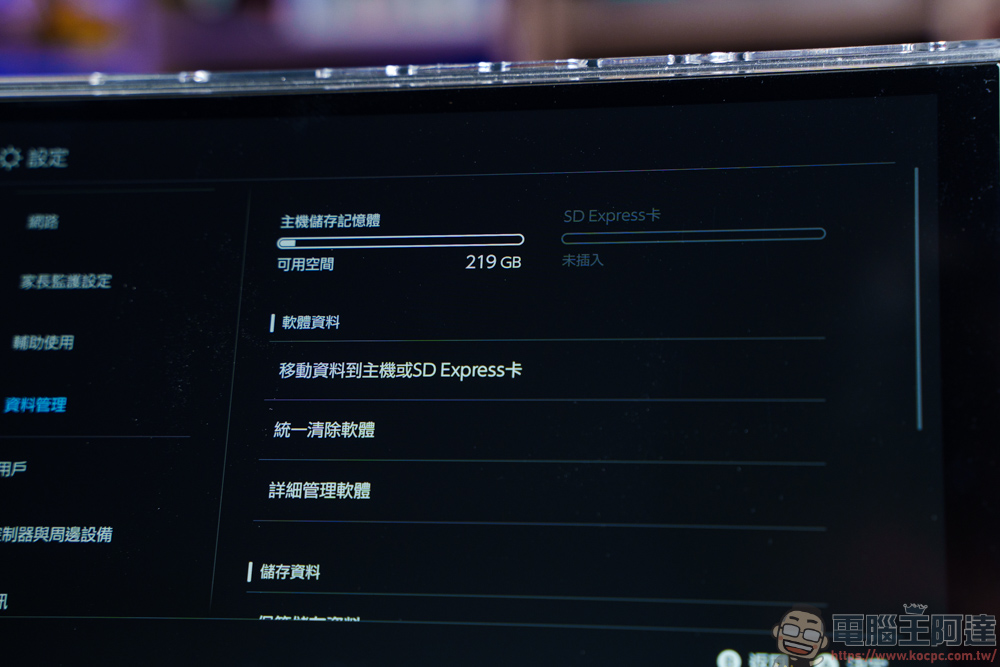
On top of that, many game developers now distribute games via key cards, which means you still need to use a key card to download the game from the internet to your console. This is where extra storage space and fast write speeds become crucial:
Powin’s high-speed microSD Express, designed specifically for the Switch 2, not only expands your console’s storage capacity but also delivers an ultra-fast user experience. Plus, in addition to being compatible with the Switch 2, it can also be used as an external storage device:
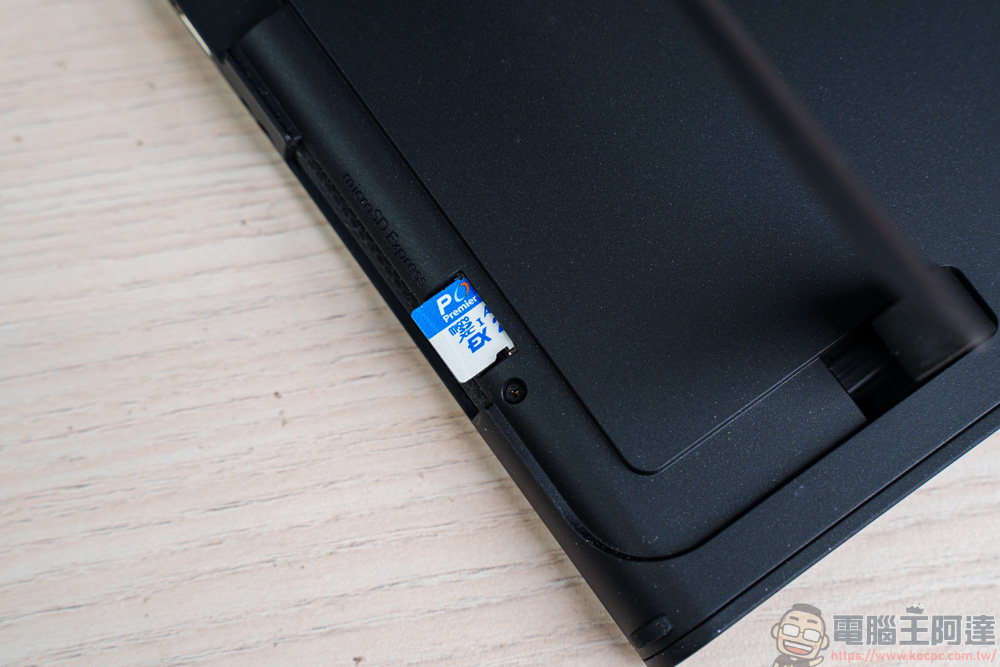
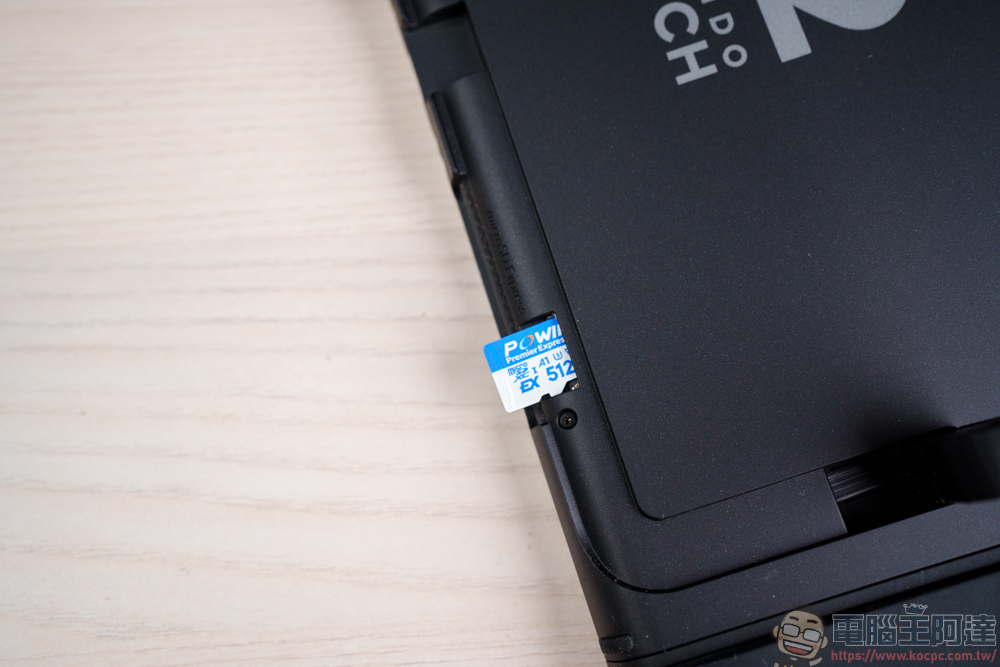
Once inserted, Switch 2 gains additional storage space via the microSD Express expansion slot, allowing you to store several more of your favorite games:
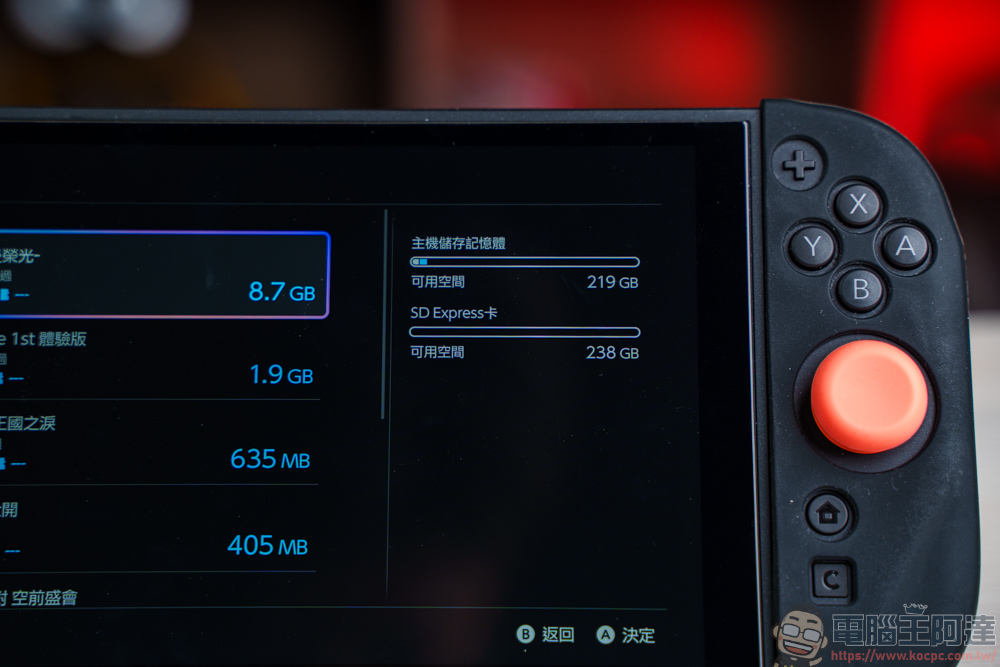
We’ve also created a video comparing the Powin microSD Express high-speed memory card with memory cards from other brands. If you’re interested, feel free to check it out:
Powin microSD Express Memory Card Read/Write Speed Test
Card Reader Used
Since microSD Express memory cards require a dedicated high-speed card reader to achieve their maximum speed, we also obtained a card reader specifically designed for microSD Express memory cards for this test:
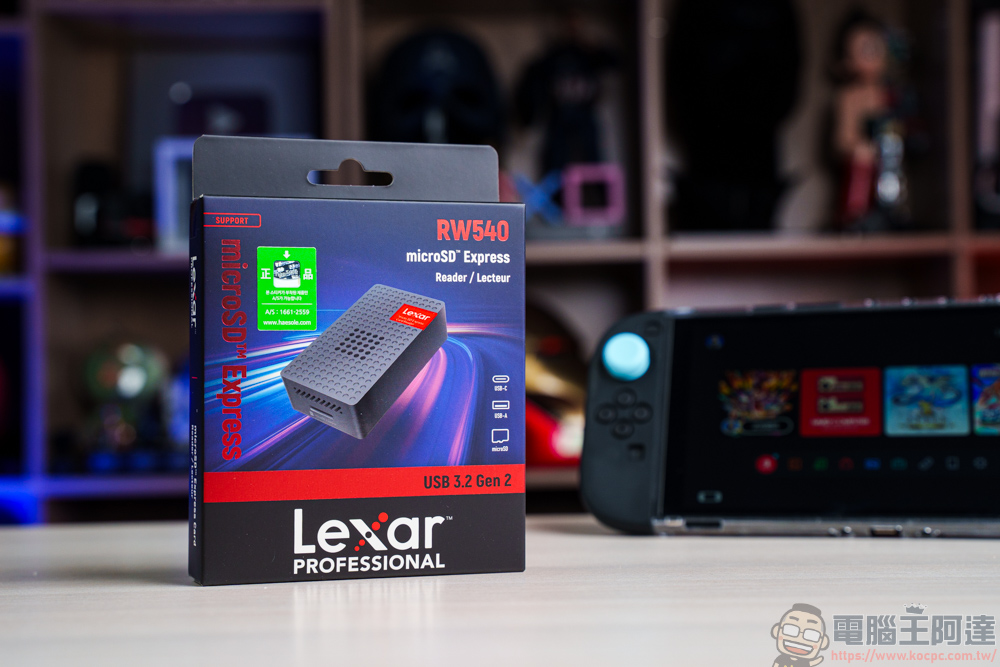
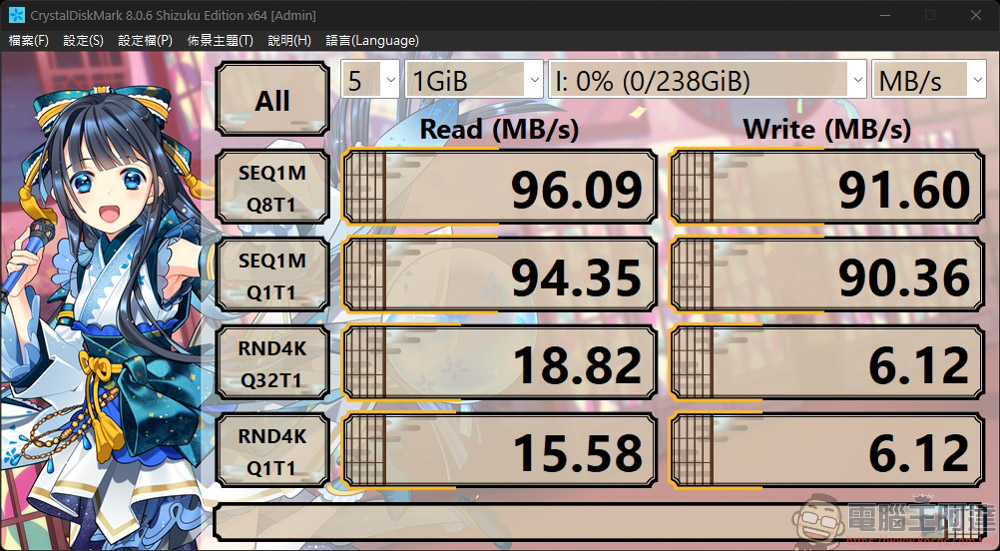
If you don’t want to spend money on a microSD Express card reader, you can still use an older high-speed card reader, but the read and write speeds will be very slow, as shown in the image below! However, if you don’t care too much about data transfer speed, this slow transfer is actually still acceptable:
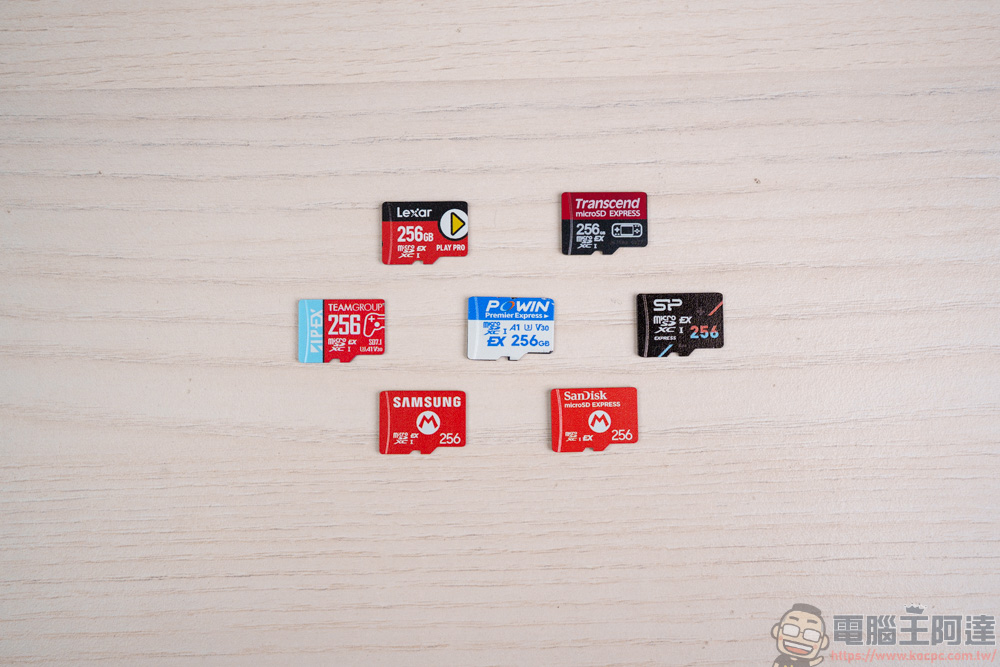
With so many microSD Express cards on the market today, which one offers the best value for the money and the fastest read and write speeds? For this test, we selected several of the more common microSD Express cards on the market, including those from TeamGroup, SanDisk, Samsung, Lexar, ADATA, Transcend, and the Powin card we have on hand. To ensure fairness, we compared the 256GB models from each brand:
Powin microSD Express memory cards deliver the fastest experience
First, let’s run a speed test using CrystalDiskMark. Of these five memory cards, only the TeamGroup model lists a maximum read speed of 800 MB/s; the Samsung model has no specifications listed; and the remaining four all have specifications of 900 MB/s read and 700 MB/s write.
To cut to the chase, Powin’s microSD Express card offers the best read and write speeds among these models, with performance figures that closely match the specifications listed on the packaging. So whether you’re plugging it into the Switch 2 to play AAA titles or simply using the card for data storage, the Powin microSD Express card will deliver the fastest possible read and write performance:
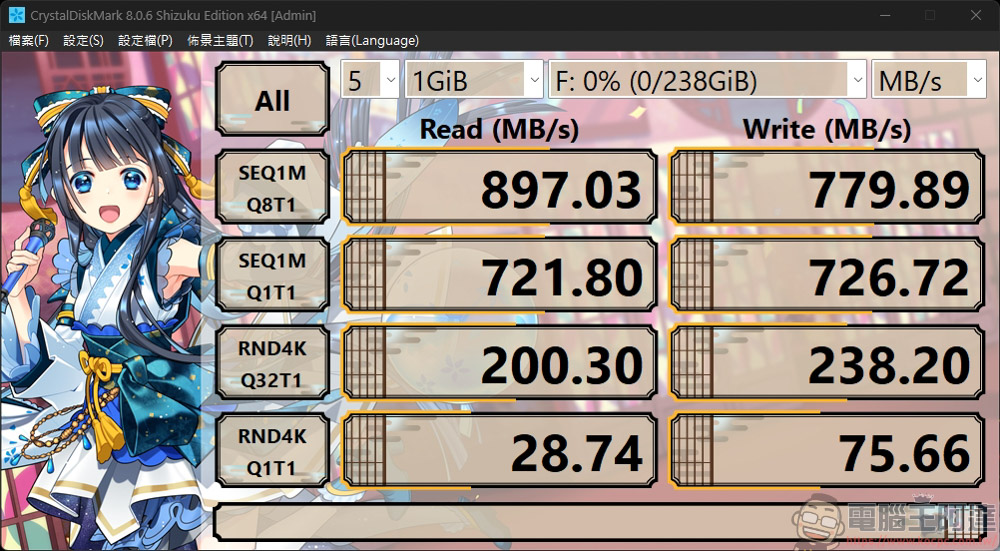
Among these models, the one that performed the best was the SanDisk, which is officially recommended by Nintendo. It recorded read speeds of 899 MB/s and write speeds of 656 MB/s. Its read speed is comparable to that of Powin, but its write speed falls slightly short of Powin’s—though it still performs quite well:
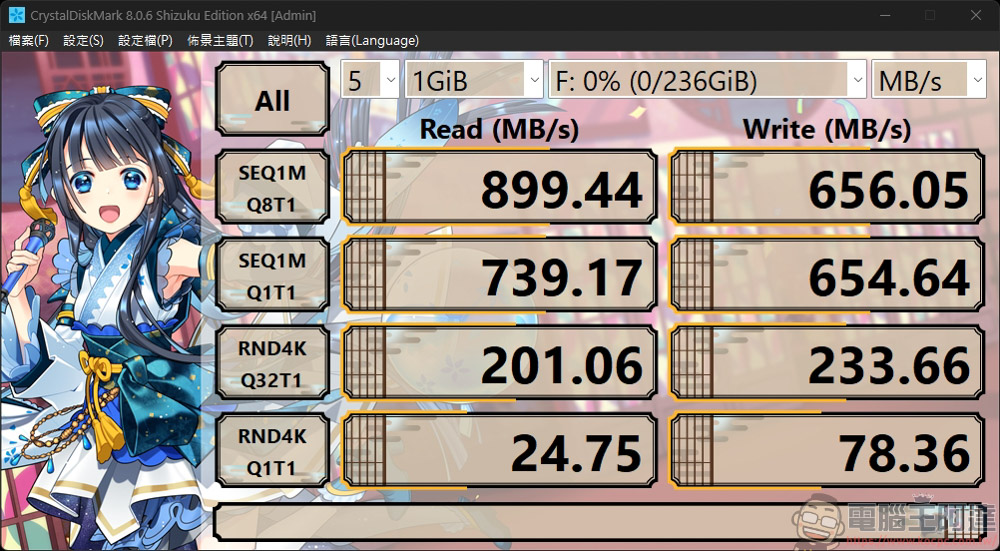
Although this is also a three-star card officially recommended by Nintendo, its read and write performance isn’t as good as the previous two—its write speed is as low as 200 MB/s. If you were to spend a similar amount on a microSD Express card, would you still choose this one?
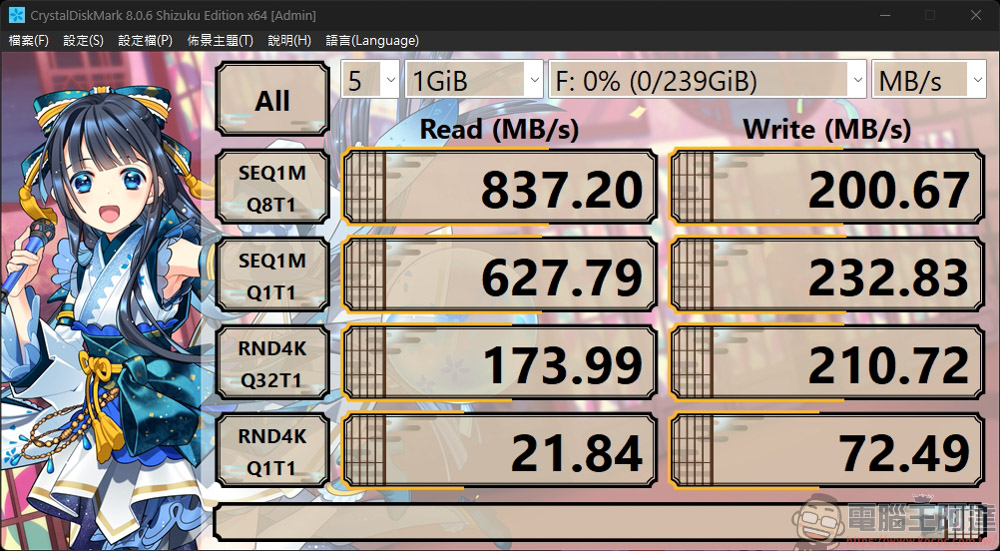
Lexar performed similarly, clocking in at just 838 MB/s read and 201 MB/s write—a bit of a letdown considering its official specs of 900 MB/s read and 700 MB/s write:
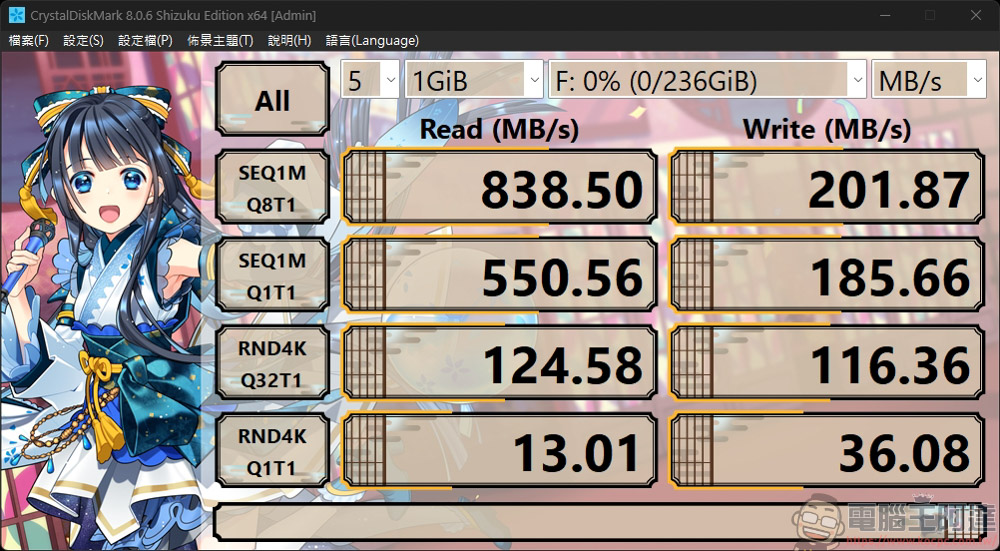
The Spectra microSD Express memory card is rated at a maximum read speed of 800 MB/s and a write speed of 700 MB/s. Its read performance is acceptable, but its write speed is only 284 MB/s—which is better than the previous two brands, but still below par:
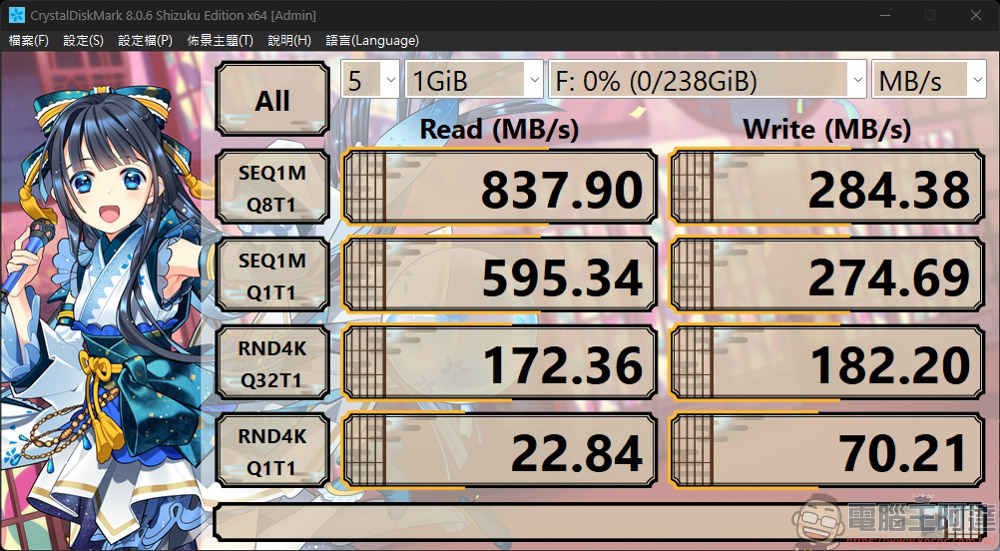
The read and write speeds of the G.Skill card are also pretty impressive, at 899 MB/s read and 764 MB/s write, but at nearly NT$2,000 per card, it really puts your budget to the test:
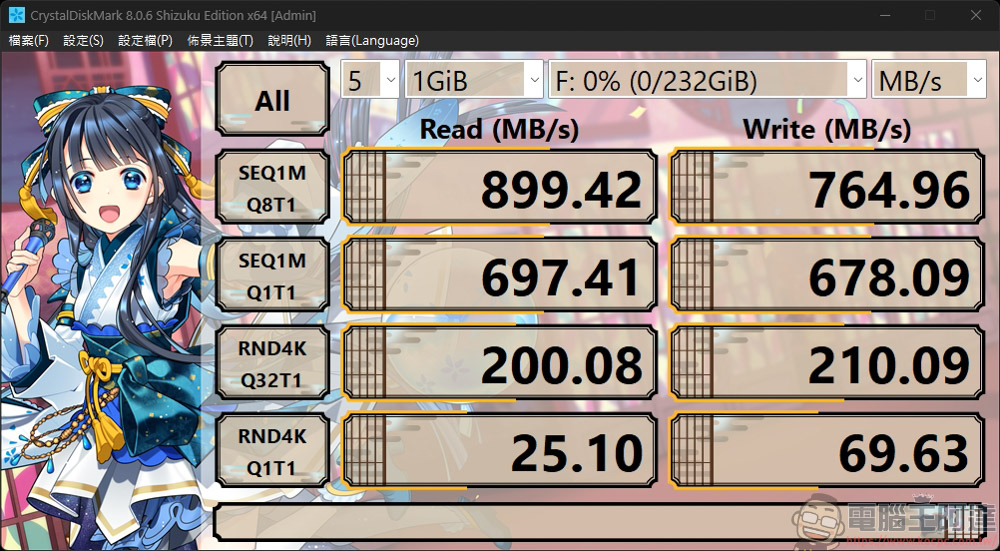
Transcend’s read and write speeds are almost identical to those of ADATA, but at nearly NT$3,000 per card, it’s also the most expensive of all the memory cards tested:
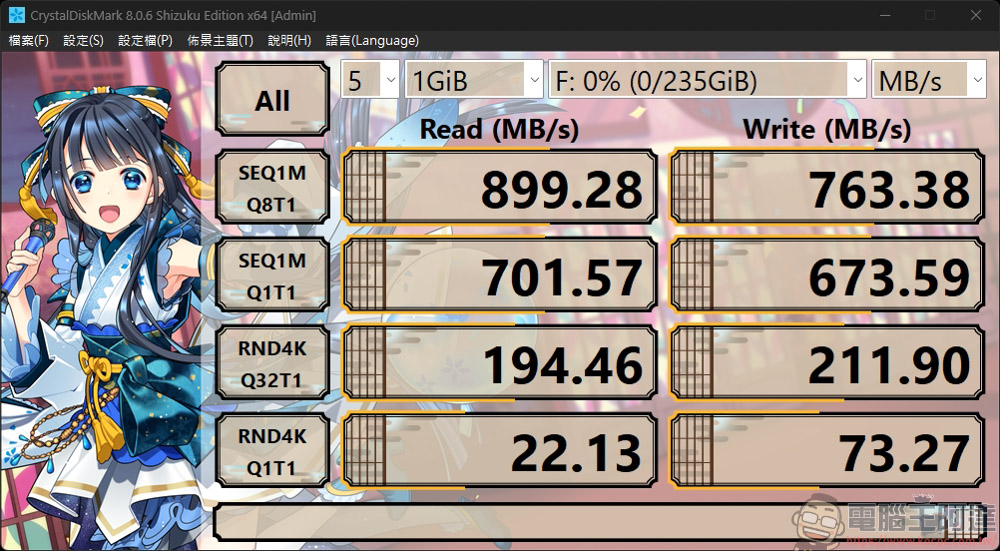
We also used ATTO Disk Benchmark to conduct read and write tests; Powin recorded read speeds of 855 MB/s and write speeds of 807 MB/s:
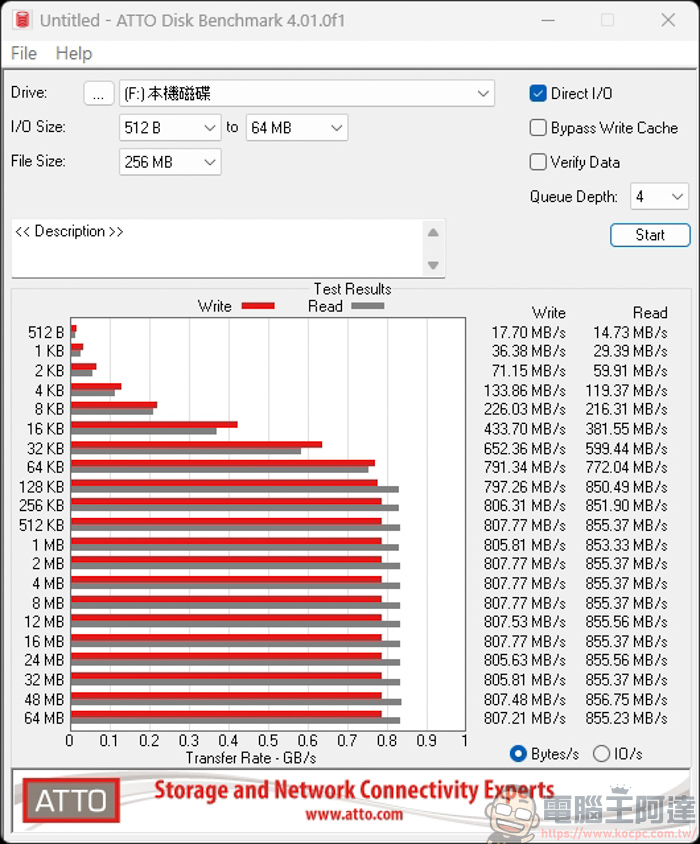
The SanDisk was measured at 857 MB/s read and 635 MB/s write. It also outperforms the Powin by a tiny bit in read speeds, but there’s a noticeable gap in write speeds:
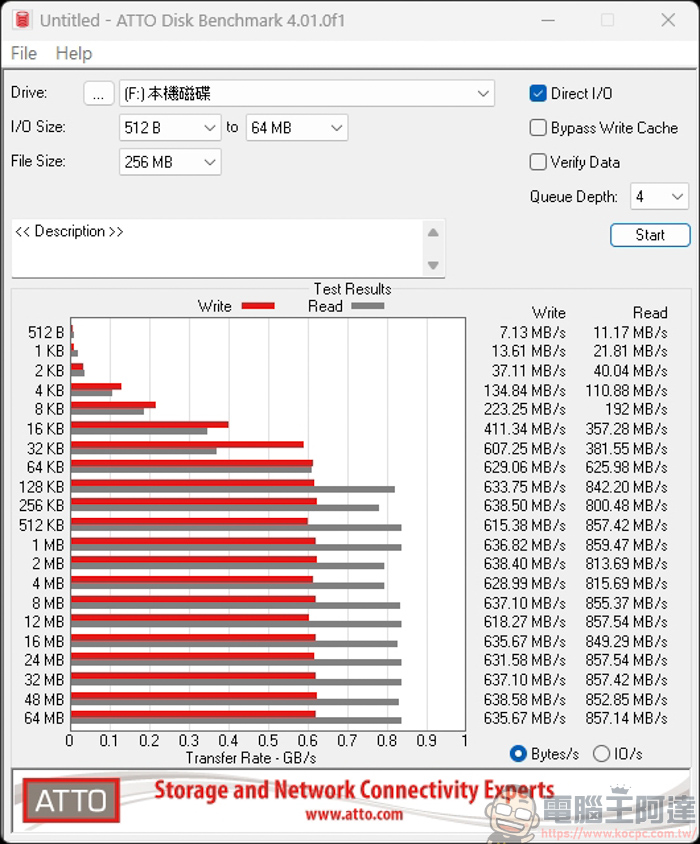
Samsung, on the other hand, recorded 794 MB/s read and 177 MB/s write speeds; its write performance was also very poor:
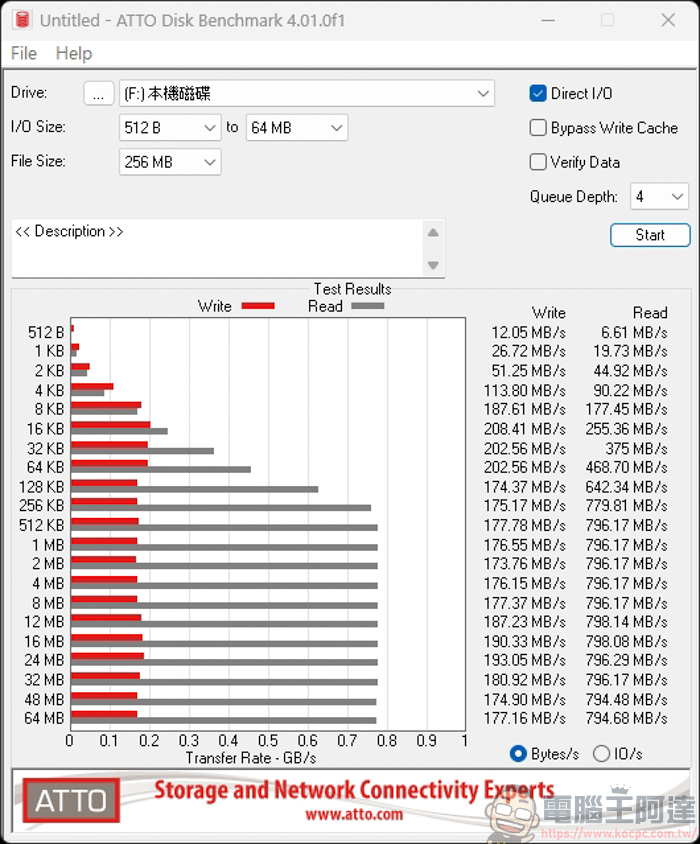
Lexar recorded read speeds of 800 MB/s and write speeds of 193 MB/s, which is slightly better than Samsung, but the performance is still lacking:
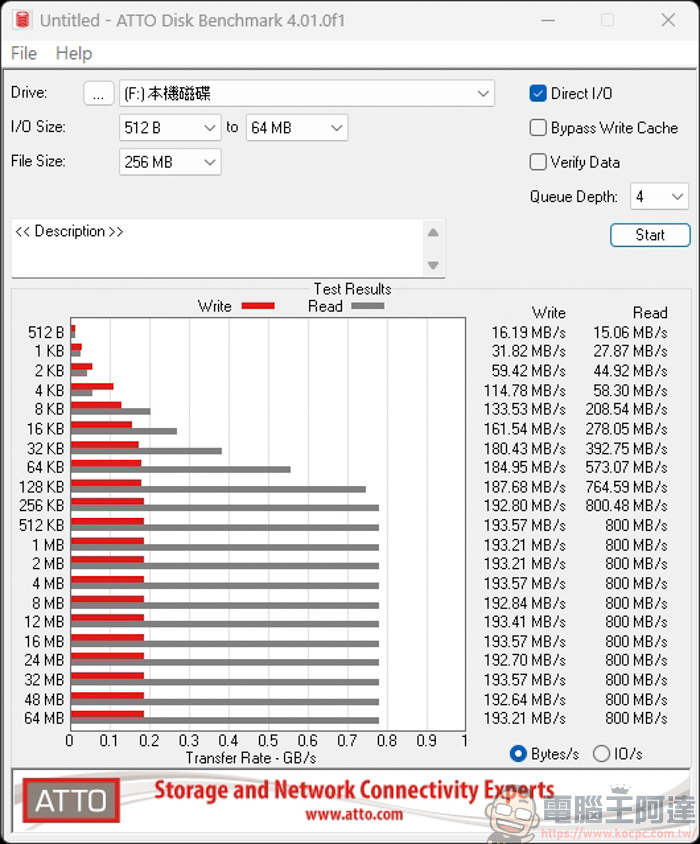
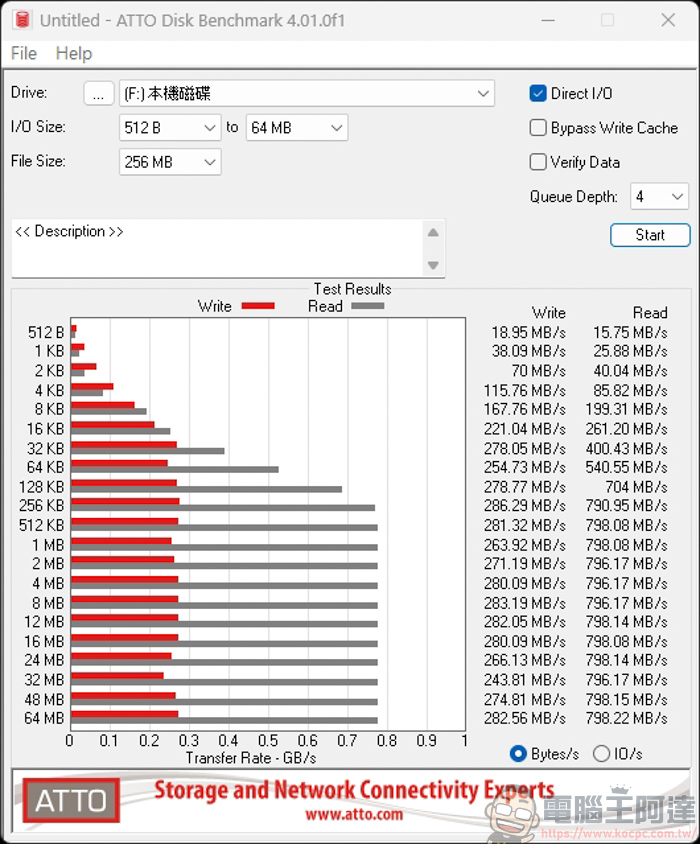
According to TenQuan’s tests, it achieved read speeds of 798 MB/s and write speeds of 282 MB/s. While its write speed is actually one of the higher ones among these three models, it still falls short of the 700 MB/s mark:
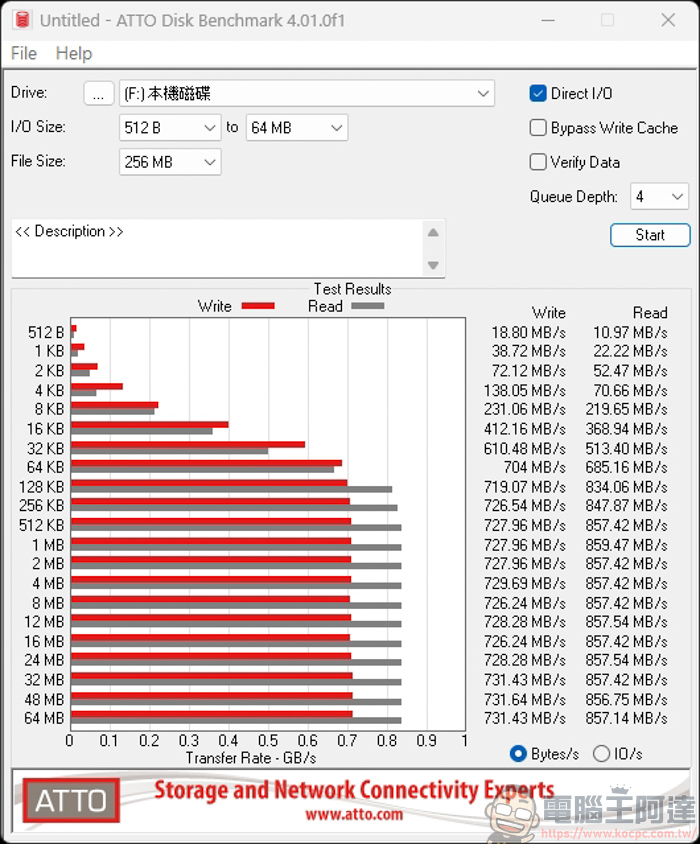
A-Data recorded read speeds of 857 MB/s and write speeds of 731 MB/s, which is within the normal range:
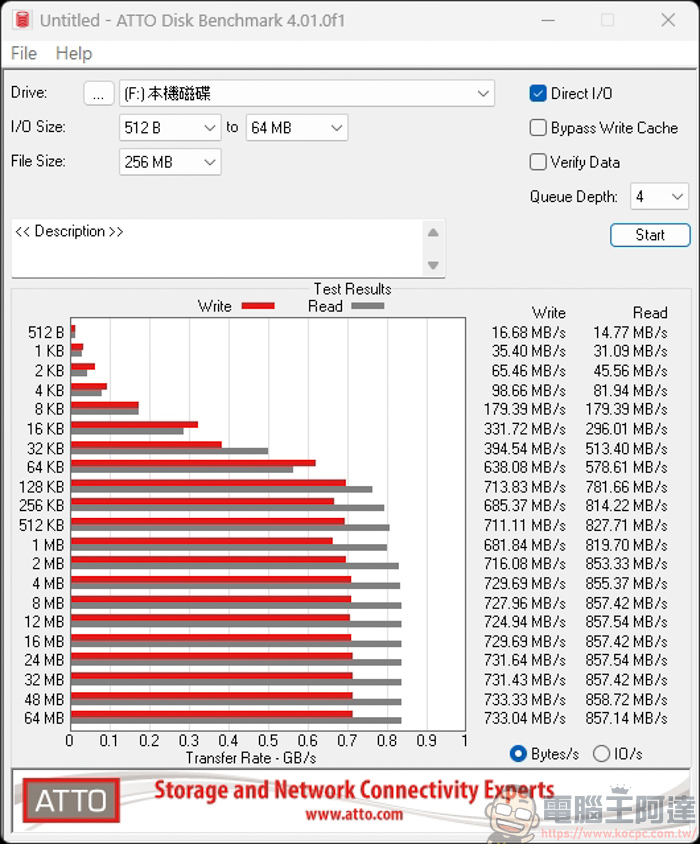
Transcend recorded read speeds of 857 MB/s and write speeds of 733 MB/s. Of these seven cards, only the Powin, SanDisk, ADATA, and Transcend models met their advertised read and write speeds. If you’re looking to choose a microSD Express card, we recommend starting with these four brands. However, as of the date of this article, the prices for these four models are as follows: Powin < SanDisk < ADATA < Transcend. So, savvy readers should know how to make their choice, right?
Buy Powin microSD Express High-Speed Memory Cards Here
My Experience with the Powin microSD Express Memory Card
To sum up, after today’s hands-on testing, I was actually quite surprised by the results. Although these cards on the market all carry the “microSD Express” label and are similarly expensive, the difference in performance is really… You wouldn’t know until you tested them—and when you do, it’s a real eye-opener. Having spent roughly the same amount on these cards, I was shocked to find that some brands only managed write speeds of just over 200 MB/s. When you’re downloading Switch 2 digital games that often run into the tens of gigabytes, the difference in perceived wait time is absolutely noticeable.
The Powin microSD Express memory card we’re unboxing this time really delivered. In tests using both software tools, its read speeds consistently hit the 900 MB/s ceiling, while its write speeds left the competition in the dust—even outperforming the officially recommended SanDisk card. So, since we’re already spending a lot of money on a microSD Express card, it really doesn’t make sense to pay the same price for a product with “neutered” performance, right? Based on current real-world test results, this Powin card is indeed the top choice for Switch 2 players seeking the ultimate in performance and value.
If you’re the type of Switch 2 player who prefers to download a large number of games and store them on the console itself, rather than waiting for them to download over a slow internet connection whenever you want to play, then I personally highly recommend the Powin microSD Express memory card featured in this unboxing. With its extremely fast read and write speeds and affordable price, it’s sure to give you a smoother, responsive gaming experience:
Source: KOCPC Chinese