


In addition to smartphones, computers, and important files, many people now use generative AI tools on a daily basis to create large volumes of images, videos, music, and even various programs using Vibe Coding. As a result, the need for data storage and backup is growing, and cloud storage has become even more important (especially now that SSDs and hard drives have become so outrageously expensive).
With the 2026 Lunar New Year approaching, pCloud is launching its “Lifetime Cloud Storage Plan” with discounts of up to 60% off, meaning you pay just once for lifetime access—available in 1TB, 2TB, and 10TB options. Compared to subscription-based cloud services on the market, you’ll break even in as little as a little over two years—a huge savings.
Get the Lunar New Year Discount on pCloud Lifetime
pCloud 2026 Lunar New Year Lifetime Cloud Storage Offer
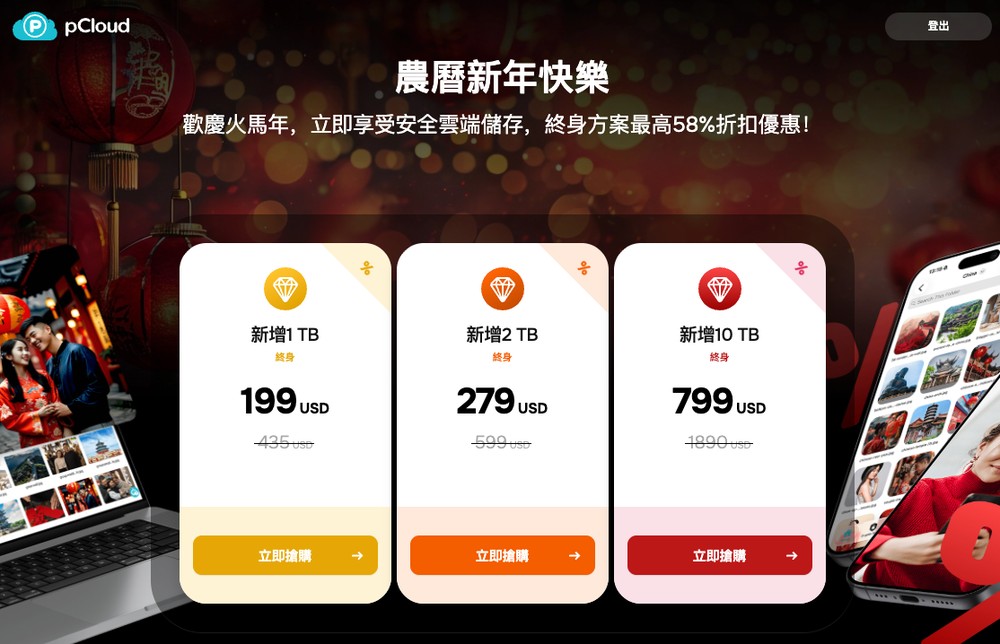
This pCloud 2026 Lunar New Year Lifetime Edition promotion runs from February 9, 2026, through February 20, 2026, and offers a very generous deal:
- 1TB Plan: Original Price $435 -> Special Price $199 (46% off), approximately NT$6,300
- 2TB Plan: Original Price $599 -> Special Price $279 (4.7-fold discount), approximately NT$8,800
- 10TB Plan: Original price $1,890 → Special price $799 (4.2-fold discount), approximately NT$25,300
Get the Lunar New Year Discount on pCloud Lifetime
Who is this promotion best suited for?
If you meet any of the following criteria, you can basically go ahead and buy it:
- People Who Hate Subscription Services: It’s annoying to see $300 or $600 deducted from my credit card every month—it feels like it’ll never end, and this amount has to be taken out of my paycheck first every month.
- Content Creators / AI Users: People who frequently use AI to generate images, videos, music, podcast audio files, Whisper transcripts, etc., and find that their computer’s hard drive space is running low.
- People Who Can’t Bring Themselves to Delete Their Memories: I’ve gone through several cell phones, and I can never bring myself to delete my photos and videos. Add to that the backups on my computer, and the amount of data just keeps piling up like a snowball.
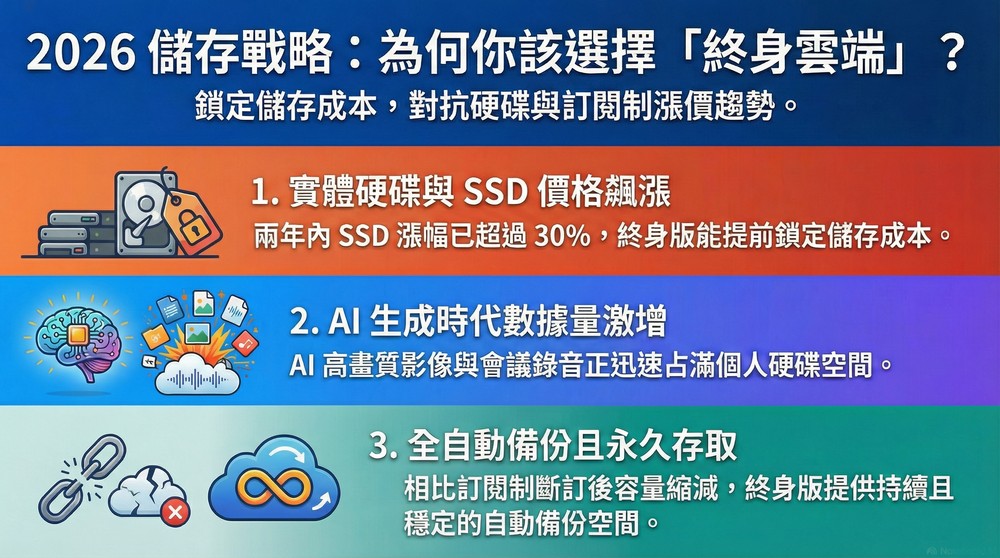
Why 2026 Is an Even Better Time to Buy “Lifetime Cloud”
1. The risk of rising storage device prices
We used to think that hard drives and SSDs would keep getting cheaper and cheaper, like cabbages, but starting in 2026, the situation changed completely. A significant portion of production capacity was diverted to meet demand from servers and data centers, tech giants like NVIDIA, Google, and Microsoft are snapping up SSDs like crazy. Not only have major manufacturers shifted entirely to producing high-margin server drives, but consumer-grade SSDs and hard drives have also become increasingly expensive and hard to find.
If you check current SSD prices, you’ll see that they’ve risen by more than 30% compared to two years ago.
Physical hard drives look set to become increasingly expensive in the coming years, and cloud storage services may raise their prices as a result. Therefore, purchasing a lifetime subscription to pCloud now effectively locks in your future storage costs. No matter how outrageously high hard drive prices rise in the future, it won’t affect you.
2. A Surge in AI-Generated Content
Everyone has probably noticed this over the past couple of years. AI-generated images are now very convenient and getting more and more advanced. You might have an idea at any moment and keep generating images—and if each one is high-resolution, the total storage space they take up is nothing to sneeze at, not to mention AI-generated videos.
In addition, as AI meeting transcription tools have become more widespread, we’ve gotten into the habit of recording every meeting and every interview, then using AI to convert them into verbatim transcripts. These audio files and transcripts are gradually filling up our hard drives.
3. Backing Up Data from Your Phone and Computer
Everyone’s phone and computer are sure to contain a wealth of important data, as well as photos and videos filled with precious memories. pCloud supports automatic backup on iOS, Android, Mac, and Windows, which means that once you’ve set it up, it will automatically back up your data in the background whenever you’re connected to the internet—so you’ll never have to worry about losing your data again.
More importantly, since this is a lifetime license, your cloud storage capacity remains the same no matter what—unlike subscription-based cloud services, where your storage is immediately reduced if you don’t renew your subscription the following month, making it impossible to continue backing up your data.
Turn the anxiety of monthly or annual payments into a one-time investment
The scariest thing about a subscription service isn’t the cost—it’s having to “make a decision.” Every time the payment is deducted each month or year, you’ll find yourself wondering, “Do I really want to renew?” This is especially true when your income is unstable or you’re under financial pressure. But if you don’t renew, your storage capacity will shrink, preventing you from saving any more data once you exceed your limit—and you might even have to rush to move your data elsewhere.
The greatest value of a one-time purchase is that you can use the service with peace of mind for the long term. It’s like buying a house versus renting: once you’ve made this one-time payment, you won’t have to worry for the next 5 or 10 years about whether to renew your subscription or what to do with your backup data if you don’t. That sense of peace of mind is truly priceless.
Take the 2TB plan, currently on sale for about NT$8,800, as an example: Google One’s 2TB plan costs NT$3,300 per year. Let’s do a quick calculation: as long as you plan to use it for more than 3 years, you’ll start saving money every day starting in the 4th year. If you’re planning to back up data long-term or maintain an AI素材库, the return on this investment is extremely high.
Get the Lunar New Year Discount on pCloud Lifetime
How should you choose the capacity?
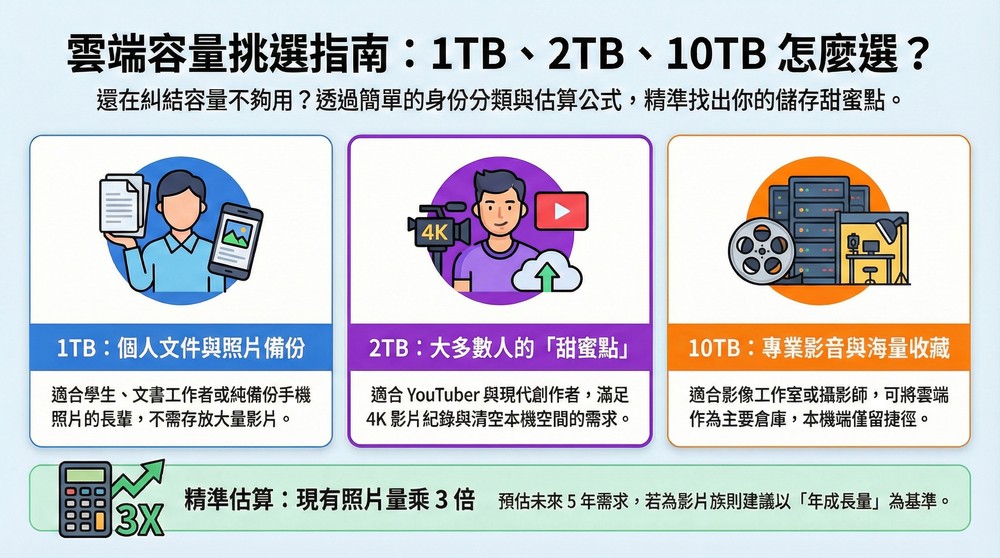
Many people are torn between choosing 2TB or 10TB; the following suggestions are provided for your reference.
1 TB: Mainly personal files and photos from my phone
- Suitable for: Students, office workers, and seniors—device backups.
- Usage Scenarios: People who mainly take photos, don’t shoot many videos, occasionally experiment with AI-generated images, and don’t need to store large amounts of RAW files.
2TB: The sweet spot for most creators—videos, assets, and backups (highly recommended)
- Suitable for: YouTubers, designers, and the vast majority of people today.
- Use Cases: People who edit videos, create graphics, use AI extensively, shoot a lot of 4K video on their phones, and want to move all their old data from their computers to the cloud.
10TB: Long-Term Media Collections, Team Asset Libraries, and Alternatives to NAS
- Suitable for: Photography studios, photographers, and users with large amounts of data to back up.
- Usage Scenarios: Whether you need to organize your work files by project or prefer to use the cloud as your primary storage repository and keep only shortcuts on your local device.
Quick Tip: How to Estimate the Capacity You Need?
- Photo Enthusiasts: Check how many GB your phone’s photo album currently takes up; usually, multiplying that by 3 (to account for the need to replace your phone over the next 5 years) should be enough.
- Movies/AI Community: It’s best to base your decision on “annual growth.” If your storage needs increase by about 500 GB per year, a 2 TB drive will only last 4 years; it’s safer to go straight for 10 TB.
A Quick Look at pCloud’s Key Features
pCloud has many features, so here I’ve compiled a few that I think are particularly great.
Get the Lunar New Year Discount on pCloud Lifetime
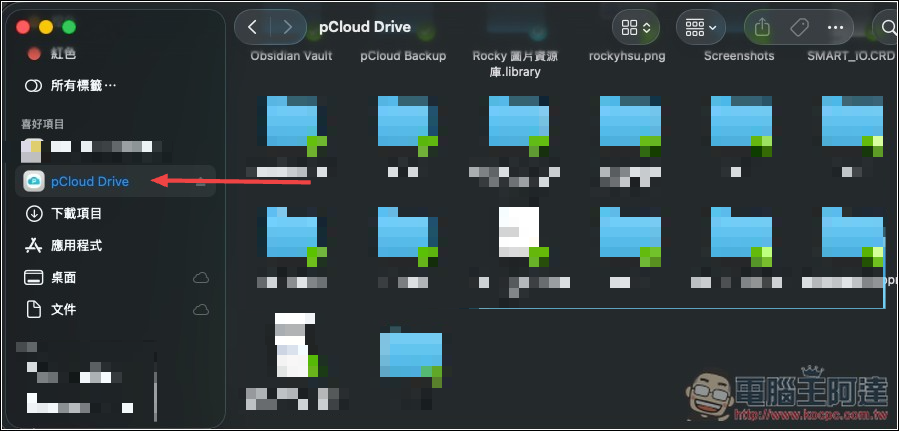
1. pCloud Drive Virtual Disk: Use the cloud as if it were a hard drive
After installing the desktop app, a new “pCloud Drive” will appear in your “Hard Drives” list. You can treat it just like a local hard drive—simply drag and drop files into it or open and edit them directly—without taking up any of your computer’s original storage space. This is incredibly useful for users with laptops that only have 256GB or 512GB of storage.
2. Rewind / Version Rollback: Recover Accidentally Deleted or Corrupted Files
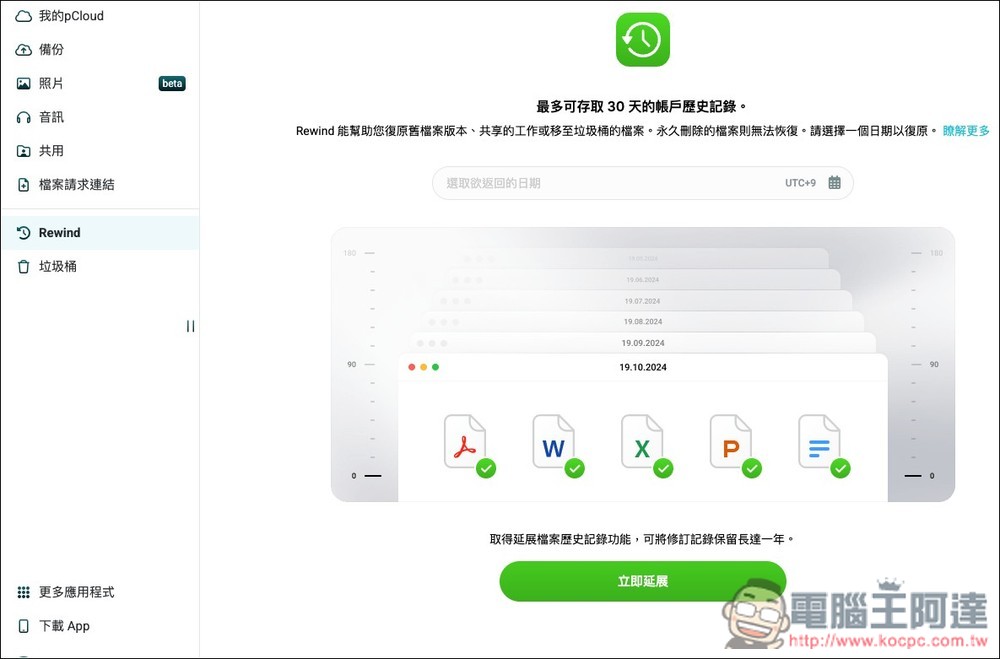
When editing files or creating AI projects, there are often multiple versions (v1, v1_final, v1_really_final, etc.). It’s easy to end up with a mess, accidentally overwrite the original file, or even corrupt the file. That’s where pCloud’s Rewind feature comes to the rescue—it lets you “rewind” your entire account to a specific point in time, just like a time machine.
3. Sharing Links and Collecting Files
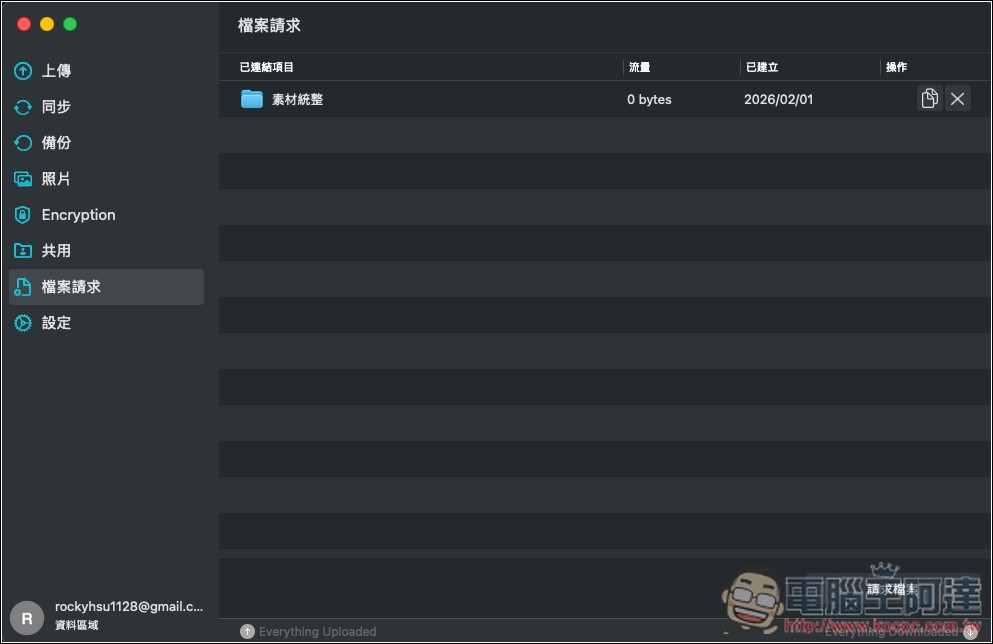
For those who frequently share files, freelancers, or anyone sharing AI assets with others, pCloud not only allows you to create shareable links for specific files or folders, but also lets you create links for file collections—such as setting up an “upload link” so clients can drop their assets into it. Best of all, clients don’t even need to sign up for a pCloud account—they can send you large files, even several GB in size, right away.
4. Automatic Backup and Synchronization Features
When it comes to backups, as long as they require “manual intervention,” they’re basically bound to fail (because people are naturally lazy).
Enable auto-upload in the pCloud mobile app, and your photos and videos will be automatically backed up in the background as soon as you take them. If your phone ever falls down the toilet or gets stolen, you won’t have to worry at all about losing your precious memories and data—you’ll just be upset about the cost of the phone.
The pCloud desktop app also offers synchronization features. Once you’ve set up the local folders you want to sync, you’ll be able to access the latest versions of your files in real time through the pCloud sync folder on any device.
Get the Lunar New Year Discount on pCloud Lifetime
Source: KOCPC Chinese