


ChatGPT already had a task feature that let you set reminders or recurring tasks using natural language, but anyone who’s used it probably felt it was pretty similar to standard reminder apps—not particularly impressive. Well, OpenAI has finally upgraded this feature, launching the new “Scheduled tasks,” which transforms the original task function into a more complete “scheduling hub” and makes ChatGPT feel more like an AI assistant that proactively helps you keep track of things.
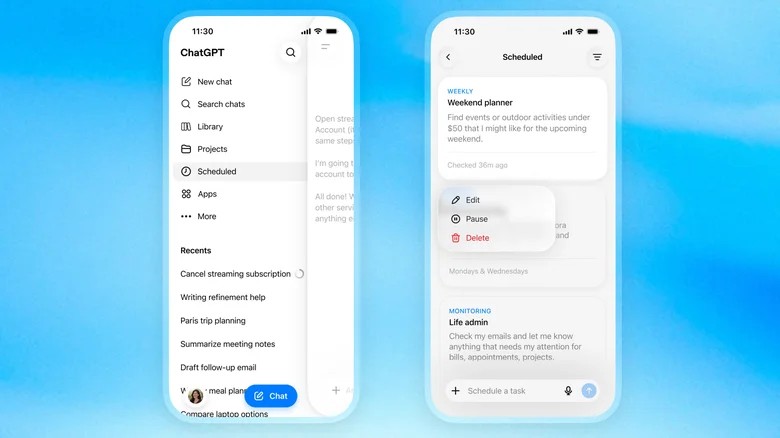
Image source:engadget
OpenAI upgrades ChatGPT scheduled tasks: centralized schedule management, regular monitoring of website and app changes, supports up to 15 active tasks
The biggest change to ChatGPT’s scheduled tasks is that OpenAI has built a more complete management interface — it’s no longer buried in the settings.
Users can find the new “Scheduled” menu in the ChatGPT sidebar, where they can view currently running tasks, as well as add, pause, resume, edit, or delete tasks without having to go back to the original conversation where the task was created.
The creation method remains the same as before—you can simply say in chat “Remind me to reply to this email tomorrow at 9am” or “Organize last week’s work highlights every Monday.” You can also manually add reminders on the scheduling page.
OpenAI’s official documentation also clarifies that tasks can be one-time reminders or recurring schedules, and the timing doesn’t have to be as precise as traditional calendars down to the exact hour and minute—you can also use more conversational time ranges like “morning,” “afternoon,” or “evening.”
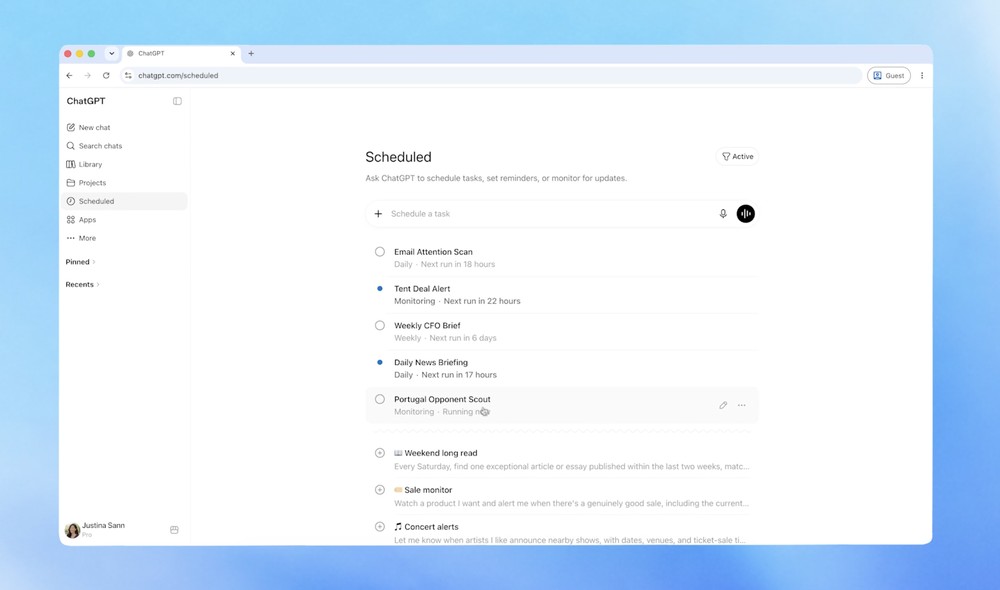
Notably, scheduled tasks are more than just “reminders” — they can now periodically check webpages or monitor connected ChatGPT services for updates, only notifying you when something worth your attention comes up.
This is also the biggest difference from the original task function — giving ChatGPT the ability to monitor whether something has changed.
For example, if you usually track whether a certain product has dropped in price, you can have ChatGPT regularly check the page and notify you as soon as there’s a price cut. Additionally, when connecting to Gmail or other work services, you can also ask it to compile important unread emails for you on a weekly basis.
OpenAI also specifically noted that monitoring tasks will remember the results of previous executions, so that ChatGPT can determine whether any new changes have occurred this time.
Tasks can also have end conditions set, such as stopping monitoring once a certain event occurs, instead of running forever—it’s a really nice feature.
However, scheduling tasks also come with usage restrictions, including a limit of no more than one execution per hour, so you can’t use it for real-time monitoring or high-frequency automation tools. Voice chat and GPTs are also not currently supported, meaning you can’t use this scheduling mechanism within custom GPTs.
For notifications, ChatGPT will send you task results via app push notifications or email.
ChatGPT’s new scheduled tasks feature will gradually roll out to Go, Plus, Pro, Business, and Enterprise users. Plus allows up to 5 active tasks, Business/Edu up to 10, and Pro/Enterprise up to 15.
Another feature called “Pulse” that provides updates and summaries will also be retired. OpenAI says Pro users can continue using Pulse for 14 days, after which it will be removed.
Beyond scheduled tasks, ChatGPT has also received the following updates:
- A brand new iOS camera and Photos experience with a more beautiful interface.
- World Cup coverage fully updated with the latest scores, schedules, standings, team statistics, and play-by-play timelines for every match.
- Pronunciation assistance: ChatGPT can now help with word pronunciation in over 60 languages.
- Improve the management and organization of pinned chats and Projects.
- Further optimize the plugin experience (such as Gmail and Slack) on the Android input field (iOS coming soon).
Source: KOCPC Chinese