


Apple opened a new door for Mac developers at WWDC 2026: running AI agent workflows locally on their own hardware. The session “Run local agentic AI on the Mac using MLX,” demonstrated live by MLX team engineer Angelos, showcased how to build a fully cloud-free, API-key-free Agentic AI workflow using only local hardware computation on the Mac. This approximately 13-minute demo starts from the most basic level MLX frameworkCovering the complete Agent stack, a three-step quick local Agent setup, and the 4x prompt processing speedup from the M5 chip neural accelerator.

From Traditional Conversations to Agent Loops
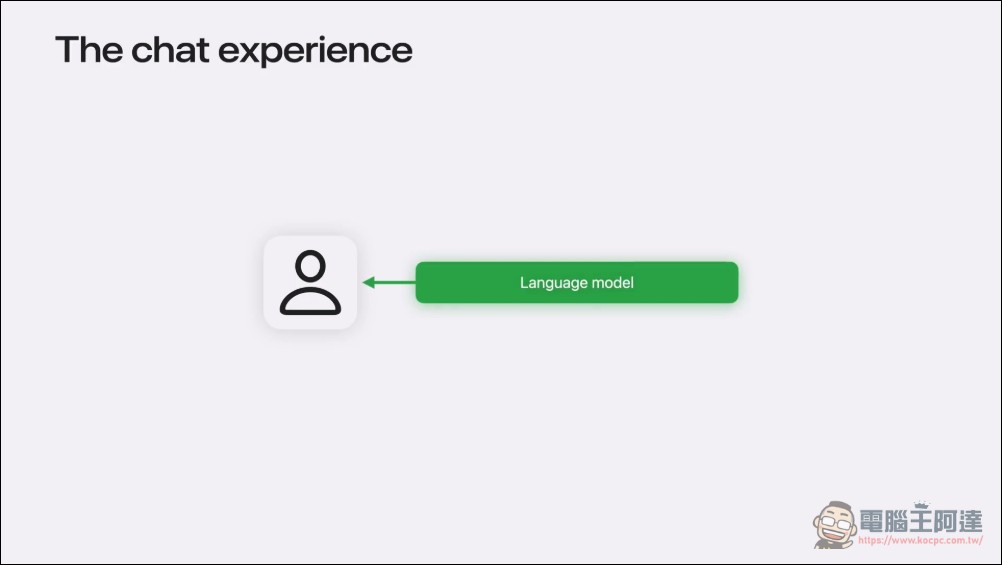
Angelos opened by comparing traditional LLM conversation mode with the Agentic mode. In the traditional mode, users send prompts to the language model, which returns responses, while all subsequent work—executing commands, checking files, or fixing errors—falls entirely on the user.
However, in Agent mode, the process is completely different: the Agent first converses with the model to decide what to do next, then calls tools to actually execute tasks—potentially running shell commands, reading files, or calling APIs. It then observes the tool’s returned results and returns to the model to determine the next step. This iterative cycle of “User → Agent → Model → Tool → Agent → Model…” is what we call the “Agentic Loop” (代理迴圈), which continues running until the task is complete.
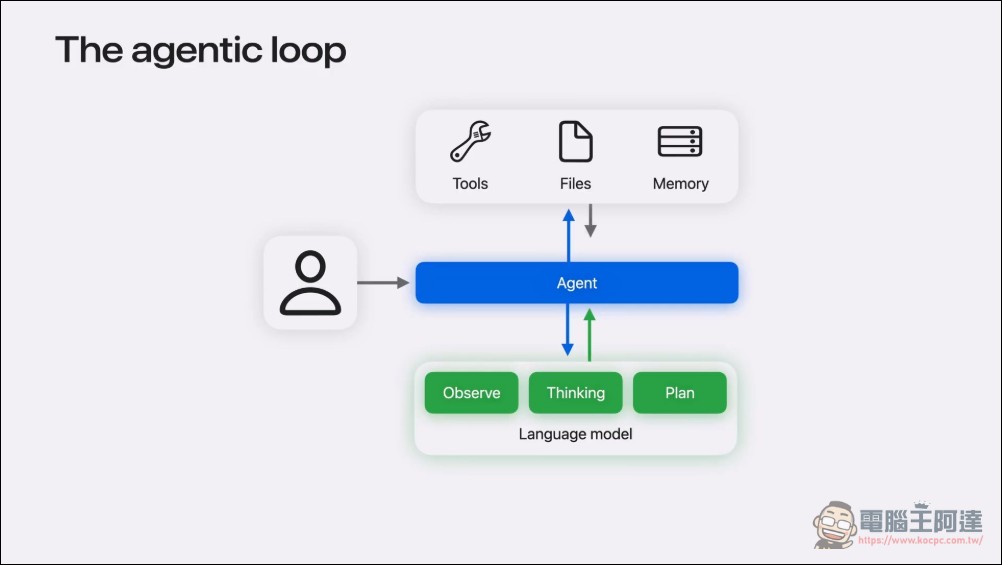
On Apple Silicon, the entire loop can run locally on your device. This means your data never leaves your machine, AI is available anytime and anywhere, and there’s no usage cost.
Four-Layer Stack for On-Device Agentic AI
For this system to work, Apple proposed a four-level technology stack. From bottom to top, they are:
- MLX (underlying): An open-source array framework specifically designed for Apple Silicon, handling all low-level computations, Metal acceleration, and memory management.
- MLX LM (Model Layer)Provides everything needed to load, run, quantize, and fine-tune large language models, supports thousands of Hugging Face models, and also offers CLI tools and a Python API.
- MLX LM Server (Server Layer)This is an HTTP server compatible with the OpenAI API that exposes local models through a standard API interface. It supports structured tool calling and reasoning models, allowing direct replacement of any cloud-based LLM API.
- Agent (Top Level)Can be any framework or tool that supports the OpenAI Chat Completions protocol, including Xcode, OpenCode, PyAgent, or custom scripts.
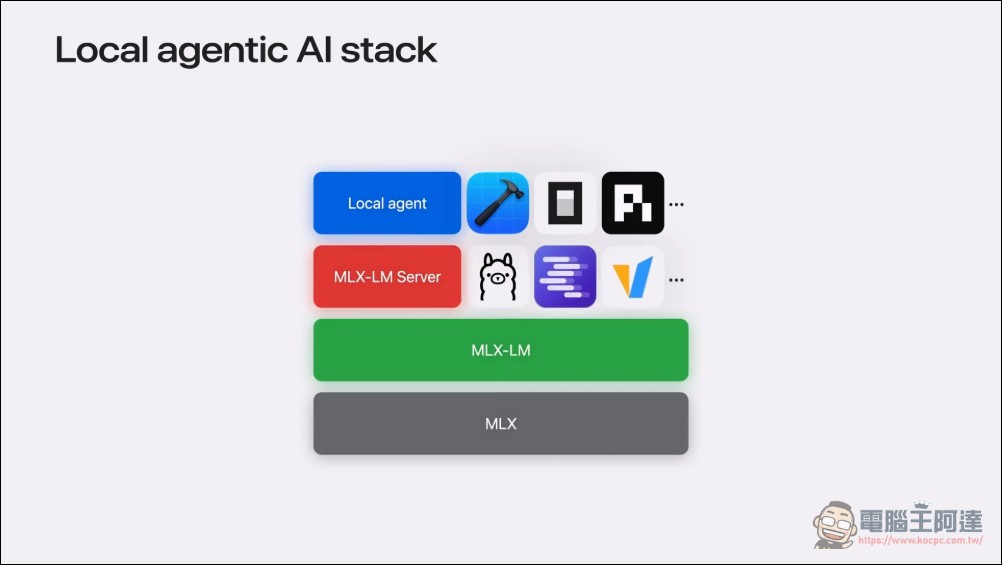
Additionally, this stack isn’t exclusive to Apple—popular tools like Ollama, LM Studio, and vLLM are all built on top of MLX and MLX LM. If you’re using any of these tools, you may already be running on MLX.
MLX LM – GitHub Repository
Run AI Agents Locally on Your Mac in 3 Steps — No API, No Subscription Required
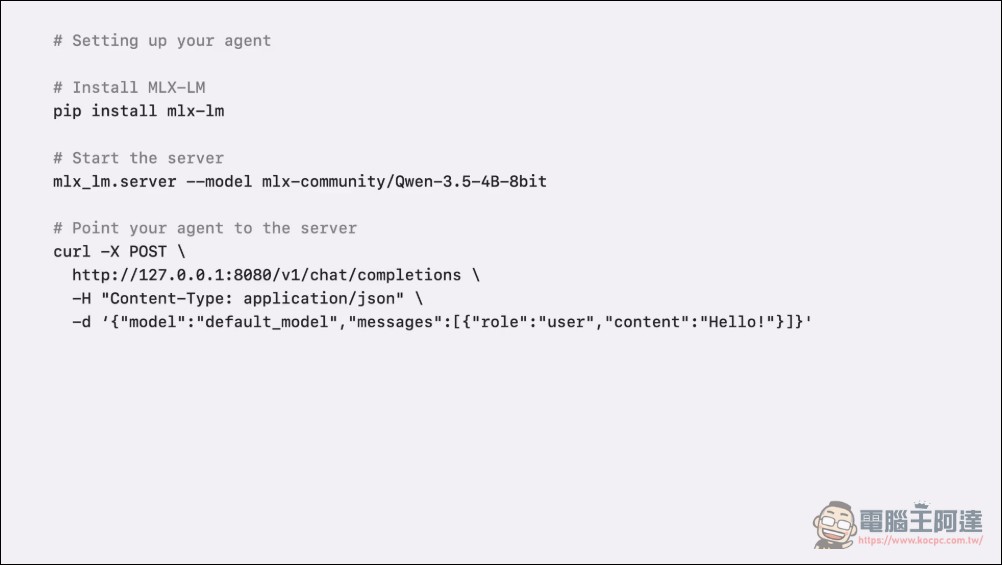
Angelos demonstrated in the session that building a complete local Agent workflow from scratch requires just three steps, with every command executed directly in the terminal.
Step 1: Install MLX LM
pip install mlx-lm
Everything you need with just one pip install.
Step 2: Start the server
mlx_lm.server --model mlx-community/Qwen-3.5-4B-8bit
Execute a server with tool-calling capable models. It is recommended to start testing with a small model (the official example uses Qwen2.5-4B-8bit). Once the server starts, it will load the model and be ready to accept requests on localhost.
Step 3: Point the Agent to the local server
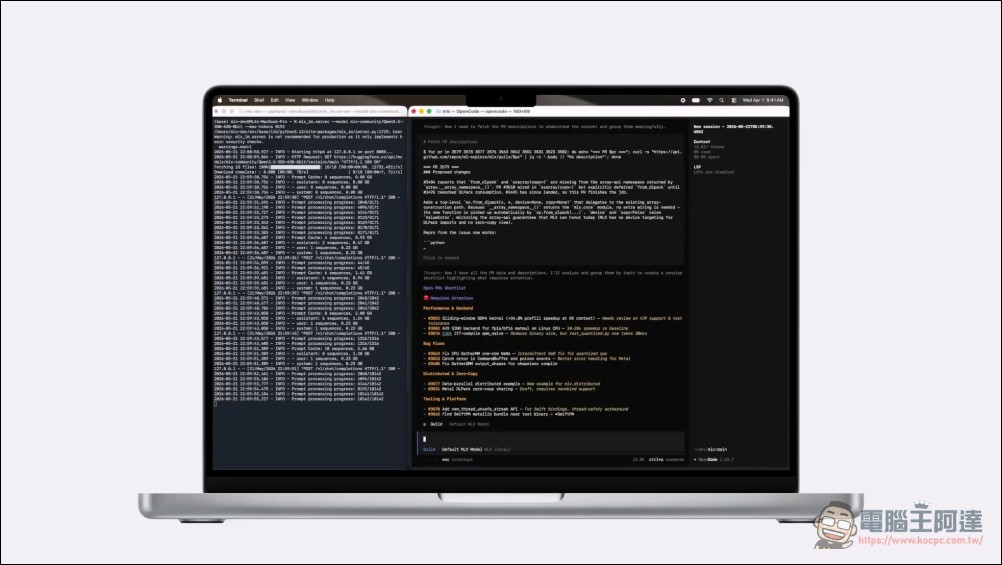
In most Agent frameworks, you just need to set the Base URL to a local server address (http://127.0.0.1:8080) and you’re done. The Agent doesn’t know or care whether the model runs on your Mac or in the cloud.
For example, with OpenCode, you define a local Provider in the configuration file, set the URL to localhost, specify the model name, and tell OpenCode to use this local model for all operations. This way, every interaction will be executed through your local model.
Three Key Technologies for Faster Agents
Running agents locally presents three main challenges, and Apple has prepared corresponding solutions for each one:
Challenge 1: Prompt Processing Speed
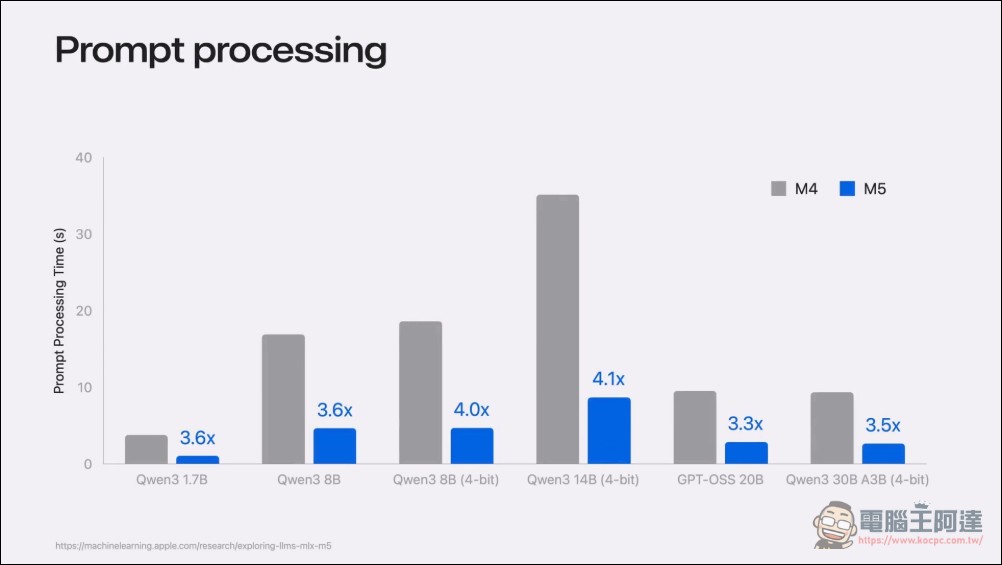
In agent workflows, each time the model receives a tool output, it must first process all the new context before it can reason about the next step. This process repeats in the agent loop, accumulating rapidly—a session often contains hundreds of thousands of tokens, most of which are not generated.
Apple’s solution is the dedicated Neural Accelerators on the M5 chip. MLX can directly leverage these accelerators, making matrix multiplication on M5 4x faster than on M4. Combined with dedicated matrix multiplication and attention kernels in MLX, this translates almost directly into 4x faster prompt processing. Better yet, developers don’t need any special parameters or code modifications—MLX automatically selects the best kernel for the available hardware.
Challenge 2: Parallel Processing
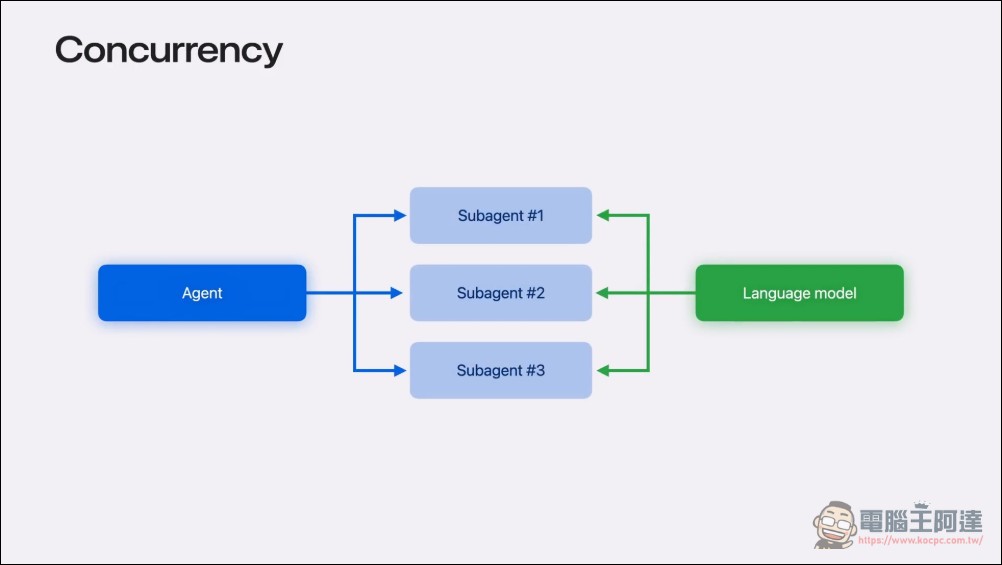
In actual use, agents rarely work alone. A common pattern is one agent spawning multiple sub-agents, each handling different parts of a problem—one reading documents, one searching code, one writing tests, all running simultaneously. This means multiple requests hit your local model at the same time.
MLX LM Server addresses this through Continuous Batching. Instead of processing requests one by one, it dynamically groups incoming requests into batches and processes them together on the GPU. New requests can join an ongoing batch without waiting for the current batch to finish. The result is that sub-agents don’t get stuck waiting in a queue—they all get served simultaneously, keeping the entire workflow moving forward.
Challenge 3: Model Size and Distributed Inference
Sometimes, even a single machine with 512 GB of memory is not enough, because the model is too large to fit in memory. For example, the latest DeepSeek model has 1.6 trillion parameters, with weights alone requiring more than 800 GB of memory.
MLX’s distributed support lets you spread models across multiple Macs connected via Thunderbolt or Ethernet. Starting with macOS 26.2, Thunderbolt RDMA (Remote Direct Memory Access) provides low-latency, high-bandwidth communication. Benchmark results show that distributed inference performance can improve by up to 3x with 4 nodes.

Live Demo: From SwiftUI App to Xcode Bug Fixes
Angelos presented two impressive case studies on the agenda.
Example 1: Building a SwiftUI Drawing App from Scratch
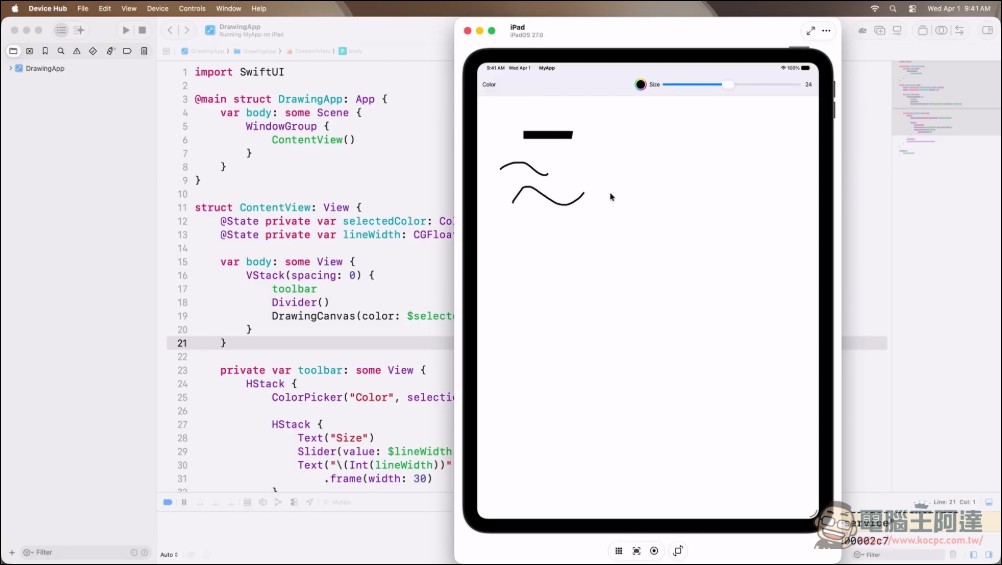
Starting from a blank Xcode project, the user asked Agent to build a drawing app for iPad. Agent first examined the current directory to understand the project structure, created an implementation plan, and then started writing code. Agent wrote the files, built the app, and fixed any errors encountered along the way—no manual copying or project building required at all. It took only a few minutes to produce the first version of the app, and it was a fully functional drawing tool. Angelos even asked Agent on the spot to change the pen tip to rounded end caps, and Agent edited the code and recompiled, completing the modification within seconds.
Case 2: Fixing Bugs in Xcode(
This demonstration shows how a local Agent can be directly integrated into the Xcode development environment. The steps are straightforward: open Xcode Settings → Intelligence tab → Add chat provider → select Locally Hosted Provider → configure the port number (default 8080) → done. Once configured, Xcode can communicate with the local model. Angelos first introduces a bug in the app, then asks the model to fix it. Within seconds, the model identifies the error location, examines the related code, and writes the fix. All of this happens locally—the code never leaves the Mac.
This video is packed with content, and we’ve also prepared a detailed translation for everyone. Check it out if you’re interested:
Conclusion
This session at WWDC 2026 marks Apple’s official endorsement of local AI Agents. From the MLX framework to MLX LM Server and direct integration with Xcode, Apple is building a path for Mac developers to move from cloud back to local—your data stays on your machine, no per-token billing pressure, and it works out of the box. As Angelos said at the end: “Everything shown today is open source and available right now.” Developers who are interested can now run a complete local AI Agent workflow on their own Mac.