


Although previous real-world tests by overseas YouTube channels showed,After upgrading to iOS 27, battery life won’t change much.But it seems quite a few people are still experiencing worse battery life, and according to foreign media reports, the culprit may be the “Connectivity Assistant” feature in iOS 27. Multiple users’ tests show that after turning this feature off, battery life improves noticeably.
Is iOS 27’s “Connection Assist” secretly draining battery and cellular data? Here’s how to turn it off.
On overseas Reddit forums, people have been reporting one after another that battery life gets worse after upgrading to iOS 27. One user, u/ZoteTheMitey, shared that simply turning off iOS 27’s “Connectivity Assist” can improve battery life.
iPhone 15 Pro Max 電池健康度 89%,更新到 iOS 27 之後,我的螢幕開啟時間(SOT)只剩下 3 到 4 小時。把「連線輔助(Connectivity Assist)」關掉之後,現在可以達到 7 小時了。你必須在兩個地方把它關閉:Wi-Fi 設定裡面,以及你連接的每一個 Wi-Fi 網路設定中。它之前即便連著 Wi-Fi 也讓行動網路一直處於啟用狀態,徹底摧毀了我的電池續航力。
PSA: Turn off connectivity assist in iOS 27 unless you absolutely need it
byu/ZoteTheMitey iniphone
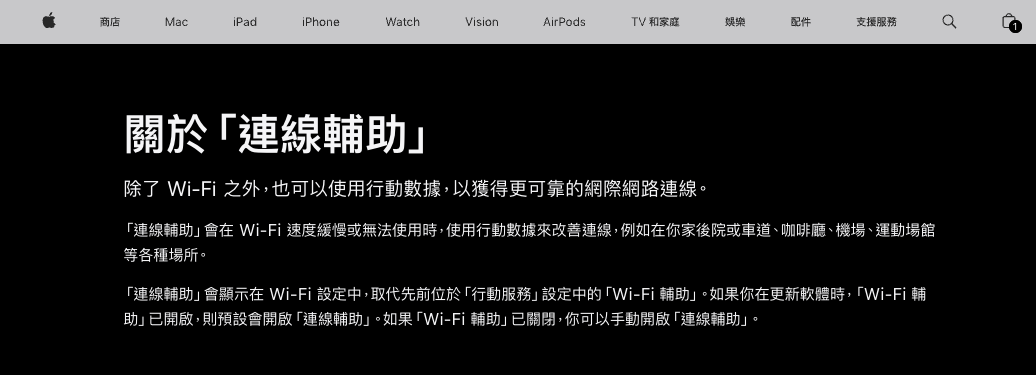
In fact, this feature has been around since iOS 9; it was just called “Wi‑Fi Assist” before, and was only renamed to “Connectivity Assist” in iOS 27. The feature used to be at the bottom of Settings > Cellular, and iOS 27 moved it to the bottom of the Settings > Wi‑Fi page.
So what is this feature used for?
According to Apple, this feature works with cellular data to improve connection quality when Wi-Fi is slow, congested, or unavailable, and it applies to scenarios ranging from your backyard and driveway to cafes, airports, and stadiums; the documentation also notes that enabling it “may use more cellular data.”
In addition, iOS 27’s “Connectivity Assist” appears to operate more aggressively. In the past, Wi-Fi Assist mainly used cellular data when the Wi-Fi connection quality was poor, but Apple’s description of Connectivity Assist now says to “use cellular data with Wi-Fi” when the Wi-Fi signal is weak, congested, or unable to connect to the internet.
And this could lead to higher power consumption issues.
When this feature kicks in, the iPhone is not only transmitting data over Wi-Fi; the cellular modem may also need to maintain an additional connection and actually transmit data, which increases the modem’s operating time and power consumption. If the cellular signal is also weak at the time, the phone typically needs to consume more power to maintain the cellular connection, which can make battery drain even more noticeable.
foreign media iDropNews In the cited cases, tech site AnotherApple found in testing that even when connected to Wi-Fi most of the time, Wi-Fi Assist still used over 800MB of cellular data within two days; the AnotherApple author even said that when first checking the stats, it had already accumulated about 4GB. Another Pocket-lint reviewer said that on the first day staying in a hotel with poor Wi-Fi quality, Wi-Fi Assist used about 174MB of cellular data.
You might be thinking, I don’t remember turning this feature on.
If Wi-Fi Assist was on before the upgrade, Connectivity Assist will also turn on automatically after the upgrade. Wi-Fi Assist has historically been on by default, so after most people upgrade to iOS 27, this feature will be on.
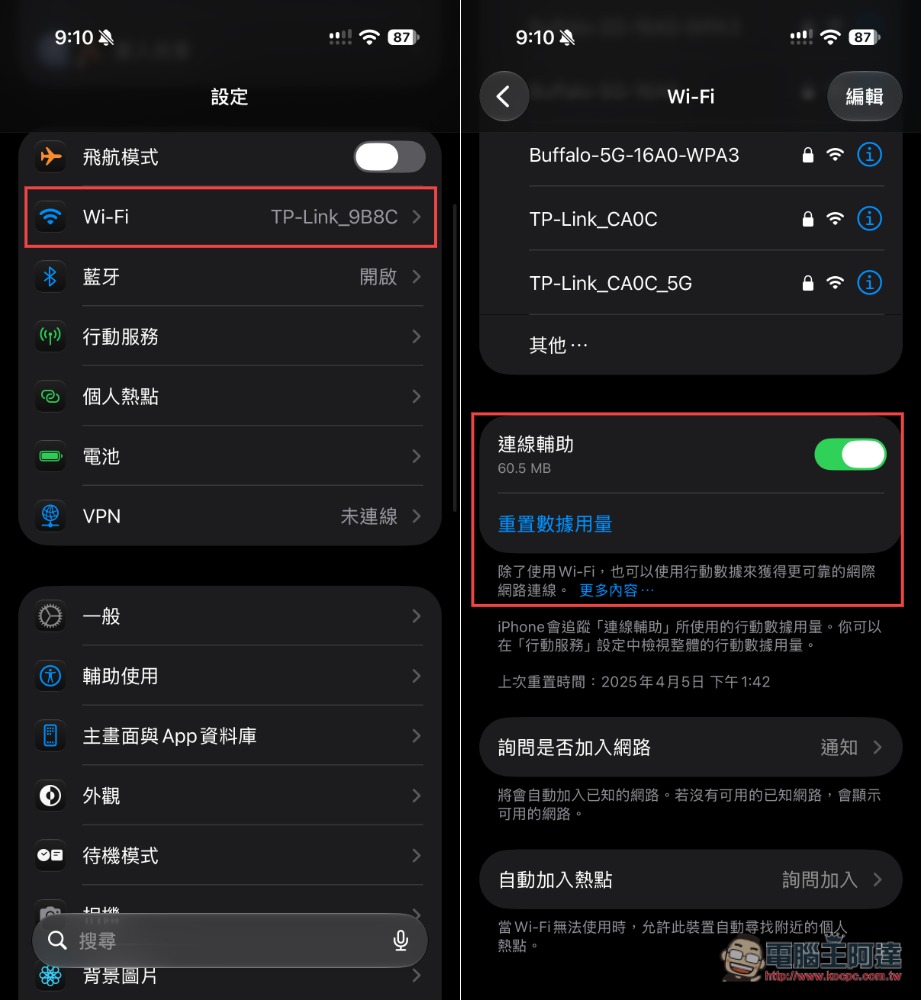
If your iPhone’s battery life drops significantly after upgrading to iOS 27, you can try turning it off. Here are the steps.
Open Settings, go to Wi-Fi, scroll down, and you’ll find the “Connection Assist” feature; just turn it off:
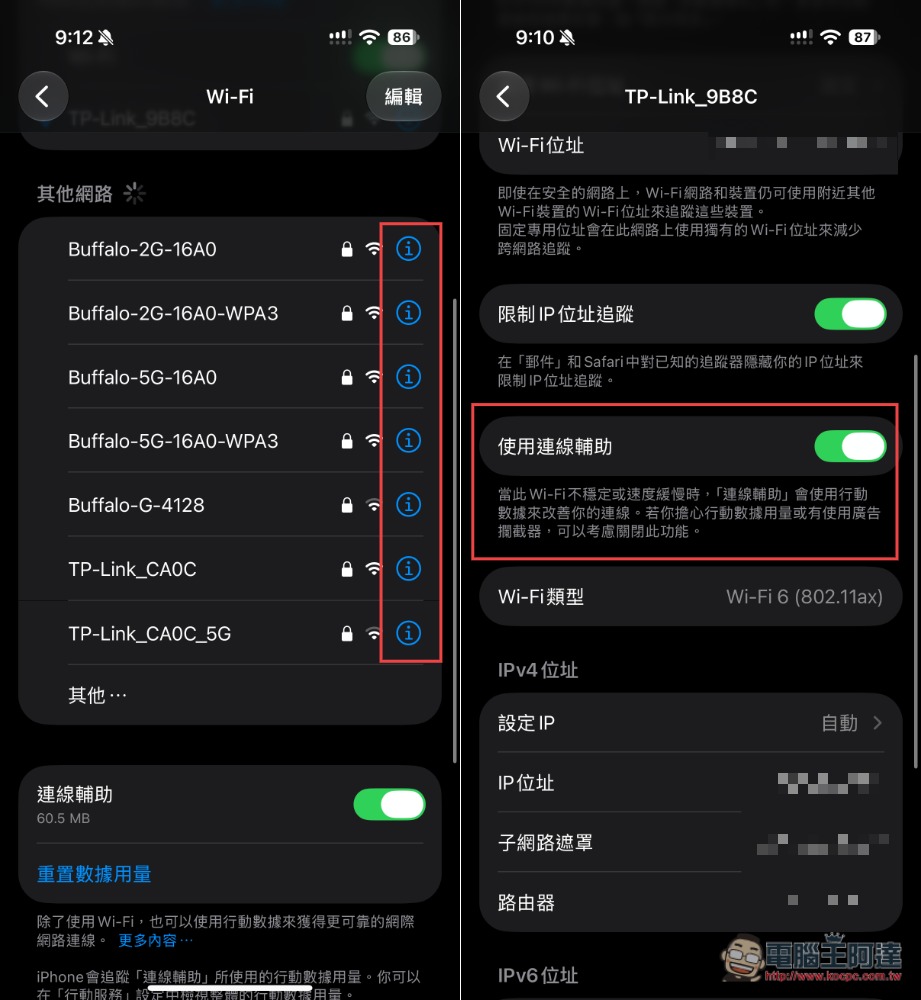
However, this method disables this feature on all networks. If you want to turn it off only for a specific network, you can go to the “ⓘ” icon next to that network and turn off the connection assistance-related toggle on the settings page; this way, it will only affect that network:
Source: KOCPC Chinese