


The M6 Mac mini officially went on sale on September 22, priced from NT$29,900 in Taiwan. For those who are interested but on a limited budget, they might just go with the standard version—16GB of memory and a 256GB SSD—thinking they can just use an external drive if the capacity isn’t enough. However, note that the difference between the 256GB and 512GB versions isn’t just capacity.
According to real-world tests by Japanese media, the SSD read/write speeds of the 256GB version are only about half those of the 512GB version. The “up to 2x faster storage” Apple claimed at launch is only available on models with 512GB or more. Although upgrading to 512GB costs an extra NT$7,000, you get double the capacity and double the speed.
Watch out if you’re buying the 256GB M6 Mac mini! Its SSD speed is only half that of the 512GB version; Apple’s claim of “2x faster storage” only applies to 512GB and above.
According to Japanese media AAPL Ch. In a hands-on report, they took apart the just-released M6 Mac mini 256GB version and found that the SSD uses only a single NAND flash memory chip. They then ran Blackmagic Disk Speed Test, and sequential write was only 3,000.2MB/s, while sequential read was 3,216.8MB/s. By comparison, Tom’s Hardware measured the 512GB version at 6,577.4MB/s write and 6,371.5MB/s read. The 512GB version was 119% faster in write and 98% faster in read, almost exactly double:
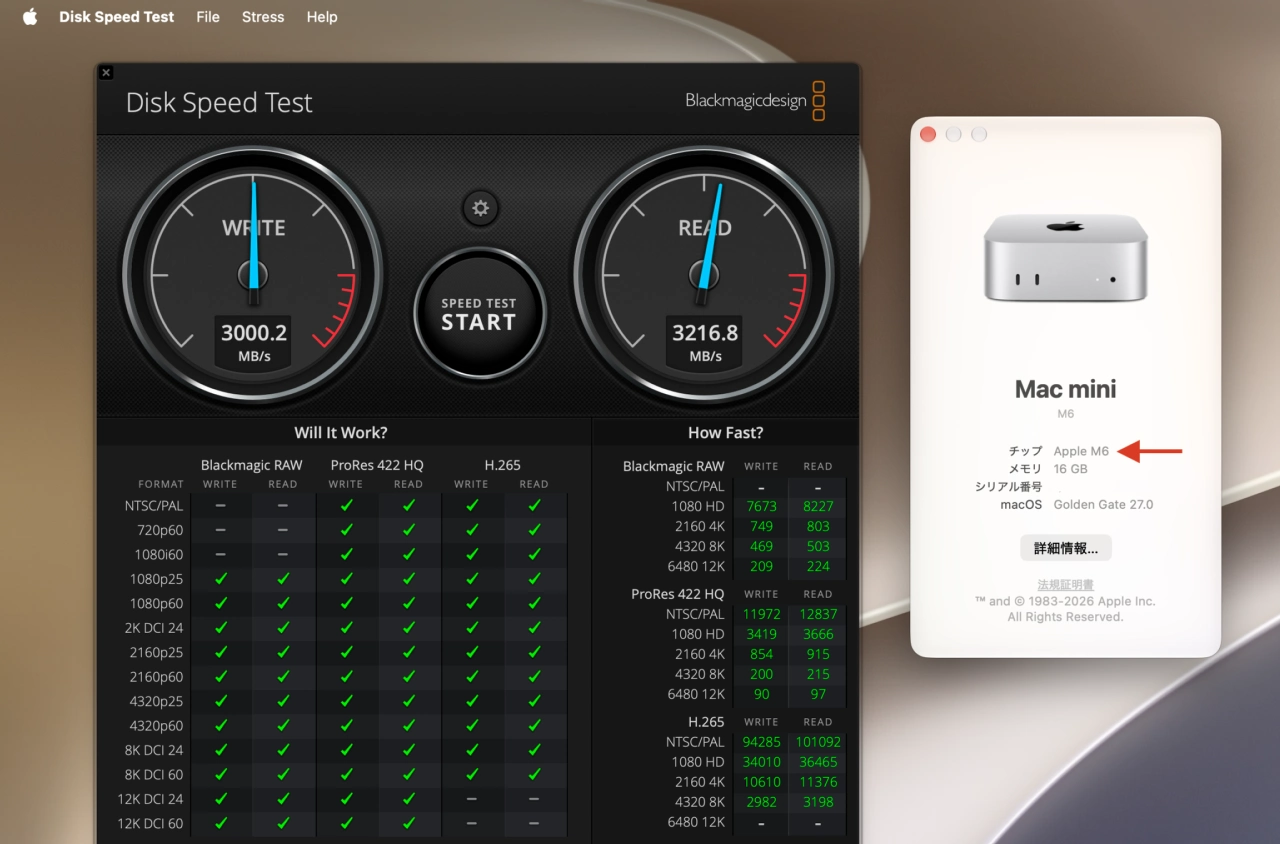
Image source: AAPL Ch.
Below are the results of actual tests by several well-known foreign media outlets, all of the 512GB version, also tested using Blackmagic Disk Speed Test, with both write and read speeds exceeding 6,000MB/s:
| media | Test machine configuration | Sequential write | Continuous read |
|---|---|---|---|
| Tom’s Hardware | M6/24GB/512GB | 6,577.4MB/s | 6,371.5MB/s |
| Macwelt | M6/24GB/512GB | Approximately 6,700 MB/s | Approximately 6,400MB/s |
| 9to5Mac | M6/24GB/512GB | 6,000~6,400MB/s | 6,000~6,300MB/s |
| AAPL Ch. (Self-purchased) | M6/16GB/256GB | 3,000.2MB/s | 3,216.8MB/s |
When Apple announced the new Mac mini in August, it said the M6 delivers up to 4x the AI performance, 2x faster storage and graphics performance, and 40% faster CPU performance than the M4, but it did not note that the storage speed improvement depends on capacity. At the same time, the review units Apple provided to major tech media and well-known YouTubers were all 512GB versions, so the SSD speeds did indeed all meet the official claims.
So why does changing the capacity make the speed differ by a factor of two? The key lies in the number of NAND chips.
The components in an SSD that actually store data are NAND flash memory chips. An SSD controller can read from and write to multiple chips at the same time, so the more chips there are, the more work can be done simultaneously. The 512GB version uses two NAND chips, which is like having two lanes running at once; the 256GB version has only one, leaving just one lane:
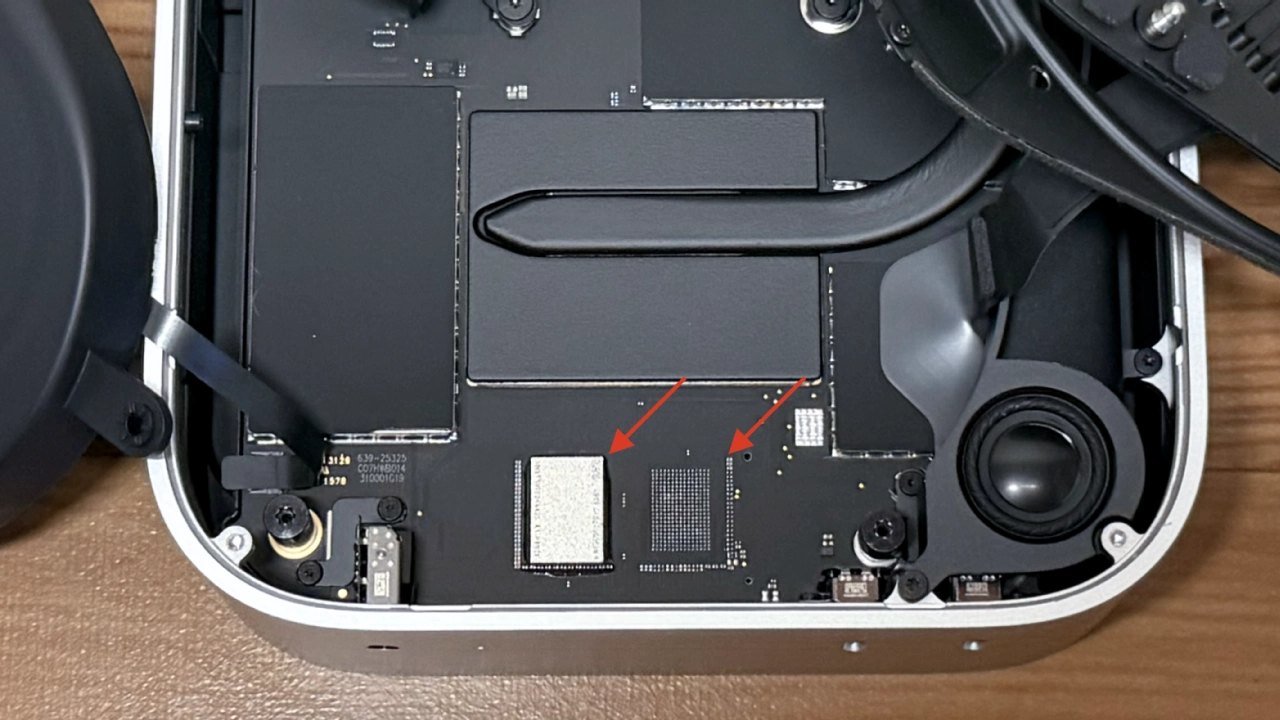
Image source: AAPL Ch.
Actually, this isn’t the first time Apple has done this. The 256GB versions of the 2022 M2 MacBook Air and the 2023 M2 Mac mini also used a single NAND chip, and at the time they were likewise found to be much slower than the 512GB versions. The later M3 MacBook Air switched back to a two 128GB configuration. And the M6 Mac mini has returned to the M2-era approach.
As for why Apple did this again, there’s no official explanation; the more likely reason is cost—one 256GB chip is cheaper than two 128GB chips,
The M6 version of the Mac mini offers four capacities: 256GB, 512GB, 1TB, and 2TB, with a maximum of only 2TB. If you want 4TB or 8TB, you have to opt for the M5 Pro version.
Below are the SSD upgrade prices based on the standard model (M6, 16GB memory) on Apple’s Taiwan official website:
| SSD capacity | Price increase (Taiwan) | M6/16GB complete unit price | NAND configuration |
|---|---|---|---|
| 256GB (standard) | — | NT$29,900 | Single NAND chip |
| 512GB | +NT$7,000 | NT$36,900 | Dual NAND |
| 1TB | +NT$17,500 | NT$47,400 | Dual NAND |
| 2TB | +NT$35,000 | NT$64,900 | Dual NAND |
| 4TB/8TB | Available only on the M5 Pro version. | — | |
Although the 256GB version is much slower than the 512GB version, it actually isn’t any slower than the previous generation’s 256GB version.
Below is an image compiled by AAPL Ch. of SSD results for Mac mini across generations. Comparing the M6 256GB version with the M4 256GB version, write speed increased from 2,014.5MB/s to 3,000.2MB/s, a 49% increase. Read speed increased from 2,792.5MB/s to 3,216.8MB/s, also a 15% increase. And compared with the M2 256GB version, which also uses a single NAND chip, write speed is 86% faster, and read speed is more than twice as fast. So the SSD in the M6 256GB version is also the fastest among standard versions across generations, except it doesn’t reach the 2x Apple claimed:
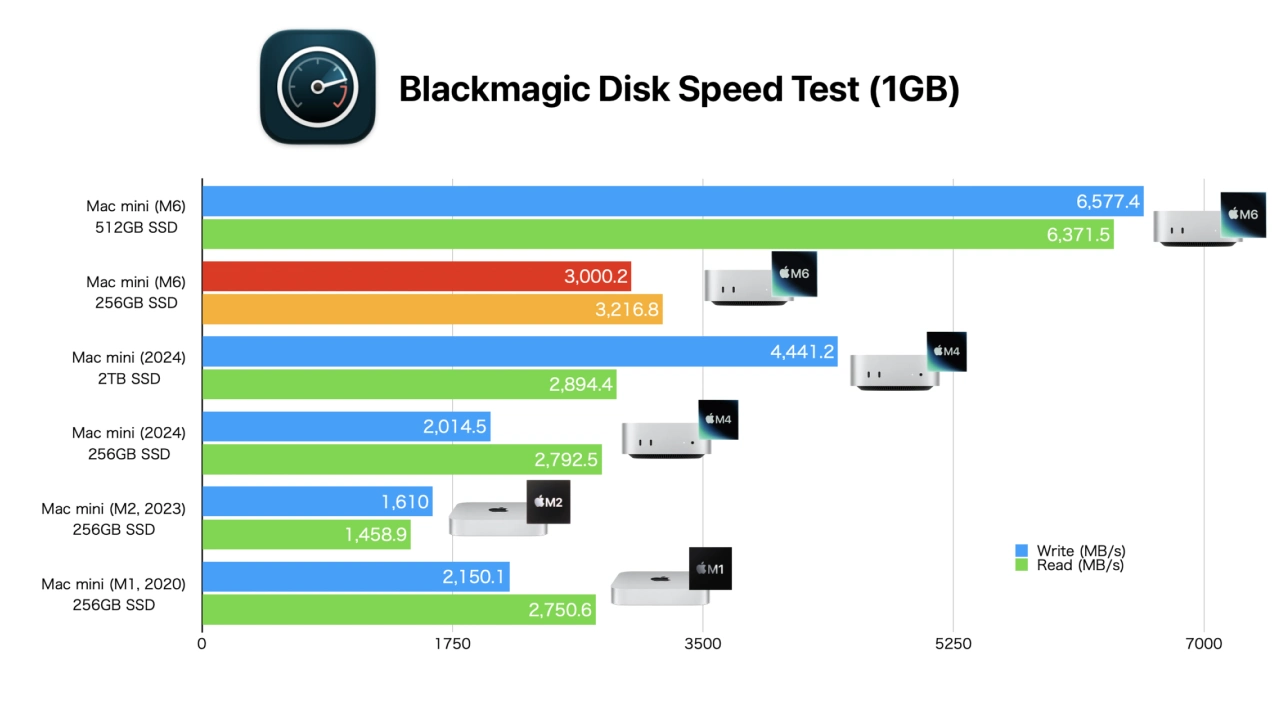
Image source: AAPL Ch.
There are several benefits to upgrading to 512GB besides speed.
The first is the storage capacity itself. After subtracting macOS, built-in apps, and system data from 256GB, the actual usable space isn’t as much as you’d think. Install a few large applications and keep one iPhone backup, and it fills up quickly.
The second is that the standard M6 Mac mini has 16GB of unified memory. When many apps are open at once and memory is maxed out, macOS temporarily moves some data to the SSD. The faster the SSD, the less noticeable the lag feels in these situations. A 2x difference in SSD speed is noticeable in this scenario.
Third, and most importantly for this generation: the SSD is soldered in place, so once you buy it, you can’t upgrade it.
The previous-generation M4 Mac mini had a modular SSD design. iFixit actually tested swapping the 256GB module for a 512GB one and found it worked normally, and third-party vendors later released upgrade modules. But the M6 Mac mini has reverted to soldering the SSD directly onto the motherboard, just like the M2, making after-the-fact upgrades impossible.
Source: KOCPC Chinese