


Speaking of the mobile Yahoo App, many people probably had the same impression I did before, thinking it was only for reading news, shopping, or searching. But after recently trying it again, I found that it now has way more features—it’s almost become an app that can handle all kinds of everyday needs. It even has podcasts and games, and has introduced AI features too. That’s a huge help for reading news—not only does it make the experience more interesting, it also saves a lot of time.
In addition to automatically organizing recent trending events, AI also supports a very handy Yahoo listen-to-news feature, letting us catch up on the day’s top stories in just a few minutes of listening.
If you haven’t used it for a while, or have never used it at all, I highly recommend downloading it to try it out. Below are a few features that I found quite worth trying after actually experiencing them.

Yahoo Listen to News: Get the day’s top news highlights in just 3 minutes of listening.
Yahoo’s Listen to News is arguably my favorite feature of all. It only takes about three minutes to quickly catch up on the day’s top stories, and it’s audio-based, so I can listen while doing other things—like tuning in during my commute or listening while eating.
The feature also runs on AI in the background. Basically, three times a day—morning, afternoon, and evening—the AI organizes the key information from various Yahoo News categories in real time, picks out the top 5 news stories, and rewrites them into spoken-style content that’s easy to listen to.
This point has indeed been improved quite well, and it sounds very smooth. Especially worth mentioning is the “AI voice” — it doesn’t have that robotic tone at all; at first I thought it was recorded by a real human anchor.
Open the AI Beta menu and you’ll see Yahoo Listen to News. Press the button next to it to start listening. Each episode also comes with a text description:
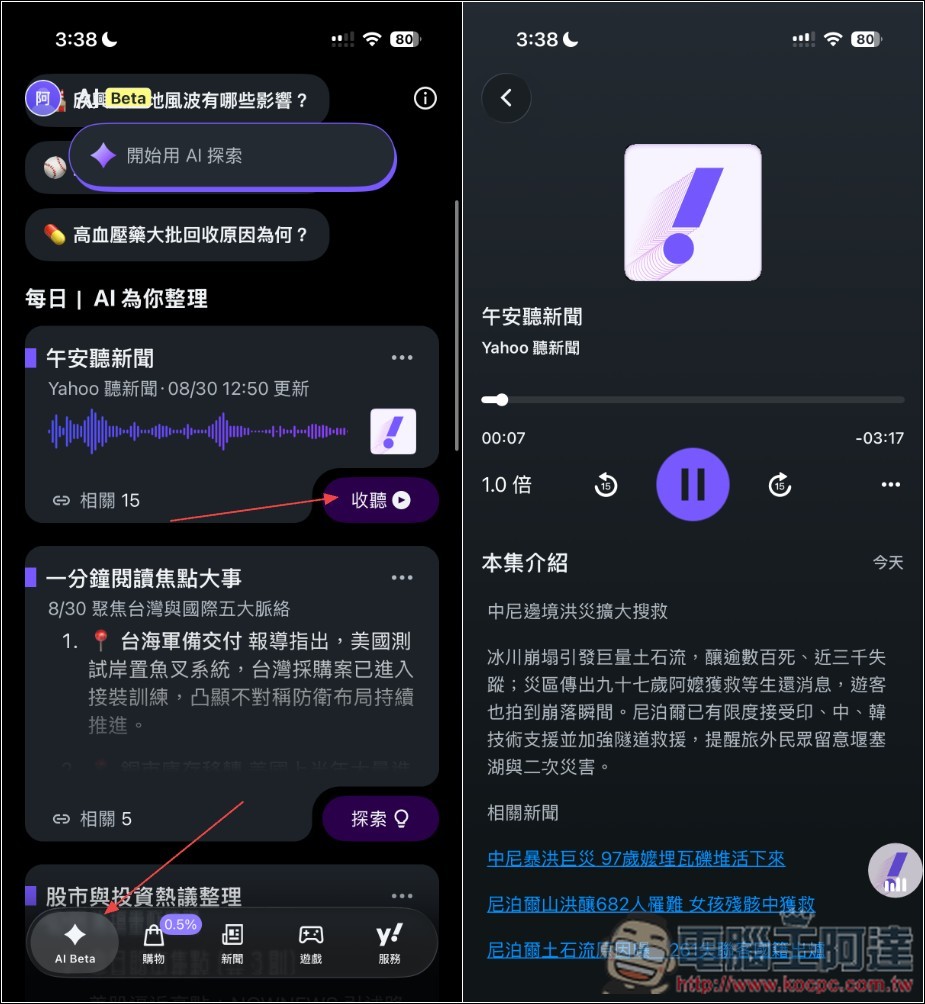
Of course, if you want to learn more information, you can further look at related news reports:

AI Exploration: Let AI Guide You Step-by-Step Through In-Depth News Understanding
AI Exploration is a brand-new way of reading news. Unlike the traditional approach, AI guides us step by step to understand a story, and since it synthesizes multiple news sources, it gives us more in-depth and well-rounded information than we would get from reading on our own.
This feature is in AI Beta. Once you turn it on, a selection of trending news from the day will appear on screen—currently around three stories. The topics are wide-ranging, from stock market investing, society, lifestyle, international news, and technology to sports, just to name a few. If you scroll down, you’ll also find AI-curated news features like “One-Minute Read on Key Events” and “Stock Market & Investment Discussion Digest.”
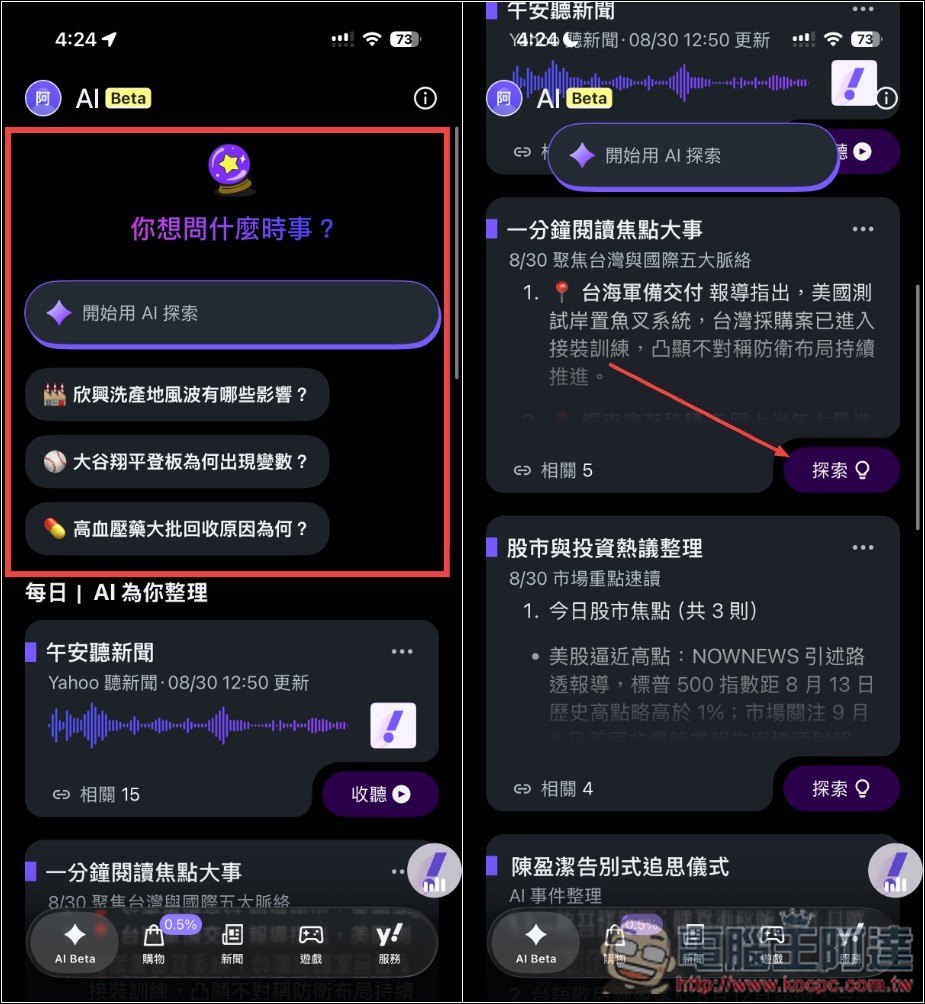
After pressing Explore, the AI will summarize and organize based on multiple news sources, letting us quickly know the key points of the news. Then, at the bottom, it will show 3 suggestions for information we might want to know:
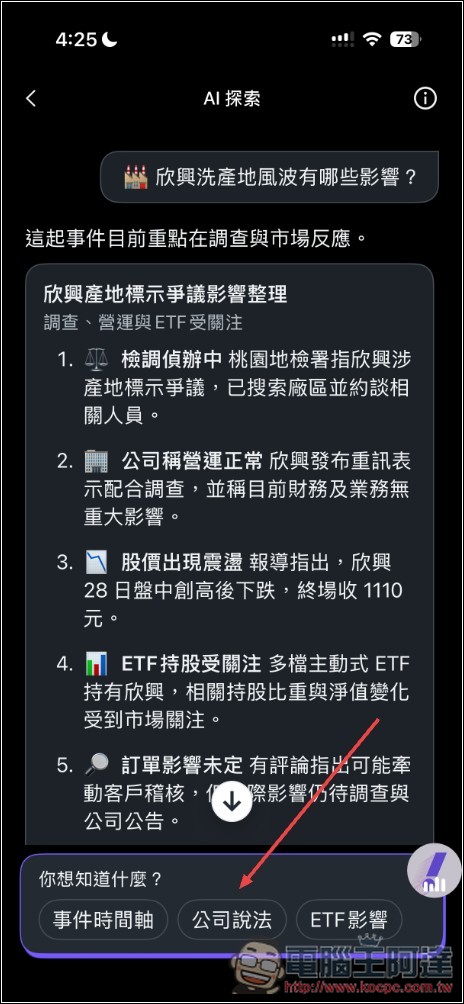
After selection, the AI will summarize and organize this information.
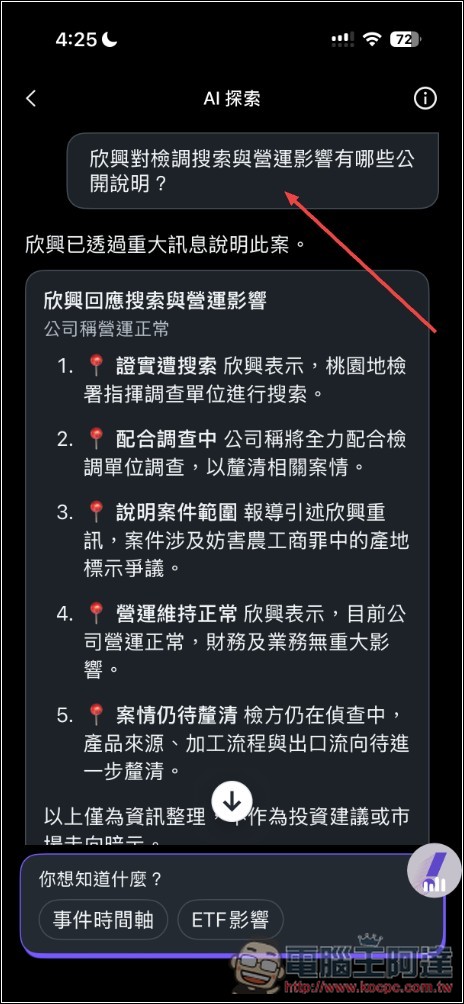
Related news materials will be available below, so if you want to learn more about the coverage, you can find and read it all here.
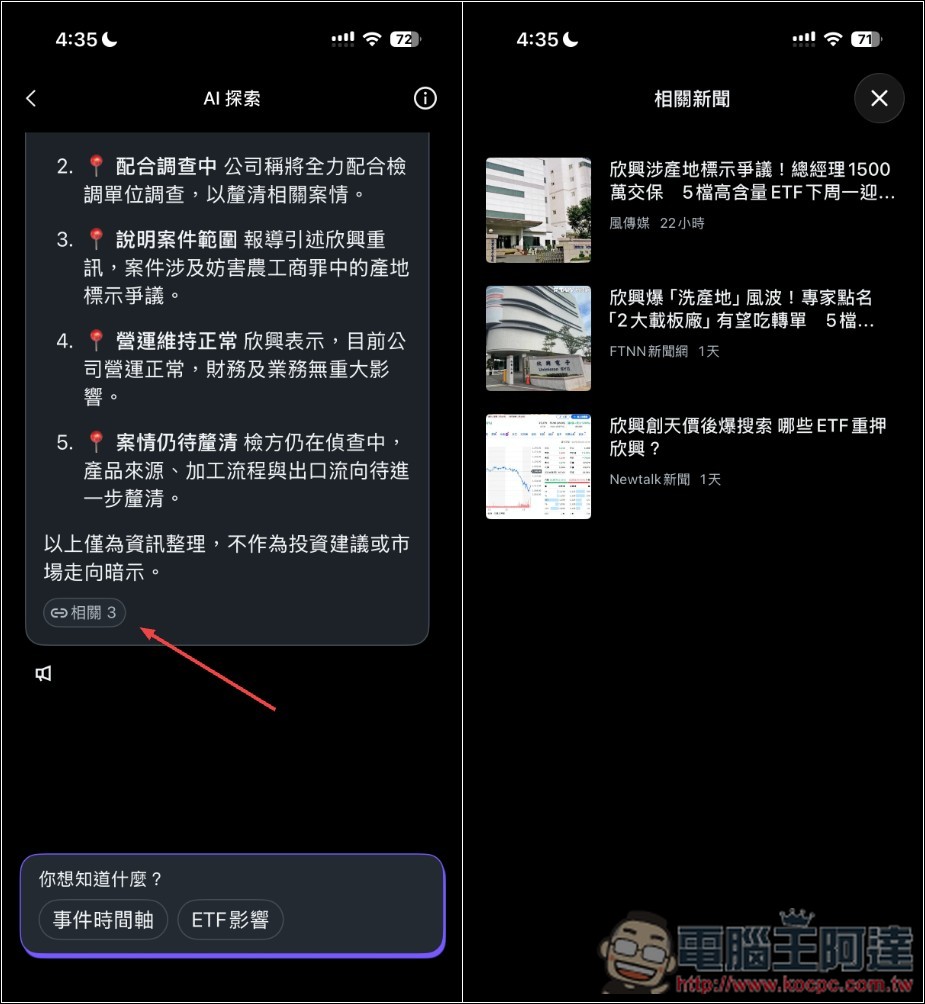
When news you’re interested in comes up, AI exploration really is much more convenient, especially the suggested “more information” options below the summary. A lot of the time, they’re exactly what we really want to know—just click and you get it easily, without having to spend time searching.
The only slight downside is that there aren’t many AI news stories available each day, and there’s no way to specify the type, so it can’t be customized to your preferences and you might not always find something interesting. Also, the information suggestion options below are fairly limited. Hopefully, in the future, users can input their own questions and keep asking follow-ups.
AI event roundup: Quickly grasp the key points of recent top news without having to spend time researching on your own.
Every day brings a lot of news, and everyone’s time is limited. Especially with hot stories that last for days or even weeks, related coverage can run into dozens or hundreds of articles. If you haven’t been following them from the start, it’s easy to lose track of the full picture.
At this point, “AI Event Summary” is quite practical. It uses AI to automatically organize the background, development, and subsequent changes of the same event, consolidating important information scattered across different news articles. This way, we don’t have to search through articles one by one—we can grasp the whole process in a single view.
In the categories at the top of the news menu, you can find “AI Event Compilation.” The AI organizes recent headline news. At the moment I took the screenshot, there were as many as 50 news events. Each news event not only has a summary of key points, but also, in the lower right corner, shows the number of related news items for that event, allowing for in-depth reading. If you were to spend time reading the news yourself, you definitely couldn’t grasp everything—even a single news story could take several hours or even days to truly understand what originally caused the result and how it was subsequently handled:
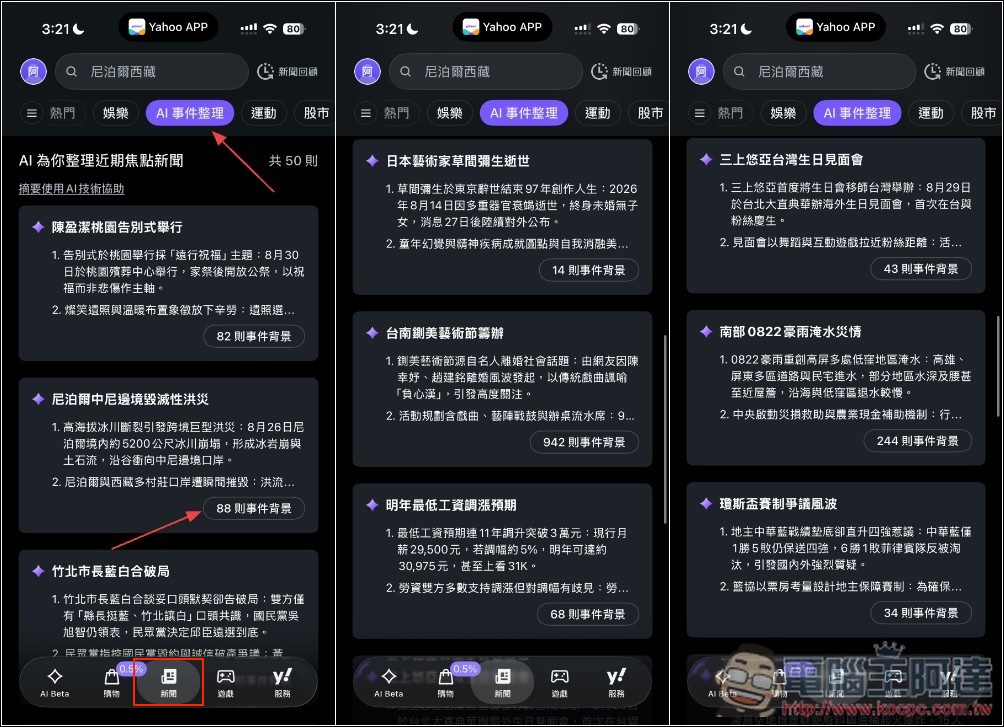
Taking the recent major international event of “Nepal’s devastating floods” as an example, many people may have seen related videos, but are not clear about why such a disaster occurred.
The AI clearly explains the reason in the key summary section: it was triggered by a glacier collapse, which then destroyed multiple villages in Nepal and Tibet. It also includes the current death toll and number of missing people that many are concerned about, as well as rescue operation updates. Scrolling down, you can also find a compilation of news context, arranged by publication timeline:
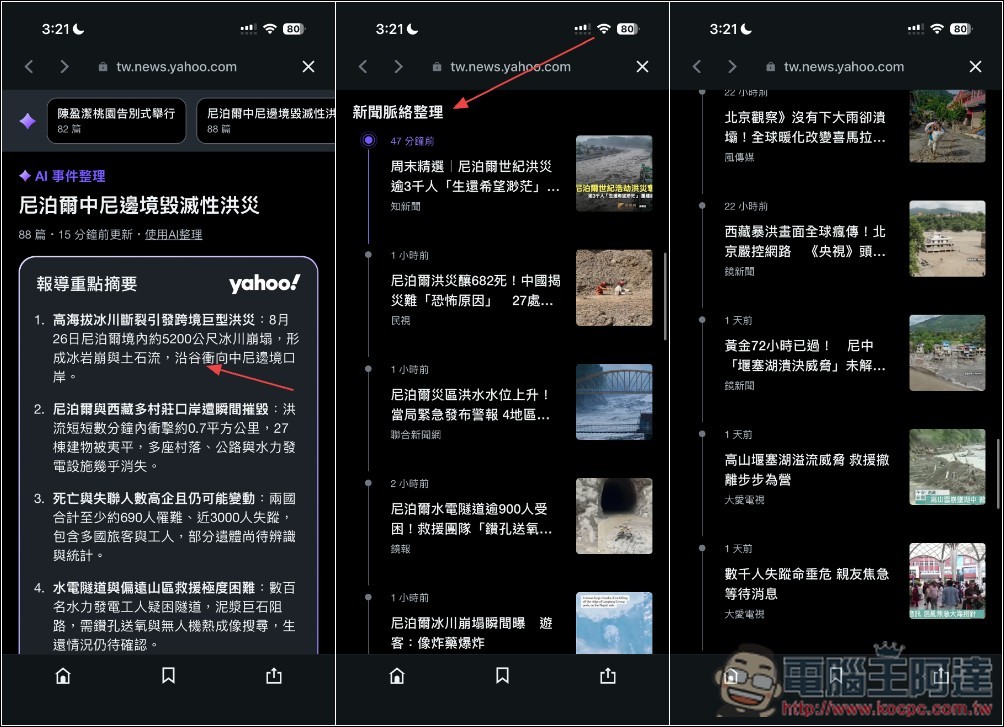
With AI-curated events, in the future you’ll be able to scroll through recent top news just like browsing social media—quickly and effortlessly.
AI Pop Quiz: A few questions to see if you’re a news whiz.
I really didn’t expect the Yahoo App to have fun little quizzes like this now — people who check the news every day are sure to love them.
“The ‘AI Pop Quiz’ generates several multiple-choice questions based on recent news, so after reading the news, we can also test how much we truly understand.”
Of course, the entire answering process is completely stress-free, just like playing a mini-game. It only takes a few minutes to answer a few news quiz questions (all multiple choice for now), and along the way you can also review important recent events. You’ll get the correct answers right after finishing.
After entering the news homepage, swipe left on the options below the banner, and on the far right you’ll find the “AI Pop Quiz” feature. Tap the banner above to enter the quiz. There will be 4 questions, all multiple-choice.
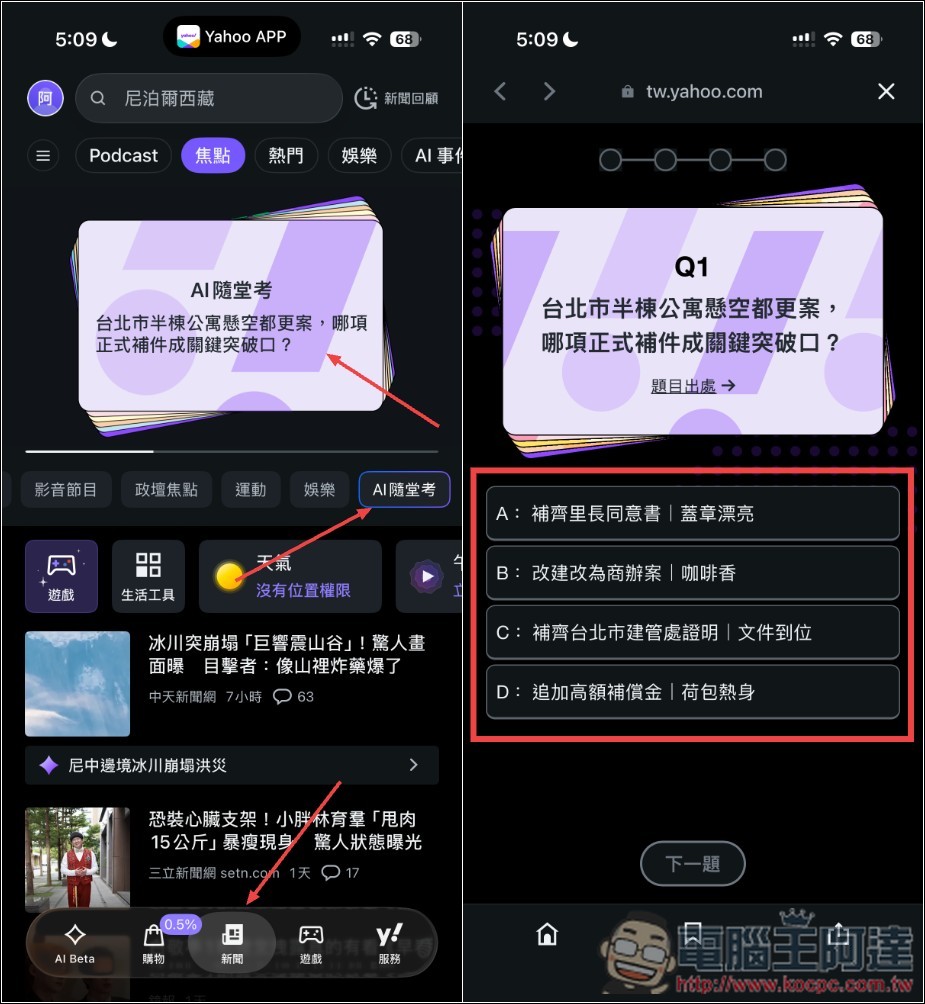
Whether you answer correctly or not, the correct answer will be explained below. After you finish all four questions, related news for each question will also be included so we can read it directly. This AI quiz updates with new questions every day at 11 a.m.

AI Comment Sentiment Analysis: See the Mood of the Comment Section at a Glance
After reading the news, many people also want to see what netizens have commented — do they agree, or are they turned off?
Yahoo has now also added an interesting “AI comment sentiment analysis” feature for comments. Once a news article accumulates over 30 comments, AI is used to analyze the comment content and organize it into six emotions—”encouragement, happiness, mixed feelings, dumbfounded, anger, and sadness”—so you don’t have to read through each comment one by one to quickly grasp the overall discussion trend in the comments section.
News articles with more than 30 comments will have an emoji added next to them, which is the AI comment sentiment analysis. After entering, you can view the current AI analysis results, showing the percentage of each emotion:
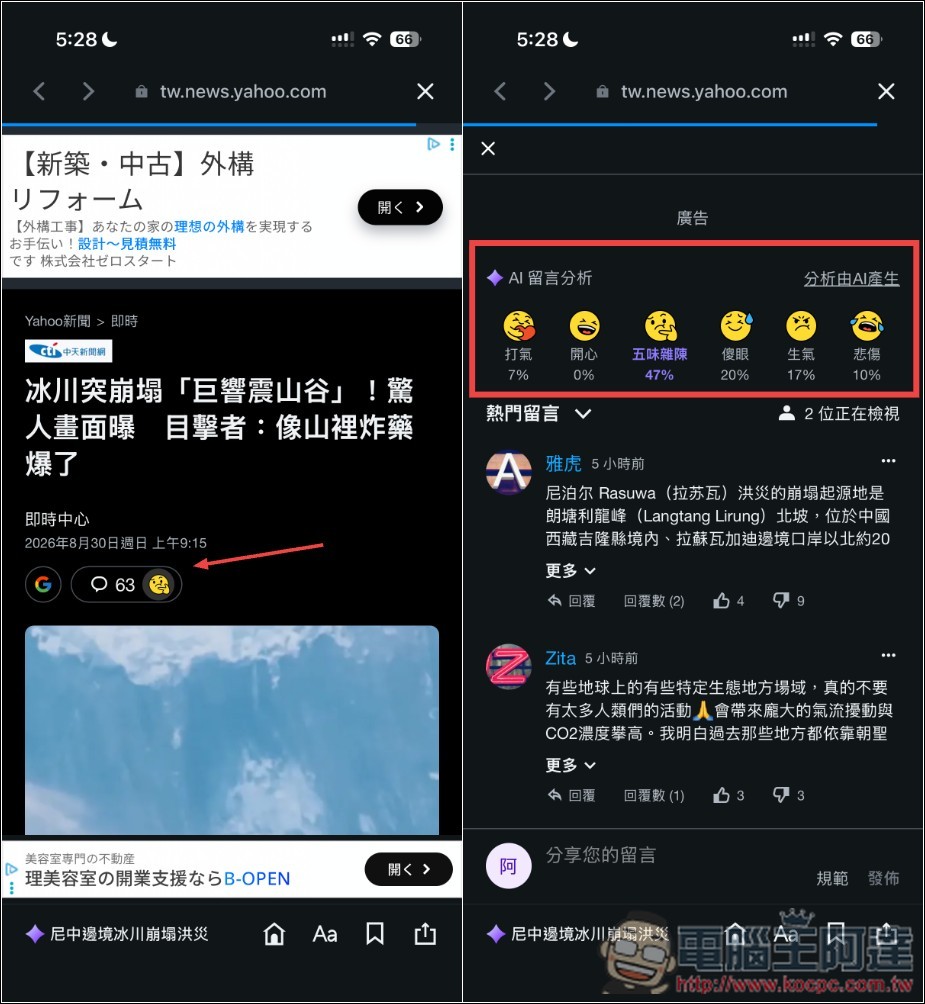
The best part of this feature is that when encountering highly controversial news, there’s no need to scroll through the comment section for ages—just by looking at the emotion distribution, you can roughly tell which way the overall sentiment in the comment section leans. When you see a certain emotion with a particularly high percentage, scrolling down to read what users actually commented gives you more direction in your reading.
Built-in free games, Podcasts: great for passing the time when bored
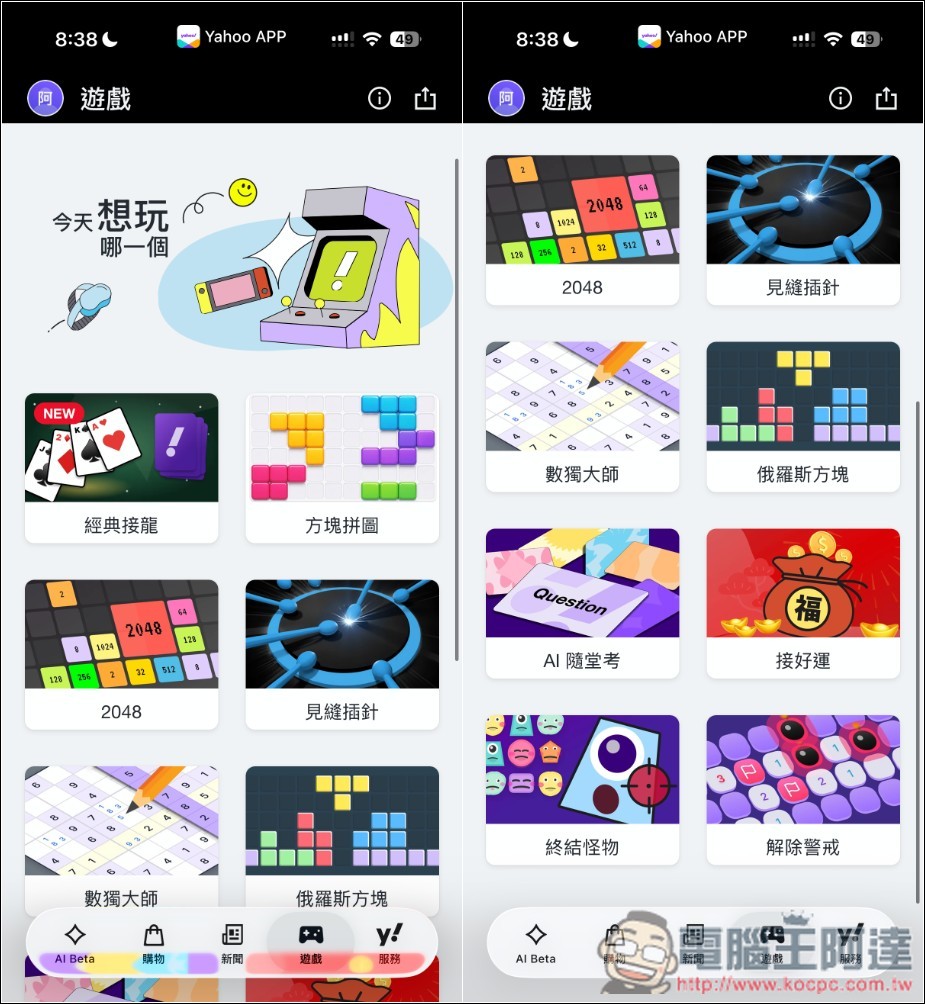
The Yahoo App now also comes with built-in free classic games, and there are quite a few—up to 10 titles. You can play them directly in the app with no need to install anything else. This also means it’s not just for getting daily news; you can use it to pass the time when you’re free.
Most of the games are quite classic, like Classic Solitaire, Tetris, 2048, Block Puzzle, Sudoku Master, and so on. After selecting, just click to start the game:
Also, in the news menu, there is a Podcast option. When I first saw it, I was actually quite surprised—I never expected the Yahoo App to support Podcasts. And the features are quite complete: it supports channel search, and you can also follow channels you frequently listen to (which appear at the top of the homepage):

Summary
From my experience, the Yahoo App today is truly quite different—it’s no longer just a simple app for reading news, but has gradually evolved into a comprehensive app that combines news, AI, podcasts, games, and various everyday tools.
Among them, the most noticeable are the various AI features, especially Yahoo’s audio news and AI event summaries. Before, when I had no time to read the news, I could only quickly scroll through headlines, and for more complex stories, I had to search through articles one by one. Now I can just let AI organize it for me, or even grasp the day’s key news by listening, saving a lot of time.
This is especially suitable for people who are busy with work and don’t have much time to keep up with the news.
Source: KOCPC Chinese