


In early July this year, Google rolled out a major interface redesign for Google Photos on Android. One of the most noticeable changes was the removal of the date markers that were previously clearly displayed on the main photo page. At the same time, Google redesigned the bottom navigation bar as a floating interface, giving the overall look a more modern feel and enhancing visual simplicity.

How do I get the date display back on Google Photos?
Based on the current reactions, this redesign has received quite a lot of positive feedback. Many users think the new navigation bar design is both aesthetically pleasing and functional, and some even hope Google will bring this design style to more of its apps. According to relevant survey results, most users have a positive attitude toward the new interface, saying its appearance better aligns with modern Android app design trends. From a purely visual standpoint, the new Google Photos does look cleaner and more streamlined.
However, behind the aesthetic appeal lies a trade-off in functionality. Although date information hasn’t completely disappeared, Google now presents it as floating labels, with the top of the screen dynamically showing the date range of the photos currently being viewed only as users scroll up or down. Since all photos are arranged in an almost continuous list, the boundaries that once clearly separated different dates have been greatly weakened, making it harder for many users to quickly track the timeline when browsing through large numbers of photos.
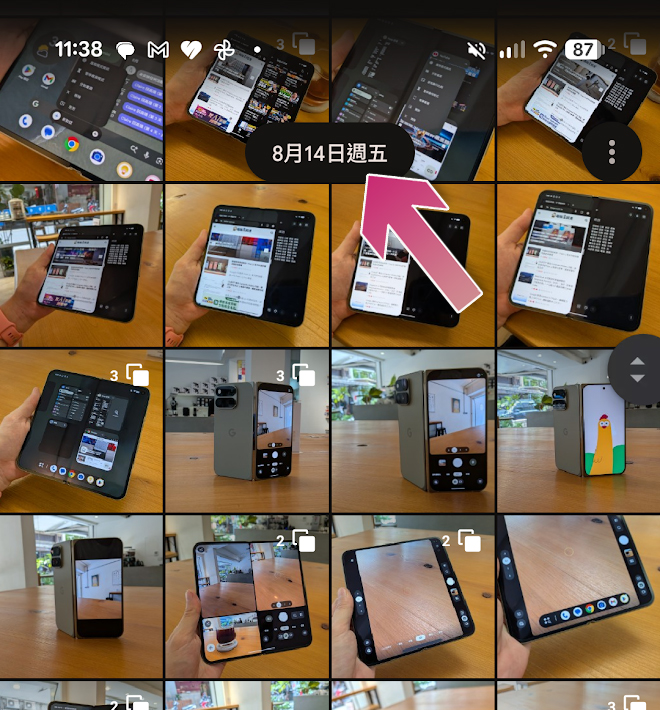
For people who are accustomed to organizing and finding photos by date, this change clearly reduces usability. In the past, opening the photo library immediately showed date range dividers, but now users have to rely on floating date indicators that appear while scrolling, making it less intuitive to find photos from a specific time. The good news is that Google hasn’t completely removed this feature—it’s just hidden in the settings menu. Users can still manually enable the old date grid display mode to have photos clearly grouped by date. Although this setting is buried quite deep and many people may not find it right away, it can actually be turned back on in just a few steps.
If you want to restore the date grid display, you can perform the following steps in order:
- Open the Google Photos app.
- Click the profile icon in the top right corner.
- Enter “Album Settings”.
- Select “Preferences”.
- Click the “Photos tab” or a similarly named option.
- Turn on the “Show date in grid view” option (default is off).
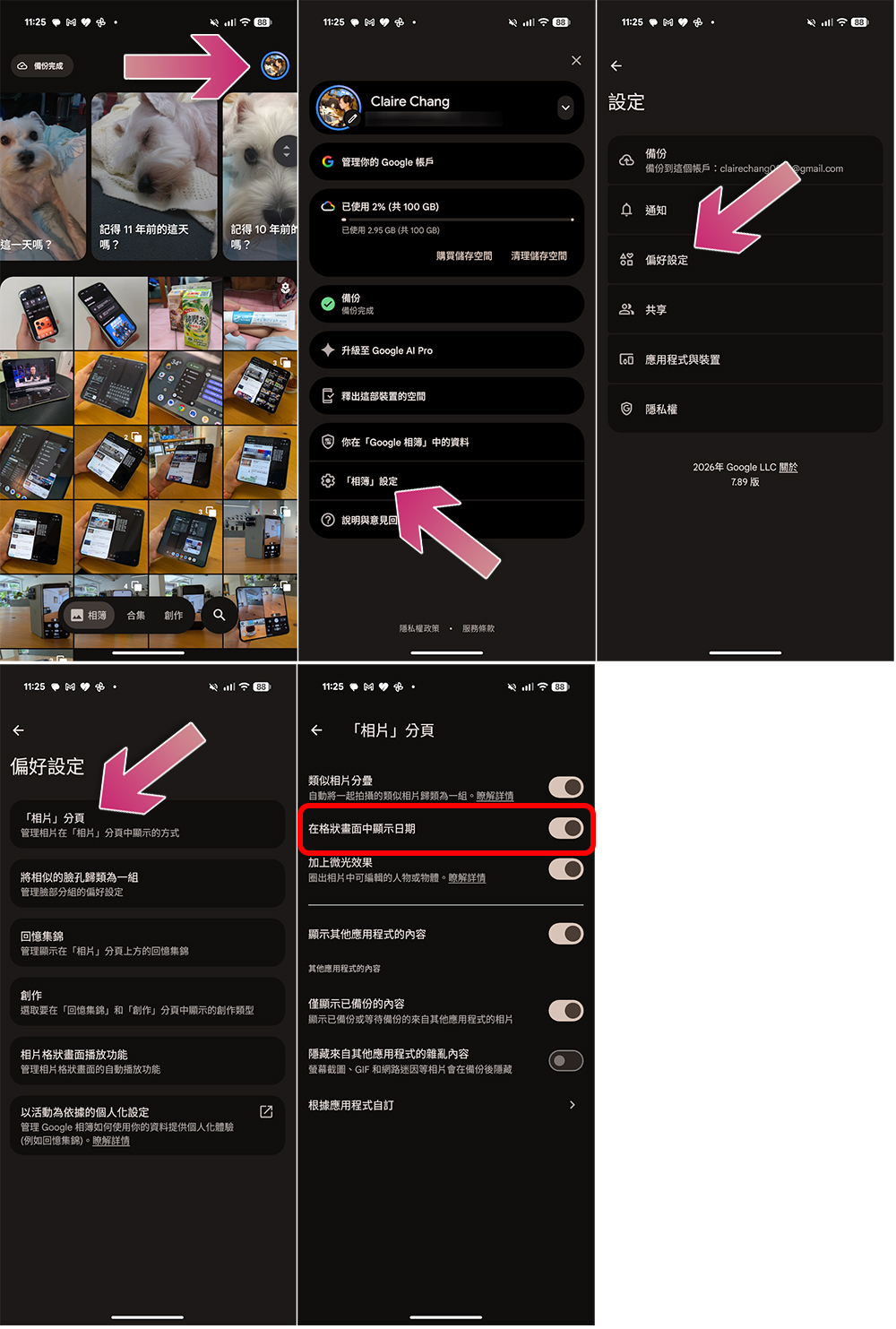
After finishing the setup, return to the photo home page and you’ll notice the change. Each date section reappears above the photos, making the chronological sorting of the entire library much clearer. Although the floating date label still appears at the top when scrolling, the browsing experience feels more organized than the default mode since the grid itself already contains date separators.
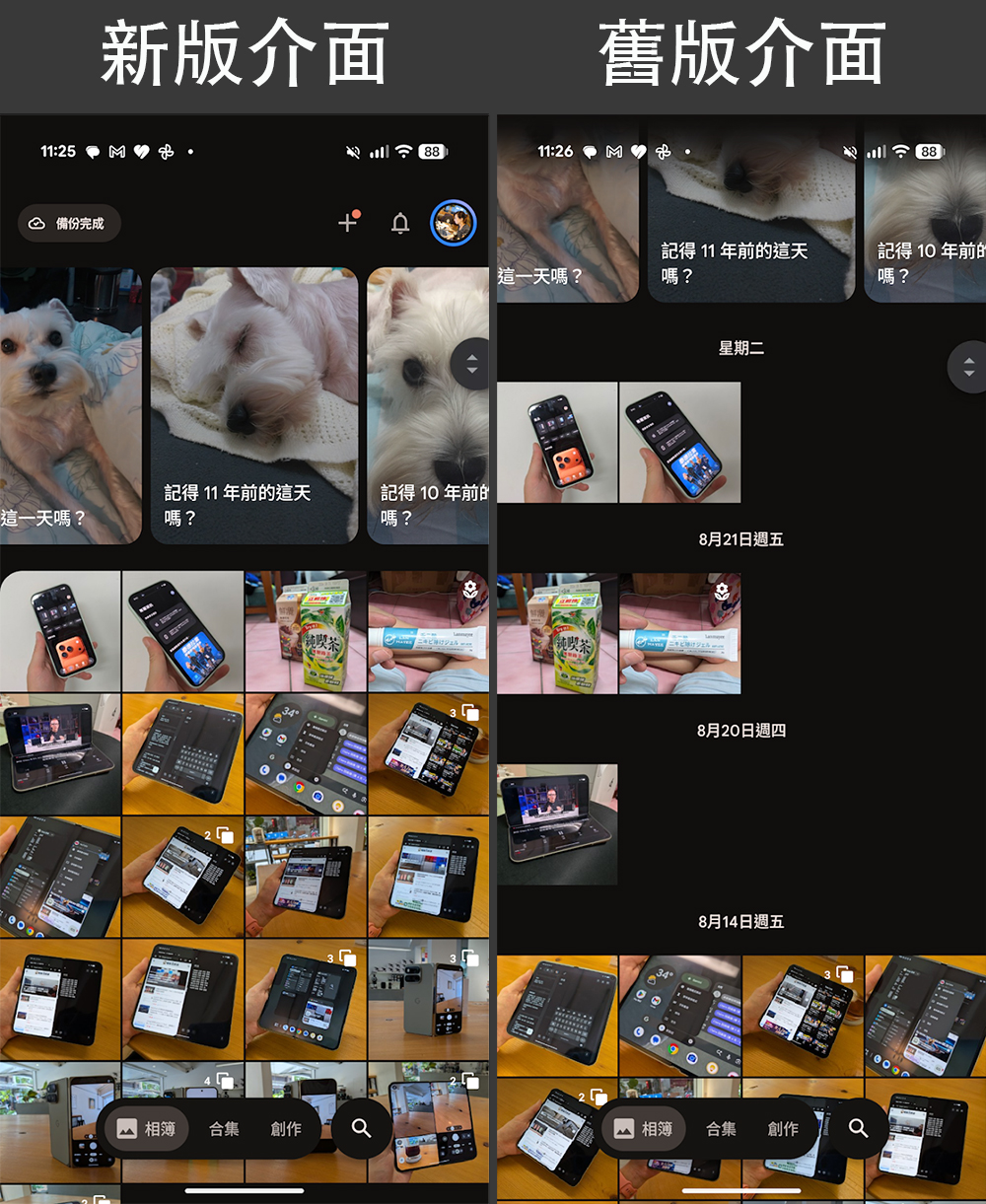
From a design perspective, Google’s aim to create a cleaner interface by hiding date labels is understandable. Reducing on-screen elements does make the layout look more streamlined and fits the minimalist direction many mobile apps are pursuing these days. However, when visual appeal clashes with practicality, some users still value operational efficiency more.
Therefore, many people believe that although the new Google Photos looks nicer by default, it isn’t as convenient to use as before. Especially for users who often look back at travel photos, work records, or family albums, date information matters far more than interface simplicity. Fortunately, Google still keeps the date grid feature—though it’s buried deeper, at least it gives users the freedom to choose. If you’re also struggling to find date separations in the new interface, try following the steps above to turn the date display back on. It should greatly improve your photo browsing experience and help Google Photos regain that familiar, efficient feel.
Source: KOCPC Chinese