


In the past, everyone pursued accuracy in speech-to-text, with every word needing to be clearly recognized. But in the AI era, that’s already basic. What matters more is whether filler words can be removed and the content organized into a suitable format, so you don’t have to spend time editing after speaking—it’s ready to use right away. To this end, Google recently introduced its next-generation speech-to-text model, Gemini 3.5 Transcribe, which emphasizes this capability. Not only is recognition faster and more accurate, it also supports automatic filler-word removal and format organization (smart transcription). That means filler words disappear, and punctuation, capitalization, and paragraphs are filled in for you. Instead of a verbatim transcript, you get text that can be directly pasted and used.
Google has launched Gemini 3.5 Transcribe, a speech-to-text model that automatically removes “uhs” and misspoken words, supports 85 languages, and is 70% faster than the previous generation.
Google announced earlier on its official blog the launch of its next-generation speech-to-text model, Gemini 3.5 Transcribe. The improvements in this release can be broadly broken down into four areas: first, “smart transcription,” which automatically handles mid-sentence corrections, removes filler words, and adds proper punctuation and formatting; second, accuracy and speed, with streaming word error rate reduced to 4.0% and non-streaming to 2.6%, while output speed is 70% faster than Chirp 3; third, language and speaker identification, automatically detecting over 85 languages and distinguishing up to three speakers in pre-recorded audio with word-level timestamps; fourth, custom vocabulary, allowing you to provide proper nouns, names, and internal company terminology in advance.
Also, the price is much cheaper than Chirp 3. Let’s go through them one by one below.
“Smart Transcription” is arguably the biggest highlight of Gemini 3.5 Transcribe. Traditional speech-to-text is basically word-for-word transcription—it outputs exactly what you say, including every slip of the tongue, pause, and filler. Gemini 3.5 Transcribe adds an extra layer of understanding. For example, if you say “Let’s meet Tuesday—wait, no, Wednesday,” the model recognizes that the second part is a correction and only keeps “Wednesday.” Similarly, filler sounds like “um” and “uh” get cleaned up, and natural pauses in speech aren’t mistaken for periods.
Google also cites Artificial Analysis test results to illustrate the accuracy of Gemini 3.5 Transcribe. In streaming mode—that is, when transcribing as you speak—the average word error rate (WER) is 4.0%; in non-streaming mode, where the entire recording is processed at once, the word error rate further drops to 2.6%.
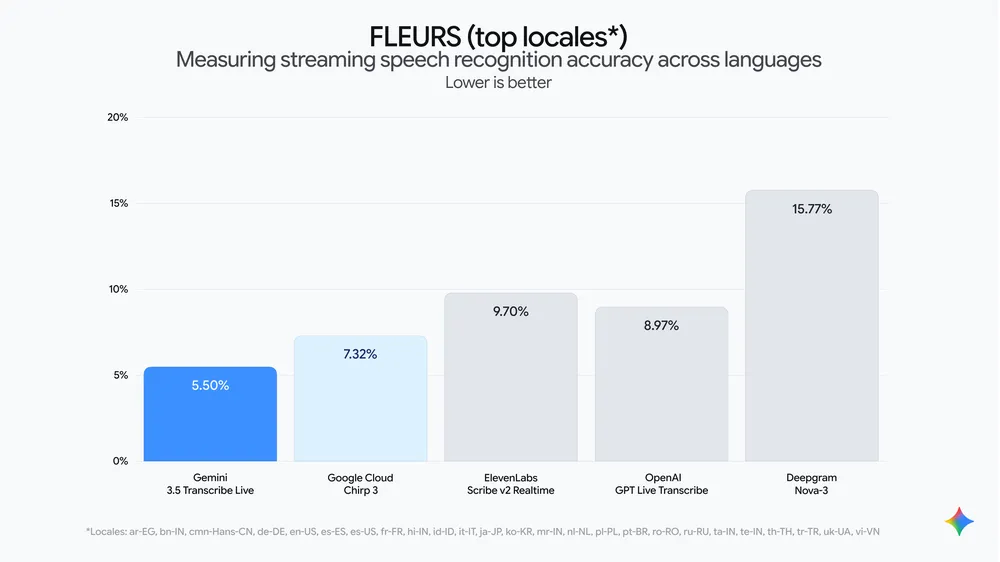
For multilingual recognition, Google uses the FLEURS cross-lingual benchmark, and Gemini 3.5 Transcribe achieves word error rates of 5.50% and 5.04% in streaming and non-streaming modes, respectively. Beyond accuracy improvements, speed is another major step forward this time. Google says the time from when a user finishes speaking to receiving the final transcript has been reduced by about 70% compared to the previous generation Chirp 3.
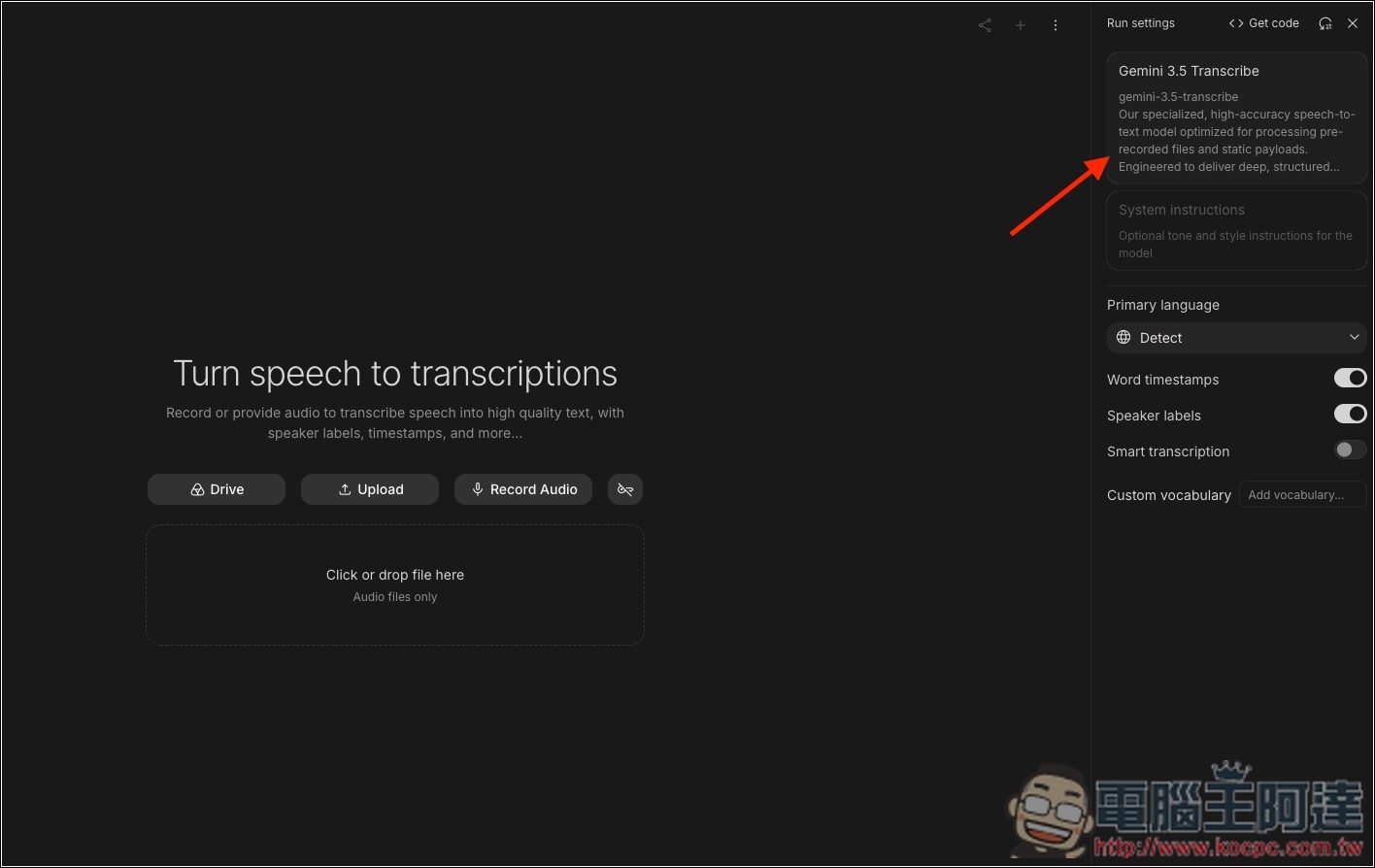
Gemini 3.5 Transcribe supports over 85 languages and uses automatic detection—you don’t need to specify which language the audio is in beforehand, as the model determines it on its own. Regional accents and dialects are also supported, which is especially convenient for users who frequently mix Chinese and English. In addition, pre-recorded audio supports speaker identification, automatically labeling who said each segment. It currently supports up to 8 speakers, though the official notes indicate that identification of more than 3 speakers is still an experimental feature.
For company product codenames, colleagues’ names, medical or legal terminology, or proper nouns from anime or games, you can also customize your vocabulary in advance, with a maximum of 1,000 terms. However, official documentation notes that keeping it within 100 terms usually yields the best results, so it’s not about cramming in more for better accuracy—it’s better to pick just a few keywords you actually use frequently.
Beyond simple transcription, Google has also used Gemini 3.5 Transcribe for voice control in the macOS version of the Gemini App. Users can directly issue commands such as “generate images” and “analyze files” by voice, and the Gemini App will then call other Gemini models to complete the tasks. However, note that this is a feature integrated into the Gemini macOS App; the Gemini 3.5 Transcribe API itself currently does not support Function Calling.
In terms of pricing, Gemini 3.5 Transcribe is also quite competitive. For the standard version, the transcription cost works out to roughly $0.005 per minute of audio; for Transcribe Live, which transcribes speech into text in real time, it’s about $0.009 per minute.
For those interested, there’s no need to pay or build your own API integration. You can currently try Gemini 3.5 Transcribe for free in Google AI Studio, and the Gemini API itself also offers a free tier.
Source: KOCPC Chinese