


Apple’s cheapest laptop Macbook Neo Since its launch, many netizens have been complaining about the use of mobile phone processors, only 8 GB of RAM, and limited performance. However, the following reports may make many people shocked. Virtual machine software manufacturer Parallels An official test report was released this week, confirming that its Parallels Desktop 26 is fully compatible with Apple’s new entry-level notebook MacBook Neo. Surprisingly, when the MacBook Neo equipped with the A18 Pro chip runs the Windows 11 ARM virtual machine, the single-core CPU performance is 20% faster than the Dell Pro 14 that runs Windows 11 natively!
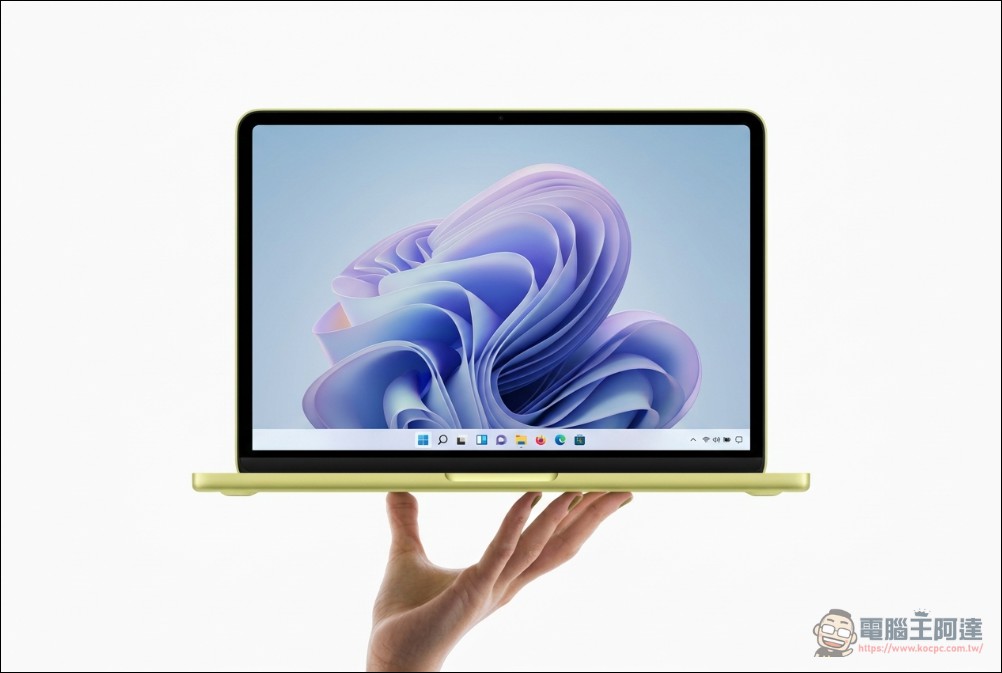
Parallels confirms MacBook Neo can run Windows 11
Performance test: Single-core is amazing, multi-core is inferior
Announced by Parallels Engineering Team on March 20Complete MacBook Neo compatibility and performance test report, which is the first on the market for A18 Pro Chip performs the definitive performance measurement of Windows virtual machines.
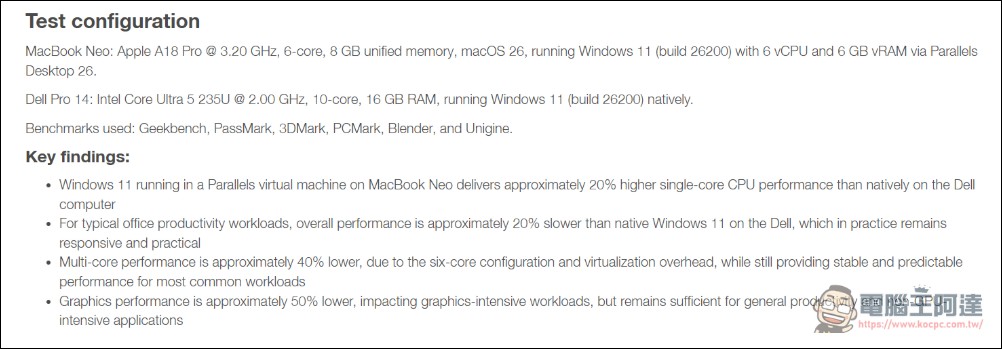
The test configuration uses a MacBook Neo (A18 Pro @ 3.20 GHz, 6 cores, 8GB unified memory) to execute Parallels Desktop 26, and the virtual machine configuration is Windows 11 (build 26200), 6 vCPU, 6GB vRAM. The control group was a Dell Pro 14 (Intel Core Ultra 5 235U @ 2.00 GHz, 10 cores, 16GB RAM) running Windows 11 natively.
Single-core performance: virtual machine exceeds native performance by 20%
The test result that surprised the market most was that MacBook Neo surpassed native Windows laptops in single-core CPU performance. According to test software data such as Geekbench, the single-core performance of MacBook Neo is about 20% higher than that of Dell Pro 14.
Parallels explained that this is due to the high clock design (3.2 GHz) of the A18 Pro chip and Apple’s architectural optimization of single-core performance. For light applications such as daily office work, web browsing, and word processing, single-core performance is often the key factor that determines the smoothness of the experience.
Multi-core and graphics performance: significantly lagging behind
However, when workloads shift to multi-core computing, the limitations of MacBook Neo become apparent. Tests show that in heavy multi-core workloads, the MacBook Neo’s multi-core performance lags behind the Dell Pro 14 by about 40 percent.
The gap in graphics performance is even more obvious. Since only 8GB of unified memory needs to be shared by both the CPU and GPU, plus the graphics performance overhead of the virtual machine, the graphics performance of MacBook Neo is about 50% lower than that of the control group. This means that graphics-intensive applications such as CAD design, 3D rendering, and image editing will lag significantly in the virtual machine environment of MacBook Neo.
8GB memory: the fatal bottleneck of dual systems
MacBook Neo only offers an 8GB unified memory option, which becomes the maximum hardware limitation for executing Windows virtual machines. According to the test,Windows 11 The system itself requires a minimum of 4GB of memory, which means less than 4GB of memory space is allocated to the main macOS system and other applications.
Parallels The official stated clearly in the FAQ: “8GB is the actual minimum configuration. After running macOS and Windows at the same time, the memory reserve is limited. It is recommended to use 16GB or more for a smoother experience.”
With this configuration, for light macOS users who only browse the web and process files, 8GB of memory can still meet daily needs. But once a Windows virtual machine is started, “whether it is the Windows side or the macOS side, it is very easy to get stuck, and it may not be able to cope with slightly complex heavy workflows.”
However, because Apple does not provide memory upgrade options for MacBook Neo, users cannot choose 16GB or higher configurations like MacBook Air or Pro.
Macbook Neo official website
Applicable scenarios: cross-platform solutions for light users
Despite the hardware limitations, Parallels still clearly states that MacBook Neo is “suitable” to run Windows virtual machines: the premise is that it must meet specific usage scenarios.
Recommended usage scenarios
Parallels points out that MacBook Neo is best suited for the following light Windows use cases:
- Standard office productivity: Microsoft Office, mail, calendar applications
- Web applications and browser tools: Various SaaS services, web productivity tools
- business productivity software:Light ERP, CRM client
- Light development and testing: Simple program development environment and testing workflow

Not recommended use case
The following application types experience poor performance on MacBook Neo virtual machines:
- CAD, 3D rendering and graphics-intensive applications: Graphics performance is only 50% of the native environment
- Heavy multi-core computing: Scenes such as video editing and large data processing will cause obvious lags.
- High load operation for a long time: Passive cooling design will cause frequency reduction and affect continued performance
Comparison with M-series Macs: A clear distinction between entry-level and advanced
For users who need a stable Windows virtual machine environment, Parallels explicitly recommends choosing a Mac with an M-series chip and at least 16GB of unified memory, such as the MacBook Air M5 or MacBook Pro. In comparison, although the single-core performance of the MacBook Neo’s A18 Pro chip is outstanding, it has fewer cores (6 cores vs. more than 10 cores of the M5), and the memory configuration is fixed at 8GB, which cannot meet the needs of professional users.
In terms of market positioning, MacBook Neo focuses on light users who “occasionally need Windows”: for example, they need to use specific Windows legacy business tools, or some professional software that only supports Windows. For such users, the entry price of NT$19,900 does provide an affordable cross-platform solution.
Conclusion
Parallels Desktop is currently the only solution officially supported by Microsoft to run Windows 11 on Mac. This confirmation of support for MacBook Neo means that Apple’s entire range of products from entry-level to high-end can run Windows through virtual machines, further strengthening the compatibility of the ecosystem.
For cross-platform workers who need to use both macOS and Windows, this development means that even entry-level users with limited budgets can get an officially supported dual-system experience at a relatively low price. However, users must clearly understand the hardware limitations of MacBook Neo to avoid purchasing it and then finding out that it cannot meet actual work needs. But don’t be scared by Parallels’ official report. Apple’s previous M1~M3 Macbook memory also started from 8GB. I have tested the earliest M1 Macbook Air before and it can run smoothly (you need to open 6GB RAM for Windows). If you only need to use some Windows applications temporarily and occasionally, the Macbook Neo is actually just as good as its previous predecessors (but don’t imagine that it can run large games and software, after all, the ARM version Windows itself has many software compatibility issues).
Source: KOCPC Chinese