


Warning! A new malware distribution method has emerged that specifically targets AI search results through SEO poisoning. When a user asks an AI chatbot “where can I download HWMonitor,” the response may contain a link leading to malware. The Microsoft Defender research team released a report on May 26, 2026, uncovering a cryptocurrency-mining botnet campaign that combines traditional SEO poisoning with AI chatbot recommendations. This weaponizes search engine optimization techniques and marks the first time large language model (LLM) responses have been incorporated into an attack method.

A New AI Chatbot SEO Poisoning Cryptomining Attack Targets High-End Hardware Users
The targets of this attack campaign were chosen with extreme precision. The attackers masqueraded as six system utilities extremely popular among PC users and hardware enthusiasts, such as:CrystalDiskInfo(Hard Drive Health Check),HWMonitor(Hardware Monitoring)Display Driver Uninstaller(DDU)(Graphics Driver Removal Tool)FurMark(GPU stress test)K-Lite Codec Pack(audio and video decoder suite) and PDFgear(PDF editing tool)
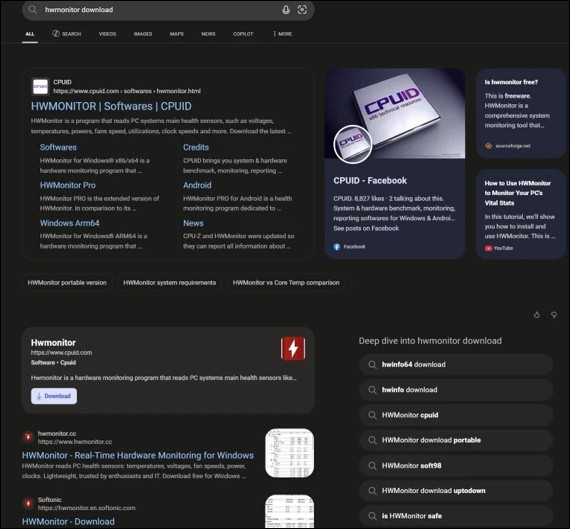
A two-pronged propagation mechanism: SEO poisoning + AI chatbots
The first layer of the attack is traditional SEO poisoning. Through coordinated search engine optimization operations, attackers push large numbers of fake download sites to prominent positions in search results. When users search for the names of the aforementioned system tools, the search engine presents manipulated results that direct users to counterfeit websites controlled by the attackers. Since March 2026, Microsoft has identified more than 150 malicious domains associated with this attack campaign.
More concerning is the second-layer distribution channel. In April 2026, Microsoft observed users being directed to malicious domains through interactions with AI tools powered by large language models. When users asked AI chatbots for software download recommendations, the generated responses included links to attacker-controlled domains.
Researchers analyzed traffic metadata for these domains via VirusTotal scans and found traffic records citing chatbot interactions as their source. Microsoft stated: “Based on observed patterns and related data sources, this behavior is consistent with the emerging technique of AI search result poisoning, representing an extension of traditional SEO poisoning beyond traditional search engines.” This is the first large-scale attack operation to incorporate AI chatbot response content into a malware distribution chain.
Sophisticated Attack Chain: From Fake Downloads to Mining Botnet
The overall attack chain is meticulously designed, with every layer capable of evading detection.
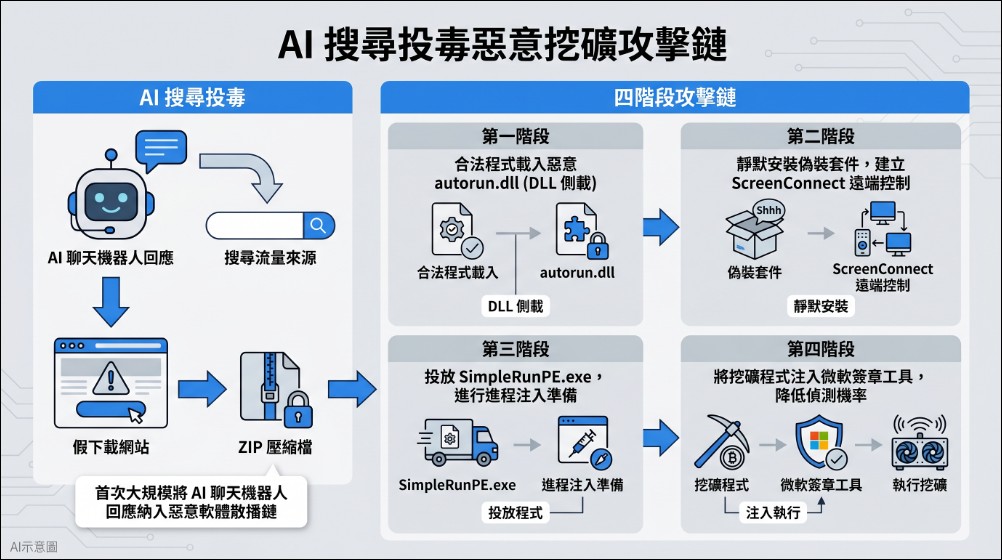
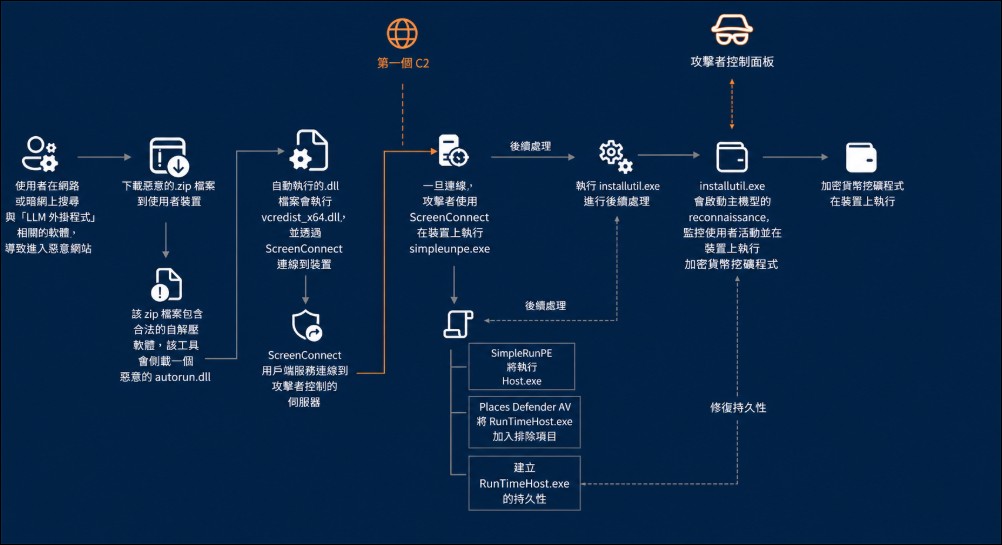
Stage 1: DLL sideloading.The ZIP archive downloaded by the user from the fake website contains the legitimate executable of the corresponding tool, as well as a file named autorun.dll the malicious Dynamic Link Library (DLL). When a user launches a legitimate program, the program loads it from the same folder. autorun.dllThis process is known as DLL sideloading (DLL Sideloading), requires no vulnerability exploitation, and produces no user-visible anomalies. Microsoft identified nine different autorun.dll Variant.
Phase 2: Install the remote control tool.Malicious DLL exploitation msiexec.exe Silently install another malicious file disguised as a Visual C++ Redistributable package vcredist_x64.dllThis file is actually the installer for ScreenConnect (also known as ConnectWise Control). ScreenConnect is a legitimate commercial remote management tool widely used in the IT management field, but attackers abuse its legitimate features to establish persistent remote access channels. The attacker’s ScreenConnect client continuously attempted to connect to directdownload.icu server.
Phase 3: Process injection.After establishing a ScreenConnect connection, the attacker used the file transfer feature to drop a file named SimpleRunPE.exe binary file. Microsoft discovered an embedded PDB path in the file’s debug directory that pointed to a public proof-of-concept project on GitHub. Watermwo/Simple-RunPE-Process-HollowingThis tool is determined to be a modified version of the publicly released code.
Stage 4: Process hollowing injection into a Microsoft-signed program.This is the most sophisticated step in the entire attack chain.SimpleRunPE.exe injects malicious mining code into one of seven legitimate Windows .NET Framework tools, including InstallUtil.exe、RegAsm.exe、MSBuild.exe and so on. These are all Microsoft-signed system tools, so antivirus software typically does not flag them as threats. The mining code runs within these trusted programs, significantly reducing the chances of detection.
Three GPU Mining Programs and Intelligent Detection Evasion
The final payload is not embedded in the malware, but is downloaded from a remote source at runtime. The attack campaign supports three GPU-oriented mining programs:gminer、lolMiner and SRBMiner-MULTIThese three are all mining tools designed specifically for GPU computing power, further corroborating the attackers’ strategy of targeting high-performance GPU users.
The malware features multiple advanced detection evasion techniques. First, it checks whether it is running in a virtual machine environment, including detecting VMware Tools and VirtualBox registry keys, SCSI identifiers, MAC address prefixes, and via WMI queries. Win32_ComputerSystem and Win32_BIOSMeanwhile, it also checks against a list of 40 analysis tool program names, including dnSpy, x64dbg, IDA, Ghidra, Process Monitor, and Wireshark, and immediately terminates execution if any analysis tool is detected.
Even more alarming, the malware features intelligent GPU usage detection. It continuously monitors GPU utilization and user activity, automatically pausing the mining process when it detects the user is gaming, streaming, or performing other GPU-intensive tasks. This prevents users from becoming suspicious due to degraded system performance while freeing up GPU resources during active use, and only mining at full capacity when the system is idle.
Six-layer persistence mechanism and automatic repair
The attack operation established an extremely robust persistence mechanism. The malicious program deployed six different persistence methods on the infected systems: three scheduled tasks (named “Windows System Health”, “Windows System Health Monitor”, and “Windows System Health Check”), and two registry Run keys (WinSysCache), and a Startup folder shortcut.
Even more astonishing, the malware runs a self-healing check every five seconds. It verifies every persistence mechanism one by one: if a scheduled task is deleted, it is automatically rebuilt; if a registry key is modified, it is automatically rewritten; if a shortcut is removed, it is automatically recreated. At the same time, it repeatedly registers Windows Defender exclusions, ensuring that even if antivirus software removes the exclusion settings, the malware restores them immediately.
C2 Communications and Infrastructure
The malware’s C2 (Command and Control) server address is encrypted with AES-128-CBC and stored in the binary file. The C2 endpoint obtained after decryption is wss://minemine.gleeze.com:8443/wsIt communicates over the WebSocket protocol and embeds the SHA-256 fingerprint of the TLS certificate for certificate pinning, preventing man-in-the-middle attacks or analysts from intercepting the communication content.
Microsoft conducted pivot analysis using this TLS certificate and identified three IP addresses sharing the same certificate:93.115.10.35、198.23.185.238 as well as 2.59.132.106Further investigation revealed that this infrastructure was linked to another using dynamic DNS domains. giize.com is related to the associated attack campaign. The attack infrastructure is built on the Dynu (dynu.com) dynamic DNS service, an infrastructure provider commonly used by threat actors.
Defense Recommendations and Contingency Measures
Microsoft recommends that organizations take the following defensive measures. At the endpoint protection level, enable Microsoft Defender’s cloud-delivered protection, EDR in block mode, and attack surface reduction rules, particularly the rule “Block executable files from running unless they meet a prevalence, age, or trusted list criterion.”
For infected systems, if found in hidden cache folders RuntimeHost.exe or SimpleRunPE.exe It is currently running; immediately isolate the infected host, terminate the related ScreenConnect sessions, remove all persistence mechanisms (scheduled tasks, Run keys, Startup folder shortcuts), and block. minemine.gleeze.com and identified IP addresses, and search the environment for all listed mining programs and autorun.dll 。
New Forms of Attack in the AI Era
The most alarming development in this attack is the integration of AI chatbots into malware distribution channels. Previously, security personnel only needed to monitor search engine optimization (SEO) poisoning; now, attackers have learned to manipulate the recommended content produced by AI systems. When users trust download links provided by AI assistants, that trust becomes the attacker’s entry point.
When social engineering moves beyond exploiting human psychological vulnerabilities and extends to manipulating how AI systems present information. As more users rely on AI chatbots for everyday advice, the impact of these attack techniques will only continue to expand. For cybersecurity defenders, AI system responses must also be brought within the scope of threat monitoring.
Source: KOCPC Chinese