


Chrome Although it has the highest market shareBrowser, but in the past there was no vertical paging function, which made many users find it very inconvenient. And it began to appear in the beta version at the beginning of this year,The experimental feature of “vertical paging” can be found in Google Chrome Beta or Canary, many people are looking forward to when the official version will be released. Earlier Google Finally, it was announced on the official blog that “vertical paging” has been officially introduced into the official version of Chrome. It also brings a new immersive reading mode, which can be used directly without going through the beta version.
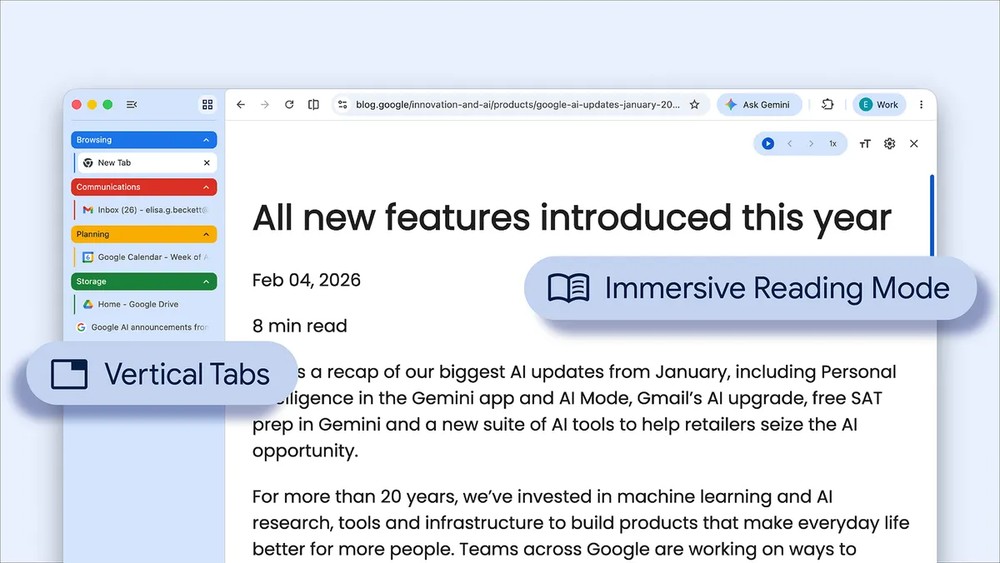
Chrome officially launches two major productivity features: “vertical paging” and “immersive reading mode”! Activation methods and key points
Many people should be like me. It is easy to open dozens of tabs when using Chrome, and the tabs will become smaller and smaller. In the end, you can’t even see the website icon, and you can’t tell which one is which.
At this time, the newly added “vertical paging” solves this problem. After enabling it, the paging column originally arranged horizontally at the top of the window will be displayed on the left side and become a vertical list. Even if you open dozens of tabs at the same time, the complete title of each page can still be seen clearly and will not be compressed to only a small section.
The method of use is very simple. Right-click on the tab bar at the top of the Chrome window and you will see the new function of “Show Tabs Vertically”. You can also go to Chrome’s “Settings > Appearance” and change the “Tab Bar Position” from “Top” to “Side” to enable it. If you feel that the sidebar takes up too much space, you can reduce it to a streamlined mode that only displays the website icon. You can expand it when needed. The width of the sidebar can also be adjusted freely:
In addition, it can also be used with the paging group function, which can classify related paging into the same group and arrange it vertically, making management more intuitive. Of course, you can switch back to traditional horizontal paging at any time.
Chrome had a reading mode before, but the old version only opened it in the side panel, and the screen space was limited, so it was still not easy to read:

After this upgrade, it was changed to a full-page immersive interface, transforming the entire web page into a clean, text-based reading screen, with all distracting elements such as advertisements, sidebars, and navigation bars removed.
It is also very simple to use. You can right-click on any web page and select “Open in reading mode” to enable it, or you can directly click the “Reading Mode” button in the address bar.
Reading mode: Make web pages more focused and cleaner
After entering the immersive reading mode, you can adjust text size, font, background color and other settings according to your personal preferences. There is also a “text-to-speech” function in the upper right corner, which can read the article directly, allowing you to listen to the content while doing other things.
However, it should be noted that according to Google’s instructions, these two features will be gradually rolled out starting from April 7, that is, they will not be open to everyone at once, but will arrive in users’ Chrome browsers in batches. If you haven’t seen it after updating to the latest version, you may need to wait a few more days.
Currently, these two features are only available on the desktop version of Chrome, which supports Windows, macOS, Linux and ChromeOS platforms. The mobile version is not yet available.
Source: KOCPC Chinese