


After months of pushing Copilot integration and being scolded by netizens, Microsoft has finally begun to back down. In the latest Windows Insider beta, Notepad has removed the eye-catching Copilot button and replaced it with a low-key “Writing Tools” menu; the Snipping Tool has also removed related buttons. While the visual AI branding elements have been removed, the underlying AI functionality remains. This is the first step in Microsoft’s previously promised plan to “reduce unnecessary Copilot entry points.”
After months of aggressively promoting the Copilot AI assistant on the world’s largest computer operating system, Microsoft has finally decided to put the brakes on it. Microsoft this week began removing unnecessary Copilot buttons and branding elements from built-in applications in Windows 11. This is a concrete action after announcing in March this year that it would “re-examine the AI strategy of Windows 11.”
Notepad takes the lead in removing Copilot keys
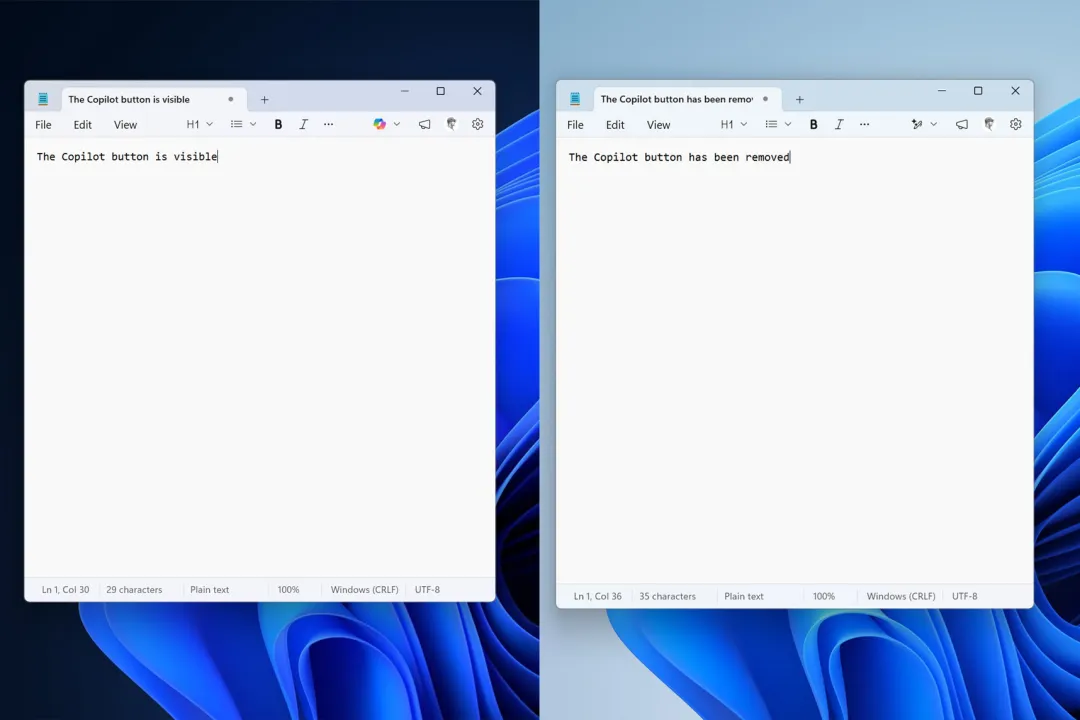
At the heart of this change is the Notepad application. In the latest Windows Insider beta, the Copilot button originally located in the toolbar has been removed and replaced by a menu icon labeled “Writing Tools.” This new writing tools menu functions exactly like the past Copilot menu, including AI-driven features such as rewriting, proofreading, and draft assistance. Microsoft just replaced the prominent Copilot brand icon in the past with a more low-key pen-shaped icon.
In addition, AI-related options that were originally clearly marked in the settings page have now been moved to the “Advanced Features” section and hidden in a deeper menu structure.
The clipping tool also removes AI buttons
The changes to the Snipping Tool are even more radical. In the past, when users used the Quick Markup function to capture a screen image, a Copilot button would appear to guide the user to AI-driven visual search and enhancement functions. Now, the button has completely disappeared and there is no option to turn it off.
In other words, the Copilot integration of the clipping tool has been directly removed, unlike Notepad which still retains the option to turn off the AI function in the settings. This means that Microsoft has chosen a complete removal of the app rather than a simple rebranding.
Microsoft admits it “went too far”
This removal was not a temporary move. Pavan Davuluri, senior vice president of Microsoft’s Windows Experience Team, has previously stated publicly: “You will see us think more carefully about how and where Copilot is integrated in Windows.”
Microsoft also admitted in a Windows Insider blog post earlier this year that it may have pushed Copilot integration too aggressively. This action is the concrete implementation of their promised plan to “reduce unnecessary Copilot entry points”, starting with the Snipping Tool, Photos, Widgets and Notepad.
AI capabilities are still there, just more low-key
From a technical perspective, Microsoft is not removing Copilot’s underlying capabilities. The AI-powered writing tool is still present in Notepad, just repackaged with a more neutral name and iconography. This represents a strategic shift for Microsoft: retaining functionality but removing the visual AI brand presentation.
What’s worth watching next is whether Microsoft will further remove Copilot-specific keys from the keyboard. This button is a symbol of the “AI PC” that Microsoft vigorously promoted in early 2024, and it still exists on many Windows laptops. In addition, File Explorer and other system applications are also possible targets for future cleaning.
point of view
Microsoft’s strategic shift this time actually reflects the embarrassing situation of AI assistants in the consumer market. Copilot has been everywhere in Windows 11 over the past year, from Notepad to Taskbar, from Paint to File Explorer, you can see it almost everywhere. Although this “comprehensive AI” strategy demonstrates Microsoft’s investment in AI, it has troubled users, and there has been constant criticism on Reddit.
Removing visual brand elements is the right first step, but the real test is whether Microsoft can find a balance between “maintaining AI functionality” and “not force-selling.” It might be better to let AI work quietly in the background rather than shoehorning it into every app.
Source: KOCPC Chinese