


The tax filing season in May 2026 is approaching. Since 2025, the IRS has launched the “Mobile Tax Filing 3.0” service, which allows people to easily use their mobile phones to file taxes at home. It has been very popular. The Ministry of Finance pointed out that as of 2:20 pm on the first day of tax filing this year, the number of comprehensive income tax declarations nationwide in 2026 has reached 1.08 million, of which the proportion of mobile tax filings is as high as 65%, which is higher than last year’s overall average of 43%.
What new optimization content will be added to mobile tax filing in 2026 (114 years)? How to use mobile phone to file taxes? Let’s summarize it below:

The 114th year of mobile tax filing has started on May 1, 2026. As mobile tax filing becomes more and more convenient, more and more people choose to use mobile phones to file taxes. Below is a summary video and detailed instructions for the latest mobile tax filing:
1. Optimization content of the mobile tax filing system in 2026 (Year 114):
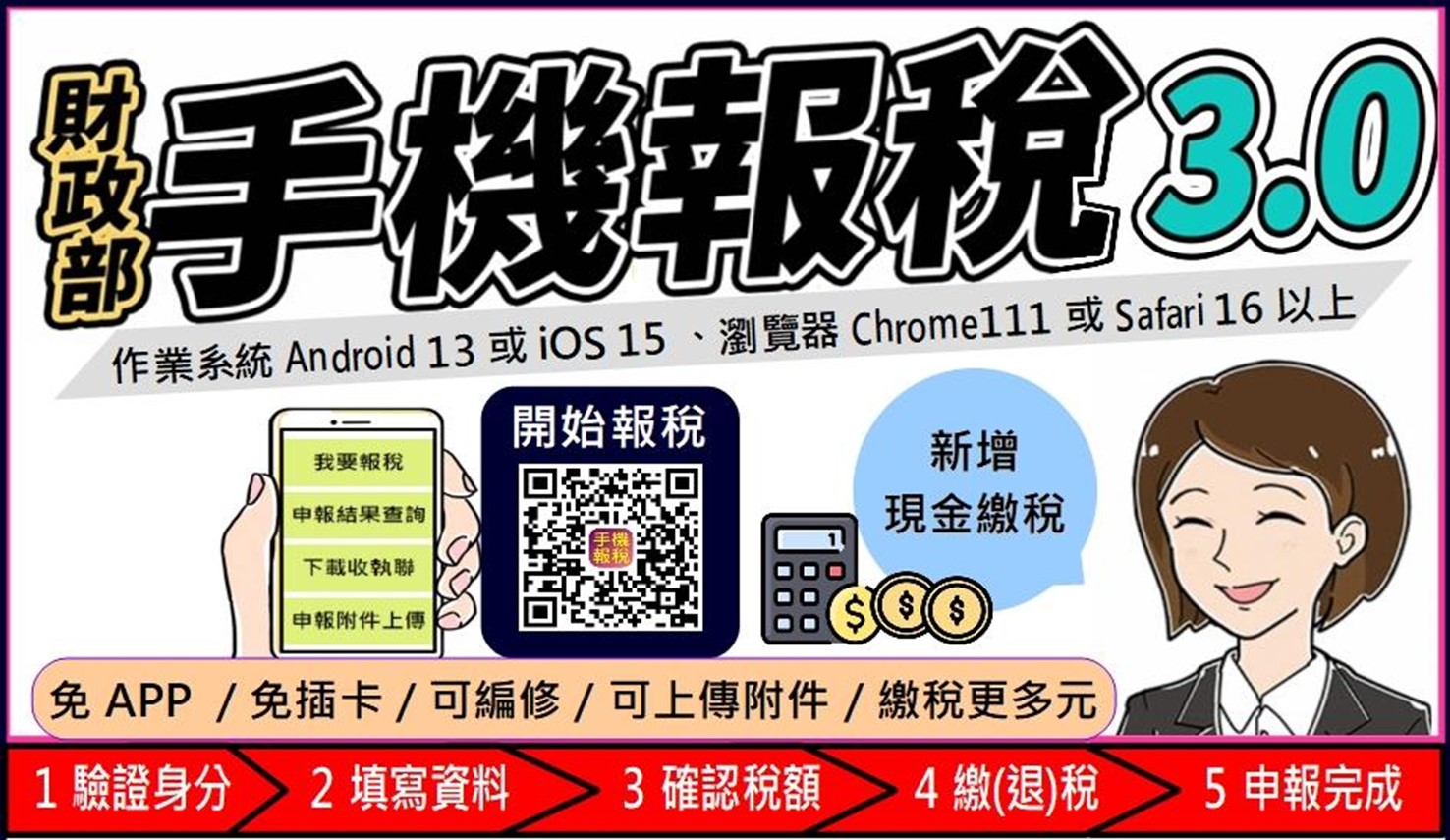
In order to optimize the mobile tax filing method and provide the public with a more convenient tax filing channel, the IRS launched [Mobile Tax Filing 3.0] in 2025, adding three new functions: cash tax payment, application for split/deferred tax payment, and trial attachment uploading. 2026In 2014, the mobile tax filing system added a “dedicated version of the Comprehensive Tax Web Page Accessibility” to provide a tax filing environment for the visually impaired:
A. Cash tax payment:
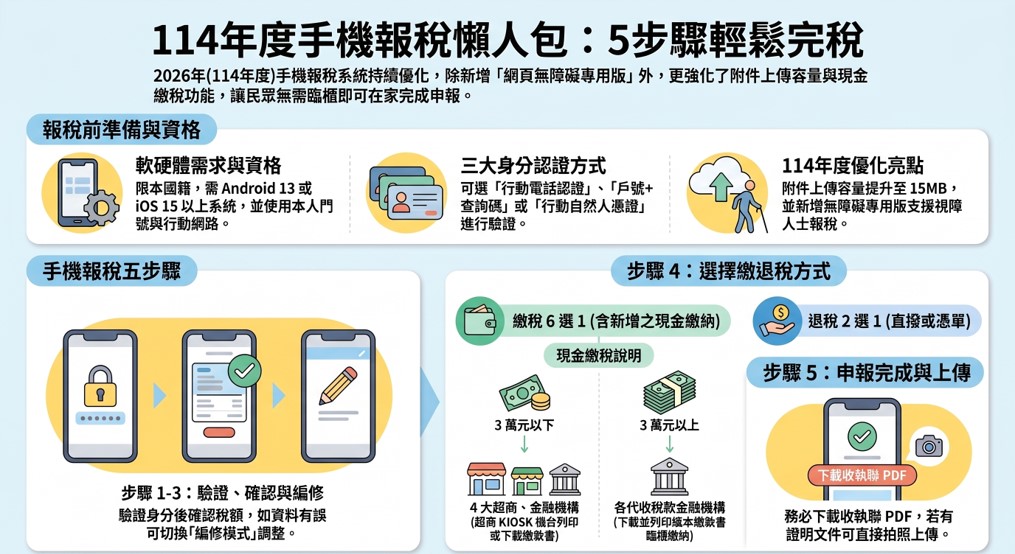
In addition to being able to pay taxes using mobile phones, Mobile Tax Filing 3.0 also allows you to pay taxes in cash. Taxpayers can choose to pay at the four major supermarkets or financial institutions.
a. The amount of tax paid is less than 30,000 yuan:
If the tax is less than 30,000 yuan, you can go to the four major supermarkets to obtain the payment slip number, go to the multimedia information machine (KIOSK) of the four major supermarkets to print the receipt, print the payment slip and receipt, download and print the paper payment slip, and go to the four major supermarkets or the financial institutions that collect taxes to pay over the counter.
b. The amount of tax paid is higher than 30,000 yuan:
If the tax is more than 30,000 yuan, please print the payment slip and receipt, download and print the electronic file of the payment slip, and go to the financial institution that collects taxes to pay over the counter.
B. Apply for points/deferred tax payment:
After choosing to pay taxes in cash and completing the income tax return, taxpayers can select “Apply for an extension or installment (without interest rate increase) due to the impact of the severe special infectious pneumonia epidemic” or “Apply for an installment (with interest rate increase) due to financial difficulties due to objective facts” on the completion page, and apply online. After the application is approved, the tax can be paid in installments or by deferred tax payment.
C. Attachment upload:
Taxpayers who file Tax 3.0 online or via mobile phone and are required to attach relevant supporting documents can “take a photo” or “scan the original document” and upload attachments in accordance with the regulations. The file formats for uploading comprehensive income tax data for 2014 are limited to JPG, PNG, and PDF. The uploaded file size has been increased to 15MB per household. Approximately 5 to 7 photos can be uploaded directly if you take photos with your mobile phone. After uploading the attachment, you can check the declaration status through the Ministry of Finance’s Electronic Declaration and Tax Payment Service Network to confirm whether the uploaded attachment file has no problem. The attachment uploading system of the electronic declaration and tax payment service network will compare with paper documents and will be received until June 11, 2026 at the latest.
D. Accessible version of comprehensive tax website:
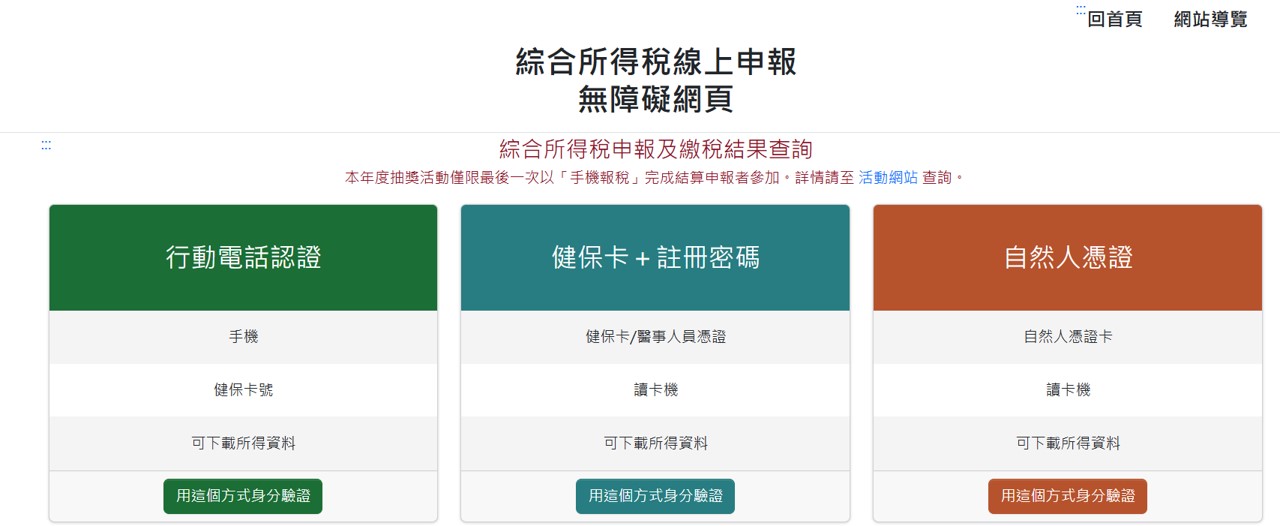
In order to implement digital equality and respond to accessibility policies, the Ministry of Finance specially launched the “Integrated Tax Web Accessibility Version” in 2026, a dual-entry accessibility version system that can support computer and mobile phone operations.
The “Dedicated Accessibility Version of the Comprehensive Taxation Web Page” is specially optimized to cooperate with the registration software commonly used by the visually impaired (such as NVDA), providing an intuitive operation interface, and has successfully obtained the accessibility mark. Visually impaired people can enter the “Chinese Comprehensive Income Tax” section through the Ministry of Finance’s electronic filing and payment service website and click “Comprehensive Income Tax Web Online Accessibility Zone” to enter the exclusive declaration page.
The login of the dedicated version of the system (six authentication methods including mobile phone authentication, health insurance card + registration password, natural person certificate, household registration number + query code, mobile natural person certificate and electronic certificate) and other tax filing methods are the same as general tax filing. After the visually impaired friends enter the system, they can listen to the tax estimate results in sequence, confirm the tax refund method, and finally upload the completed declaration to achieve the goal of self-reporting.
2.2026 (114 yearsComprehensive income)Mobile tax filing method:
The comprehensive income tax settlement and reporting period for 2014 is from 2026/05/01 to 2026/06/01.May 1st is a national holiday, and the IRS does not provide in-person tax filing services.
A. Qualifications for using mobile tax filing:
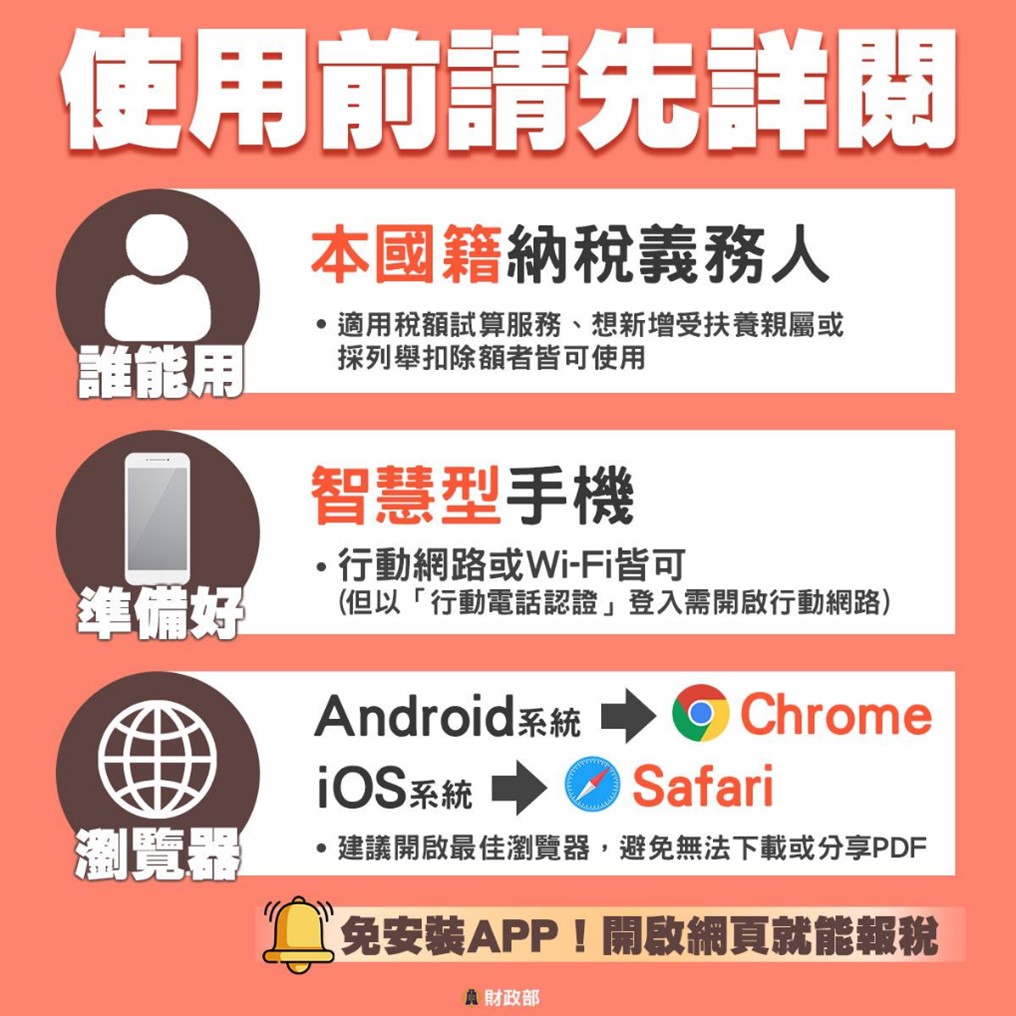
The use of mobile phones to file tax returns is limited to taxpayers of Chinese nationality. They need to bring their own smartphones with Internet access (Android 13 or above or iOS 15 or above operating systems and Chrome 111 or above or Safari 16 or above browsers). There is no need to install an APP. You can file taxes by just opening the IRS website.
Special reminder: when filing taxes via mobile phone, the holder of the mobile phone number must be the same person as the taxpayer. To log in using “mobile phone authentication”, you need to use the mobile phone network to file taxes, and Wi-Fi is not allowed. When filing a tax return, you need to prepare your personal phone number, ID number, and health insurance card number. The protection password for the information documents obtained is your personal ID number.
B. 3 methods of identity authentication:
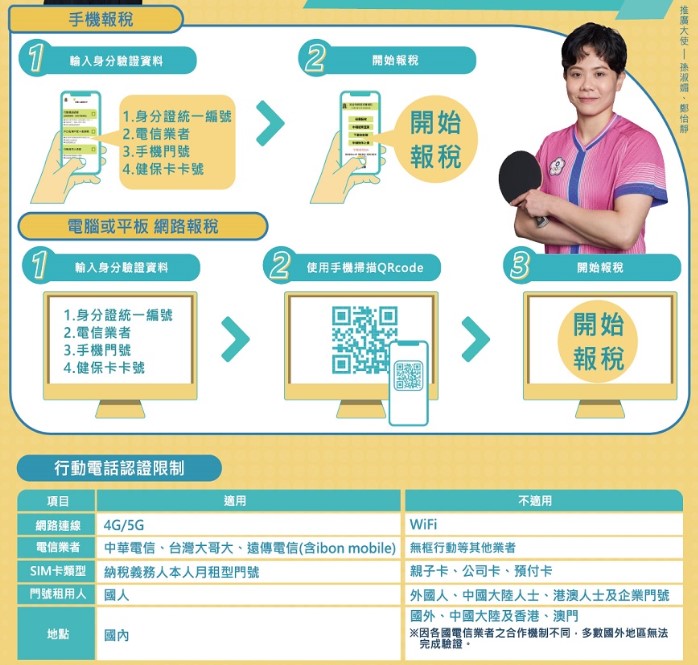
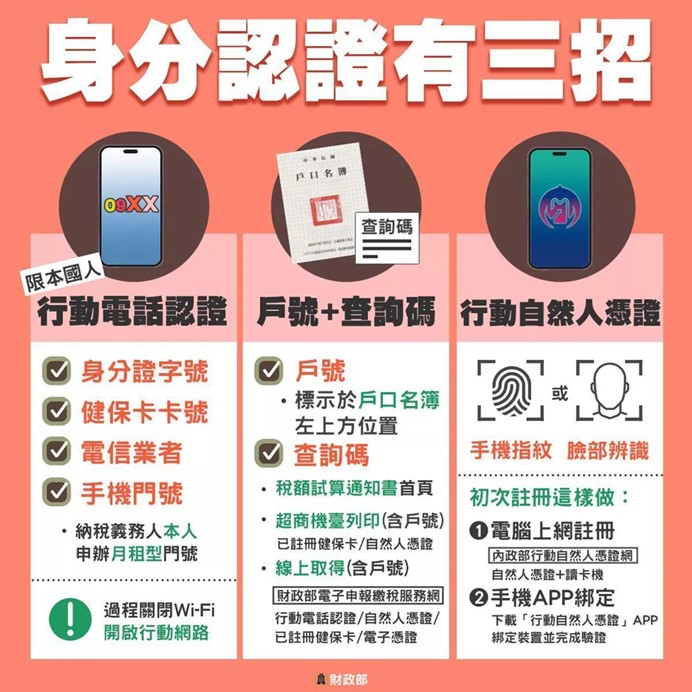
Identity authentication must be carried out before filing tax returns by mobile phone. The Ministry of Finance provides three identity authentication methods, namely “mobile phone authentication”, “household registration number + inquiry code” and “mobile natural person certificate”.
a. Mobile phone authentication:
Mobile phone authentication is only available to the three major telecommunications companies that taxpayers in the country apply for in person.Monthly rental door number, and must prepare the ID card number, telecommunications provider, mobile phone number and health insurance card number. If you use a computer or tablet to file your tax return, you must use your mobile phone to scan the QR code after entering your identity verification information to file your tax return.
Special note is that during the authentication process, Wi-Fi needs to be turned off and the mobile network must be turned on.
b. Household register account number + query code:
The “Account Number” is marked on the upper left side of the household register; the “Inquiry Code” can be obtained from the home page of the tax calculation notice, printed at the supermarket terminal, or from the Ministry of Finance’s electronic tax declaration and payment service website.
c. Action natural person certificate:
If the tax filer has bound his mobile phone, he can directly verify it through fingerprint or facial recognition on his mobile phone.
C. Mobile tax filing steps:
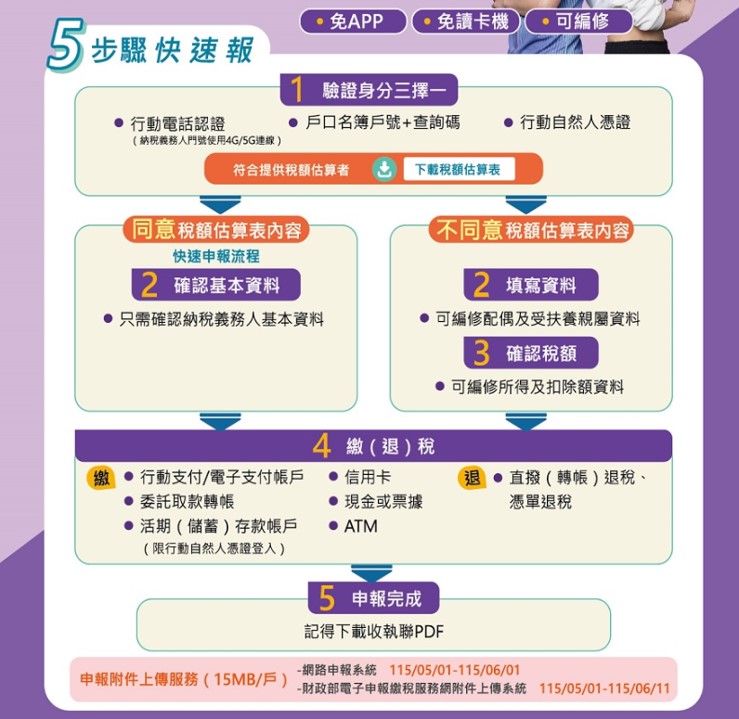
a. Verify identity:
Choose 1 of 3 identity verification methods, “mobile phone authentication”, “household register number + inquiry code” or “mobile natural person certificate”.
b. Agree or disagree with the content of the tax estimate form and fill in the information:
Choose to agree or disagree with the tax estimate. If you confirm the basic information, you only need to confirm the basic information of the taxpayer; if you do not agree with the content of the tax estimate form, please fill in the information and edit the spouse or dependent relatives, and this person will need to undergo identity verification.
c. Confirm the tax amount:
If you disagree with the tax estimate, “Switch editing mode” to edit the income and deduction data.
d. Pay (refund) tax:
You can choose one of six tax payment methods, including mobile payment/electronic payment account, entrusted withdrawal and transfer, current (savings) deposit account (limited to mobile natural person credentials), credit card, cash or bills (you can apply for deferment or installment tax payment) and ATM; choose one of two tax refund methods, including direct transfer (transfer) and voucher tax refund.
e.Declaration completed:
The Ministry of Finance and the Internal Revenue Service remind you to download the receipt PDF after completing the declaration. If there are tax filers who need to attach information, the “Upload of declaration attachments” will be displayed. The upper limit for each household is 15MB. You can directly take photos with your mobile phone and upload about 5-7 pictures. If there are many pictures, it is recommended to scan the PDF and upload them.
Source: KOCPC Chinese