


Chrome is currently the browser with the highest market share in the world, accounting for more than 64%. Therefore, many people use it every day. In this era when hard drive space is very precious, Alexander Hanff, a European privacy researcher, recently discovered that version 174 of Chrome will secretly download an AI model of about 4GB named weights.bin without the user’s knowledge and without any consent dialog box. There is no checkbox, the download cannot be turned off, and even if you delete it manually, Chrome will automatically download it again.

Google Chrome secretly stuffs a 4GB AI model into your computer: Researchers actually measured the packet capture, and it will automatically install it back after deleting it.
Privacy researcher Alexander Hanff This information was exposed on my personal blog a few days ago. The weights.bin file secretly downloaded by Chrome is actually the model weight file of Gemini Nano. Gemini Nano is a small AI model designed by Google that can run locally without the need for a cloud. It is also the lightest version of the Gemini family.
The file is placed in the Chrome user profile folder, in a directory called OptGuideOnDeviceModel:
- Windows:%LOCALAPPDATA%\Google\Chrome\User Data\OptGuideOnDeviceModel
- macOS:~/Library/Application Support/Google/Chrome/OptGuideOnDeviceModel
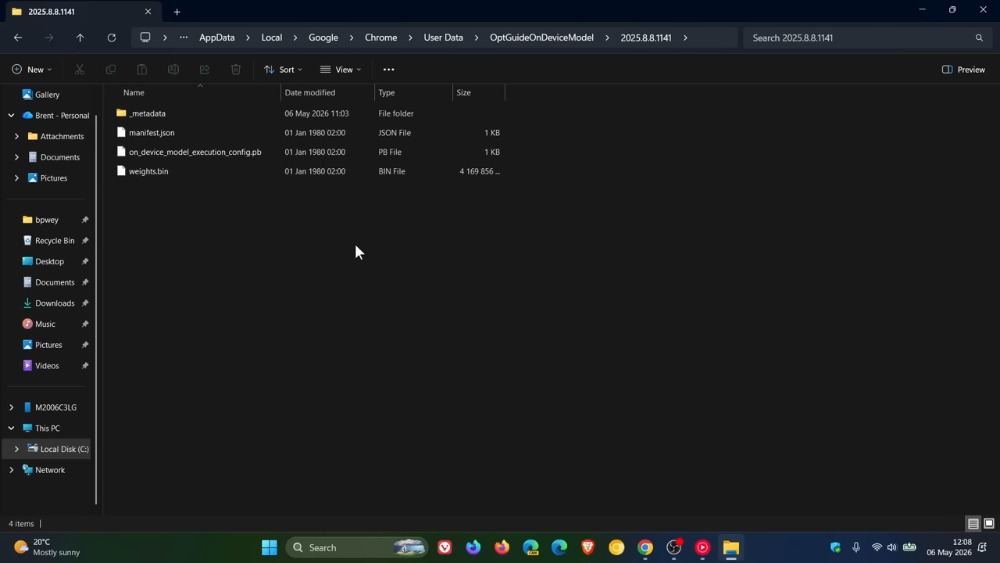
Image source:BrenTech
The purpose of downloading the Gemini Nano model is to allow users to use the built-in AI functions in Chrome, including Help me write, page summaries, smart posts, pagination group AI suggestions, local scam website detection, etc. That’s fine if you’re using it, but for most people, it won’t be used even once, and the model will still be downloaded to the computer.
However, for computers whose hardware is too old or cannot run the Gemini Nano model, it seems that it will not download automatically.
The researcher mentioned that in the Local State configuration file of the profile, it was found that Chrome would secretly read your hardware specifications in the background, including CPU level, GPU level, system memory, available VRAM, etc., and score your computer as a “performance class.” His M1 Ultra is marked as performance_class: 6, vram_mb: 36864. If the conditions are met, Chrome will directly download the model file.
Although deletion will automatically re-download it, there is still a solution at this stage: “Turn off Chrome’s AI function”. You can refer to the video below:
But the strange thing is that I checked my Mac and Windows and have not found this model file so far. It seems that this should be a newly added feature and may not be launched globally yet.
Although Google downloaded the Gemini Nano model to make it easier for users to use Chrome AI functions, this practice of downloading without asking first is still offensive, especially for users who are very concerned about storage space.
Source: KOCPC Chinese