


Nowadays, many people use their mobile phones to take pictures every dayphotoandvideo, also hope that these precious memories will not disappear, so they will be backed up to Google Photos, but the free capacity of 15GB is not very large, and it is still the same as other Google Services (such as cloud drives,Gmail, files, etc.) can easily become full. At this time, you can only consider upgrading to the paid version to obtain more capacity. There is actually “ReVanced Google Photos” on the Internet. You can get the “unlimited capacity backup” offer of Google Photos without root. The principle is to make the Google server mistakenly think that your Android The mobile phone is a Google Pixel that supports unlimited backup. If you don’t have the budget to upgrade and want unlimited backup of photos and videos, you can consider giving it a try.
Which Pixel phones get unlimited backups
Although Google Photos currently no longer offers unlimited backup, certain Pixel models can still get this offer:
- Pixel 1: Unlimited original image quality
- Pixel 2–5: Unlimited high-quality graphics
- Other phones: None, even the Pixel series
The ReVanced Google Photos introduced in this article is disguised as Pixel 5, and then qualified for unlimited capacity backup of Google Photos. As for which model to back up, according to the information obtained by netizens from patch, it seems that the majority of them are Pixel 5. Although the original image quality of Pixel 1 is better, this model is too old and is unlikely to be used by many people at this stage, so the risk is higher.
What are the risks of using ReVanced Google Photos?
ReVanced Google Photos disguises itself as a Pixel phone by modifying the official Google Photos App. It does not require Root to crack the phone, so there is no risk of cracking. However, because the signatures are different, you need to use microG to log in to your Google account, so the primary risk is: “Google account security.” Although there has been no news of stolen accounts, photos or videos being stolen since its launch, it is still not recommended to use the main Google account. It is safer to log in to your Google account backup instead.
Secondly, this practice violates Google’s terms of use, and the Google account you log in to may be blocked (it has not been reported yet). Because it is a modified version of the app, it cannot be updated from the Play Store. If developers launch a new version in the future, you will need to update it manually. Finally, if Google changes the verification method, this app will become invalid.
How to get “unlimited backup” of Google Photos through ReVanced Google Photos
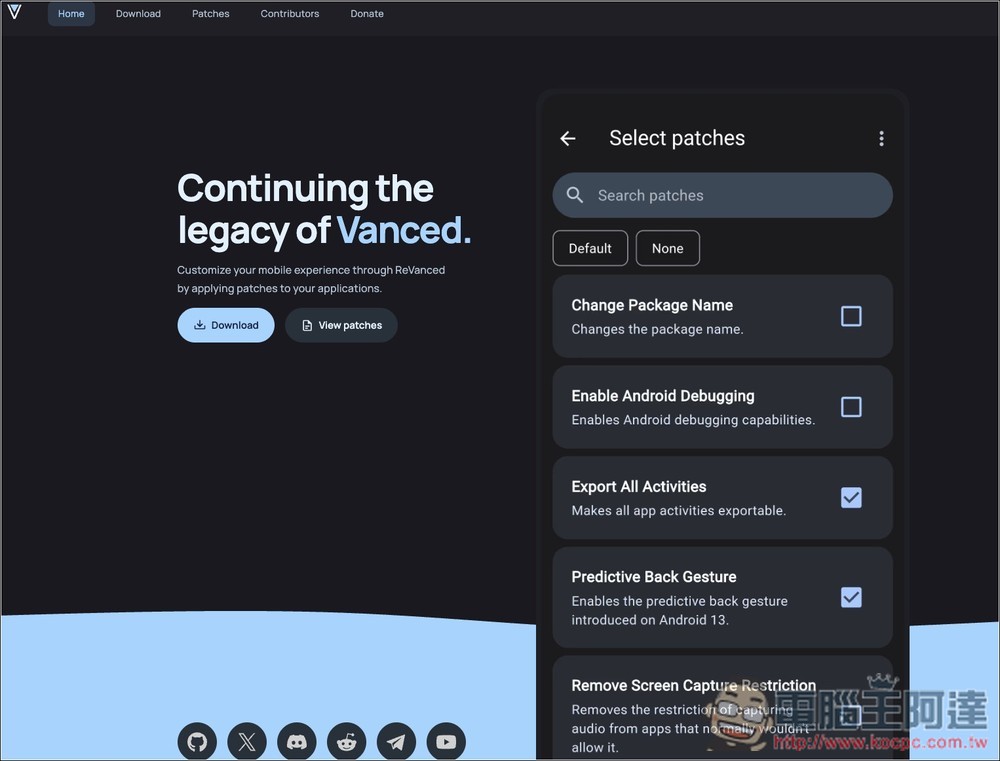
After understanding the risks, if you still want to try it, here I will teach you how to install and enable it. One thing to note is that ReVanced officially only provides ReVanced Manager. You need to use the APK + Pactch of Google Photos to complete the repair on the local machine. There is no modified APK file. The following will teach you the operation process.
You can search on Google to find APKs that have been modified by someone. The steps are not that troublesome, but there are certain risks. It is recommended to use the officially provided ReVanced Manager.
Supplement: The link provided at the beginning of the article is not the official website. If it is pretentious, it is recommended to delete it.
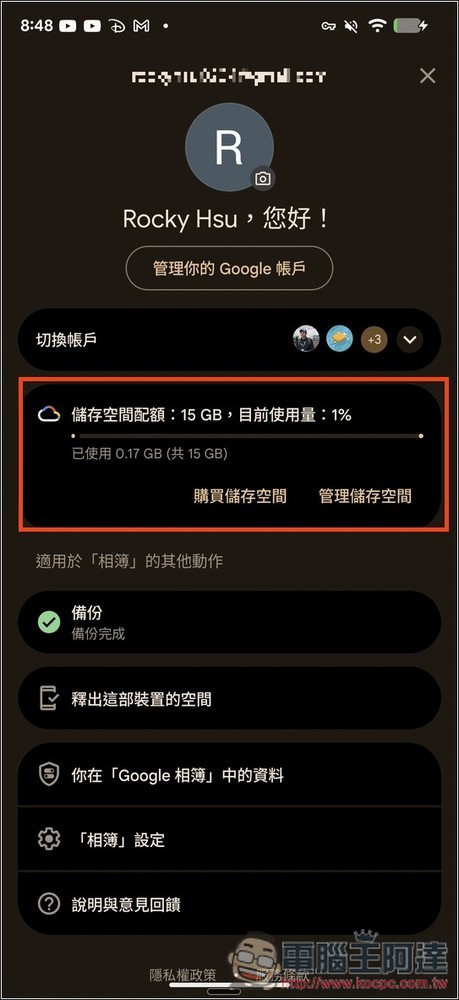
First, let me prove that the Google account I currently use on my Android phone shows only 15GB of storage space in Google Photos, not unlimited capacity:
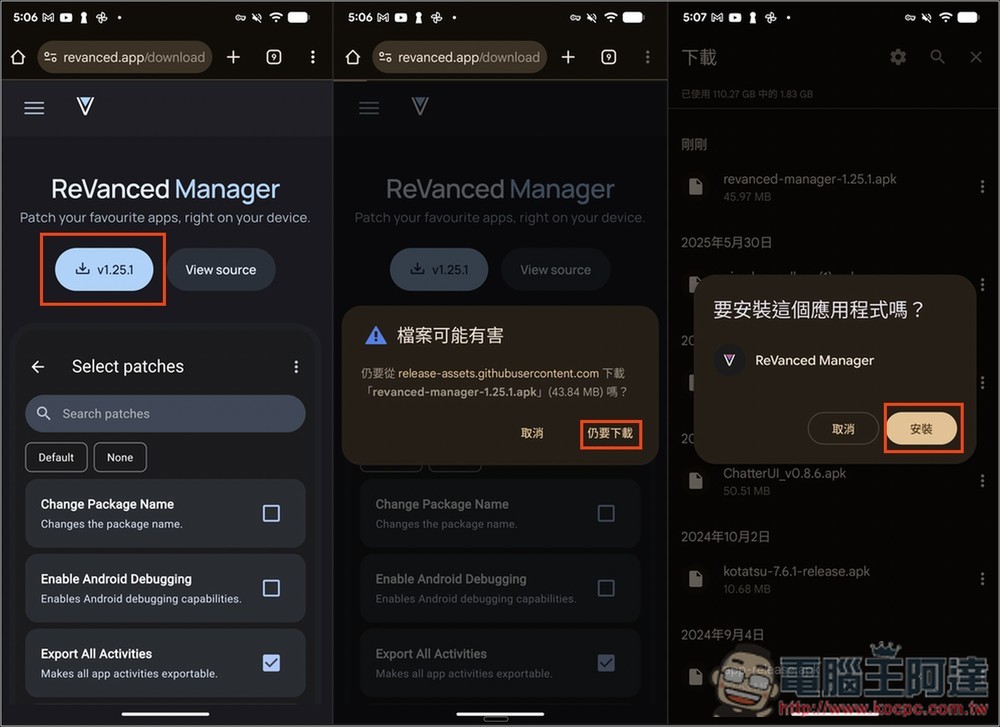
Here I demonstrate the installation process through the official ReVanced Manager. The steps are a little more complicated. The Google Photos APK file is downloaded from APKMirror. A total of three things need to be downloaded:
The first is ReVanced Manager. After entering the official website, click the download button on the screen. The latest version is v1.25.1. A prompt will pop up when downloading, so people who don’t mind can download it again. Click “Download Anyway”, open it after downloading and click Install:
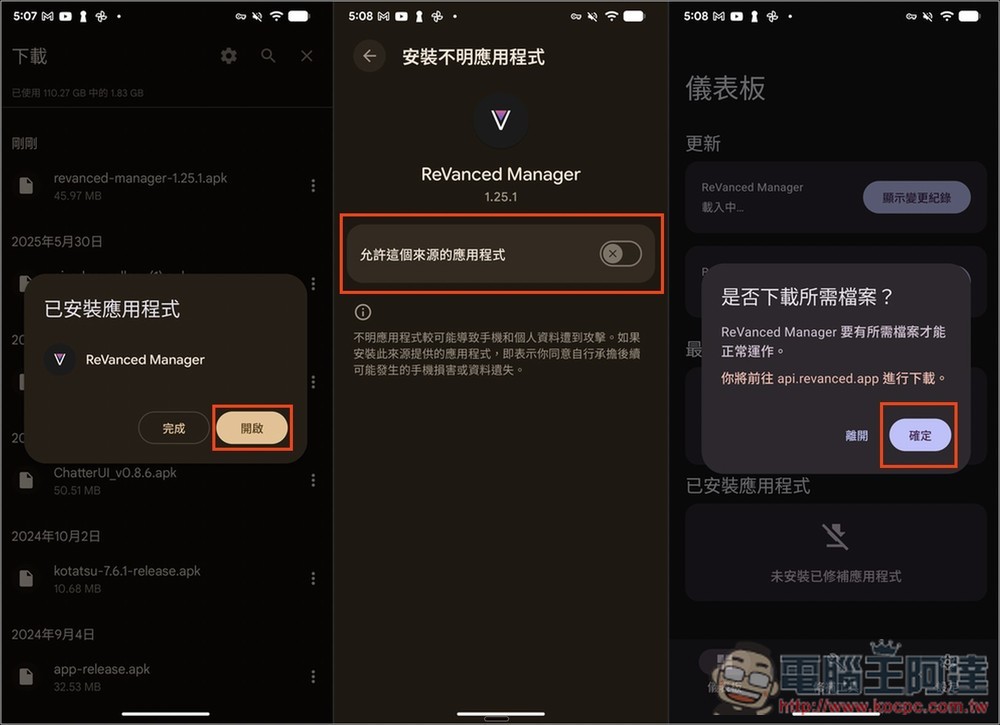
Once installed, open it and turn on “Allow apps from this source”. When running for the first time, you will be asked to download the required files, click “OK”. Then download the other two files:
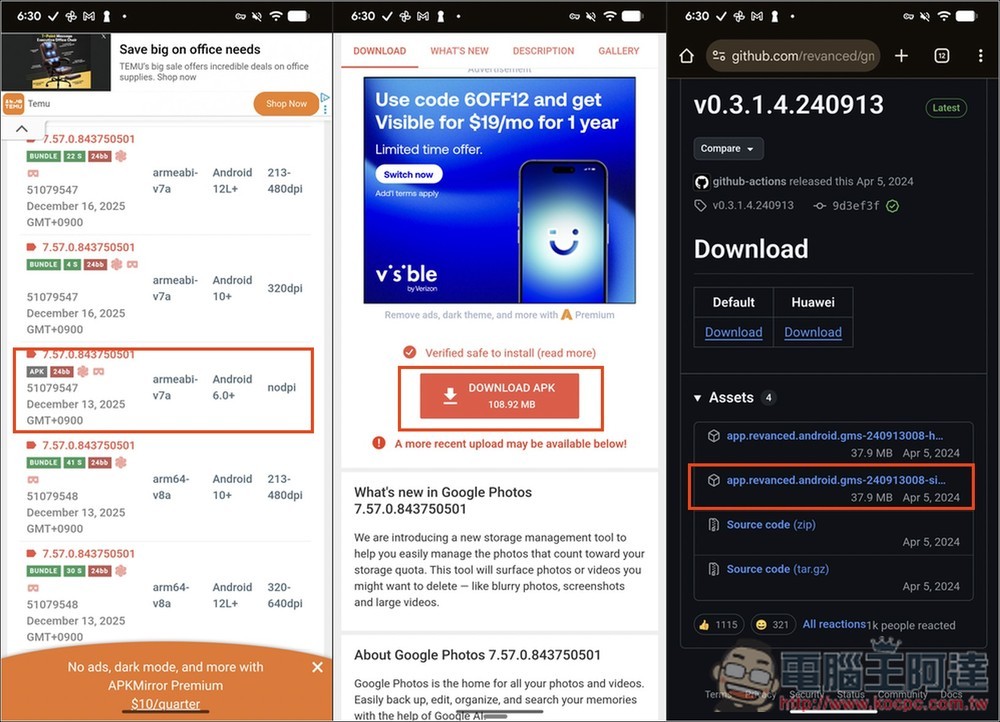
It is recommended to download the Google Photos APK file from APKMirror It is the safest download. At the time of writing this article, the latest version is 7.57.0.843… this. Remember to download the APK file, not BUNDLE.GmsCore It has not been updated for a while, but it can still be used. Please download the version without the hw word:
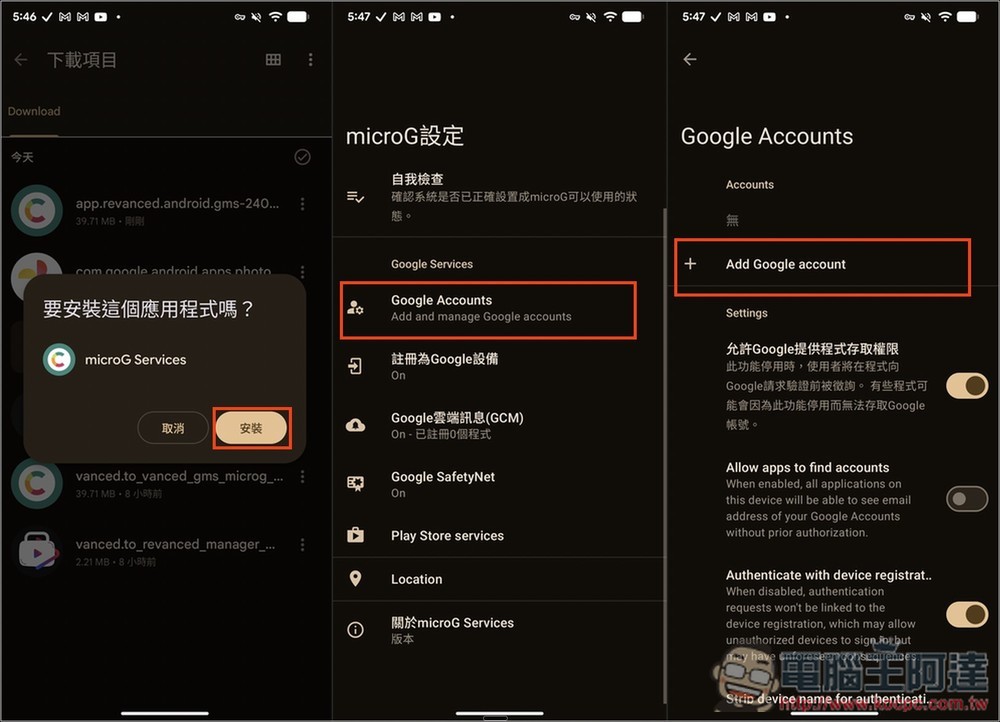
After downloading GmsCore, open and install it. The name of this application is microG Services. After installation, open it. First add your Google account, click “Google Accounts” -> “Add Google account”:
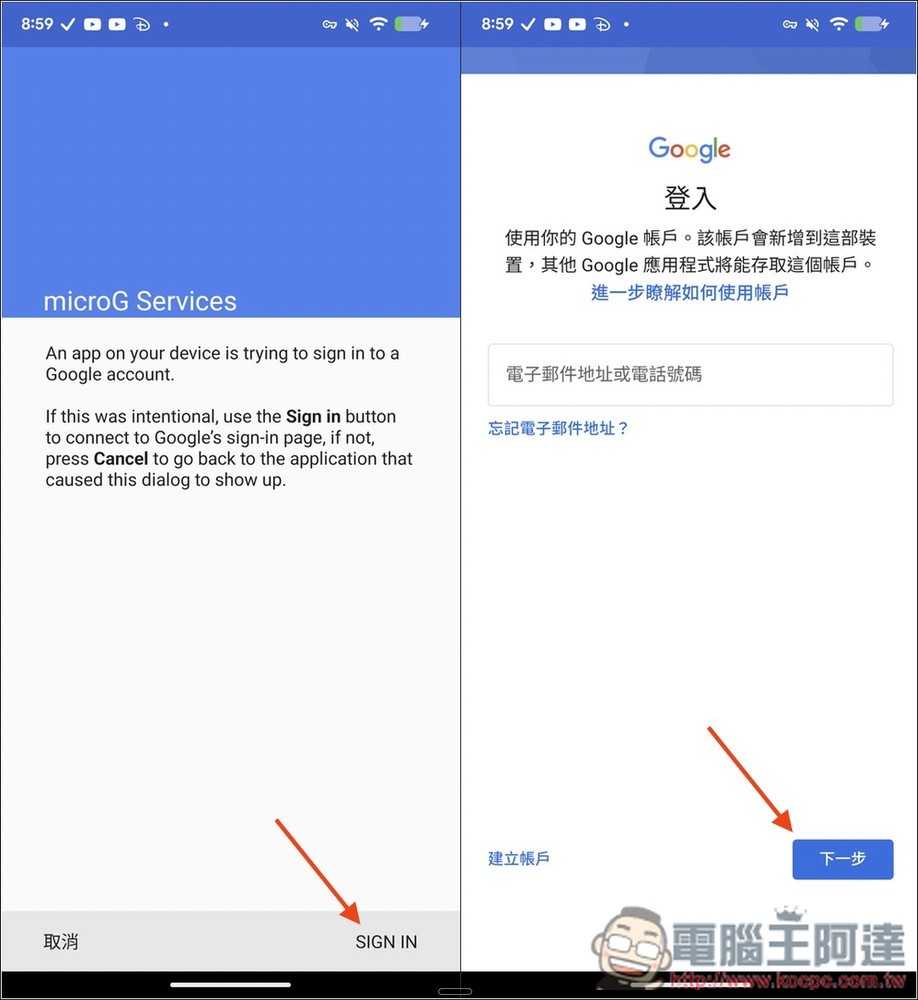
Click SIGN IN below and you will enter the Google login process. It is recommended to use your trumpet account:
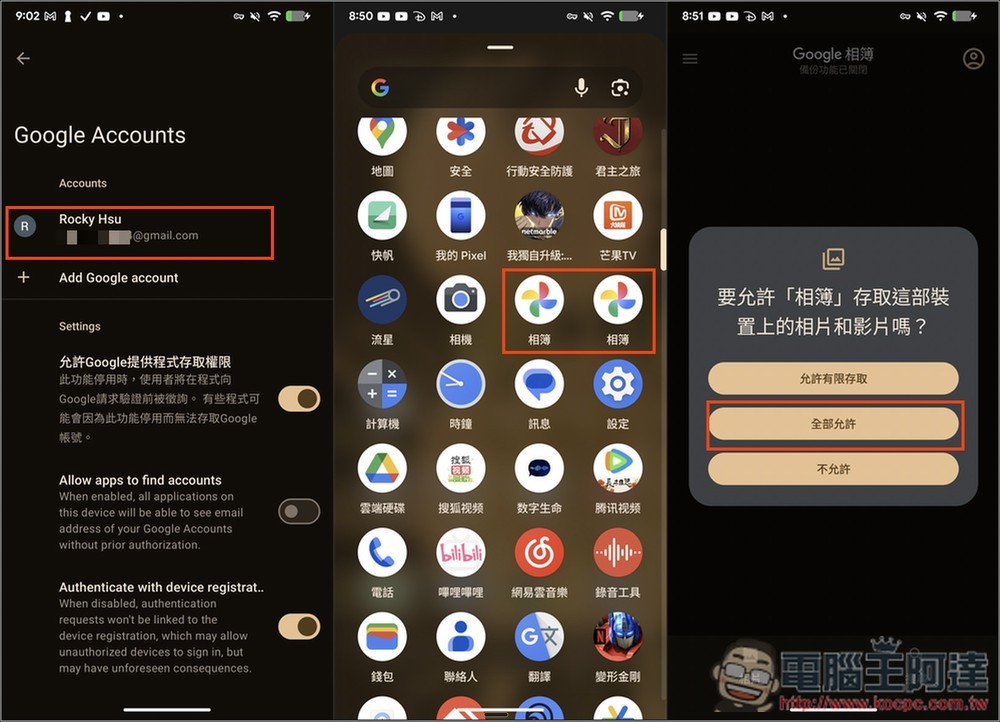
After logging in, Google Accounts will display your account. At this time, please open the newly installed Google Photos App. You will see two photo albums in the App menu, one is the original built-in photo album and the other is ReVanced Google Photos. After opening, remember to click “Allow All”:
ReVanced Google Photos will automatically connect to the Google account you just logged in to micorG. After clicking Start, you can go to the account menu and check whether “Unlimited Storage Space” is displayed. If so, you have succeeded! In the future, the photos and videos on your Android phone will be automatically backed up to Google Photos with unlimited capacity through this app:
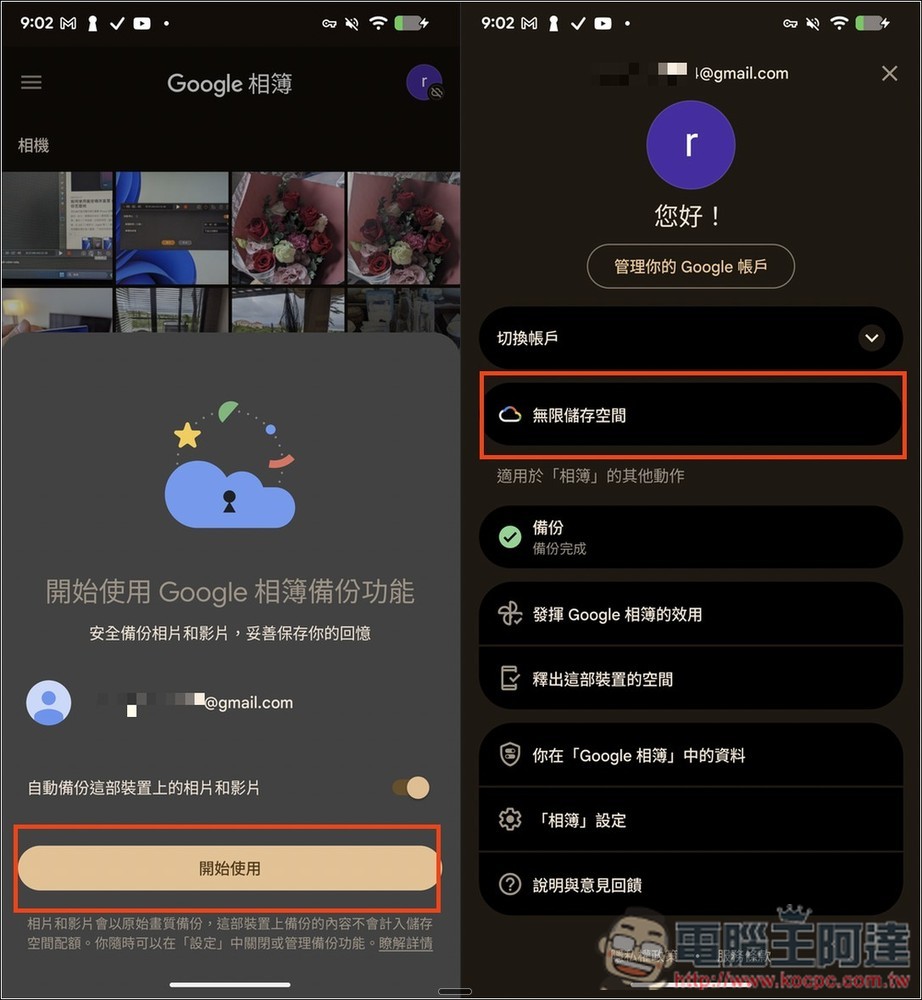
If you don’t get prompted to back up the photo album, please go to the “Album” settings in the settings and turn on the backup.
Don’t want to take the risk? You can consider the half-price offer currently launched by Google
If you feel that this method is very risky, Google currently has a super discount for Google AI Pro and Google One plans, with the lowest price being less than half price. It is worth considering. For details, please refer to the article below.
Source: KOCPC Chinese