


Many iPhone users are accustomed to using FaceTime To replace ordinary phone calls, the main reasons are not only clear sound quality and stable connection, but the most important thing is that there are no phone charges at all. However, after recently updating to iOS 26, some netizens discovered that a chat they thought was FaceTime ended up with a telecommunications bill of up to NT$5,700. After in-depth inspection, it was discovered that the iOS 26 update may cause the iPhone’s default call method to be “automatically switched”, causing FaceTime calls that should have been free to instantly become paid general voice calls. Here’s a quick checkup that can be completed in 30 seconds to help you avoid becoming the next victim.
Are you charged for FaceTime calls in iOS 26? Take 30 seconds to quickly check this setting
If you are an iPhone user who is used to using FaceTime to chat with family and friends, you must pay attention to one thing recently. Recently, there have been many discussions on Threads, all of which are complaining that after upgrading to iOS 26, it was no problem to use FaceTime for every chat, but this time I suddenly received a phone bill of more than NT$5,000. Many people were shocked after checking their call records: they were not using FaceTime at all, but had been changed to a regular paid voice call by the system.
Why did FaceTime suddenly become chargeable? Where is the problem hidden? The following explains everything clearly in a simple and easy-to-understand manner.
Why did FaceTime suddenly become paid? The key is to reset the “Default Call App”
As designed by Apple, FaceTime is essentially a VoIP call over the Internet, so the call itself is free and only consumes Wi-Fi or mobile data. In other words, under normal circumstances, there will be no telecommunications voice charges even if you chat for several hours.
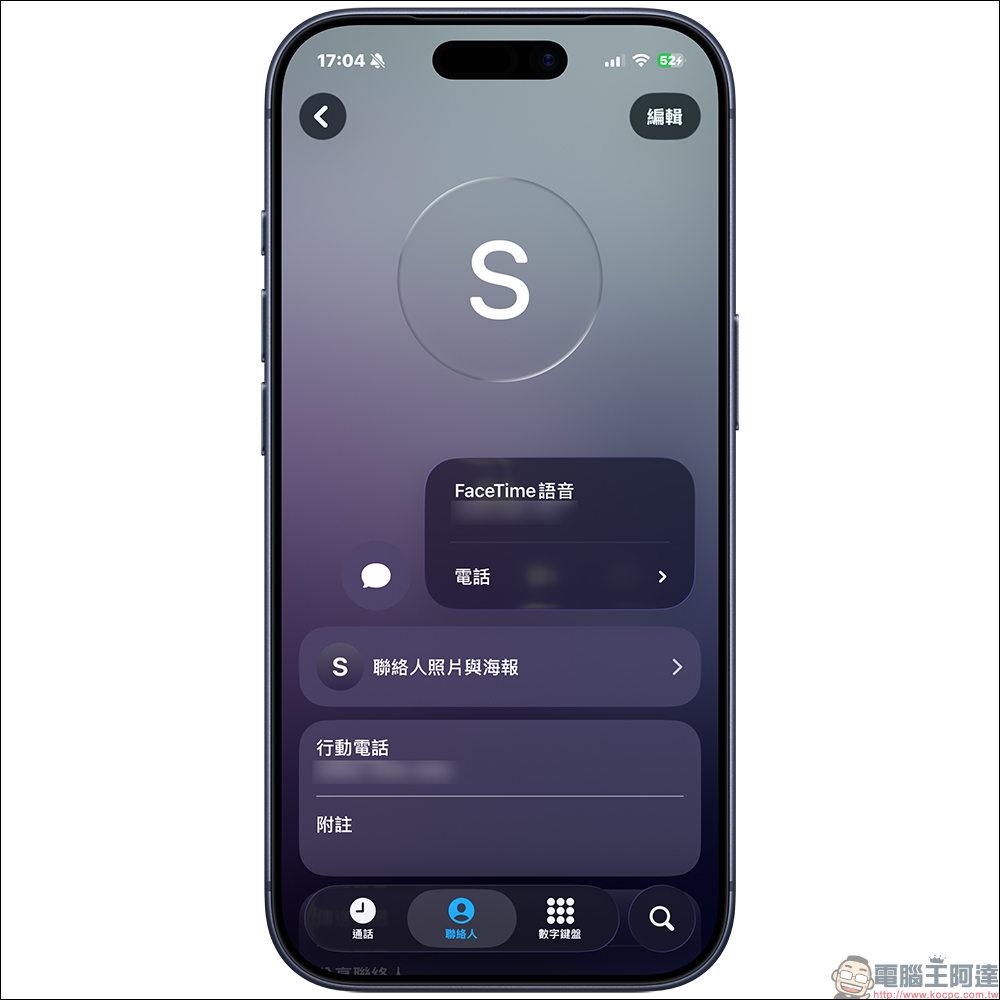
But the problem lies in that after the iOS 26 update, the “call default app” settings of some models will be automatically reset. Therefore, many users did not notice that the iPhone automatically changed the default call method to “mobile network call”, which is the call mode of general telecommunications lines.
The result is that when you are in ContactsOnce you press the phone (call) button directly, the iPhone will actually make a normal call for you by default without using FaceTime voice calls.. Therefore, as long as you chat with the other party for a little longer, especially if you make out-of-network, cross-regional or international calls, your bill will naturally skyrocket.
Some netizens also said that they clearly pressed the FaceTime icon, but what popped up was the normal phone interface. Some people also found out after collecting the bill that they used all pay phones during this period and did not use FaceTime at all.
Quick 30 Second Check, How to Change iPhone Back to FaceTime for Free Voice Calls?
In order to prevent you from stepping on this trap, here are the simplest 3 steps to teach you whether your iPhone has been changed to paid calling mode due to an update. The entire process takes less than 30 seconds, so it’s recommended to check it out immediately.
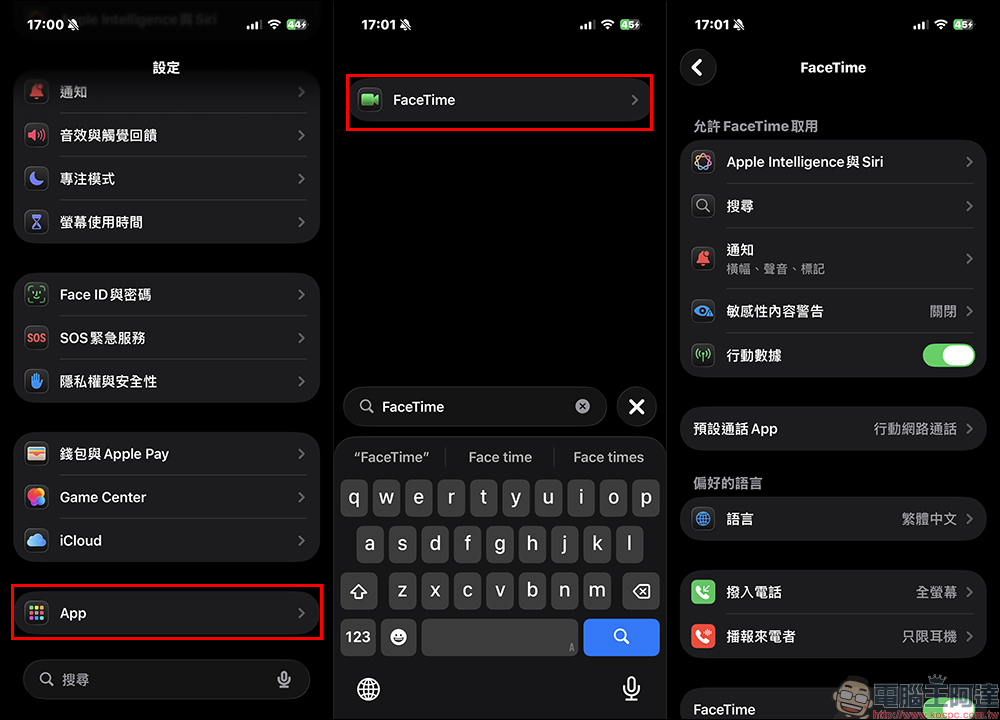
Step 1. Open FaceTime settings
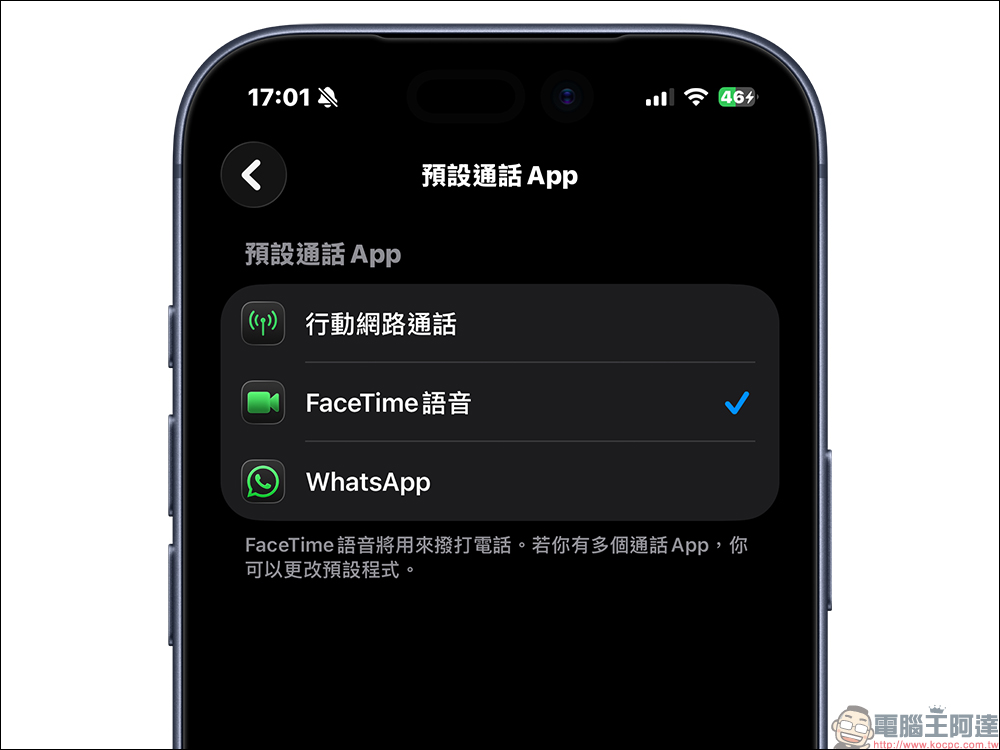
Open the iPhone’s “Settings” app, scroll down to find the “App” category, click on it to find “FaceTime” and turn it on. Here you can see all the call settings related to FaceTime.
Step 2. Confirm whether the “Default Call App” is correct
After entering the FaceTime settings page, please find the option “Default Call App”. You must confirm whether the default is “FaceTime Voice”. If you see “Mobile” or another non-FaceTime option, change it back to “FaceTime Voice” immediately.
Because as long as the default call method is non-FaceTime, the iPhone may directly skip FaceTime and force the paid telecom voice call to be connected first.
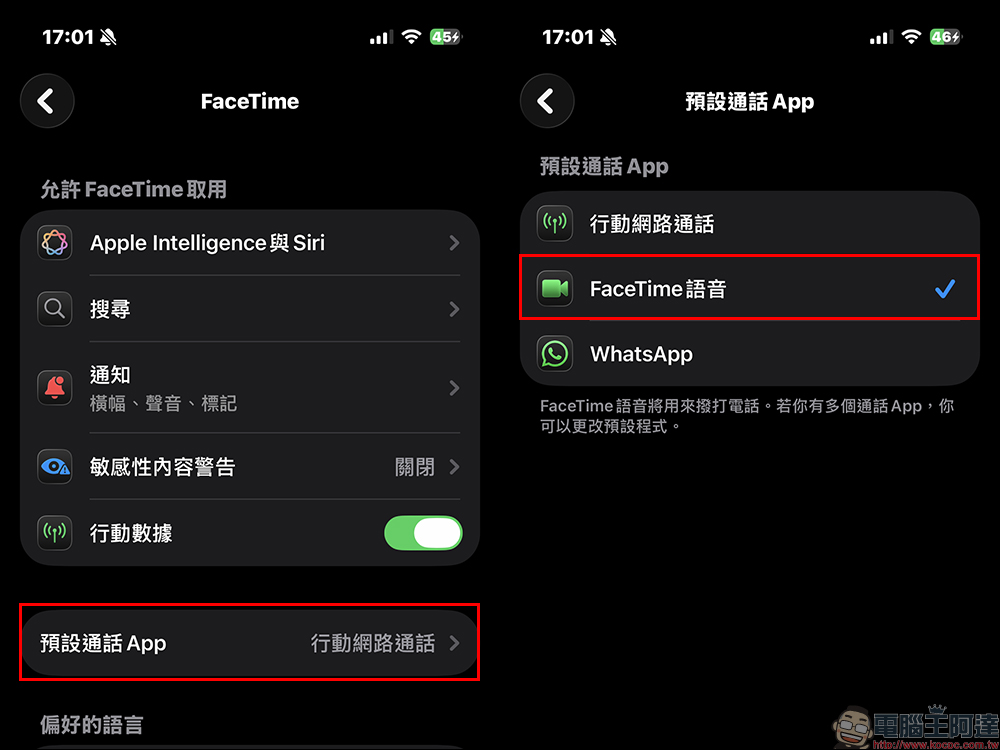
Step 3: Change the default calling method to FaceTime
As long as you switch the option back to “FaceTime Voice”, future calls made from the contact will prioritize free FaceTime calls. This setting can effectively prevent the misuse of ordinary phone calls, allowing you to make calls with confidence even in Wi-Fi or mobile data environments. If the default is “Mobile Network Call”, when the contact makes a call, pressing the call button will give priority to a normal call.
How can I tell whether I am using FaceTime (free) or mobile phone (paid)?
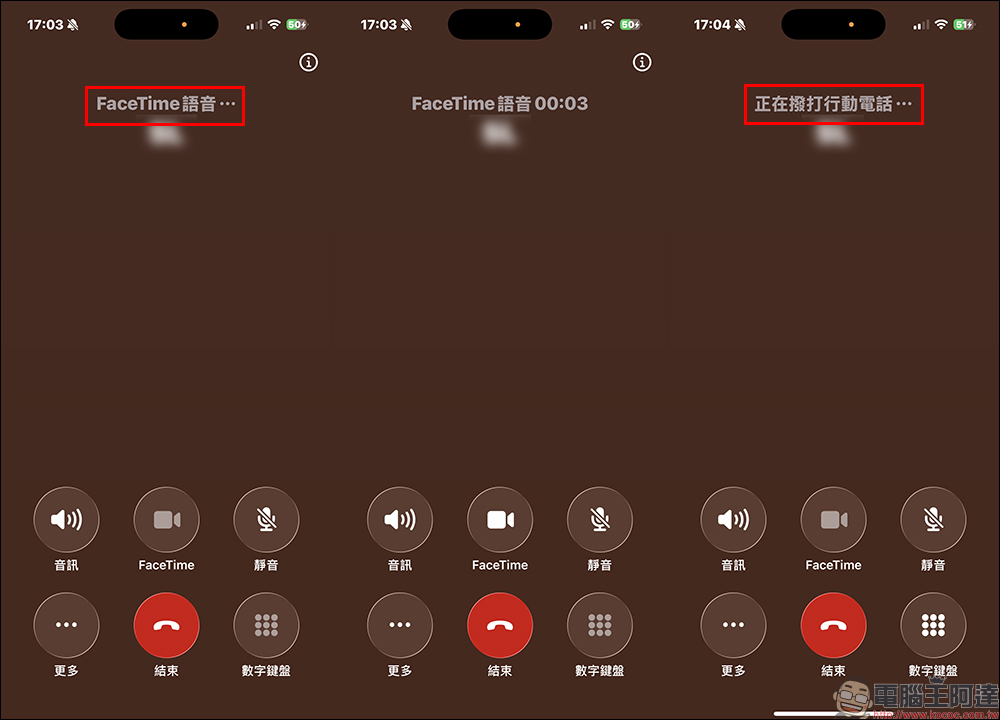
In addition to checking the settings, you can also quickly judge from the outgoing call screen:
1. Screen display mode
The words “FaceTime Voice” will be clearly displayed above FaceTime voice calls (free). The call sound quality is clear and the sound details are high, and the interface is usually like an online call. General telecom voice calls (paid) only display the contact name and call time, without “FaceTime” related words, and the sound is muffled and more like the sound quality of traditional phone calls.
To put it simply, as long as you see the latter (making a mobile phone call), you are most likely using a telecom voice call that will charge a fee.
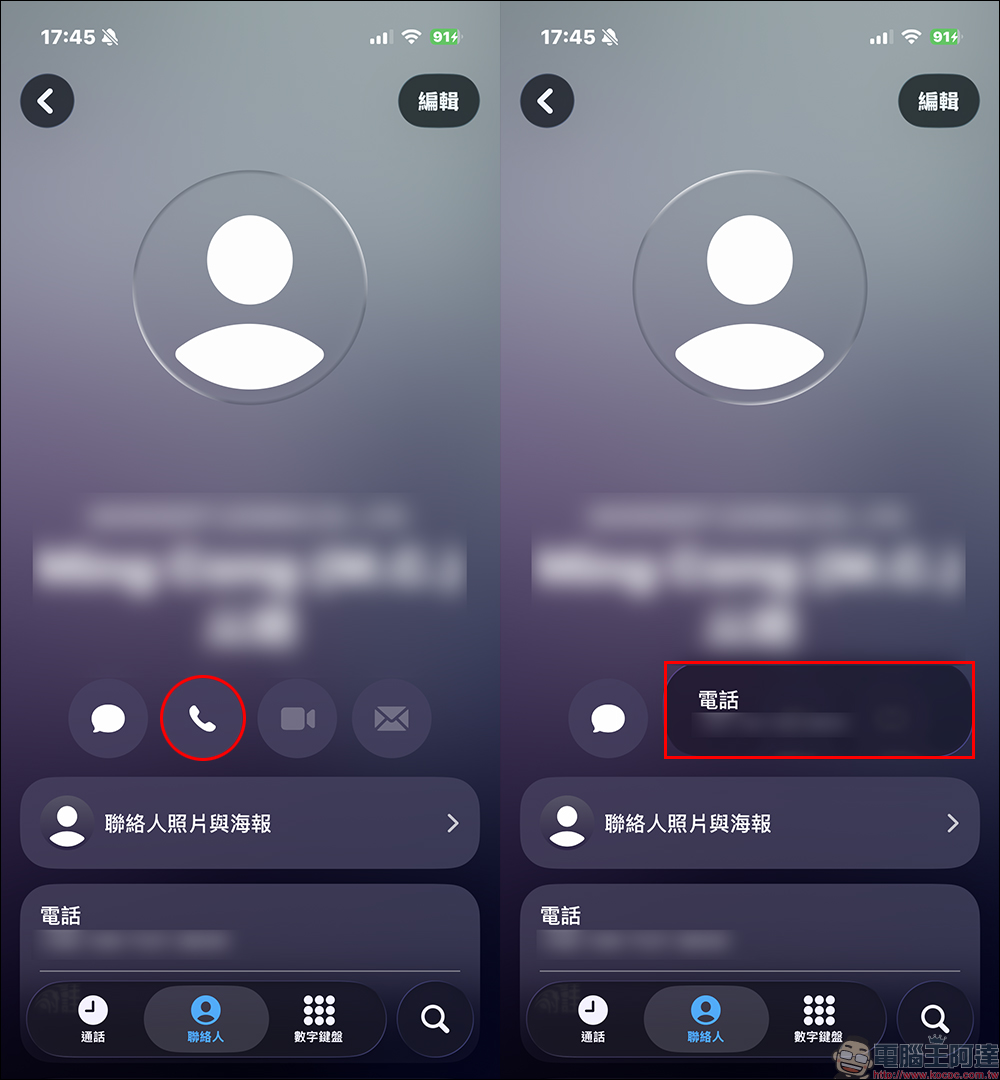
2. Determine from the contact person’s dialing method
Open Contacts and long press the “Phone” icon. If only the “Mobile Phone” option pops up, it means that the call in front of you will be connected as a paid ordinary call.
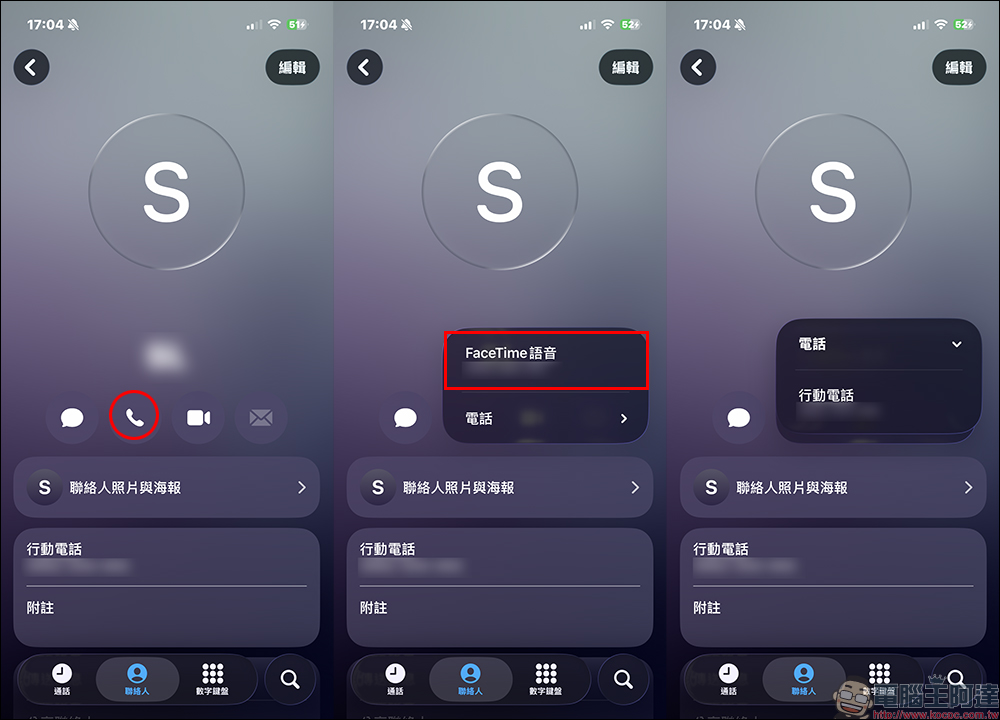
However, if you press and hold the call button and see “FaceTime Voice”, it means that this contact can make free Internet calls through “FaceTime Voice”. If you are worried about dialing by mistake, you can also press and hold to select the call method to confirm. After long pressing the call button, you can see that in addition to the “FaceTime Voice” option, the “Phone” expansion below will be the normal mobile phone call method. If you sometimes want to contact directly through a normal mobile phone call instead of through FaceTime, you can also choose here.
Are there any charges for FaceTime video calls?
Generally speaking, the video call itself does not incur phone charges. But the only thing to note is that if you don’t have Wi-Fi connection, FaceTime will consume a lot of 4G/5G data. Therefore, if you are not all-you-can-eat, using video chat may speed up the consumption of your network data, but there will be no additional “call charges”.
Conclusion
The iOS 26 update problem may seem small, but its impact is very large. As long as the default calling app is reset by the system, your iPhone will silently start dialing from a regular paid phone, but you will think you are using free FaceTime. As long as you check the settings every 30 seconds, you can avoid unnecessary costs and ensure that you can still enjoy high-quality and free FaceTime voice calls in your daily calls. It is recommended that you pick up your phone and check it now, it will be much better than regretting it when the bill comes.
Of course, in addition to FaceTime voice calls, if you are worried about pressing the wrong button with your “handicapped hand”, you can also choose to contact the other party through LINE free voice calls.
Further reading:
Source: KOCPC Chinese