


To help Gemini grow, Google has been integrating AI features into various services under its umbrella, and for Gemini itself, Google has also been actively adding more attractive new features. Now, Gemini has finally added the ability to upload and analyze audio files. This new feature can transcribe, summarize, and extract key details from audio files in common formats such as MP3, M4A, and WAV.

Gemini can now analyze your audio files.
The new audio file analysis feature is now available on Android, iOS, and web. You can access it through the “+” menu in the Gemini mobile app or the “Upload file” option on the web. Simply select an audio file from your device, and it will analyze the content you upload, making it easy to find specific details within—whether it’s a recorded meeting, interview, lecture, or even personal voice memos.
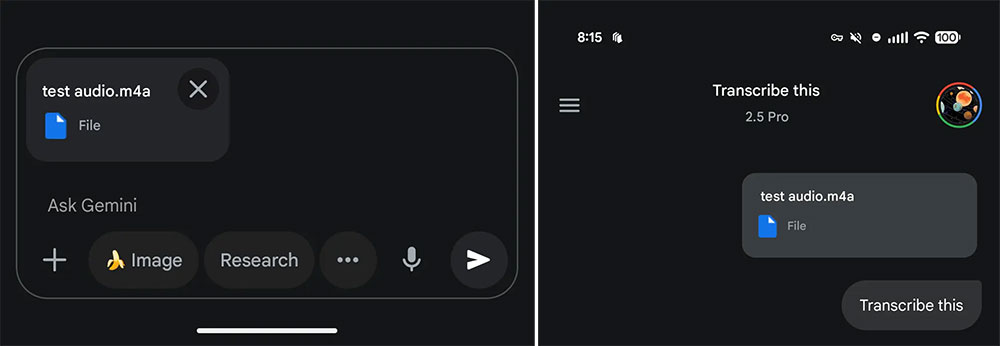
Unfortunately, the new transcription service has tiered limits, with free users and paid subscribers facing different restrictions. Free users can upload and analyze audio up to a total length of 10 minutes. That may not seem like much, but compared to other free transcription services, Google is already quite generous. The time limit isn’t the only thing to watch out for. By default, you can upload up to 10 files of any supported format in a single command, including code folders with up to 5,000 files, GitHub repositories, and up to 10 ZIP files. Audio updates won’t expand this limit, but they do count toward the 10 files you can upload at once.
After uploading an audio file, Gemini can do more than just convert it to text. Users can input commands asking the AI to summarize key points, identify different speakers, or even extract specific items or content. This can turn raw audio files into structured, searchable, and highly useful files. If you’re using it for transcription, it’s recommended to hand the script to Gemini and ask whether there’s any content that isn’t in the audio file. This is to guard against the AI making mistakes at any point, since 10 minutes to 3 hours is a long time for any AI. You shouldn’t trust it wholeheartedly; instead, develop the habit of reviewing repeatedly.

For advanced users and professionals who need broader transcription capabilities, Google offers more generous limits. Google AI Pro or Google AI Ultra subscribers can upload up to 3 hours of audio. This is a significant expansion, making the service highly suitable for transcribing long-form content such as podcasts, full interviews, or workshops. The new feature can save you a lot of time—drop a YouTube link into Gemini and quickly locate the exact moment you’re looking for in a video up to an hour long. Gemini is very good at tracking what happens in video links, so the audio upgrade could be very practical for users.
Editor’s note: You can actually also use the free AI STUDIO for audio file identification; see the link below for how.
Source: KOCPC Chinese