


In life, we often receive calls from strange or unknown numbers.incoming call,Although Whoscall and the like App It’s very useful, and it will indicate which company it is from in advance, but it is useless if the number is unknown, and many people will choose not to answer the call. Although most of the time it won’t happen if you don’t answer, you may still worry, what if it happens to be something important? Newly added “iOS 26 The “call filtering” function can fundamentally solve this problem.
iOS 26 call filtering is a “call screening” function. As long as it is turned on, when the call is not from a contact,iPhone They will help you check first and ask who the other party is? What to do? And provide this information to you so that you know in advance whether to answer the call. This function is turned off by default, but it is recommended that everyone turn it on, and then turn it off when you go abroad.
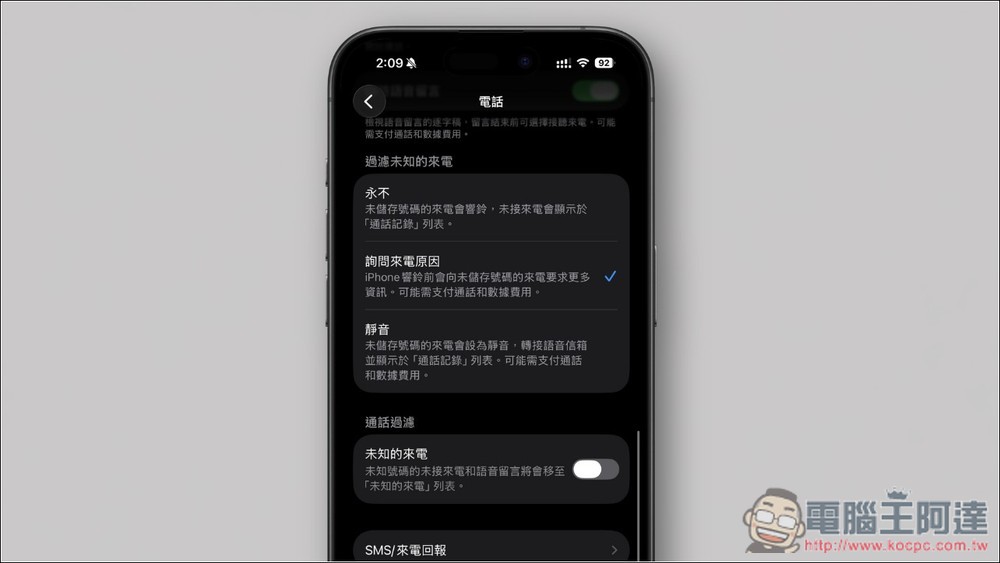
How does call filtering work in iOS 26?
When you receive an unknown call from someone you are not a contact with, you will not hear a ring tone immediately. Instead, the iPhone will automatically perform a call screening process. Here is the operation process:
- The system automatically picks up: When receiving an unknown call, the system will answer the call for you before you do.
- Siri voice query: would consist of a sounding like Siri ofvoice assistantAsk the other party questions, such as: “Who are you? What is the reason for the call?”
- Instant speech transcription: The caller’s reply is instantly transcribed into text and displayed directly on your iPhone lock screen.
- It’s up to you whether to pick up or not: By reading the text on the screen, you will have a clear idea of the caller’s identity and intent. Then, you can choose whether to answer the call, hang up directly, or even ask Siri to convey an “It’s not convenient right now” message, all without having to talk to the other party.
How to turn on iOS 26 call filtering function? Teach you step by step settings
Enabling this handy feature is easy and can be done in just a few steps.
1. Go to “Phone” settings
First, open the iPhone Settings App, scroll down to enter “App”, and then find the “Phone” option. You can also enter “phone” directly into the search:
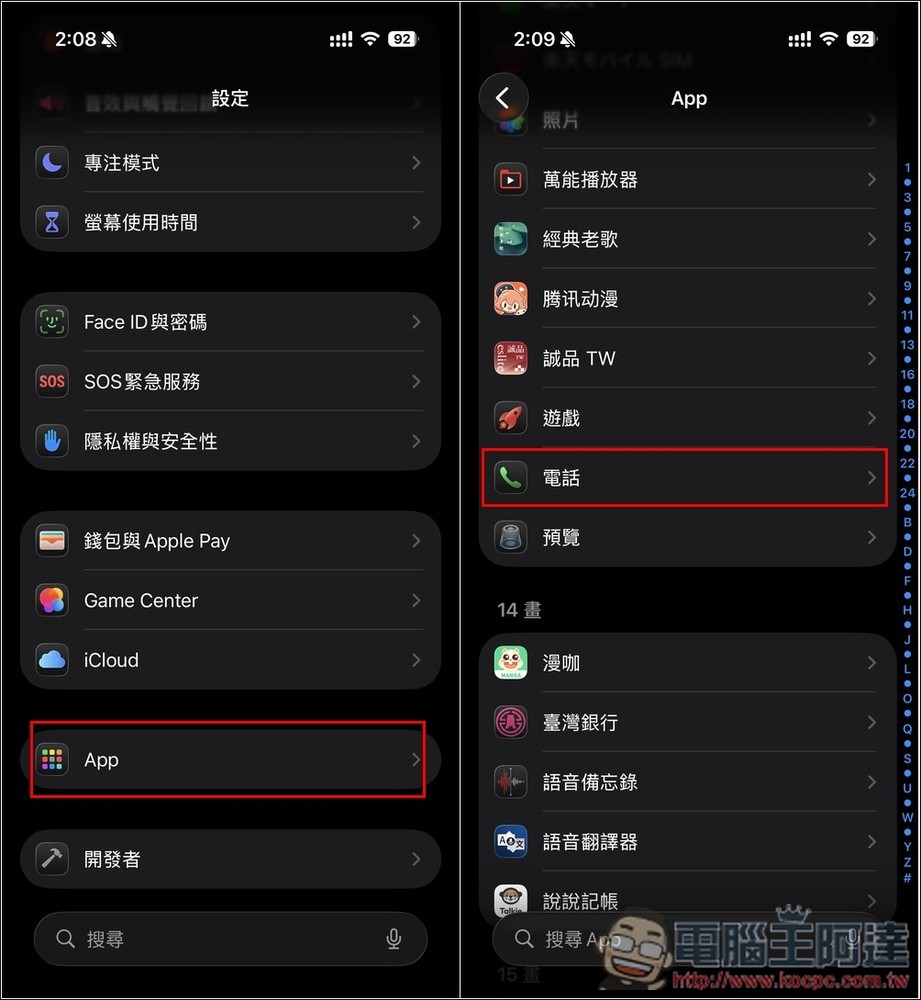
2. Find the “Filter unknown calls” option
In the “Phone” settings page, scroll down and you will see a new option list “Filter Unknown Calls”:
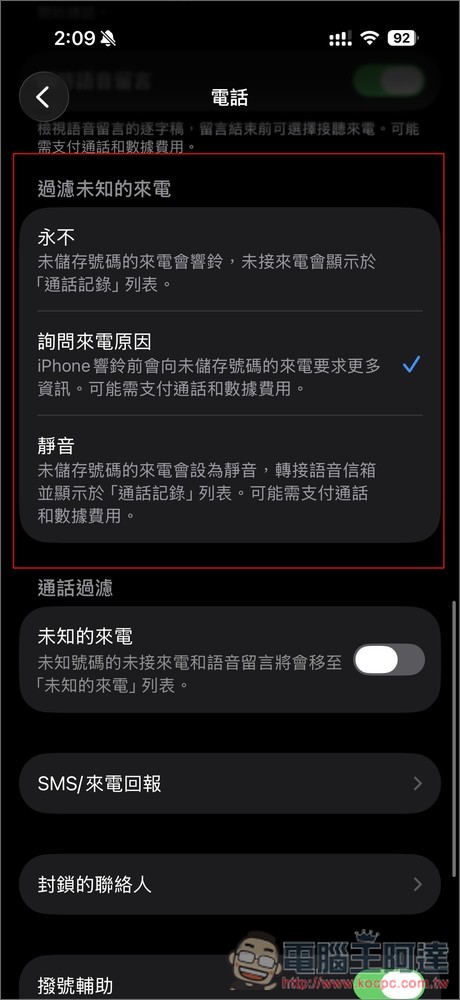
3. Select “Ask for the reason for the call”
“Filter Unknown Calls” has three options, including never, ask for the reason for the call, and mute. Please select “Ask for the reason for the call” so that the iPhone will ask the other party for some important information before it rings.
If you are sure you don’t want to receive unknown calls, you can also set it to mute, so that when there is an incoming call from an unsaved number, the ring will not ring (set to mute) and you will no longer be disturbed.
What are the benefits of enabling call filtering?
There are many benefits to enabling call filtering, and the following are the most common scenarios.
1. Filter out annoying advertising promotions
When receiving sales or advertising calls, they usually don’t respond to Siri’s questions and most hang up. You won’t even be notified, making for perfect filtering.
Of course, you may think that the other party can also tell us false content and trick us into picking up the phone first, but I don’t think this does any good to the other party. After we know that we have been deceived, we are even less likely to listen to his sales pitch.
2. Never miss important unknown calls
Some unknown calls may really have important things to notify you, so you don’t have to worry about missing them.
For example, when a text like “Hello, I am the driver of Black Cat Delivery and I have your package” or “This is XX restaurant, I would like to confirm your reservation” is displayed on the screen, you can answer the call with confidence.
3. In situations where it is inconvenient to answer the phone, first know whether the call is important or not.
In meetings, libraries, or other situations where it is not convenient to answer the phone right away, you can first understand the purpose of the call through the transcribed text on the screen. You do not have to rush to find a place to answer the phone or hang up directly, giving you more time to respond.
Is there any additional charge for the “Call Filtering” function?
The description says “call or data charges may apply.” Many people may be worried, is there an additional charge? Simply put: no.
The “Call Filtering” function is like a voicemail. The call charges incurred during the message process are the same as ordinary calls, and are borne by the caller, not the recipient.
However, if it is an international call, it will be charged according to the international call rate of the telecommunications operator, so it is recommended to temporarily turn off this function when going abroad.
Summarize
The “call filtering” function of iOS 26 can be said to be the most practical update in the phone function of iPhone in recent years. You don’t have to worry about being harassed by sales pitches, and you won’t miss important calls, so it is highly recommended that everyone turn it on.
Source: KOCPC Chinese