


Modern people are looking at their mobile phones all the time. Whether they are browsing social platforms, checking emails or understanding current news and current affairs, a lot of screen time involves the word “reading”. For some people, reading while riding in a car may be a problem. Staring at a smartphone in a moving vehicle can cause motion sickness, especially when reading text, making you physically uncomfortable and, in severe cases, preventing you from using your phone.

Feeling motion sick while reading on your iPhone during your commute? This hidden feature may help
Starting in 2024, Apple has added a feature to the iPhone that is still little-known: vehicle dynamics alerts. The Vehicle Dynamic Alert feature debuted in iOS 18 and can also be used with iPad, and will soon be launched on MacBook and other macOS devices. Through a simple function and a few moving points, many people who suffer from motion sickness can work smoothly in the car. This accessibility setting will sense if you’re in a moving vehicle and activate automatically, displaying a moving black dot on the screen. These superimposed black dots can help you reduce the feeling of motion sickness when using your iPhone in the car, or even make it disappear completely.
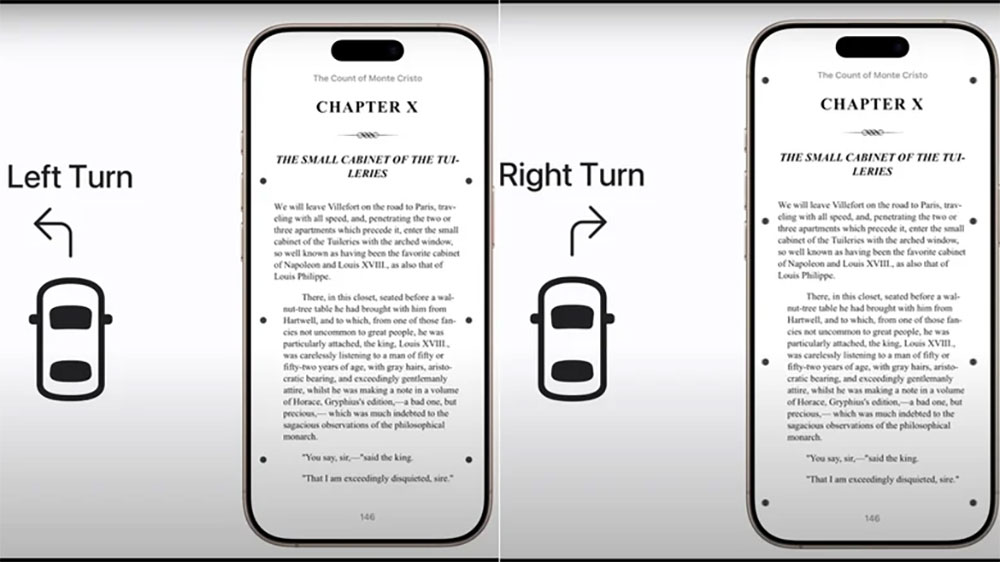
Motion sickness caused by mobile phones is not a psychological effect, there is a scientific basis behind it. Your body is stationary in the car, but everything around you is moving, which sends conflicting signals to your brain about moving and not moving. This confusion of sensory input may cause nausea because it interferes with balance. This is the same principle behind motion sickness and seasickness, which is why virtual reality is used. Additionally, reading text or viewing static images on your phone may exacerbate motion sickness because your eyes are focused on stationary objects while buildings, people, and other vehicles move quickly in your peripheral vision (or if you’re constantly looking back and forth between your phone and the scenery). On iPhone, you can turn on Vehicle Motion Alert manually or set it to start automatically when the device detects you’re in a moving vehicle using built-in sensors such as accelerometers and gyroscopes.

When the vehicle dynamics alert is activated, a series of black dots appear on the screen, located near the edges. The dots are superimposed on whatever you’re looking at, are very small and not that intrusive. What’s more, the dots move, roughly mimicking the motion of the vehicle you’re in, moving up, down, left and right as the car accelerates, brakes and turns. When you view static text and images on your phone, these animated dots remind your brain that your body is actually moving. As Apple puts it, the black dots represent “changes in vehicle motion,” helping to reduce sensory conflict without interfering with the main content.
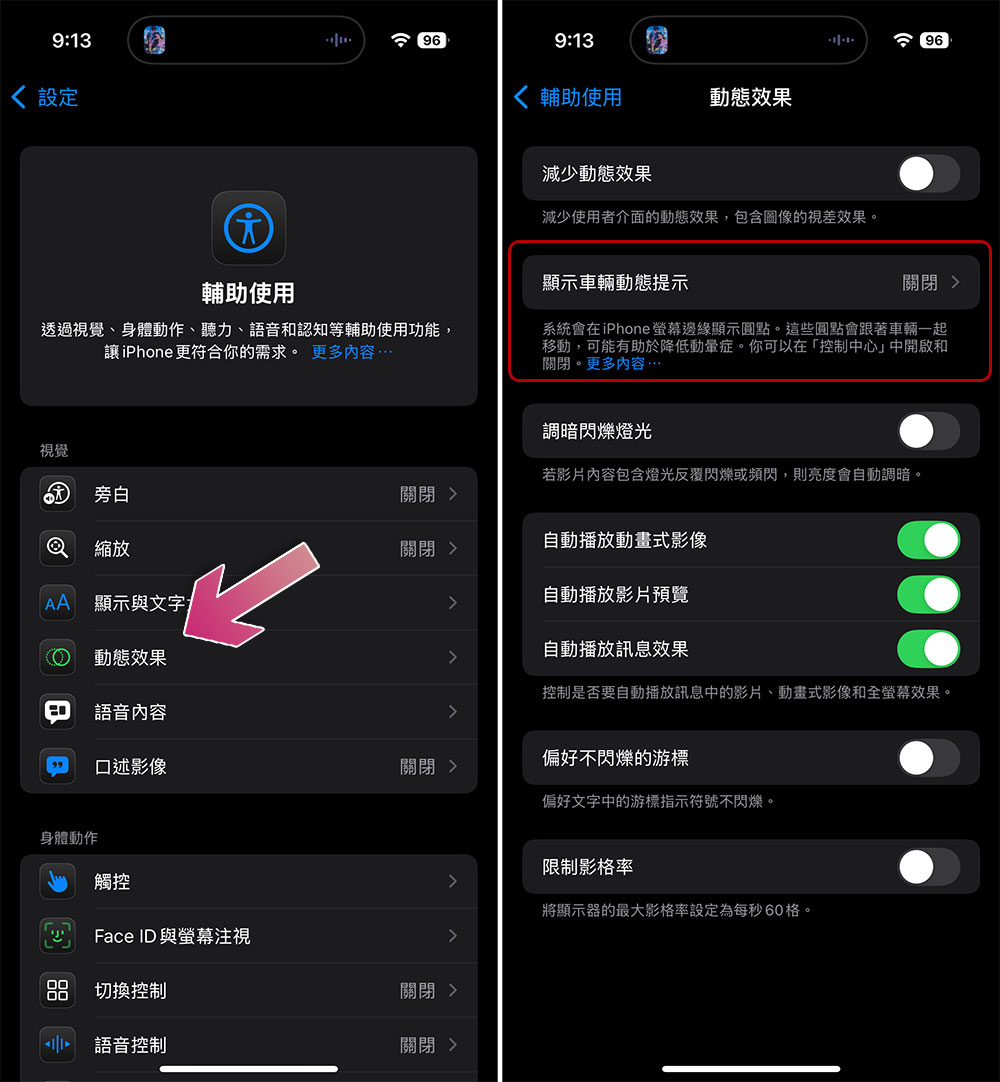
Because Vehicle Dynamic Alerts were launched on iOS 18, it is only available on devices that are compatible with the operating system and does not work on iPhone X or any device older than iPhone X. Here’s how to enable Vehicle Dynamic Alerts on iPhone:
- Open the Settings app and click “Accessibility”.
- Click “Dynamic Effects”.
- Select “Show Vehicle Dynamic Tips”.
- This function is turned off by default. If you want it to be turned on immediately and permanently, even if you are not riding in the car, please select “Manual”; if you only want these points to appear in the driving vehicle, please select “Auto”.
While most users on Reddit say the feature works and is amazing, everyone’s brain works differently, so the feature won’t work for everyone, and even if it does, it will work to varying degrees. Also, if you are a driver, please remember not to use your mobile phone while driving.
Source: KOCPC Chinese