


It is much easier to invest in foreign stock markets now than before. Many people should be like me. In addition to Taiwan stocks, they also invest in US stocks, Japanese stocks, Chinese and Hong Kong stocks, and even cryptocurrencies. And you must have encountered a similar situation. Each account is separate, so it is difficult to track investment performance. I recently experienced this Stocker PRO, and I have to say that it is really useful.
The stock markets of major countries are supported. After importing your own investment records (both manual input and imported data are supported), you can easily track the performance of all stock markets. It also provides automatic dividend and management functions.
What’s even better is that Stocker PRO also has built-in AI intelligent analysis functions to help us implement investment strategies, such as obtaining analysis reports on the current investment portfolio to gain a more comprehensive understanding of the stock prospects, technical aspects, and potential risks of investment. Of course, you can also ask any investment advice you want to know. I highly recommend everyone to try it. The following 6 points are very good features of Stocker PRO.
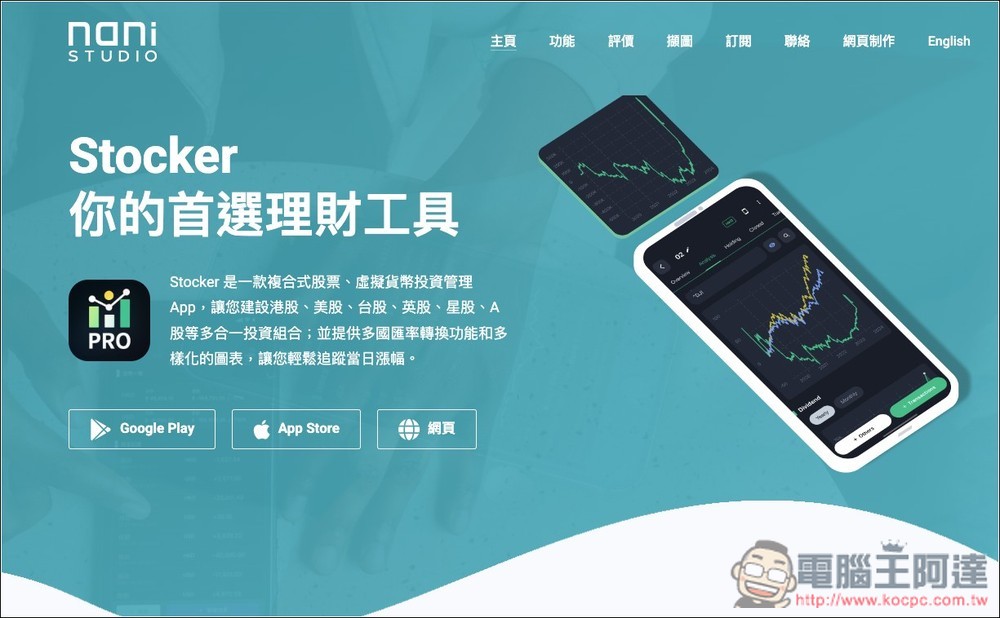
1. Easily track the stock market performance of various countries and understand your current total assets.
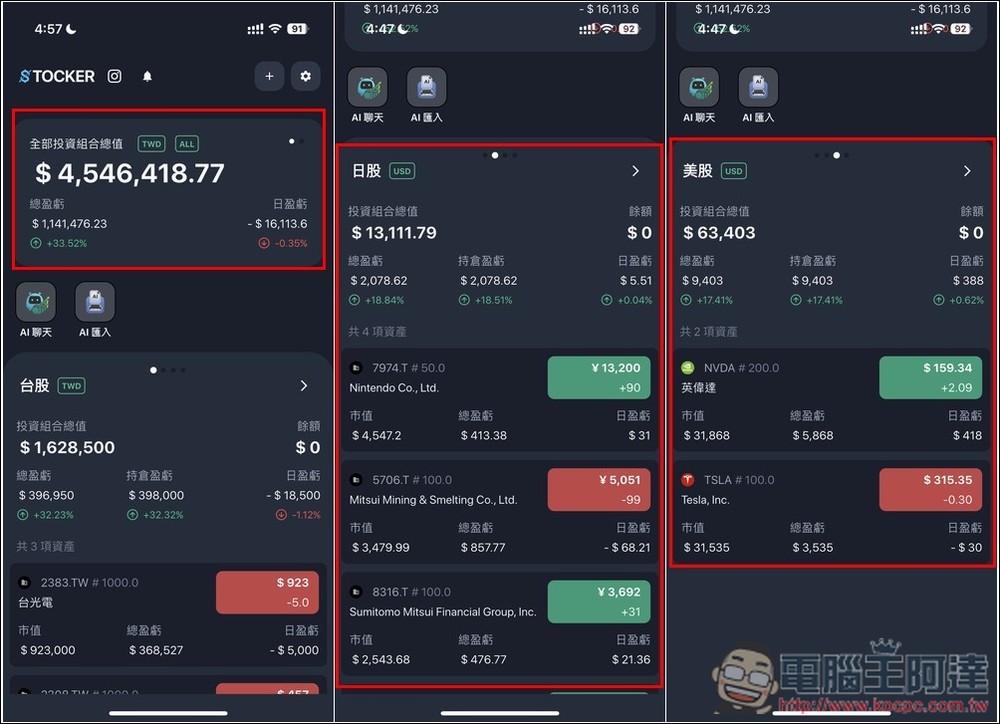
This is one of my favorite features of Stocker PRO. It supports many stock markets and asset types, and each portfolio can track performance separately. It also counts the total value of all assets for easy tracking, and updates price changes in real time. I have tested that when Taiwanese stocks, US stocks, and Japanese stocks open, they will automatically update, which is quite good.
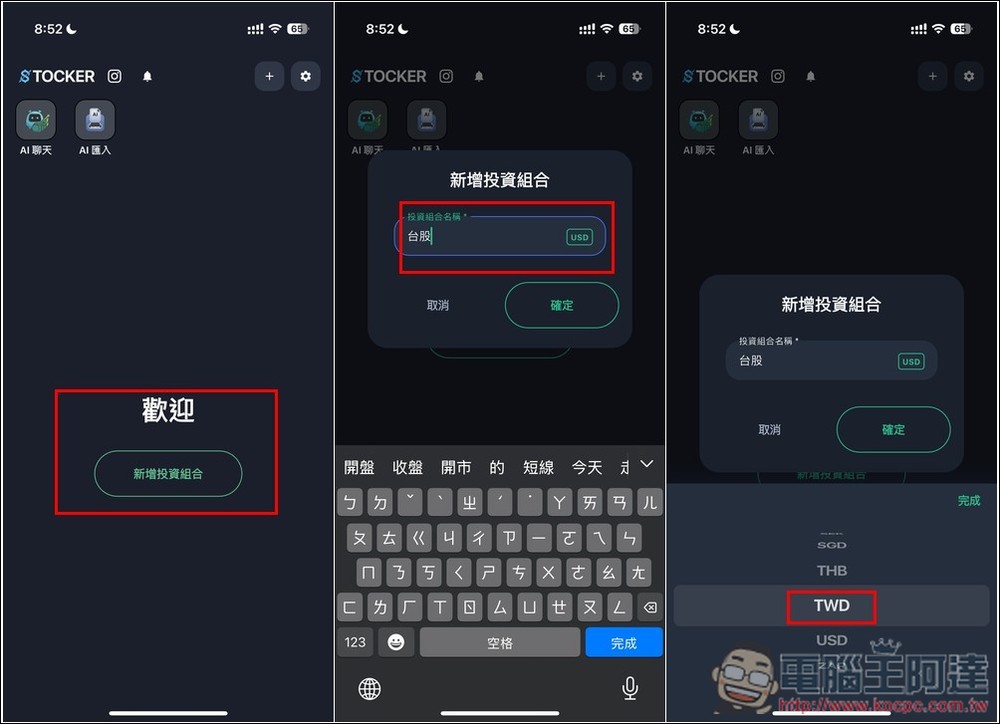
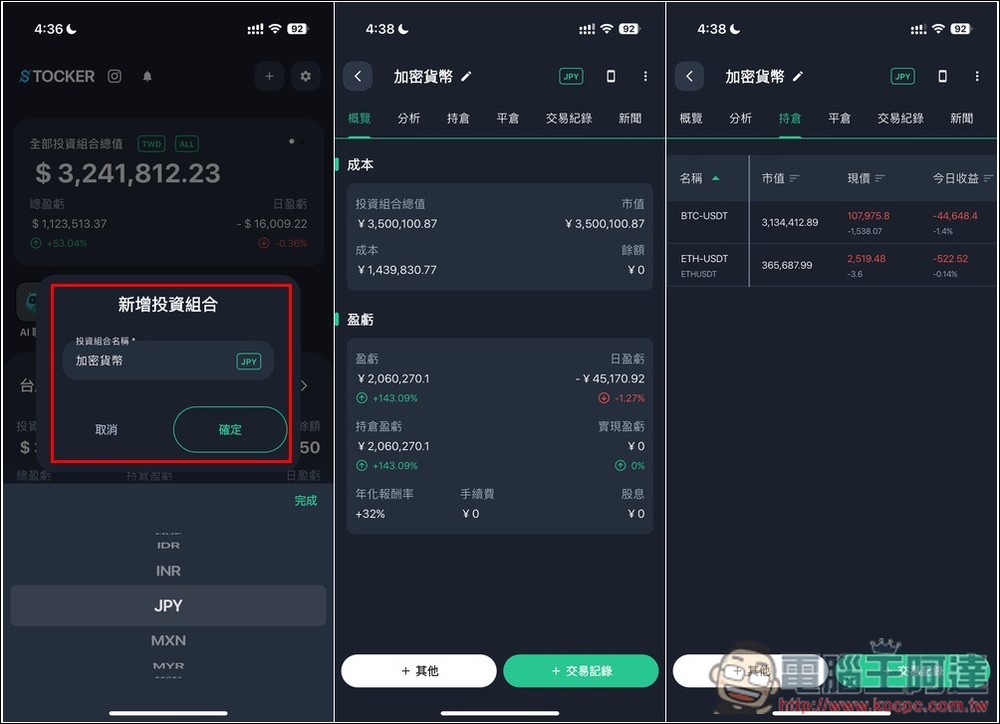
When adding a new investment portfolio, you can not only customize the name, but also set the currency value. Therefore, after I set the Taiwan stock investment portfolio to TWD, US stocks USD, and Japanese stocks JPY, I can easily track the correct performance amount of each investment portfolio. I have used other similar apps before. The unit can only be set in USD, and all I see is the amount after the exchange rate conversion:
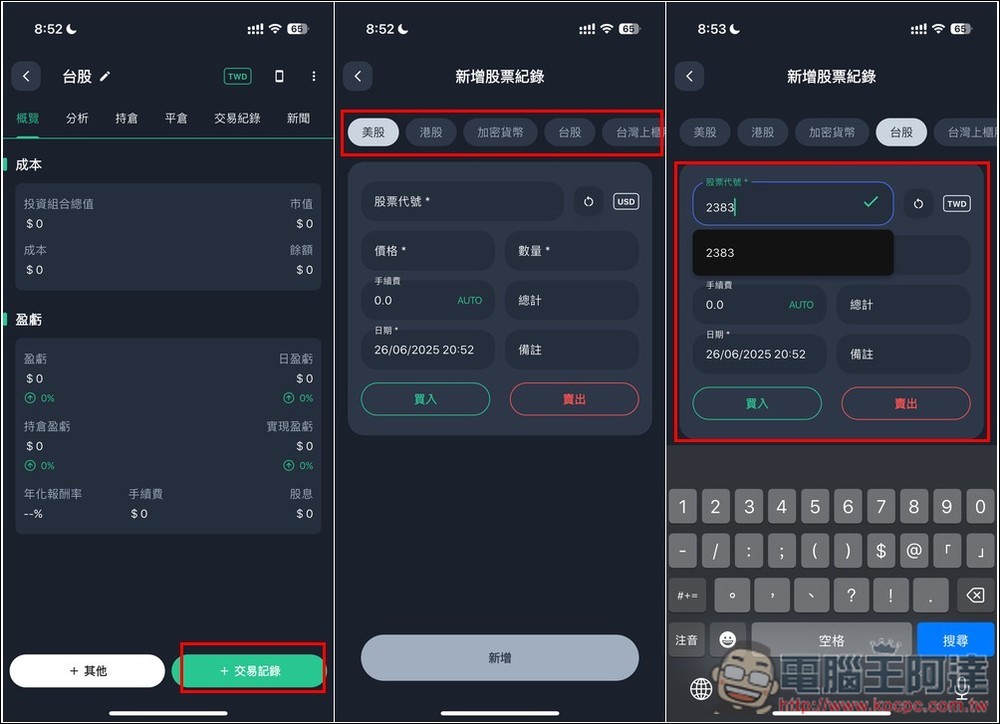
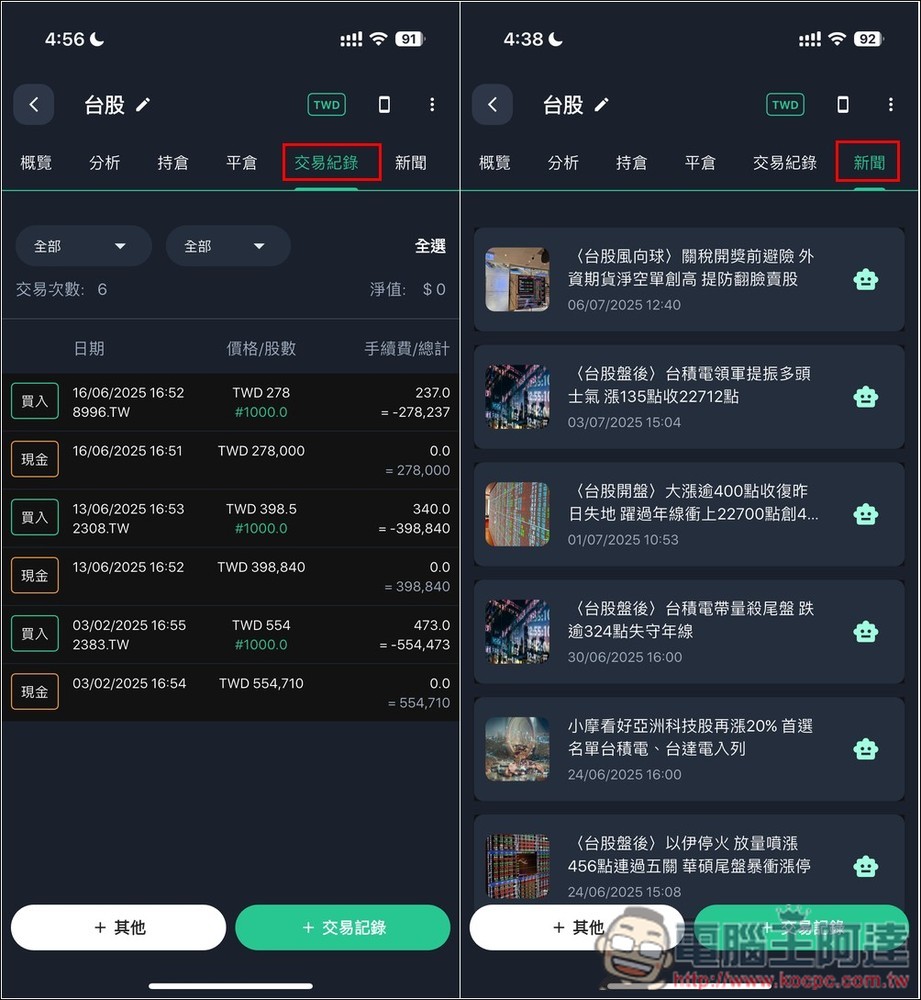
After adding it, click “Transaction Record” to add the stock. You can select the market at the top. My investment portfolio is Taiwan stocks, so I selected Taiwan stocks, and then enter the stock code to find:
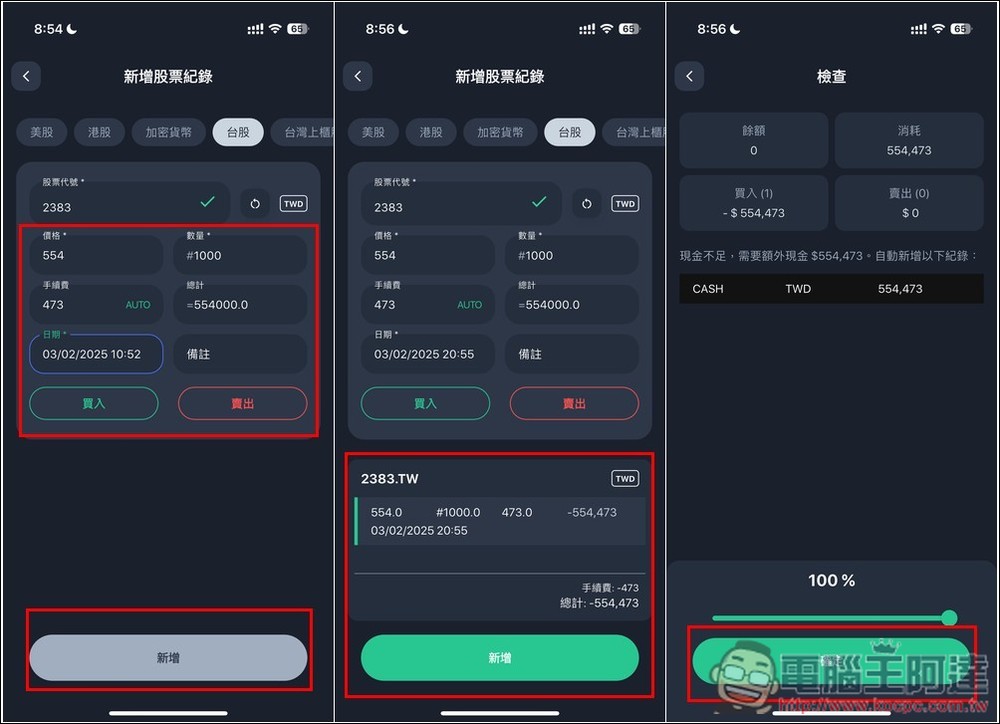
Next, enter the purchase price, quantity (one Taiwan stock is 1,000 shares, so I set 1,000), and the handling fee, and the total amount will be automatically calculated. After selecting the date, click “Add” below, and you will be asked to confirm whether the content is correct. If there is no problem, click Add again and you will enter the check page. Press Confirm to complete:
Then add the stocks you have invested in in Taiwan one by one (if you don’t want to enter them manually, Stocker PRO also provides an AI import function, which will be introduced below). The “Positions” page can track the market price, current price, and today’s earnings of each stock. The “News” page allows you to read the latest news about these stocks, but not every platform collects it, so it is better to read it online yourself:
In addition, I also invest in Bitcoin and Ethereum. Most performance management apps can only set USD. However, I purchased through a Japanese service provider and used JPY to trade in Japanese yen. It is inconvenient to only set USD. However, through Stocker PRO, I can set the cryptocurrency investment portfolio to JPY. In this way, I no longer have to convert by myself in the future, and I can immediately obtain the current yen price, which is very convenient:
After Taiwanese stocks, Japanese stocks, US stocks, and cryptocurrencies are all added, you can quickly browse the investment performance of each one by swiping left or right on the homepage. What’s more important is the “total value of all investment portfolios” at the top. Every time you open the app, you can immediately know the total value of all current investments, as well as the total profit and loss and daily profit and loss. Watching the total assets slowly increase, your mood will get better and better:
In addition, Stocker PRO can also add cash deposits on hand that have not yet been invested to the investment portfolio, making it easier for us to manage the total investment amount.
Go into the investment portfolio, press + Others on the left, there is a “Cash” function, fill in the amount in the “Amount” field, and you are done:
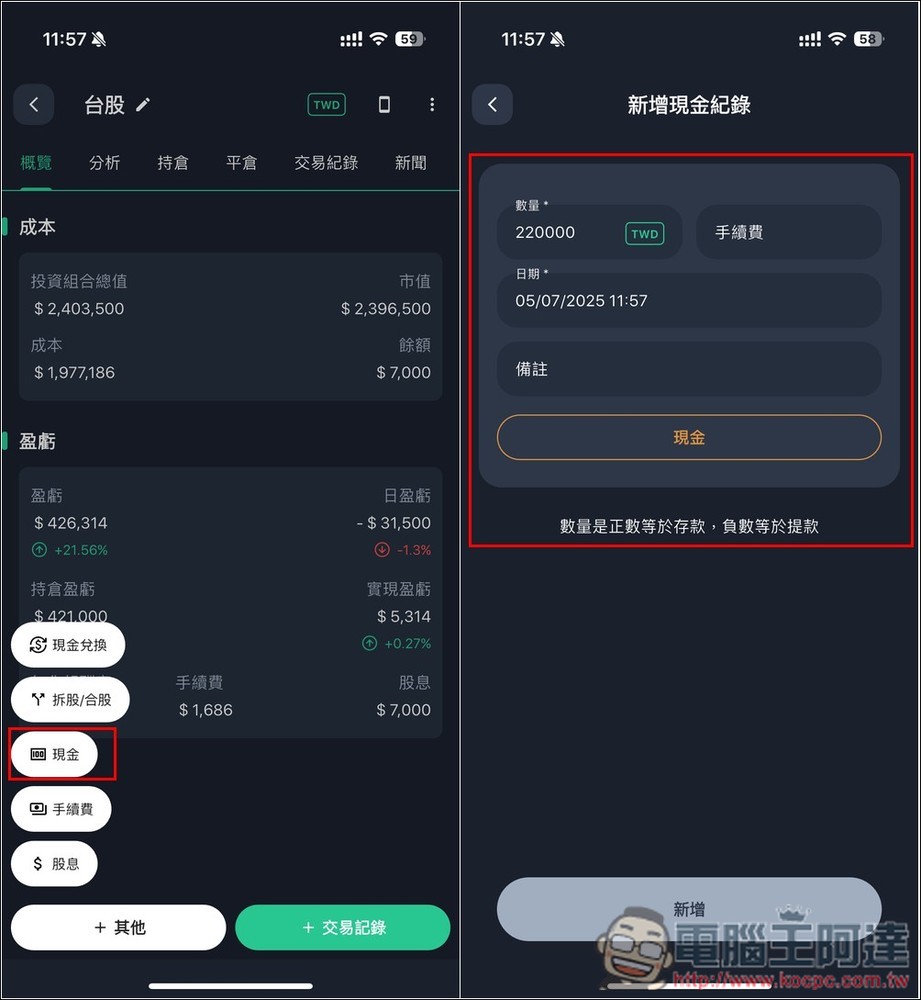
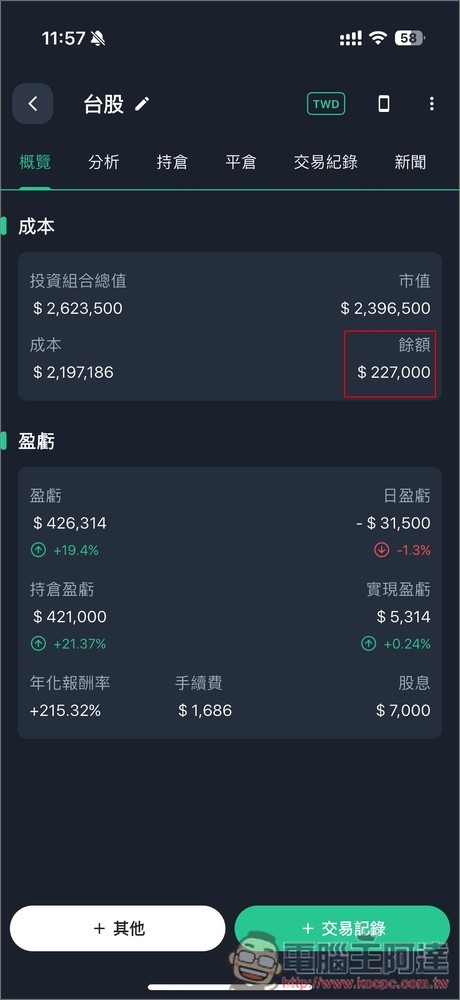
The cost balance in the overview is the cash that has not yet been invested. This cash will also be added to the “total investment portfolio”:
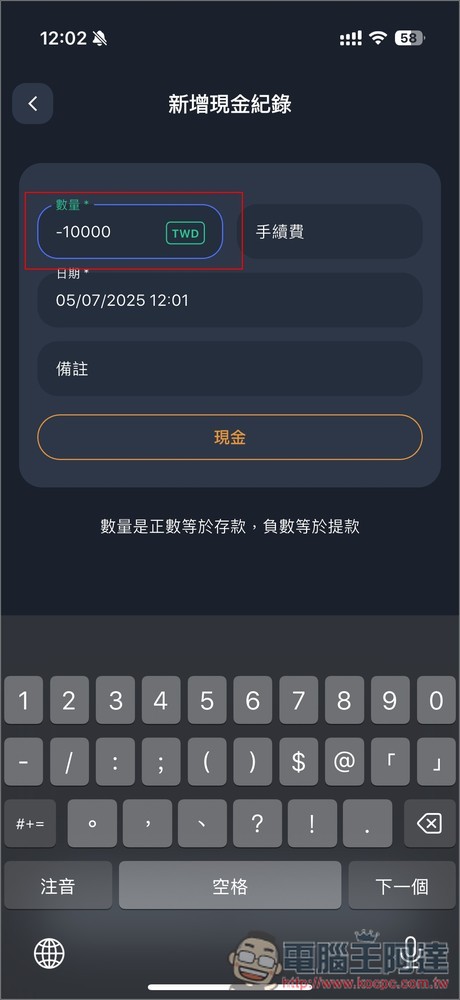
If you withdraw money for spending, you can also add a record in the “Cash” function and fill in the amount – a negative value. For example: if you withdraw 10,000 yuan, fill in -10,000, and this amount will be automatically deducted from the cost balance:
2. Supports one-click AI import function for reconciliation, eliminating the need to record transaction records yourself
For those who have many stocks on hand or those who frequently trade, manually entering them one by one is very time-consuming. Stocker PRO also has a data import function for lazy people. It not only supports Firstrade, Interactive, and Charles Schwab brokers, but also provides an AI intelligent import function. As long as you have a csv file of transaction records or statements, you can import it. The representative said that Taiwan’s brokers are no problem. I have tested KGI and the recognition is quite accurate.
The transaction records of KGI Securities are all in xls format. You can import the files by converting them to csv.
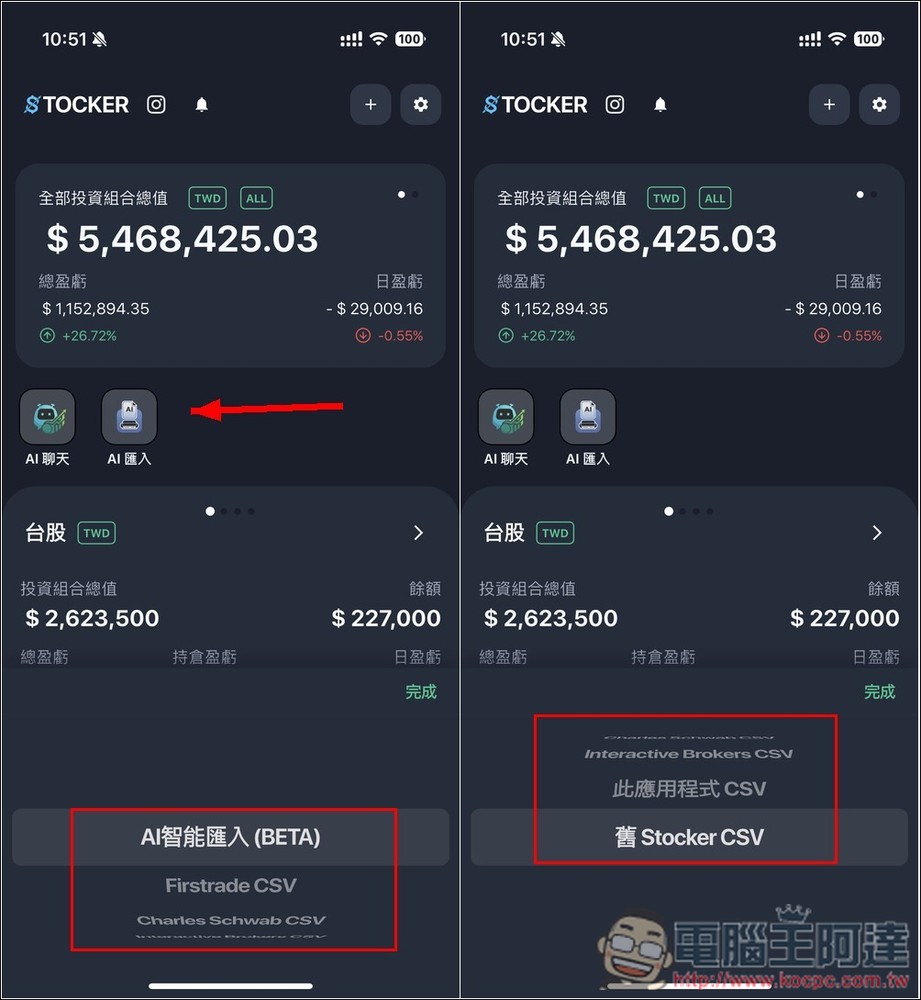
Press AI Import on the homepage, and the import option will pop up. If your broker is not on the list, use the first AI smart import:
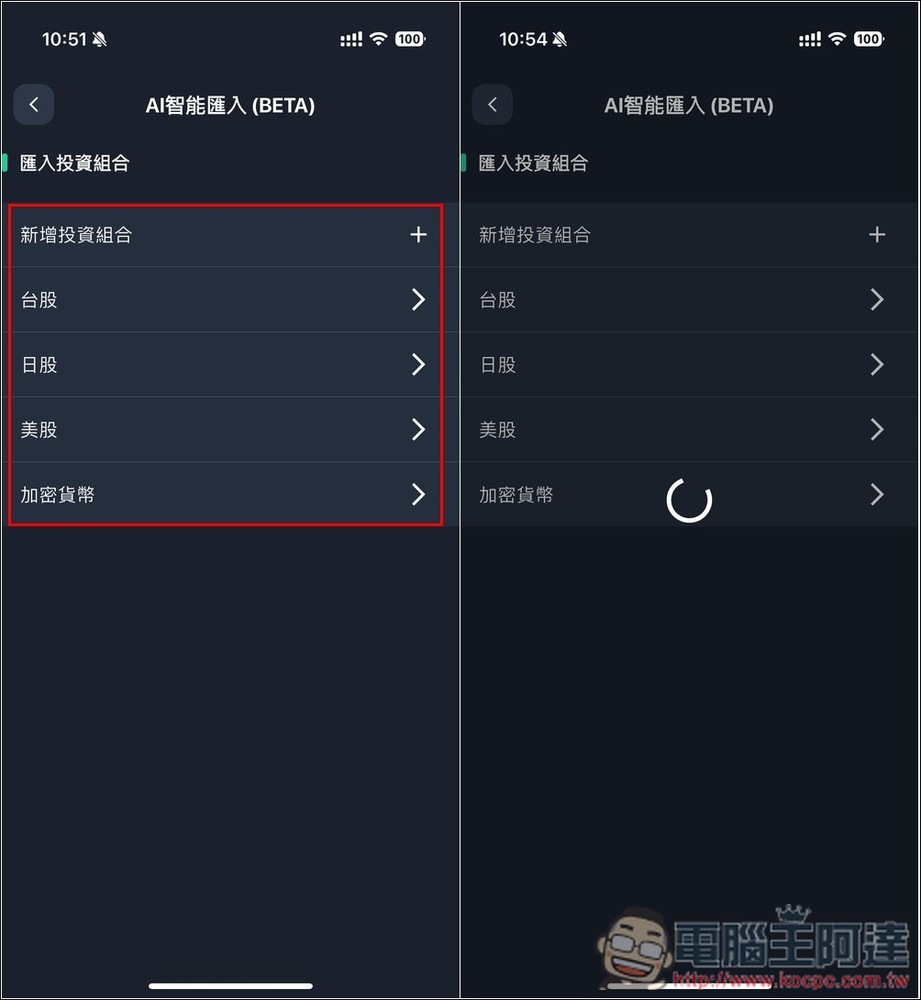
Set the investment portfolio you want to import, and then select the csv file. AI will start analysis. It will take a while. Sometimes it may happen that the data is not recognized after running. I encountered this once, but it was successful after re-importing:
After completion, the screen will list the AI recognition results. No problem, click “Add” and it will be imported into your investment portfolio. Afterwards, you can go into the transaction records of the portfolio and check whether everything has been transferred in:
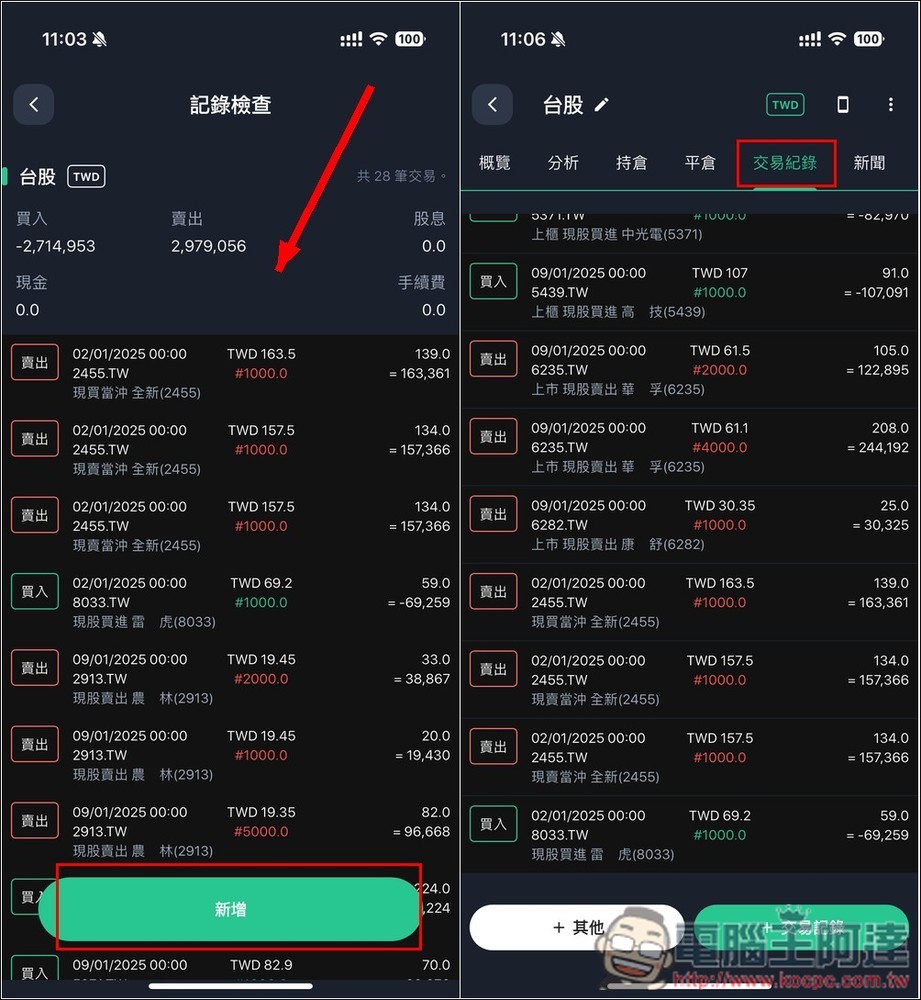
3. Manage the dividend income of all stocks without any burden through the automatic addition of dividends function
The dividend management function of Stocker PRO is also very easy to use. It has the function of automatically adding dividends and is supported by multiple stock markets. I have tried it on Taiwan stocks, US stocks and Japanese stocks. After opening it, when you receive dividends in the future, the system will automatically add transaction records for you. No manual input is required. It is super lazy.
In addition, the dividends received will also be added to the cost balance, which is the cash balance that has not yet been invested, so no additional additions are needed. The information page of the stock will also record the number of dividends received.
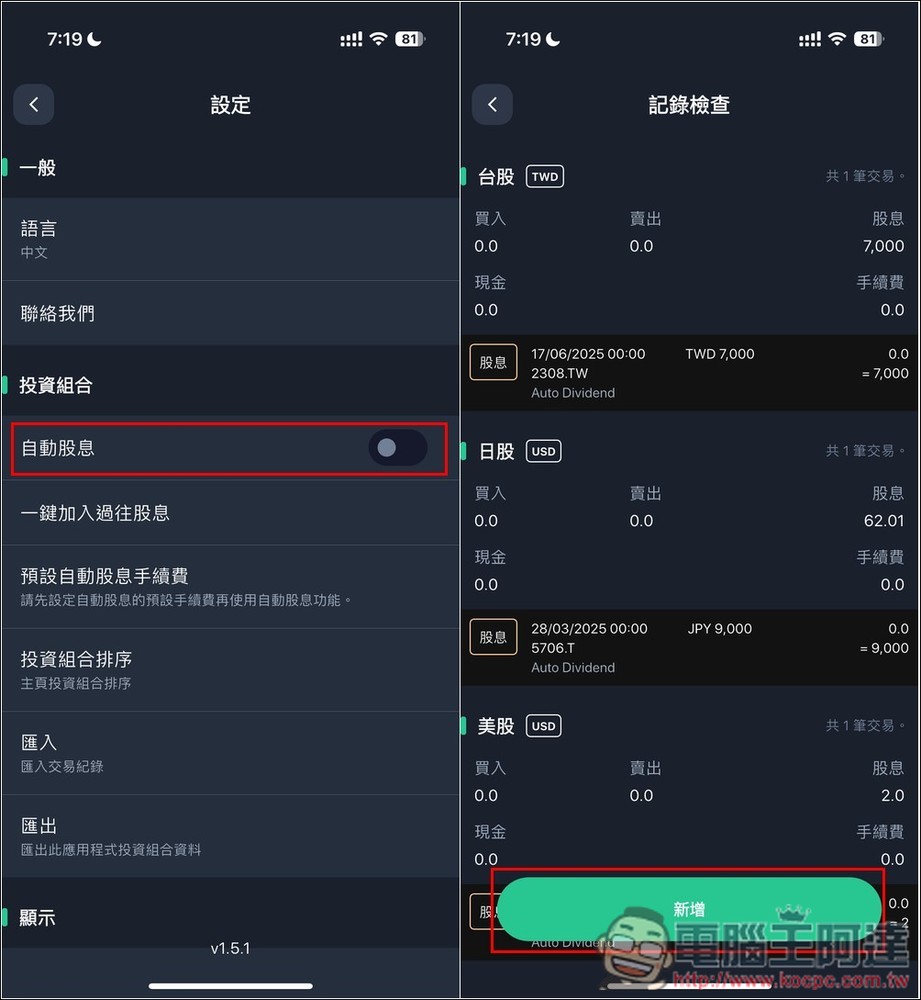
After entering the settings menu, you can see the “Auto Dividend” function. After it is turned on, the system will scan the stocks in the portfolio. If there are dividends issued after the purchase date, it will display the dividend detected. Click the button below to add it. After the automatic dividend function is turned on, future dividends will be added automatically, and you do not need to do it manually. There is also a “one-click addition of past dividends” function. If you only want to automatically add past dividends and enter them manually in the future, you can use this function:
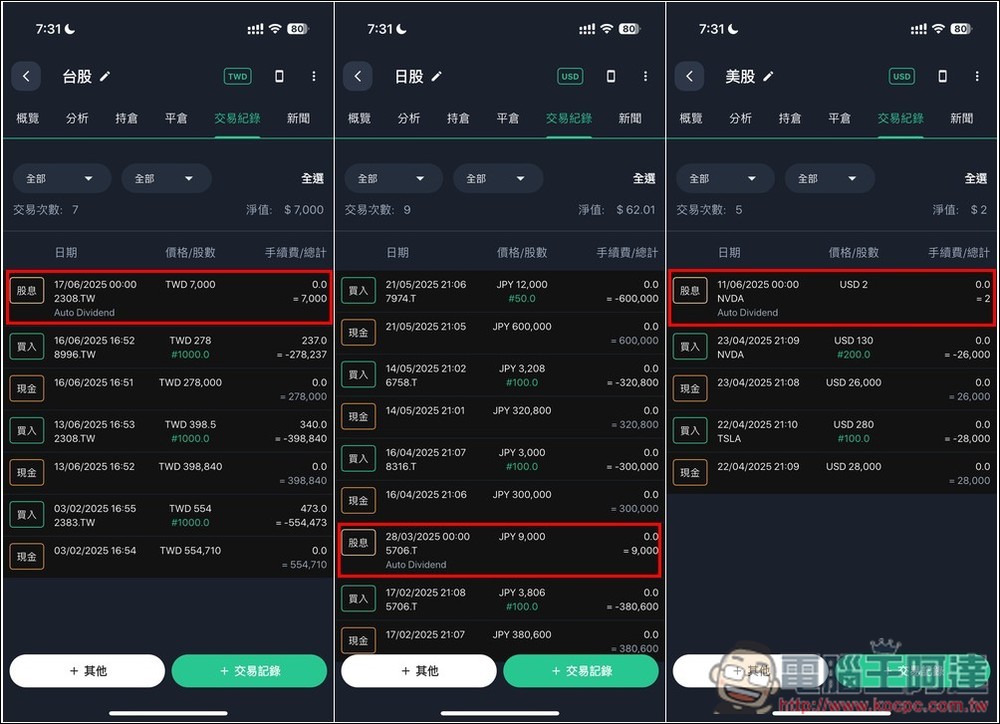
Then enter the transaction record of the investment portfolio and you will see the dividend. The automatic dividend will be marked Auto Dividend:
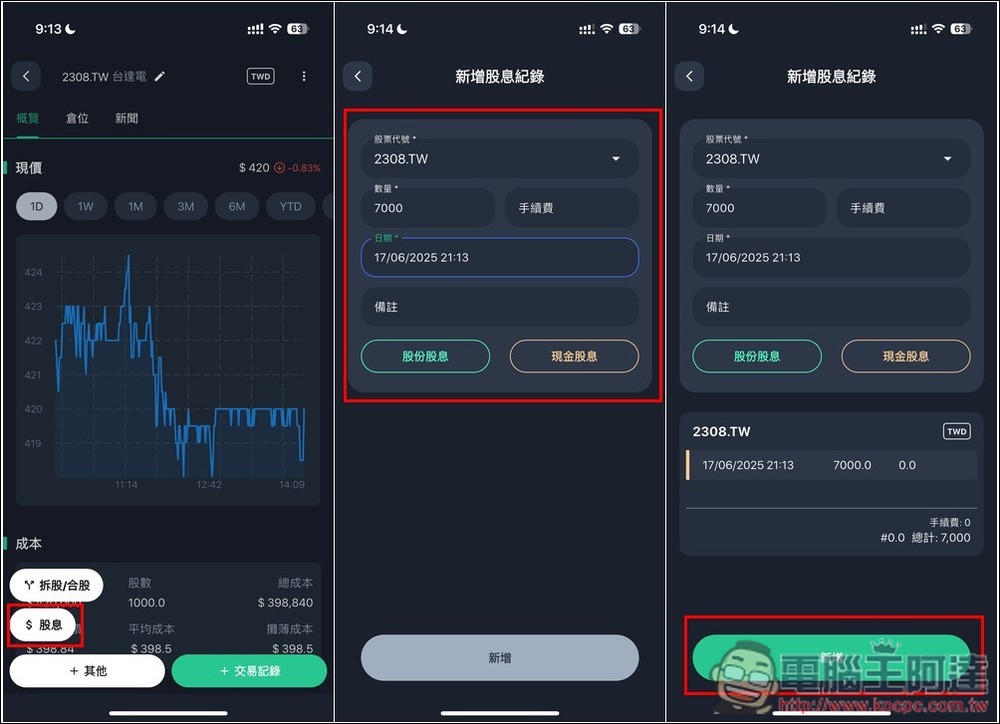
You can also enter dividends manually if the system does not automatically add them.
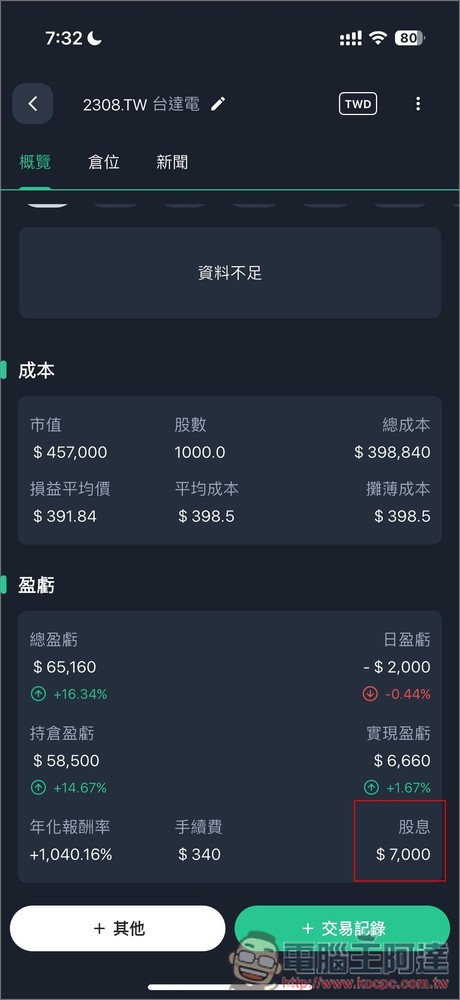
Enter the stock page. I’ll take Delta Electronics as an example. Press other functions to find “Dividends” and fill in the amount (quantity), handling fee, and date. Delta Electronics’ dividend this year is 7,000 yuan. It went ex-dividend on the 17th of last month. Then select “Share Dividends” or “Cash Dividends”:
After adding it, you can see the dividend income in the profit and loss item of the stock overview, where all past dividend income of this stock will be counted:
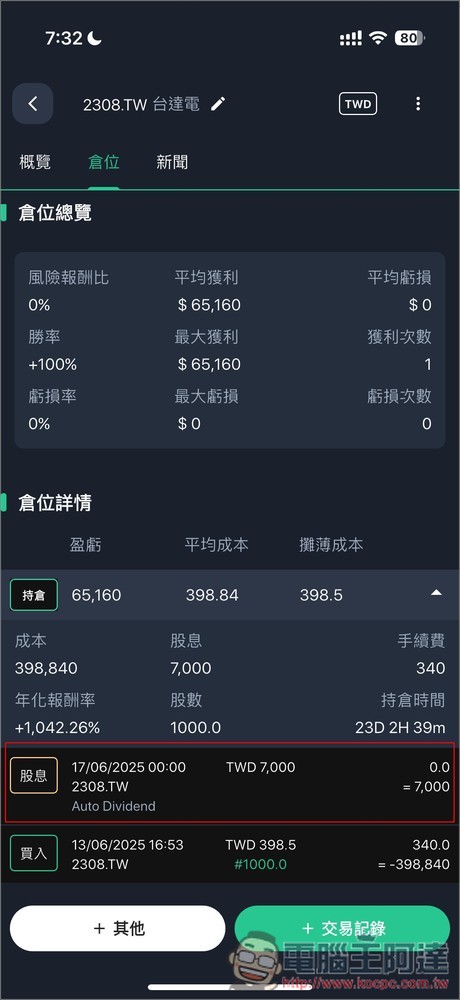
The details at the bottom of the position page will also record each dividend record:
4. Get all the performance, fees, and dividend income of the portfolio at a glance
The overview of Stocker PRO’s investment portfolio provides a lot of practical information. In addition to quickly knowing the total value, cost, and balance of the current investment portfolio, there are also “daily profit and loss”, “realized profit and loss”, “annualized rate of return”, “all fees spent”, and “total dividend income”:
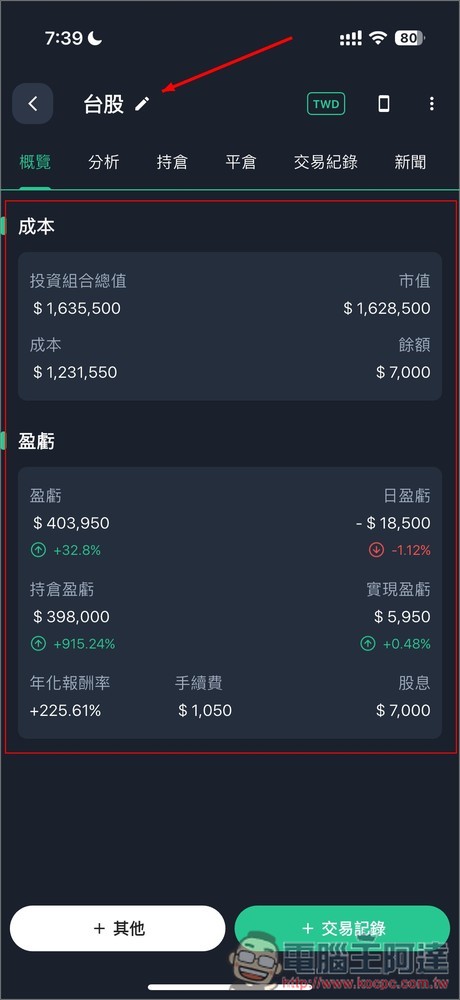
If you use a broker’s app, you have to query these information one by one. Stocker PRO displays these core information at once, which really saves a lot of trouble.
Among them, I think the handling fee is very important. The handling fee for each transaction is only tens or hundreds of yuan. Many people may think it is not a lot, but accumulated over a long period of time, coupled with frequent transactions, the total amount is quite amazing. With Stocker PRO, you can easily track it.
5. Compare your portfolio to the broader ETF index to see which one is better
Stocker PRO also allows us to easily compare the gap between the investment portfolio and the ETF market index to quickly understand whether there are any problems with our stock selection strategy and whether it can beat the ETF market index.
Go to the investment portfolio and open my Taiwan stocks. There is an analysis function at the bottom of the analysis page. After opening it, you can compare it with two stocks. I set 0051 and 006208. 0050 was split recently, so I chose 006208 instead:
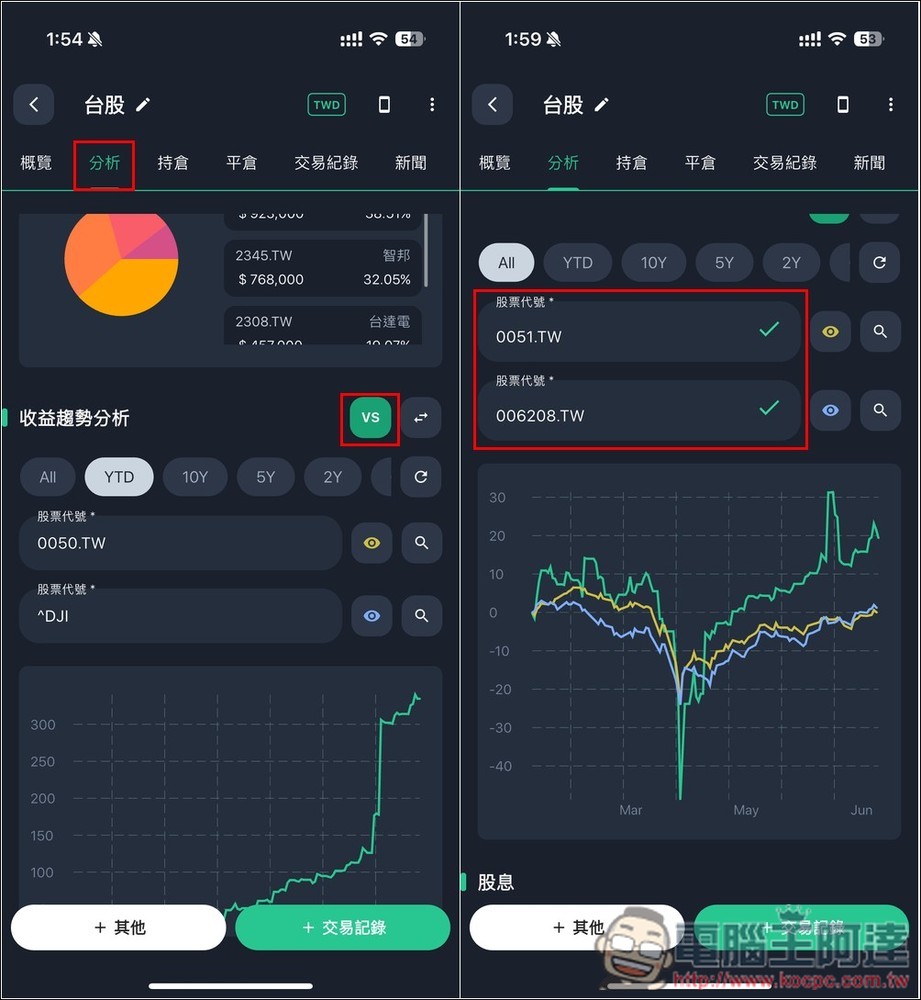
As you can see from the picture above, green is my Taiwan stock investment portfolio. Compared with the ETF broad market index (yellow 0051, blue 006208), only the April stock market crash was lower than the ETF, and the rest were ahead. Especially recently, the representative said that my stock selection was fine.
If yours is lower than the ETF broad market index, it means that your stock selection may need to be adjusted, or you may just buy ETFs directly.
6. Use AI intelligent analysis to obtain investment strategies
AI intelligent analysis is a very powerful function of Stocker PRO. You can ask it any investment questions, including investment strategies, fundamental analysis of the company, finding more investment targets, and analyzing the prospects of stocks in the current investment portfolio, etc. Even for people who do not understand technical aspects, you can directly ask AI to help you to easily understand the current strength and weakness of stocks.
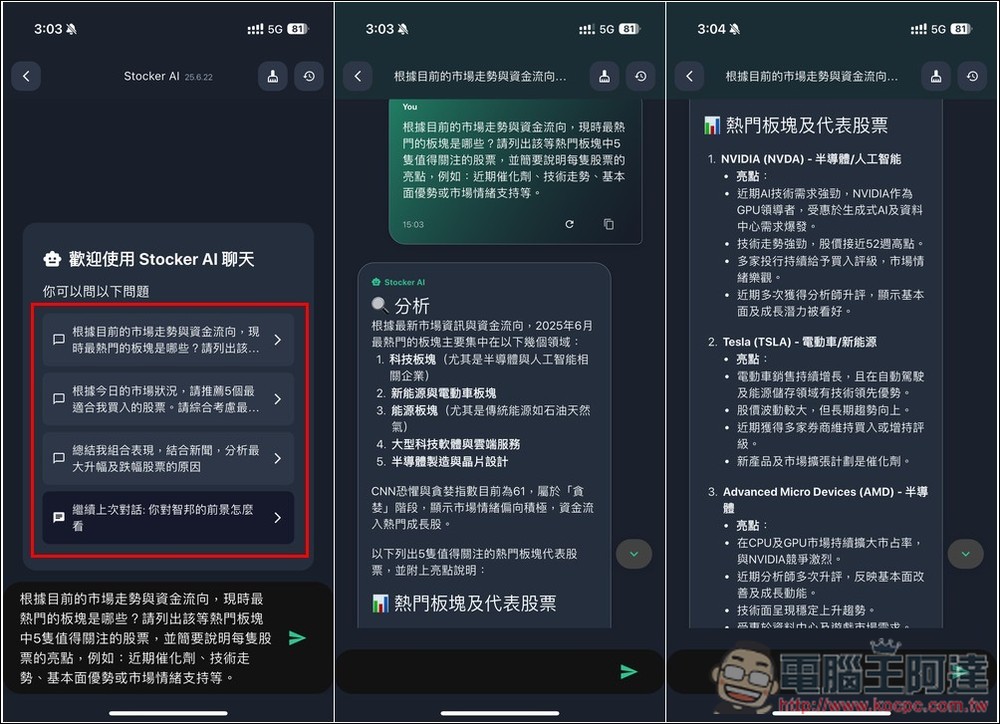
After turning on AI intelligent analysis, there will be some common questions. If you don’t have any ideas yet, you can also use these examples, such as “Recommend 5 stocks based on today’s market conditions.” Then AI will analyze the recently popular sectors and investment targets. However, this example does not specify a market, so the default AI will answer the US stock market, and the AI recommends me NVDA, TSLA, AMD, XOM and MSFT:
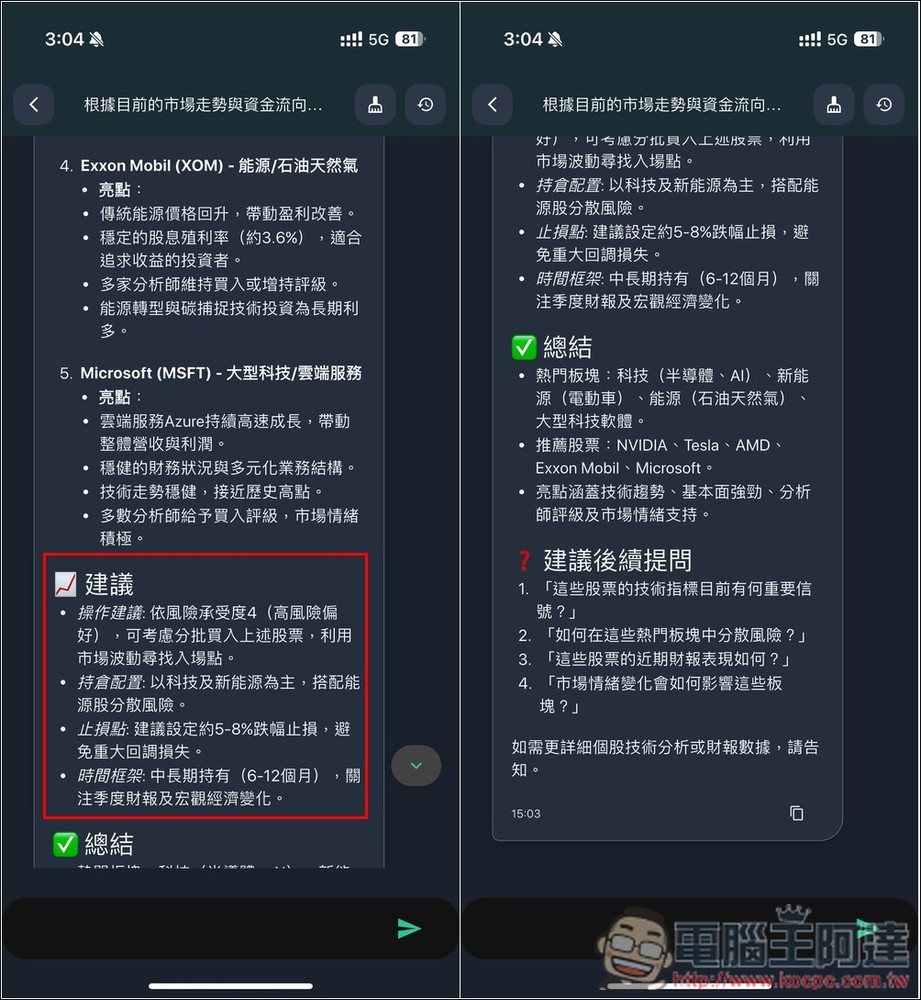
Compared with general AI services on the market such as ChatGPT, Stocker PRO’s AI model is specially optimized for investments and stocks. Therefore, even simple questions will be answered in very detail by the AI. Like the question above, in addition to telling me which popular sectors and highlights of each stock, the AI also provides operational suggestions, shareholding allocations, stop-loss points, etc.:
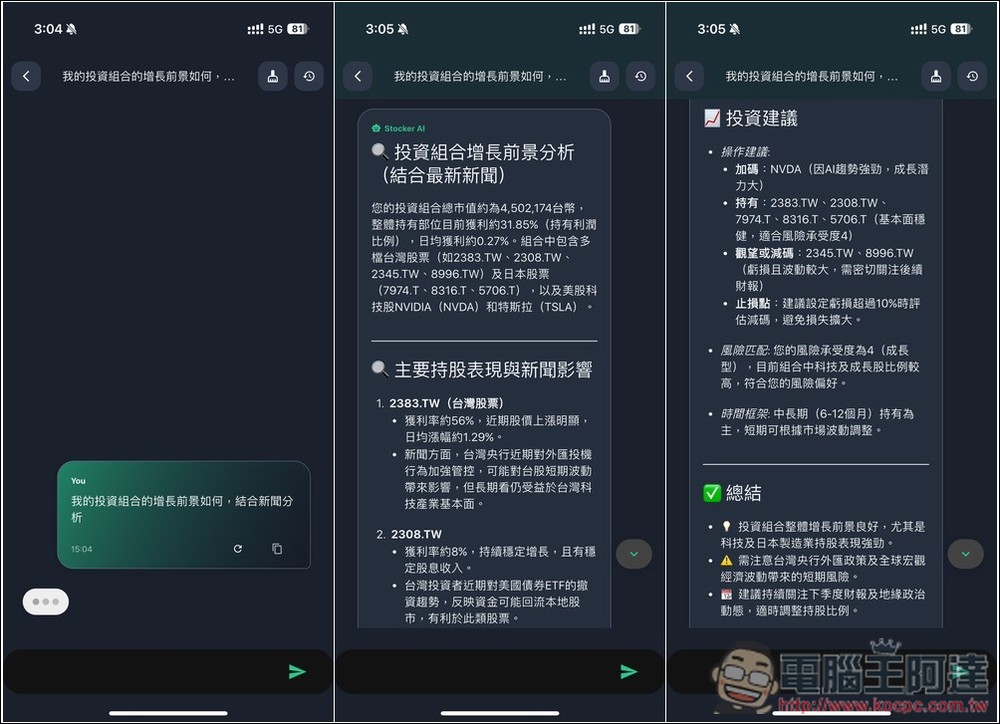
You can also ask AI to analyze your portfolio and combine it with the latest news. In addition to giving the yield rate of each stock and analyzing recent news content, AI will also provide market sentiment views, investment suggestions, etc.:
If you are interested in a certain stock, you can also give it to AI and ask it to analyze the prospects, whether it is worth investing in, what things to pay attention to, etc.:
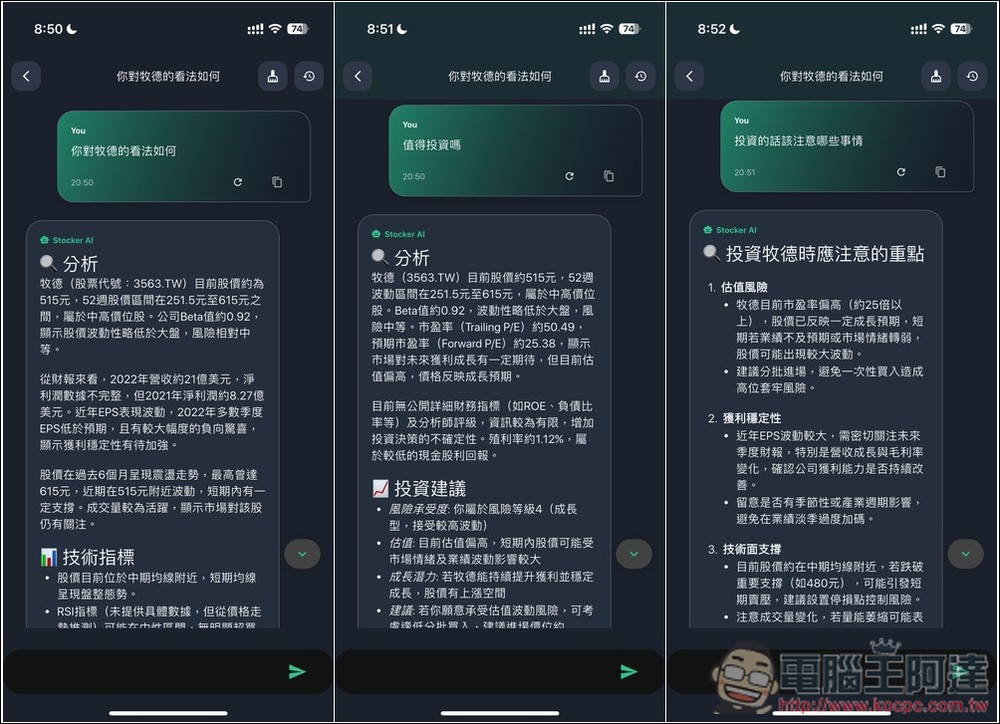
Technical questions are also fine, such as wanting to know whether the current technical line shape of a certain stock is good, what are the support and pressure points, and when is it worth selling:
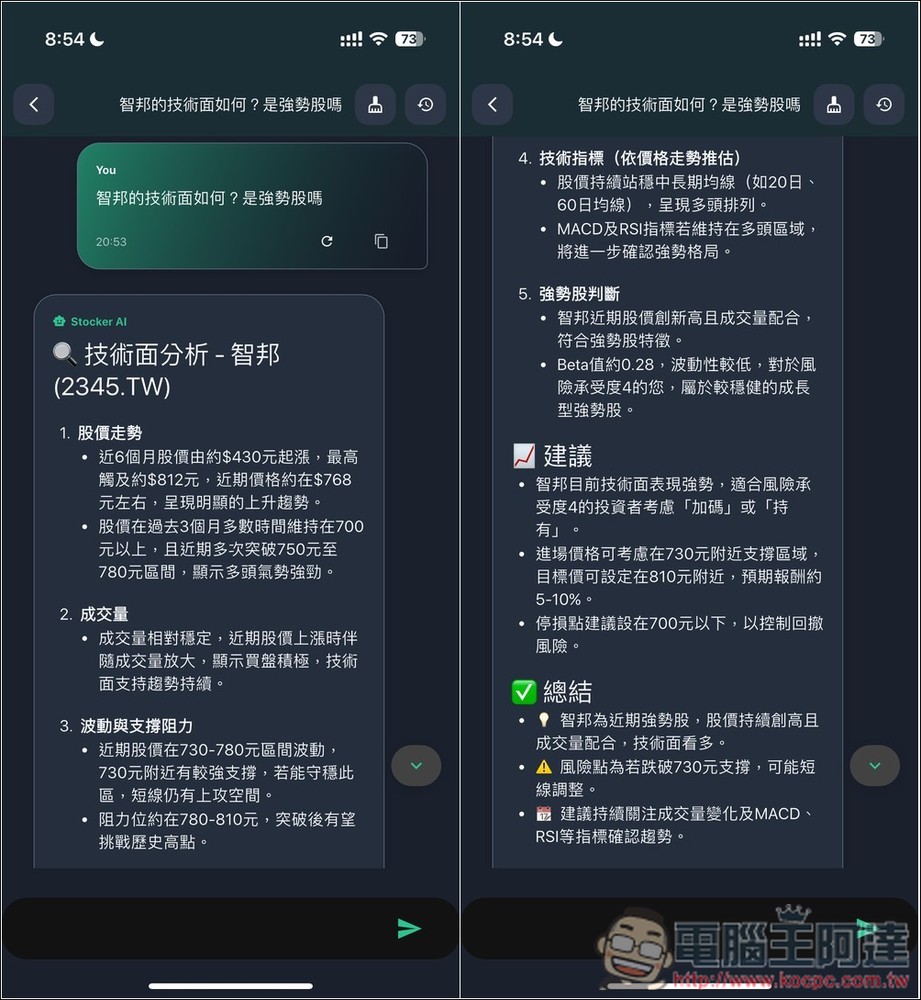
Of course, just like other AI services, AI’s answers are not 100% correct, and occasionally errors will occur, so in the end you still have to rely on your own judgment.
Which platforms does Stocker PRO support?
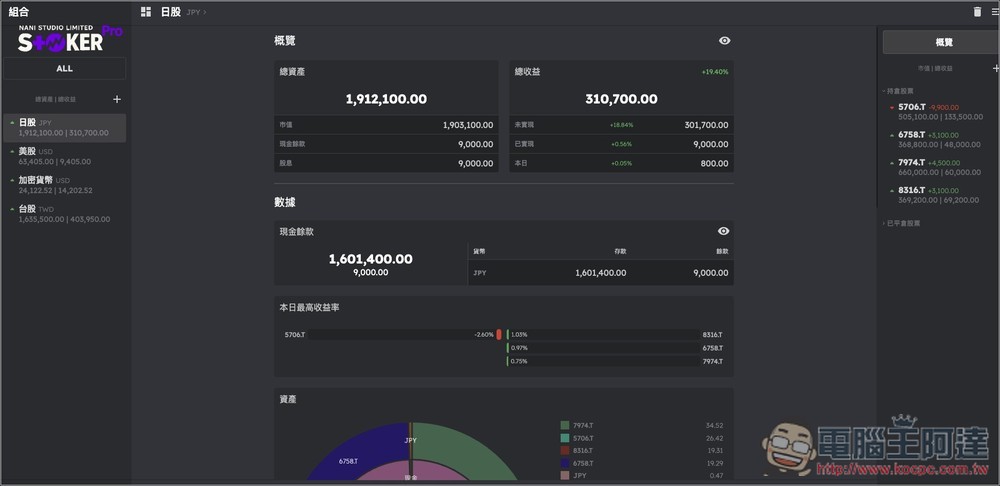
In addition to iOS, iPadOS, and Android Apps, Stocker PRO also provides Mac and web versions. Therefore, Mac users can also download and install it from the App Store, while Windows users can use it through a browser.
However, the web version is still in the testing stage, so it is recommended to back up before using it. The following picture is the screen of the web version:
Summarize
For readers who are investing, Stocker PRO is really worth trying. Not only is it no longer difficult to track investment performance, it is highly recommended for single/multi-country stock markets. AI intelligent analysis is also very practical. When there are any problems with stocks, there is an AI assistant that can help with analysis, saving a lot of time in querying and sorting out information.
Source: KOCPC Chinese