


Use Microsoft Windows Most users of the system should not be clear about the concept of system restore points, but for advanced users, restore points are an important process that adds insurance for personal use. But can you create it once and use it once and for all? This time, we will tell you how to create a system restore point and a couple of other things about restore points.

How to create a system restore point on Windows 11 24H2 system? How long are restore points valid?
A system restore point is a safe stop that allows you to roll back Windows after a driver, update, or application installation error. If you want to create a system restore point, you can follow the process below. It is recommended that you create a restore point every few weeks just in case.
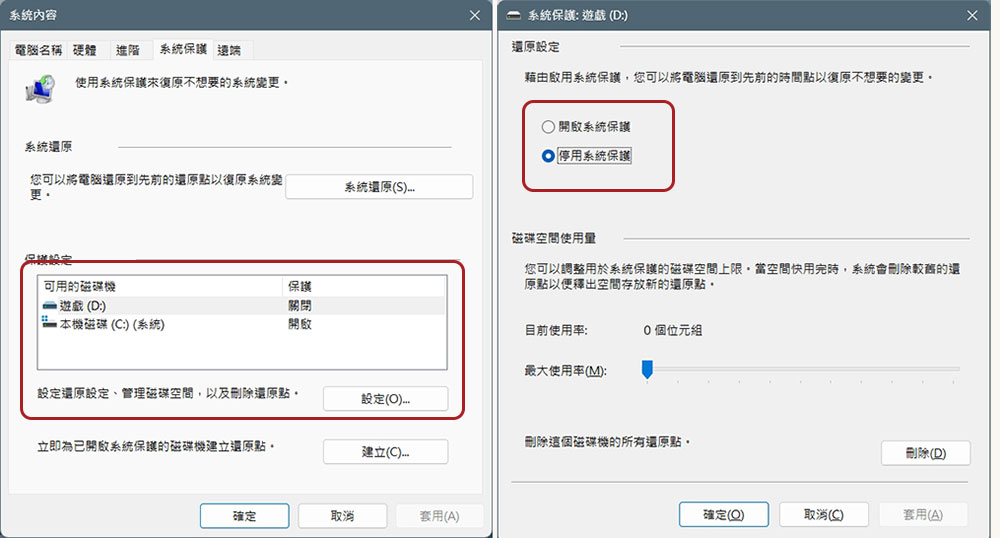
- Open Windows and search for “Create Restore Point”. This will open a small window with system contents.

- In the “System Protection” tab, make sure that the hard drive you want to create a backup has protection turned on. If it shows that protection is turned off, you can first select the specified hard drive, click “Settings” below, and turn on protection from there.
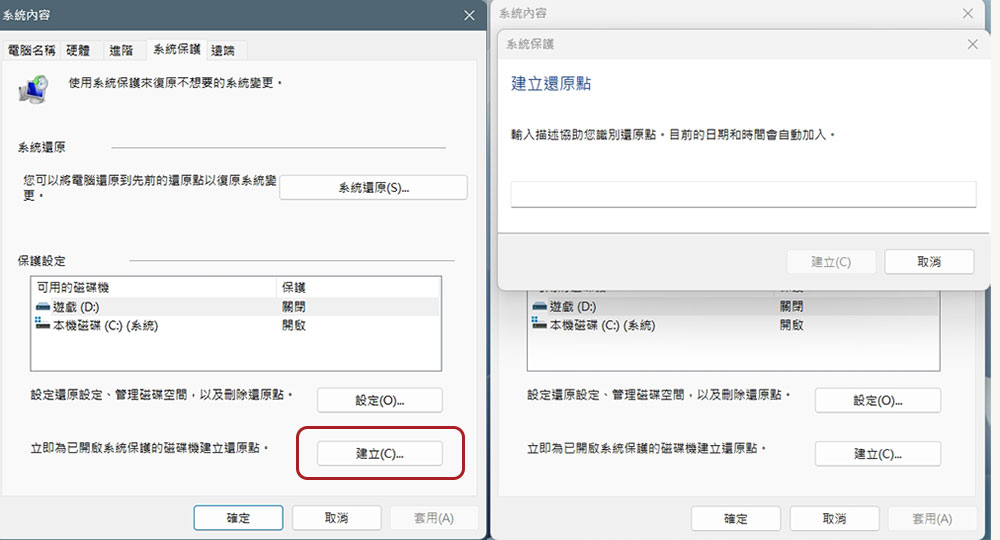
- After the settings are completed, click “Create” at the bottom after creating the restore point, and then follow the step-by-step instructions on the screen.
How long are system restore points valid for?
Microsoft in system restoreold filesIt’s not specified exactly what the effective retention period is, and Windows restore points were originally designed to expire after 90 days, which is the case in Windows Vista, Windows 7, and later versions. But in a December 2020 document titled “SystemRestoreConfig class” Windows Server filesappears to mention a valid retention period of 90 days. In the release notes updated in June 2025, Microsoft once again confirmed that restore points are locked for 60 days.mentioned in the article, Windows 11 24H2 will retain system restore points for up to 60 days after installing the June 2025 Windows security updates, and this 60-day limit will also apply to future versions of Windows 11 version 24H2.

When your device runs out of storage, Windows deletes all restore points to try and free up disk space, and that still seems to be the case. Proactively and regularly creating restore points will keep multiple versions of your backups ready in case of system problems, but if the 60-day period expires, Windows will be deleted starting with the oldest version. So here we suggest that if your computer plays an important role in your life and contains key and important files, you can develop the habit of regularly creating restore points. In addition, before installing new applications, updating the system, or upgrading the firmware, you can create a restore point easily to ensure your use is more secure.
Source: KOCPC Chinese