


Are you still worried about having to manually copy and paste information every time, switch between different apps to fill out forms, or input by voice but always fail to understand what you mean? At the “Android Show: I/O Edition” event yesterday (12th), Google officially announced a new AI function integration solution called “Gemini Intelligence” to bring Gemini’s powerful computing power into billions of Android devices. Starting this summer, the latest flagship phones such as Galaxy S26 and Pixel 10 will be the first to support it, and will gradually be expanded to smart watches, car systems, smart glasses, laptops and other devices.
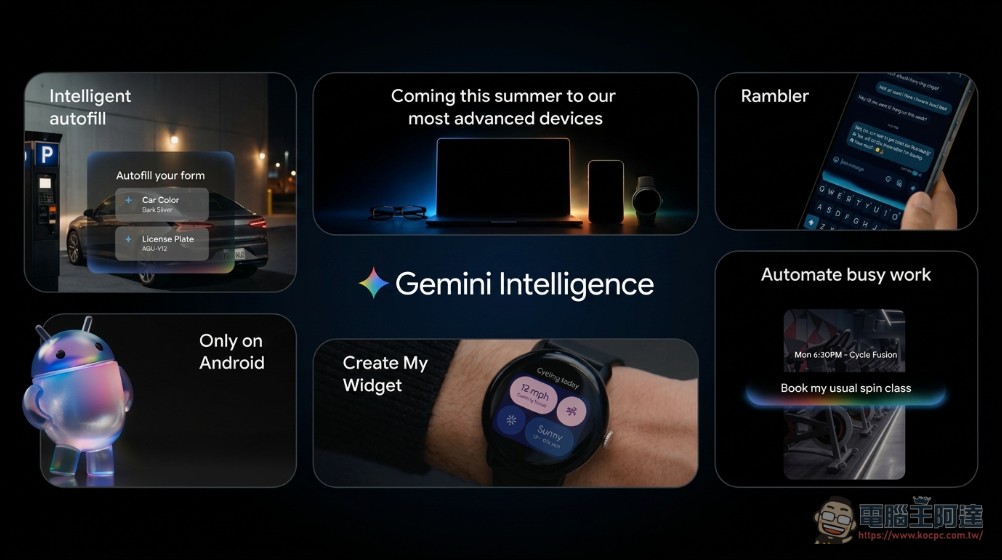
Cross-App Automation: Long press the power button to help you complete chores
The core highlight of Gemini Intelligence is its ability to automate multi-step tasks across applications. Google spent months fine-tuning popular food delivery and ride-hailing apps for the Galaxy S26 and Pixel 10 to ensure every automated step works smoothly.
Specifically, you can ask Gemini to reserve a front-row seat for a Flywheel class, or find the course syllabus in Gmail and automatically add the required textbooks to your shopping cart. What’s even more amazing is that when you long press the power button, you can call Gemini directly from any screen and use the content on the screen as the context to perform tasks – for example, say “Help me add these items to the delivery platform shopping cart” to the shopping list in the notebook, and Gemini will automatically complete all the steps for you. When you see a package itinerary poster in the hotel lobby while traveling, just take a photo and say “Help me find a similar itinerary on Expedia.” Gemini will run in the background and let you know the progress in real time through notifications.
It is worth noting that the entire process is entirely in the hands of the user. Gemini will only act after receiving clear instructions, stop immediately when the task is completed, and finally hand it over to the user for final confirmation.
Chrome’s built-in AI assistant: helps you research, organize, and make appointments
Chrome for Android will also receive a smarter AI assistant starting at the end of June. Users can see the Gemini icon directly on the Chrome toolbar. After clicking it, they can ask AI to help you summarize web content, compare information from different web pages, or ask questions about the article they are reading. What’s more noteworthy is the “Auto Browse” function: Gemini can automatically help you handle daily appointment tasks in the background, such as making medical appointments or booking parking spaces. However, this feature is currently only available to Google AI Pro and Ultra subscribers, and was first launched in the United States and supports devices above Android 12.
Smart automatic filling: complete complex forms with one click
Filling out complex forms on a mobile phone screen is a common pain point for many people. Google has upgraded its autofill feature from a simple convenience tool to a smarter assistant. Through Gemini’s “Personal Intelligence” personalization service, Android can automatically read relevant information from connected Google applications to help you fill in all the fields. Users can decide whether they want Gemini to be linked to the auto-fill function – this is a setting that must be actively turned on and can be turned on or off at any time in the system settings, fully protecting privacy autonomy.
Gboard’s new feature Rambler: Speak naturally and instantly turn it into smooth text
Android’s Gboard speech-to-text function is already quite accurate, but our speaking habits are often different from typing – mixed with self-correction, repeated words, or modal particles such as “uh” and “that”. Google this time launched a new feature “Rambler” in Gemini Intelligence designed for natural speaking. As long as you speak naturally, the system will automatically capture the important meaning and organize it into a smooth text message. Voice files are used for real-time transcription only and will not be stored or retained. At the same time, Rambler supports the mixed use of multiple languages. Whether it is a mixture of Chinese and English or other language combinations in daily life, Gemini can understand the context of the context and make the message look natural and smooth.
Use natural language to create exclusive desktop gadgets
In addition to the upgrade of AI functions, Google will also bring the concept of generative UI into Android’s most representative desktop gadgets. The new “Create My Widget” function allows you to create customized widgets using natural conversations. For example, if you say to the system, “Recommend three high-protein meal preparation recipes for me every week,” the system will generate an exclusive information panel that you can directly add to the desktop and adjust the size. If you are a cyclist and want a weather widget that specifically displays wind speed and rainfall probability, you can also generate it with a natural language description.
From operating system to smart system
Google said that Android is transforming from an “operating system” to a “smart system.” The launch of Gemini Intelligence represents Google’s integration of its most powerful AI tools into a single system, with the goal of making devices more proactive in helping users deal with everything in life. This also means that the future of Android is not just about faster performance and longer battery life, but also about truly becoming a smart partner that can “understand you” and “complete trivial tasks on your behalf.”
Source: KOCPC Chinese