


It can be scary when you suddenly lose access to, lose, or forget your Apple account password. Especially if you’ve forgotten your Apple ID or password and can’t get back into your Apple account any other way, Apple’s standard recovery process can take several days. After an account recovery request is made, the initial email response can take up to 72 hours, telling you only when you’ll receive instructions to regain access, and then another few days or more.
How to set up a “recovery key” for your Apple account?
Fortunately, Apple has a “recovery key” feature that you can choose to turn on or not, which not only improves the security of your Apple account, but also speeds up the account recovery process. Before setting up a recovery key for your Apple account, you must complete two important steps. First, you must enable two-factor authentication, as it significantly increases account security, so you should enable it regardless of whether you ultimately decide to set up a recovery key or not.
Secondly, if you enable “Stolen device protection, there may be a one-hour security delay before you start setting up your recovery key, depending on how you set it up and whether you’re in a familiar, usual location, such as your home or office. You can continue the process if necessary, and you will be notified when the safety delay has passed and can continue to perform subsequent operations.
- Open the Settings app on your iPhone.
- Click on the field with your name and avatar at the top.
- Select “Login & Security”.
- Then click “Recover Key”.
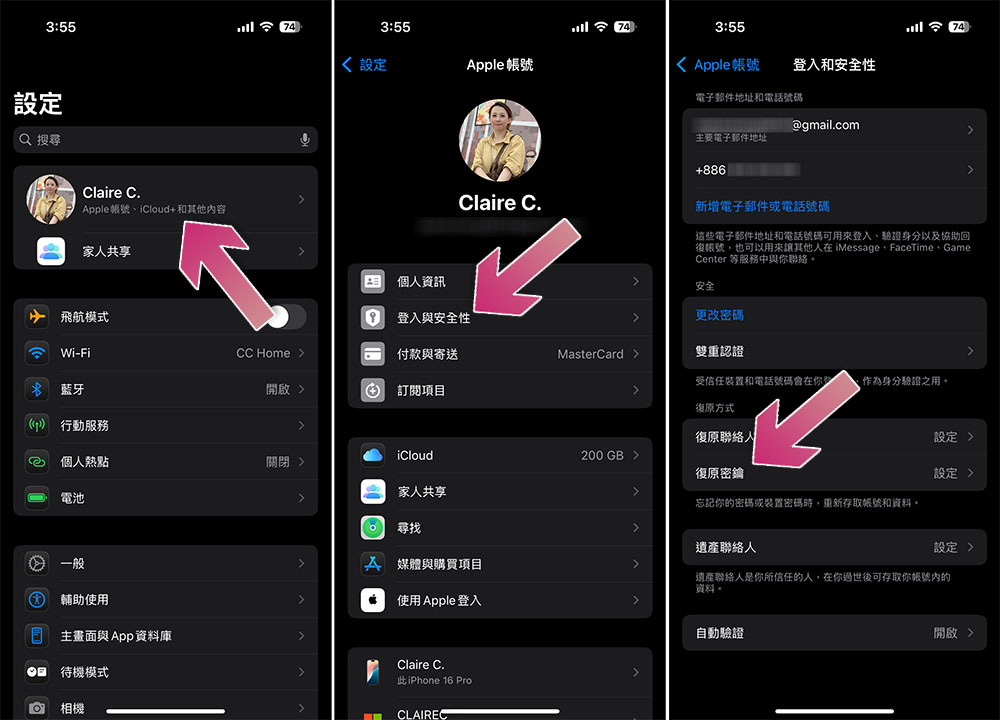
- Just follow the instructions.
Special attention!When you are setting up a recovery key and you see a string of keys asking you to print or write them down, be sure to do so., or take a screenshot and store the image in another location (on your computer or in another secure cloud service), because you will be asked to enter the recovery key for repeated confirmation in the next stage. Also, once you create a recovery key, Apple can no longer help you regain access to your account, so this is absolutely necessary!

If you want to delete the recovery key, follow the same path above to delete it. If you have lost your original recovery key or are concerned that it may have been compromised, you can also create a new recovery key from here.

Having an Apple Account recovery key is an optional but potentially valuable additional layer of security, but if you lose your recovery key and lose access to your trusted devices, your Apple Account is permanently locked.
Source: KOCPC Chinese