


When you’re shopping for a new CPU, you may see many different specs, such as cores, clock speed, TDP, and process. Another important aspect of CPU hardware is high-speed cache memory, which speeds up performance by storing frequently accessed data on the CPU itself. So the question is, you often see L1, L2 or L3 written on the CPU specifications. So what is the difference between these caches? How does it affect CPU performance?
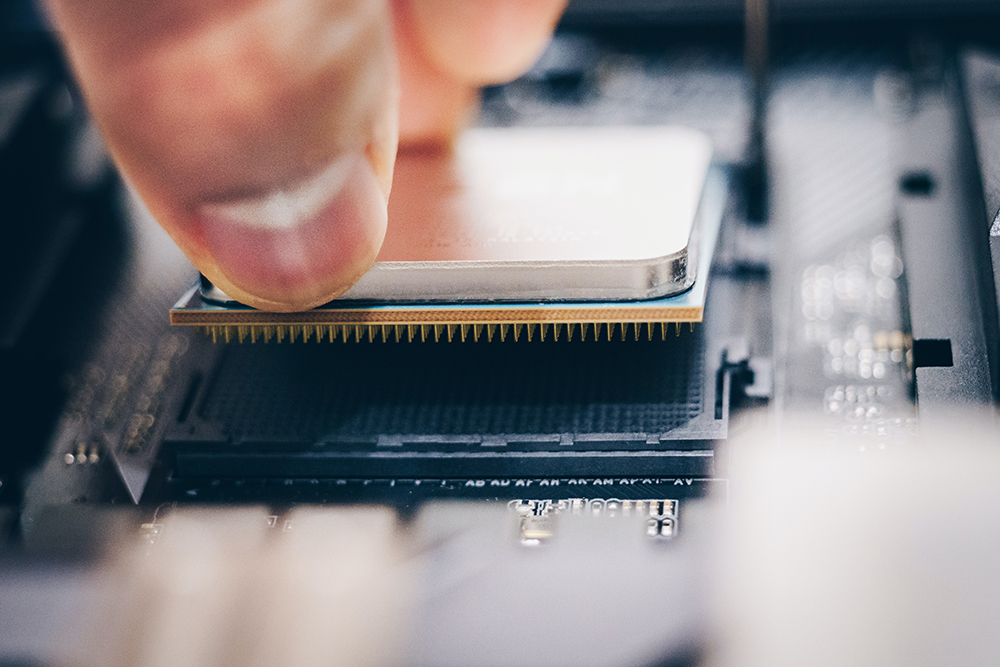
How do L1, L2, and L3 caches affect CPU performance?
The CPU cache was developed in response to the need in the 1980s for processors to be faster than system memory (RAM). Compared to early computers, today’s CPUs have massive, high-speed caches, which is an important aspect of how modern computing operates. Let’s understand the CPU cache hierarchy and how it affects CPU performance.
What is the difference between L1, L2, and L3 cache? Why does the CPU need them?
Before the 1980s, both CPUs and RAM were slow enough that the latter slowing down the former wasn’t a big problem. However, RAM speeds could not keep up with CPU speeds, so new and faster memory was needed, which is why CPU high-speed caches were developed. This built-in memory is much faster than system memory (about 10 to 100 times faster, in fact), and the processor no longer has to wait to get data from relatively slow RAM.
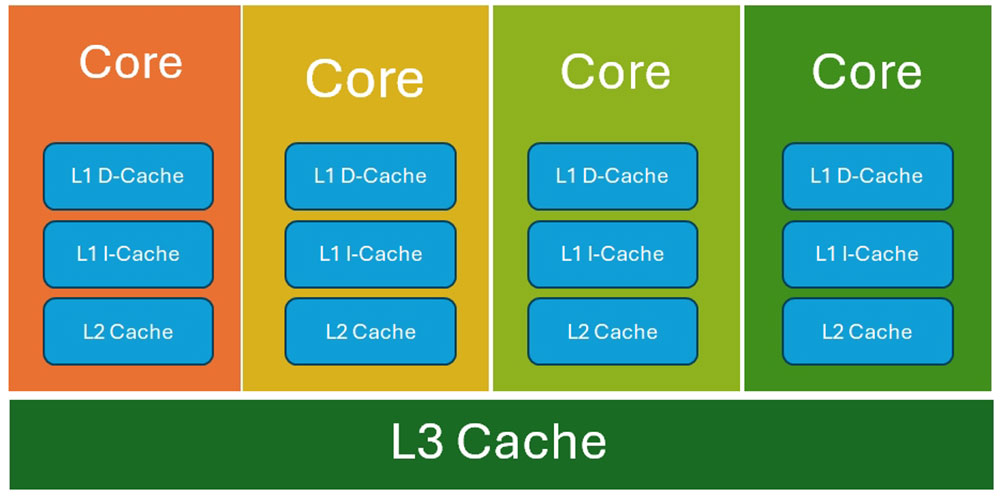
Now, CPU caches are not all the same, there are three (sometimes four) variants, L1, L2, and L3. The main differences between the three variants are speed, capacity, and cost. While the L1, or primary, cache is closest to a single CPU core, the L2 cache is slightly further from the core, and the L3 cache is the furthest from the core.
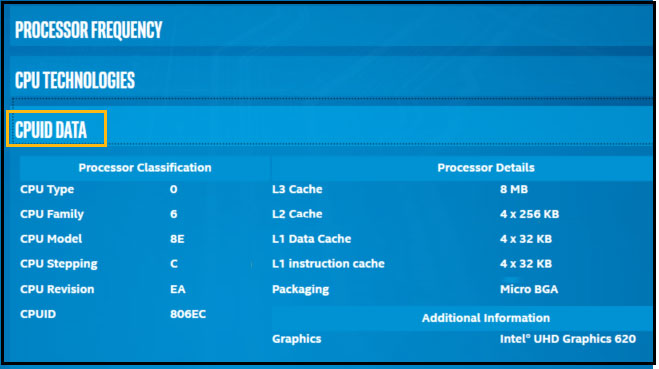
The L1 cache is the fastest but smallest memory buffer on the CPU core, usually measured in KB. The L1 cache stores the data the CPU is most likely to need to complete certain operations. It is approximately 100 times faster than system memory and is the first place the CPU goes to get the data it needs. It is divided into instruction cache and data cache. As the name implies, the command cache stores information about operations to be performed, while the data cache stores the data for operations to be performed.
Each CPU core has its own L2 cache, just like the L1 cache. In MB terms on modern CPUs, the L2 cache is slower than the L1 cache, but still about 25 times faster than system memory (RAM). The L2 cache is almost always larger than the L1 cache, typically around 6MB to 12MB on most modern CPUs. A few series of processors use a shared L2 cache, such as the Intel Jasper Lake Celeron series.
Finally, the L3 cache or last level cache is the slowest but largest memory buffer in the CPU (still 10 times faster than RAM). Unlike the L1 and L2 caches, the L3 cache is shared across all cores of the CPU. On most modern CPUs you’ll typically see around 24MB to 36MB of L3 cache, while AMD’s Ryzen X3D processors can come with up to 128MB of 3D V-Cache (a form of L3).
How does the CPU utilize various caches?
The data flow between various forms of memory on a computer is as follows: main storage, system memory (RAM), L3 cache, L2 cache, and L1 cache. When the CPU needs to access data to perform a specific operation, it starts with the fastest memory available (L1 cache), and if it doesn’t find it in the L1 cache, it goes to the L2 cache, and down to the L3 cache.
If the CPU finds the required data at any of the three levels of cache, it is called a “cache hit.” If not, it will go to system memory, which is a miss and is called a “cache miss.” Of course, the ideal situation is that the CPU can always find the required data in the L1 cache. However, both the L2 and L3 caches are much faster than RAM and will not cause significant delays to the user. The levels of reading data layer by layer can be seen in the figure below, from left to right.
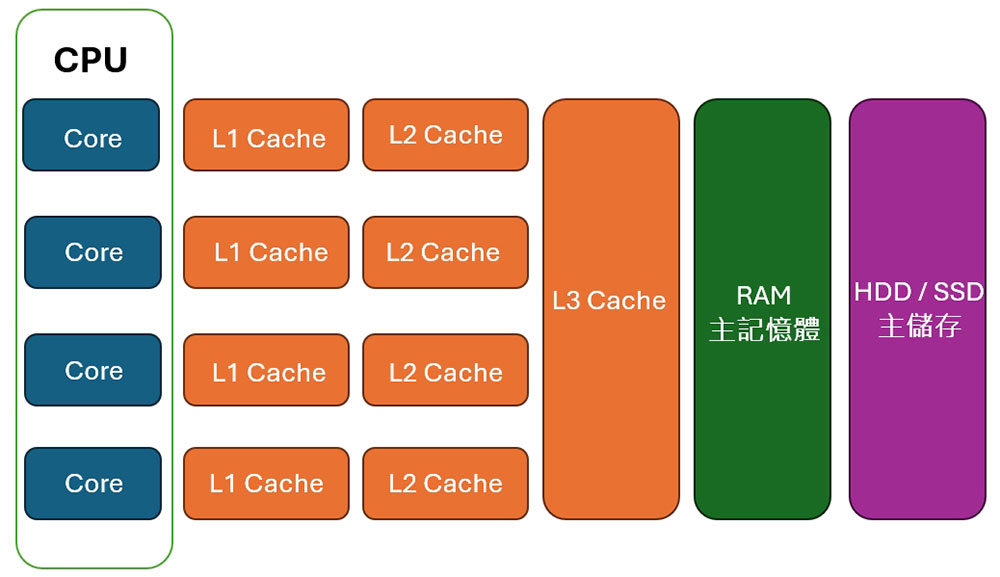
CPU caching is designed to reduce system latency by providing access to increasingly faster forms of memory caching. With the advancement of DDR5 RAM, RAM speeds are getting faster and overall system latency is going down, but onboard high-speed cache on the CPU is still a key factor in the entire equation.
How useful are high-speed caches on modern CPUs?
Almost all modern CPUs have enough L1, L2, and L3 caches to meet the needs of day-to-day operations. In addition, CPU cache is not the only factor that determines CPU performance. However, if you’re looking for maximum gaming performance and simply don’t want to compromise, caching is more important than ever. The importance of L3 cache to gaming performance has become a hot topic thanks to AMD’s Ryzen X3D CPUs.

AMD processors like the Ryzen 7 5800X3D, Ryzen 7 7800X3D, and Ryzen 7 9800X3D, among others, have massively fast L3 caches, allowing them to hit FPS numbers that are impossible to achieve on non-X3D CPUs. This is what makes these processors the best gaming CPUs to date. So, in short, your gaming PC will run perfectly fine without an AMD X3D CPU, but if you can get one, you won’t regret it if you’re not a productivity freak.
Source: KOCPC Chinese