


With the rapid development of social media, LINE has gradually become an important platform for many people to communicate and share information on a daily basis. However, in a LINE community with thousands of members, there are often hundreds of messages active every day. Sometimes important notifications or messages are easily overwhelmed. The challenge faced by managers is how to ensure that important messages can be seen by all members in real time.
Based on this, LINE has listened specifically to the opinions and needs of users, and will launch the much-anticipated “@All tag all“Function. This new feature will help community managers efficiently deliver key information in busy group chats so no one misses important notifications.

The LINE community welcomes the new feature “@All annotation”. Learn how to use it in just one minute!
“@All Annotation” is a new feature tailor-made by the LINE team for LINE community managers. It aims to make important messages invisible and ensure that all members can receive and see them. In LINE communities, administrators can use this feature to tag all members to ensure that messages reach every member in a short time.
Each administrator can use “@All annotation” once per hour. This design can avoid disturbing members too much and can deliver information immediately when needed. This is an indispensable tool for teams that require a lot of daily communication, event planning organizations, or any group that needs to effectively manage members’ attention.

How to enable and use “@All annotation”?
To enable “@All annotation” in a LINE community, first of all, only administrators or co-administrators in the community have permission to use the “@All all annotation” function. Here are the setup steps:
- In the LINE social chat room, click the “Settings” option
- After entering the community settings, select “Manage Permissions”
- In “Manage Permissions”, you can find the setting option “Mark Everyone (@All)” and turn on this permission.
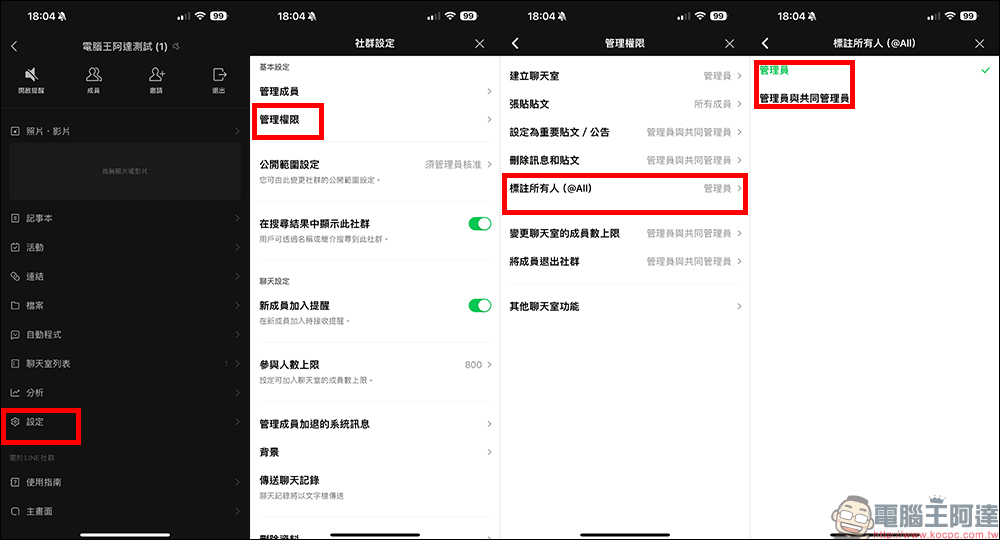
After completing the above settings, the designated administrators and co-administrators can use the “@All Annotation All” function when needed!
How to use “@All annotation”?
In the LINE community chat room, when the administrator needs to notify all members, he only needs to enter “@” in the dialog box, and he will see the “@All” option. After clicking, he can mark all members of the entire community. This way, all members will receive and notice this important message, even in a busy chat.

Notes and reminders
To use the “@All annotation” function, the mobile version of LINE needs to be updated to version 14.14.0 (inclusive) or above, and the computer version needs to be updated to version 9.3.0. In addition, in order to ensure the effectiveness of the function and a good experience for members, the administrator and co-administrators combined can only use the “@All All Annotation” function once per hour, and the quotas of “administrators and co-administrators” are added together.
In other words, if both the “administrator” and the “co-administrator” of the LINE community can use this function, as long as one of them uses this function, other people with permission will temporarily be unable to use this function within one hour. This design is to avoid possible harassment caused by overuse and to ensure the importance and timeliness of the message. LINE will gradually promote this feature. Users need to wait for updates and new features to be gradually released. The computer version will also be launched in the near future.

The “@All annotation” function of the LINE community is undoubtedly a powerful tool for community managers. It not only greatly improves the efficiency of managers in transmitting information, but also optimizes the communication quality of the entire community. With this feature, administrators can better monitor group dynamics and ensure that all members do not miss important messages at critical moments. With the launch of this feature, we believe that the LINE community will become more dynamic and cohesive. We look forward to this feature bringing a more convenient and efficient experience to every user using the LINE community!
Further reading:
Apple M4 series of Mac computers are rumored to debut in November, and the M4 Pro chip version of Mac mini will completely cancel the USB-A port

Source: KOCPC Chinese