


Saw interesting videos on Facebook but can’t find a free download tool to download them to your iPhone collection? Today I’m going to share with you a Facebook video downloading app suitable for iPhone users.FSaver”, this app only needs to paste the video URL, and then you can directly download Facebook’s exciting videos to your iPhone photo album with one click! Keep reading this article to find out how to download and use it!

FSaver is a free app for downloading Facebook videos!
Some videos pushed by Facebook are often forgotten after watching them, making it very difficult to find them again and share them with friends later. If you can download Facebook videos to your iPhone, you can take them out of your photo album and share them at any time when you are bored while riding in a car or on a plane, or when you are chatting with friends and think of that interesting video. However, compared to YouTube, Instagram, Threads or X, which have many video downloading tools, Facebook’s video downloading tools are relatively few.
So, how to download Facebook videos easily and quickly? Today I want to introduce to you this useful “FSaver」iOS App。

iPhone users can go to the App Store to download FSaver for free. If you can’t find the link, it is attached at the bottom of this article.

Then pick a Facebook video you want to download! Click the “Copy” button directly on the Facebook video to temporarily copy the video link.
The demonstration here is the unboxing video of Nissin Taiwanese Lu Pork Rice that Computer King Ada shared before. If you want to watch the video, you can also watch it (Video link)。

Then open the FSaver App and paste the video link you copied earlier in the text field, or click on the text field and press “Paste”. Then just click the “Find” button and you will see that the video is being processed. The processing time varies depending on the length of the video. When the video processing is completed, you will see a play icon with a video preview below. At the same time, the video is actually silently saved to the iPhone’s “Photos (Album)”.
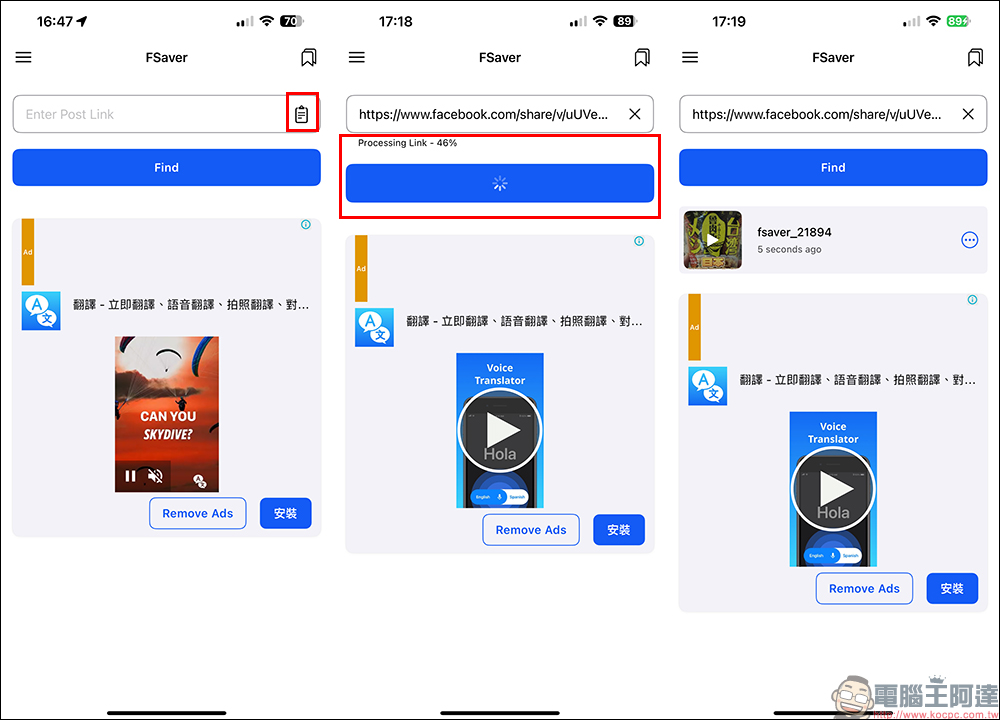
Go to “Photos (Album)” and search, and you will see that this video has been successfully downloaded to your iPhone. Isn’t it super easy?

The FSaver App is free to download. However, the free version will display advertisements from time to time during video processing. However, the advertisement time is not regular. Wait a few seconds to turn off the advertisements. If you want to completely remove ads, you can also unlock and upgrade advanced features through a one-time payment (NT$120), which will upgrade your FSaver Professional Edition qualification at once. It depends on your needs! But if you just generally want to access some Facebook videos to your iPhone, it would be a good idea to check out the ad-supported FSaver team.
FSaver App(App Store)
Further reading:
iPhone 16 series, 20 key updates about the new iPhone
Source: KOCPC Chinese