


Apple Watch is an easy-to-use smart wearable device. The biggest reason for poor user experience is usually its battery life. Compared with traditional watches that last for several years after changing the battery, the Apple Watch can last for a week on a single charge. You will not feel safe without charging it for a day. Smartwatches are very similar to smartphones in terms of power management, with the Apple Watch you have to treat it the same way you would use a phone, and it’s similar in terms of maximizing battery life.
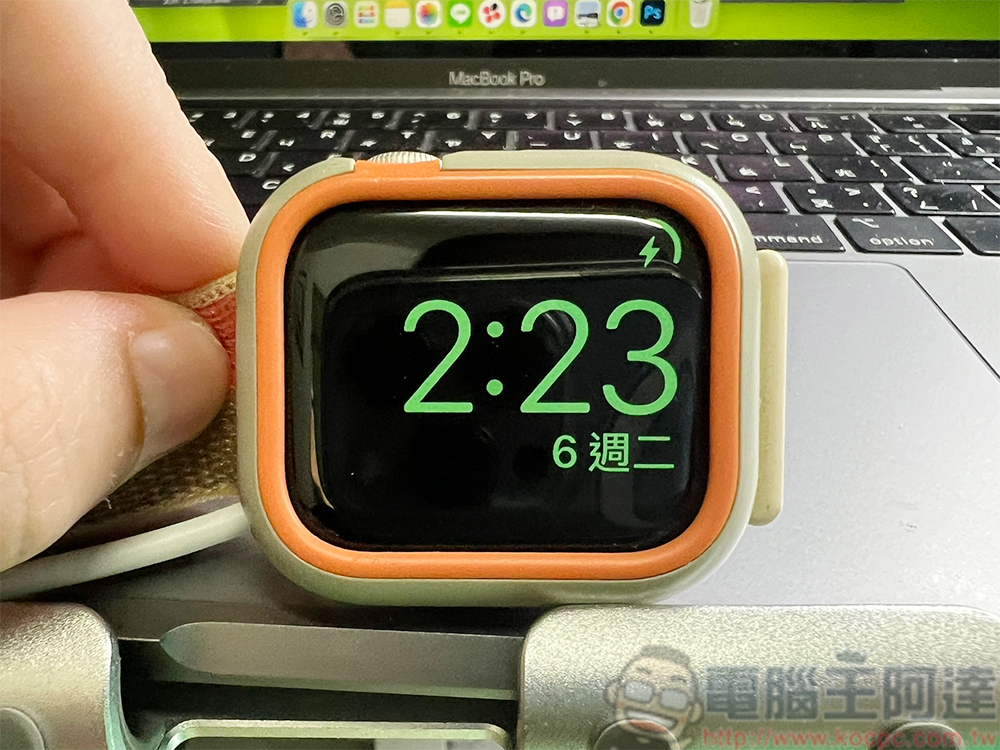
Why is your Apple Watch draining power faster than normal?
According to Apple’s official data, your Apple Watch should have 18 hours of battery life under normal use (tested using GPS and LTE Apple Watch Series 9). If you find that your watch is nowhere near meeting this standard, then you may have some issues that you need to address. Ideally, battery consumption factors should be related to the display, lighting, and processing needs of the watch. If not, then you may have an older watch or be experiencing reduced battery performance.
Apple Watch brightness is too high or AOD
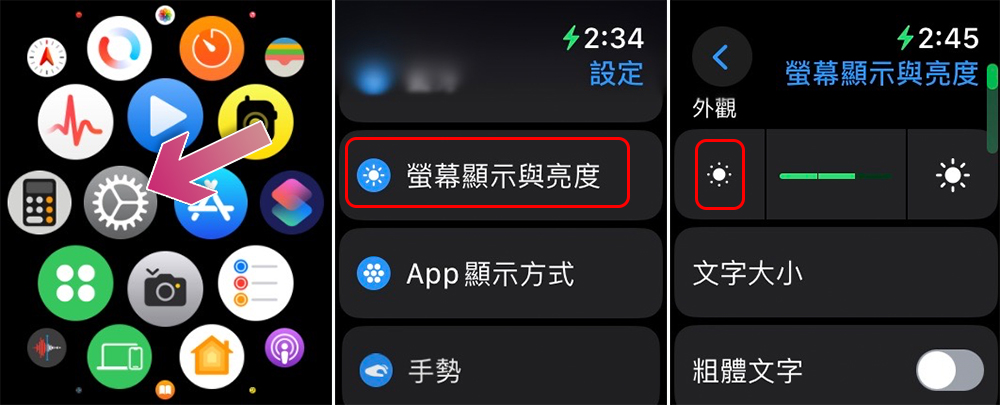
The Apple Watch uses an OLED display, which is generally more power-efficient than a backlit LCD, but it still requires a considerable amount of battery power to illuminate the display, especially when displaying vivid colors. Combine this with high display brightness and you’ll find that the battery drains much more than expected. This is also why screen brightness is the culprit behind iPhone battery draining too quickly. But unlike the iPhone, you can’t adjust the brightness from Control Center. You must enter the “Settings” app on the watch, find the “Screen Display & Brightness” option, and then click the sun icon on the left to reduce the brightness. You can also adjust the brightness by rotating the Digital Crown in this menu.
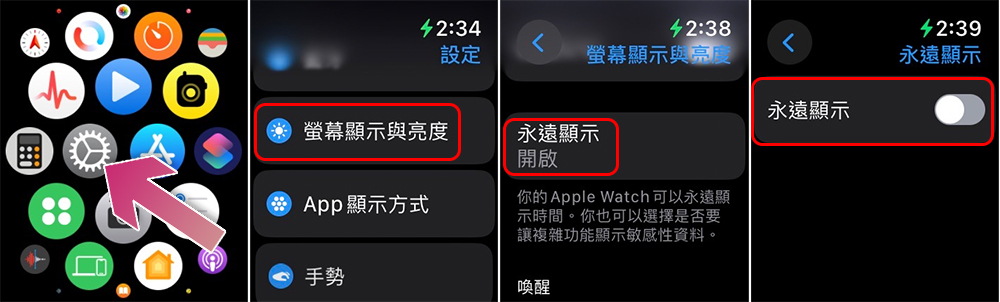
Apple Watch, prior to Series 5, would only light up the screen when you raised the watch to see the time or use it. But since Series 5, all Apple Watches (except SE) have come with AOD, which keeps the watch face lit even when you’re not looking at the watch. It dims the display significantly to save battery, but it still requires power to keep the screen on. Although it is turned on by default, you can go to the “Screen Display & Brightness” panel in “Settings”, scroll down and you will find the “Always on display” option, click to turn it off to extend battery life.
You rely too much on your watch’s Cellular and GPS connections
There’s a popular myth that Wi-Fi and Bluetooth drain your device’s battery, so you should turn them off. That’s not entirely true, Wi-Fi and Bluetooth may require more power when connected, but leaving them on to accept other devices doesn’t require a lot of power, so it’s worth turning them off. However, when they’re connected that’s when you need them, so there’s little need to turn them off. The real culprits among the connectivity options are GPS and Cellular connectivity. The small lithium-ion (Li-on) batteries in smart watches have difficulty keeping up with constant communications with multiple satellites (for GPS) and base stations (for Cellular networks). While taking calls on your watch might be cool and convenient, consider leaving that role to a phone that’s better suited for the task.
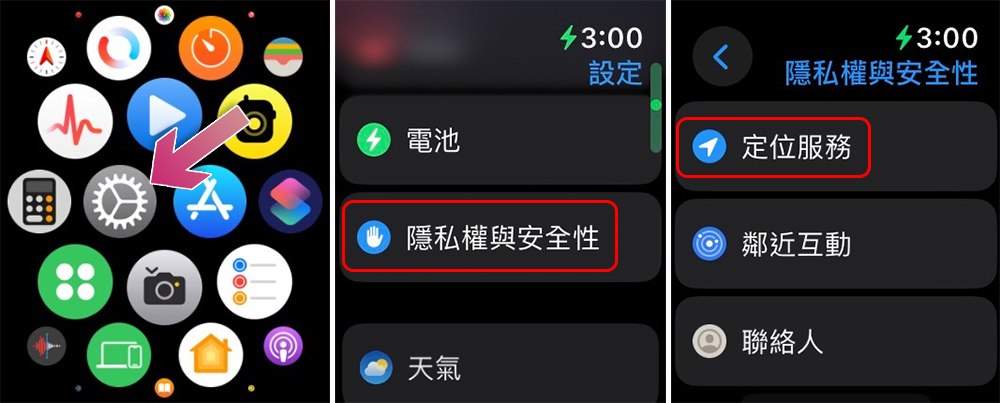
You can turn off Cellular connections by opening Control Center on your Apple Watch and clicking the Cellular icon (it looks like a broadcaster). As for GPS, it mainly works through apps that require positioning, so when you need to save battery, consider closing these apps and avoiding using them. You can go a step further and disable location services by turning it off in the Privacy pane in the Settings app on your watch. Or, bring your iPhone when you really need GPS, and most Apple Watches are preset to use your iPhone’s GPS to save battery.
Power-hungry apps running in the foreground and background and receiving numerous notifications
The Apple Watch has well-regulated background apps, but they don’t have the same functionality as the iPhone. First, they do not update frequently in the background, and WatchOS restricts most independent smart watch-specific applications from applying updates in the background. This restriction is usually looser for applications that display more complex information on the watch face. They often need to refresh information to maintain numerical accuracy, which means they consume more power.
Your Apple Watch might not update all apps in the background, but your iPhone might. This isn’t usually a problem, except that all the notifications, reminders and even phone calls sent to you through the watch, the constant flickering of the display, and the frequent vibrations it emits can take a toll on the battery. Fortunately, Low Power Mode will reduce background app updates, limit notifications, reduce animations, disable AOD display, etc. You can toggle it in “Settings >> Battery >> Low Power Mode” on Apple Watch.
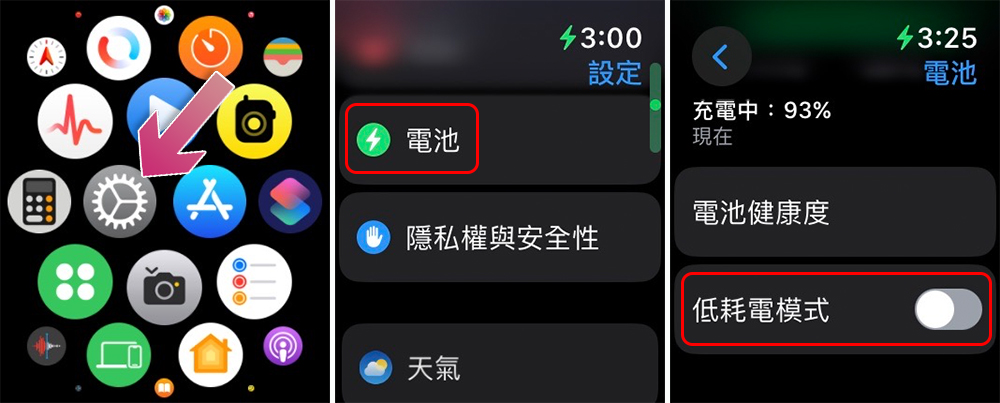
However, when we go to the foreground, there are many applications that may require the watch to consume a lot of power. For example, using location services-enabled training apps or playing games with lots of animations and vibrations will consume more battery on your smartwatch. You should avoid using these apps if you want your battery to last longer.
You have an older model of Apple Watch and its battery has degraded
Like all devices with built-in rechargeable batteries, Apple Watch has a lifespan. If you’re using a first-, second-, third-, or even fourth-generation Apple Watch and have been using it every day since you purchased it, its battery life may be nearing the end. Lithium-ion batteries lose power after each charge cycle. Charging your watch to 100% and letting it get to 0% will have a greater impact on these charge cycles, which is why you should avoid leaving your watch connected to a power source even if it’s fully charged. WatchOS can protect the battery by slowing down the charging speed after 80% through the “Optimize Battery Charging” option.
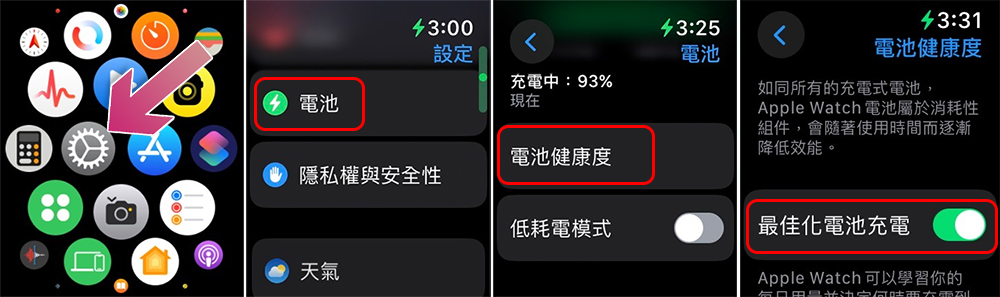
You can enable “Optimized Battery Charging” in “Battery Health” in the “Battery” option of the “Settings” app in the watch. At the same time, you can also check the current maximum capacity of the watch battery on the same page to confirm the battery health. If it falls below 80%, it will no longer hold enough power to last you a full day.
Source: KOCPC Chinese