


When you want to download pictures or files on a website, you will sometimes find multiple download buttons on the same web page. There are many advertising tricks on the Internet, and one of the most annoying types is fake download buttons. You think you’re downloading something you want, but in reality you might just end up with malware, spam, or phishing. This time, the author has put together some tips to help you spot fake download buttons and avoid falling into this trap of pretending to be real.
How to find the “real” download button on a website?
Why are fake download buttons dangerous?
Fake download buttons are not only annoying, they can also be dangerous. These fake buttons are usually deceptive advertisements, and you may face various security threats after clicking on them, such as:
- malware
Some fake download buttons download malware to your device when clicked, which may steal your personal information, corrupt your files, or hijack your browser. - Junkware
Some fake download buttons install unwanted software or extensions on your device, which can slow down your computer’s performance, display annoying ads, or change your settings. - Phishing
Some fake download buttons redirect you to fake websites that look real, but mostly trick you into entering your login credentials, credit card information, or other sensitive personal information.
Simply put, the most important thing is to identify which download button is real, so let’s take a closer look at it.
Avoid those big, flashy buttons
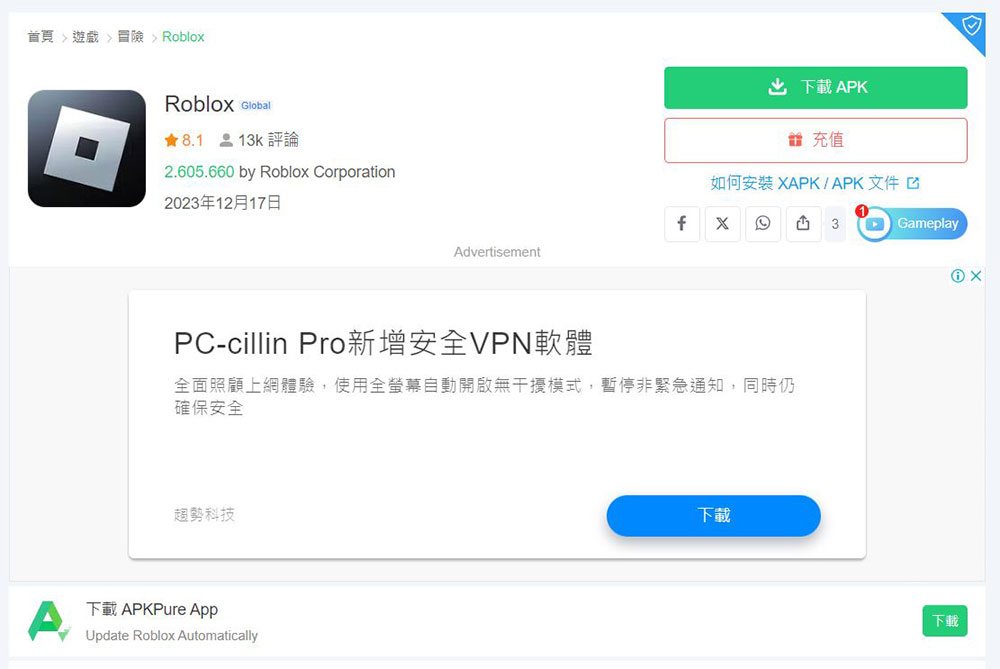
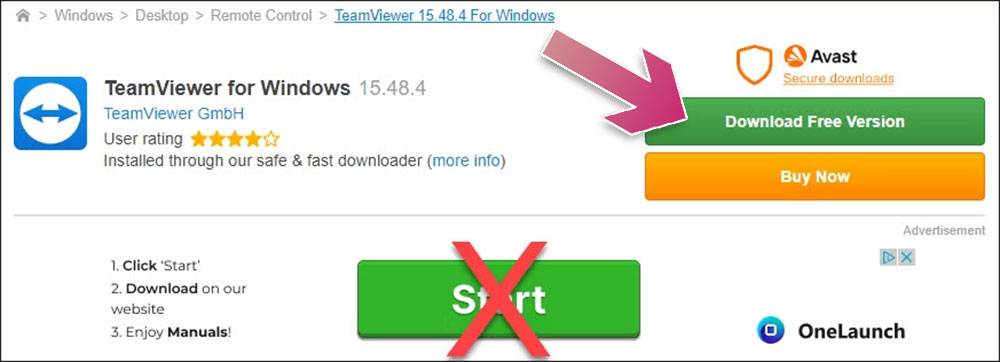
Finding the right one among the many download buttons on the web is the most important thing. The fake ones are usually very expensive, but one thing they usually have in common is that these fake buttons often grab your attention with their gorgeous, huge appearance. Usually the real download button will not jump like this visually. It will basically match the overall style of the website, or it will be presented as an inconspicuous small text embedded link.
Look for the small X or “Advertisement” (or something like AD) icon
Another thing that not only reveals the annoying fake download button, but also another, more subtle button, is the ad tag. Essentially, every ad you see on the Internet will have a small, inconspicuous “X” icon in the corner, an “Advertisement” (sometimes written advertising, AD, etc.) label in a usually watered-down color and a very small font, or the extremely common “AdChoices” logo.
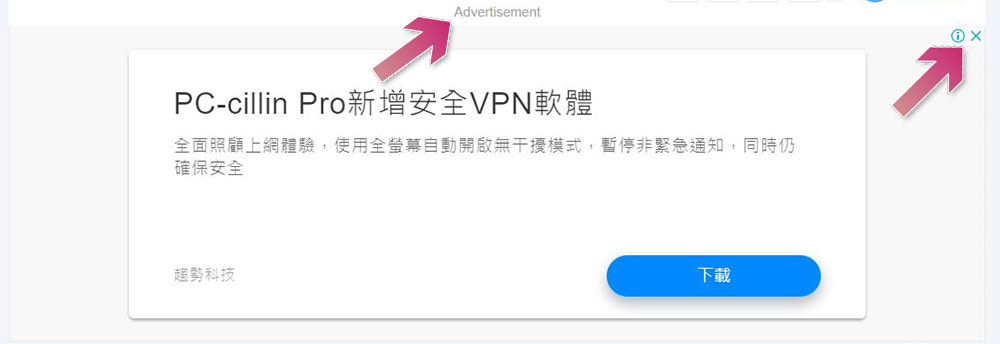
In short, real download buttons will not be marked as ads, you just need to remember to look around for various suspicious tags before mindlessly clicking on the download button.
Test URL without clicking
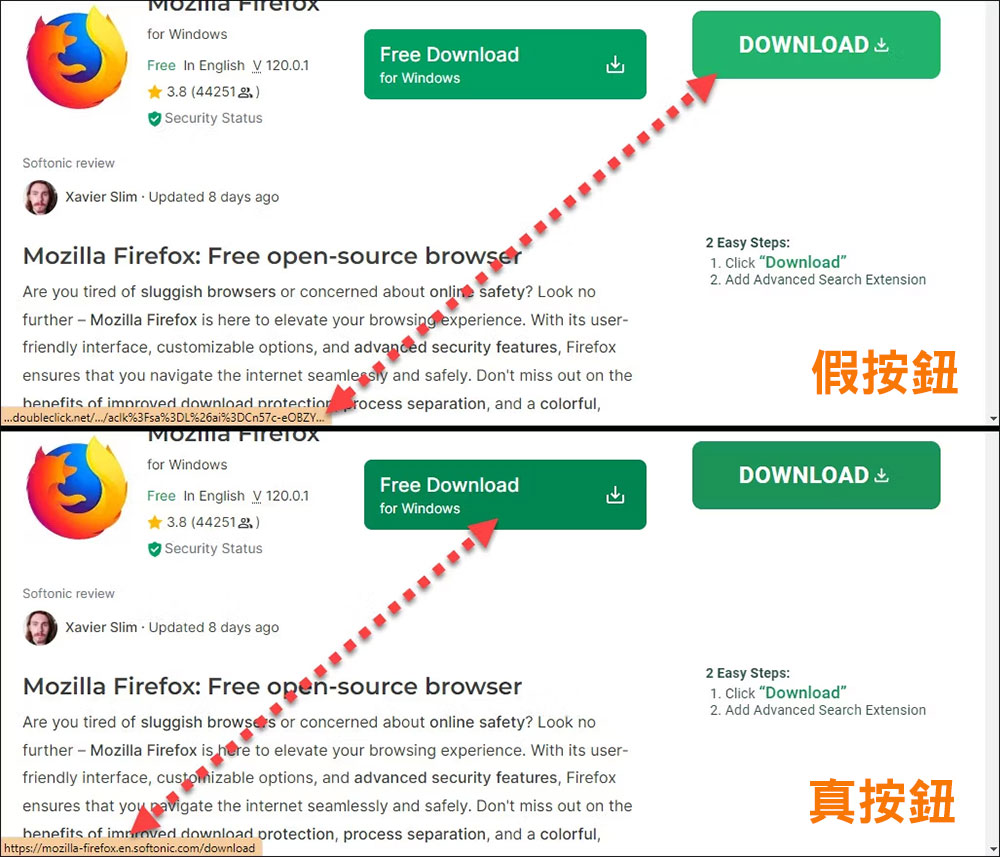
Sometimes, ad tags are easy to miss and fake download buttons are cleverly designed to mimic the real ones. In these cases, your best bet is to hover your mouse cursor over the button to quickly view the URL. In every major browser, you’ll see a preview of the URL appear in the lower right corner of the window when you hover your mouse over a link, and this also applies to buttons and ads. Be wary if a link appears as “googleads,” “doubleclick,” or some other lengthy URL that doesn’t seem to behave as expected.
The image below shows a perfect example of a false ad that looks almost identical to the real ad. However, when hovering over the button, the fake button displays a “doubleclick.net” URL, while the real button leads to a Mozilla Firefox download.
Go directly to the source
The tips above will all help you spot fake download buttons, but there’s a better way to avoid them altogether. If you know exactly what you want to download (such as a browser, decompression software, etc.), it is safest and harmless to download directly from the official website.
You’ll actually find that most sites with a lot of download buttons are not trustworthy to begin with, and while there are exceptions (like APKMirror, which has a lot of fake buttons but is a great site), it usually means you’re probably in a place you’re trying to avoid.
Source: KOCPC Chinese