


Nowadays, many people listen to music on YouTube, but occasionally they still encounter situations where there is no Internet, such as going abroad, taking a plane, or taking a train. At this time, they will definitely want to download YouTube music for offline listening. This article will help you sort out the most comprehensive method of converting YouTube to MP3, which is available on computers, web versions, iPhones, and Android Apps.
1. The best YouTube to MP3 software recommendation | Available for PC, Mac computer download
For PC and Mac, YT Saver is currently the most recommended YouTube MP3 download software. It can download sound quality up to 320kbps. Friends who are very demanding about sound quality will definitely like it. In addition, it also supports downloading YouTube videos with up to 8K resolution in common formats such as MP4, MOV, WMV, etc., which is very easy to use.
Download the installation file from the official website. If the webpage does not switch automatically, you can click the switch button above the free download to switch to Windows or Mac:
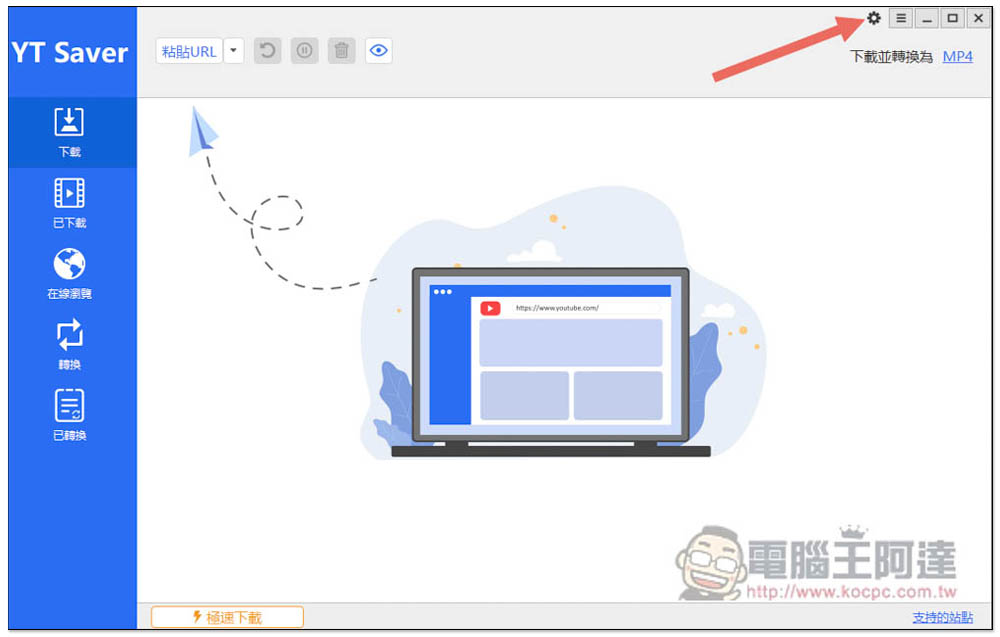
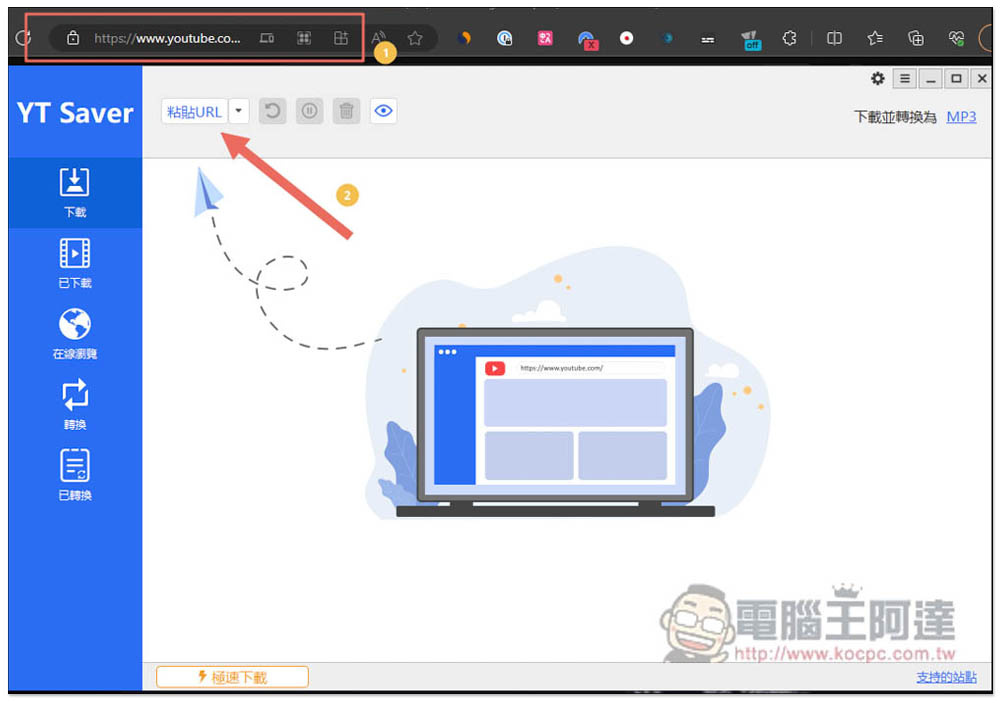
It has a Chinese interface and is easy to operate. After copying the YouTube URL you want to download, click above to paste the URL and the download will start. But before that, if you want to download YouTube MP3, you need to adjust some settings first and open the settings in the upper right corner:
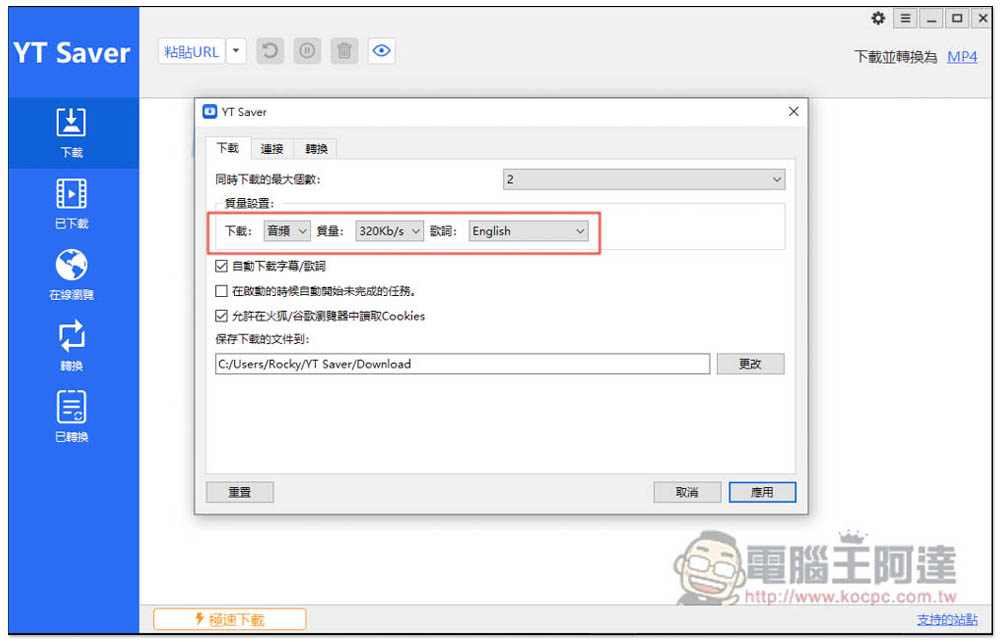
Change the quality setting in the download menu, download to audio, and set the quality to 320kbps. It depends on whether you need the lyrics. There is also a “highest” option for quality. I am more accustomed to specifying 320kbps directly. The “Maximum number of simultaneous downloads” above is defaulted to 2. Those who want to download more videos or music at the same time can change this number, up to a maximum of 10:
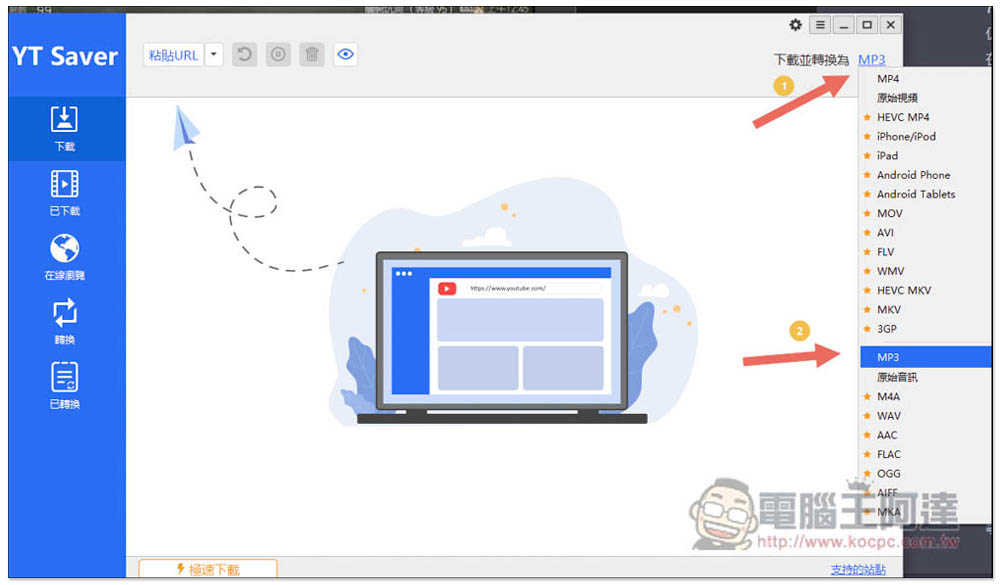
Then “Download and convert to” on the right also needs to be changed to MP3, so that the downloaded file will be converted to MP3. The default is MP4. In addition to MP3, the music section also provides M4A, WAV, AAC, FLAC, OGG and other formats:
Then copy the URL of the YouTube video you want to convert to MP3, and then press Paste URL:
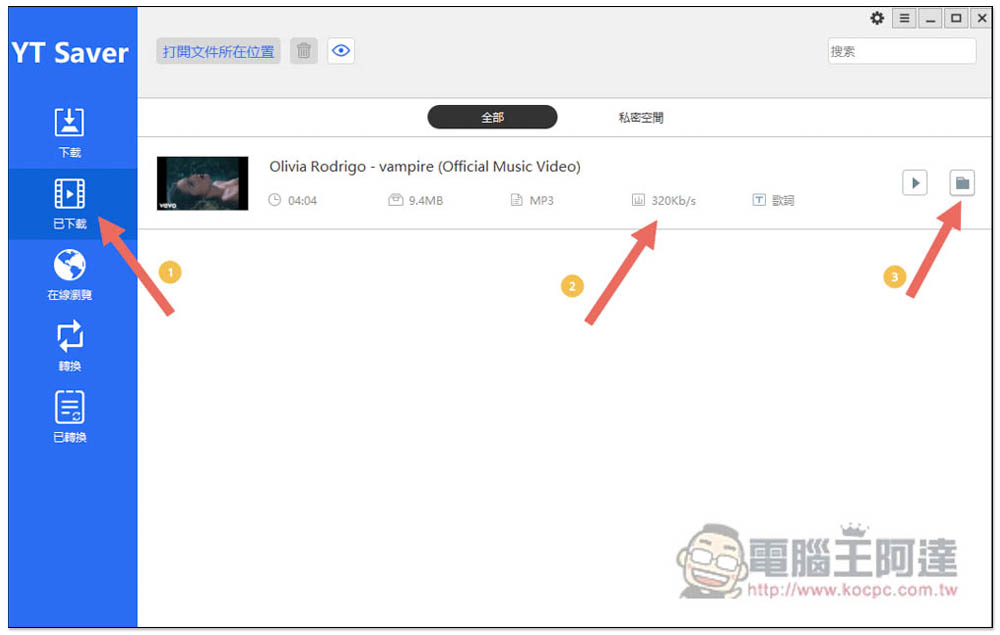
The download and conversion will begin, very quickly, and will be completed in a few seconds. After completion, relevant information will be displayed below, including format, sound quality, and file size. Click the folder icon on the right to open the file location:
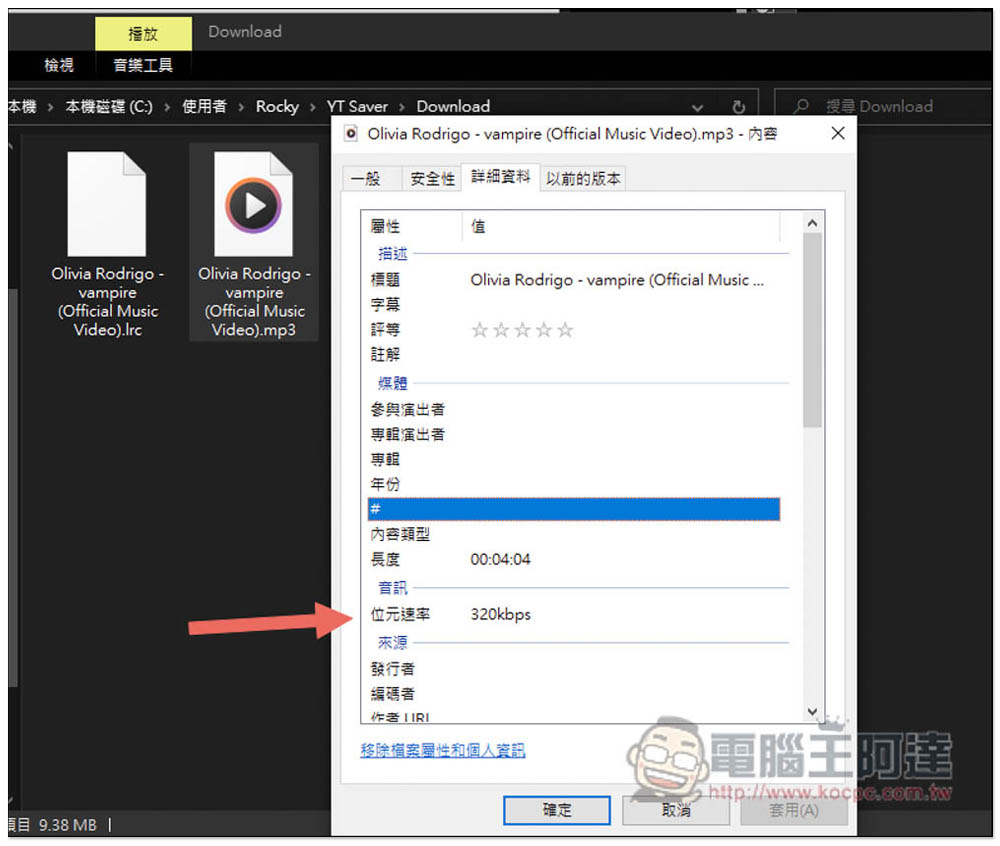
Check that it does reach 320kbps:
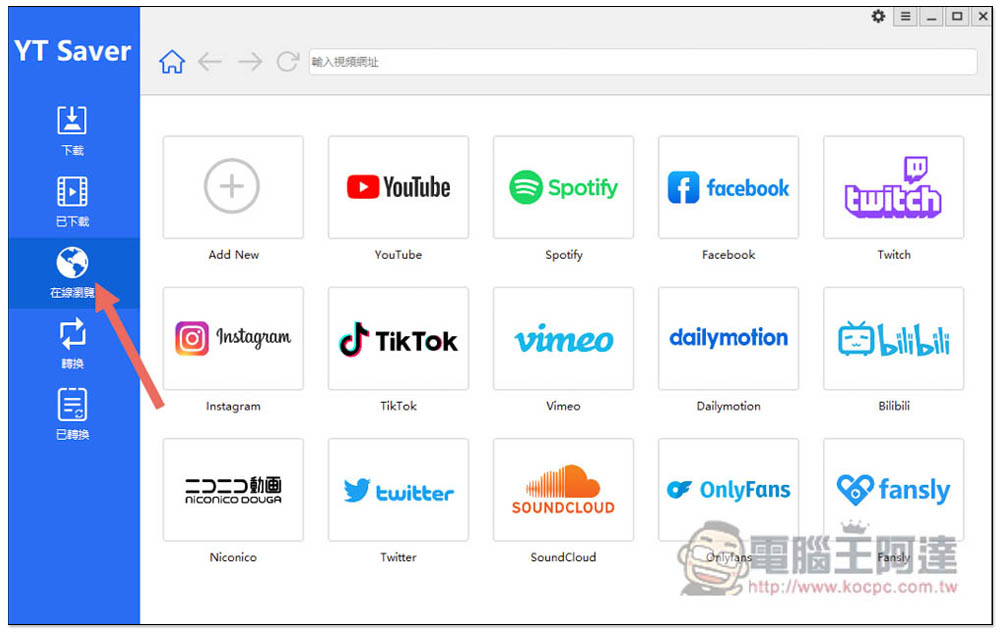
In addition to directly pasting the URL, this device also has a built-in browser function, which means you can directly find the video or MP3 music you want to download. The websites listed on the screen can be downloaded, so not only YouTube MP3 music, but also popular music websites such as Spotify MP3 and SoundCloud MP3 are available. You are not afraid of not finding the music you want:
You can also download YouTube playlists with one click and convert them into your own MP3 music playlists:
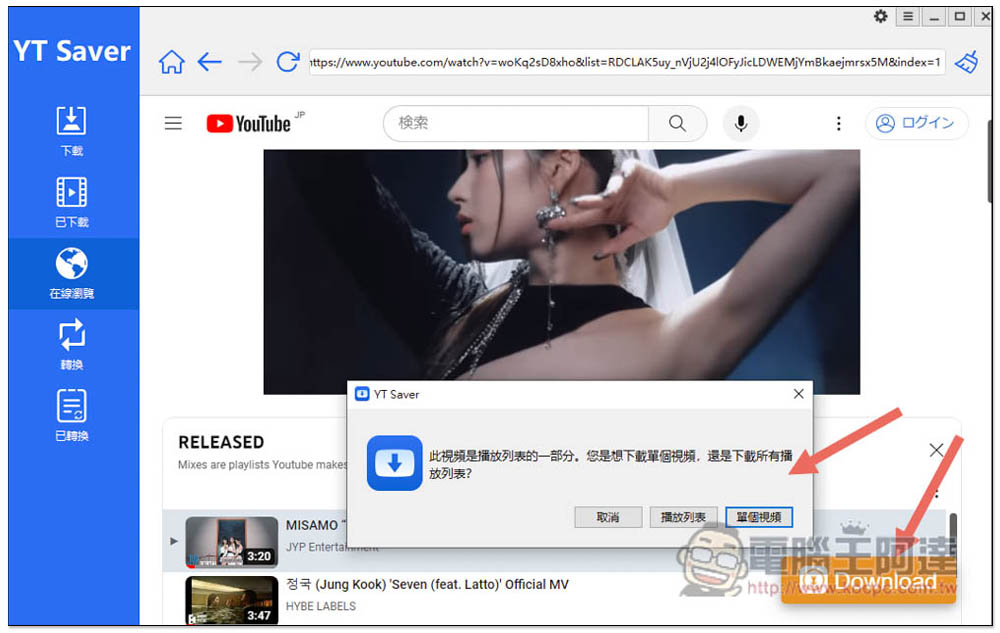
YT Saver can be said to be the easiest software to download YouTube MP3 on PC and Mac. It supports more than 10,000 websites not only YouTube, but also Facebook, Spotify, TikTok, BiliBili, Instagram, etc. It can even download YouTube live videos.
Key features of YT Saver:
- Supports more than 20 output formats, such as: MP3, MP4, MOV, WMV, M4A, MKA, WAV, AAC, etc.
- Supports a variety of sound quality, such as: 64kbps, 128kbps, 256kbps, 320kbps
- Supports all video quality, such as: 480, 360p, 720p, 1080p, 2K, 4K, 8K
- Provides YouTube editing function so you don’t have to download an entire video
2. Online, installation-free YouTube to MP3 conversion tool | Available for download on computers and mobile phones
If you don’t want to install any software, you can use MP3Jucies.guru, a free online tool that can convert YouTube to MP3 music and MP4 videos. The speed is quite fast and there are no ads. It’s just that the stability is not as good as the software version. For people who download frequently, it is still recommended to use the software.
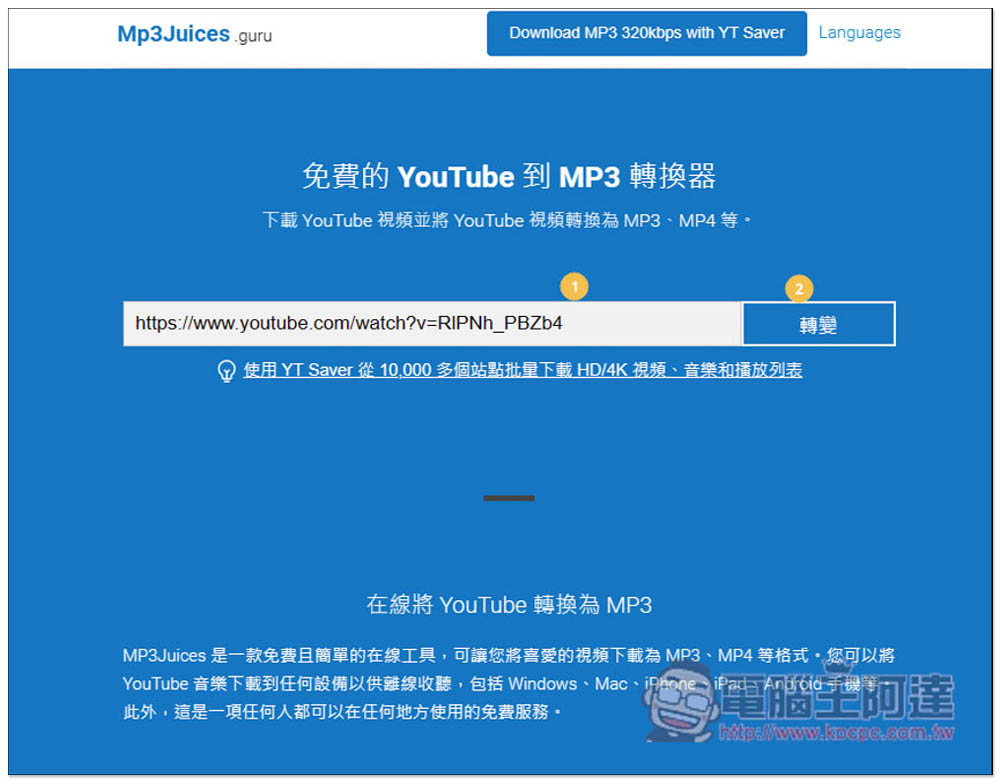
After opening the MP3Jucies.guru online tool, paste the YouTube URL you want to download and press Convert:
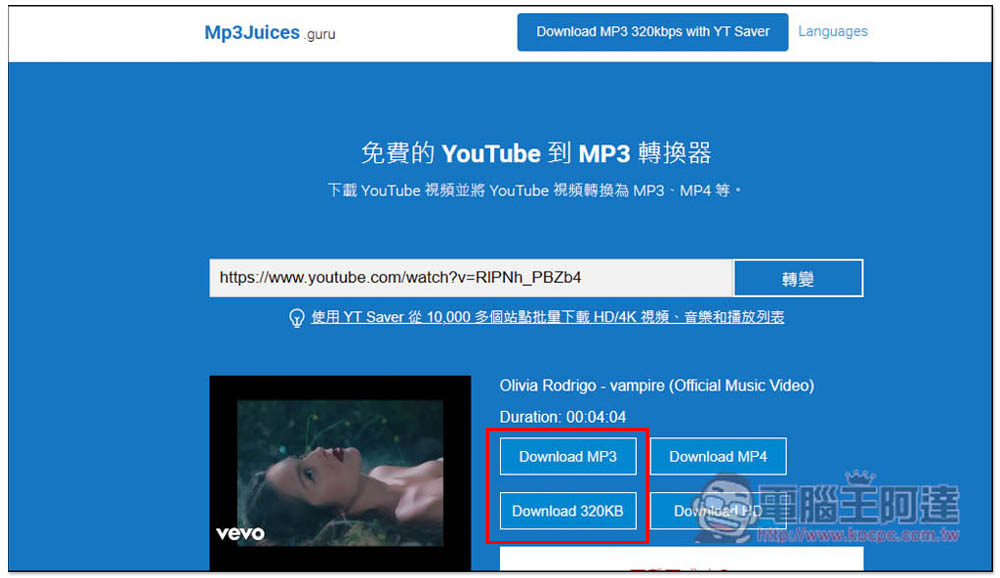
Then you will get download points, including MP3 and MP4. Just click on which format you want to download:
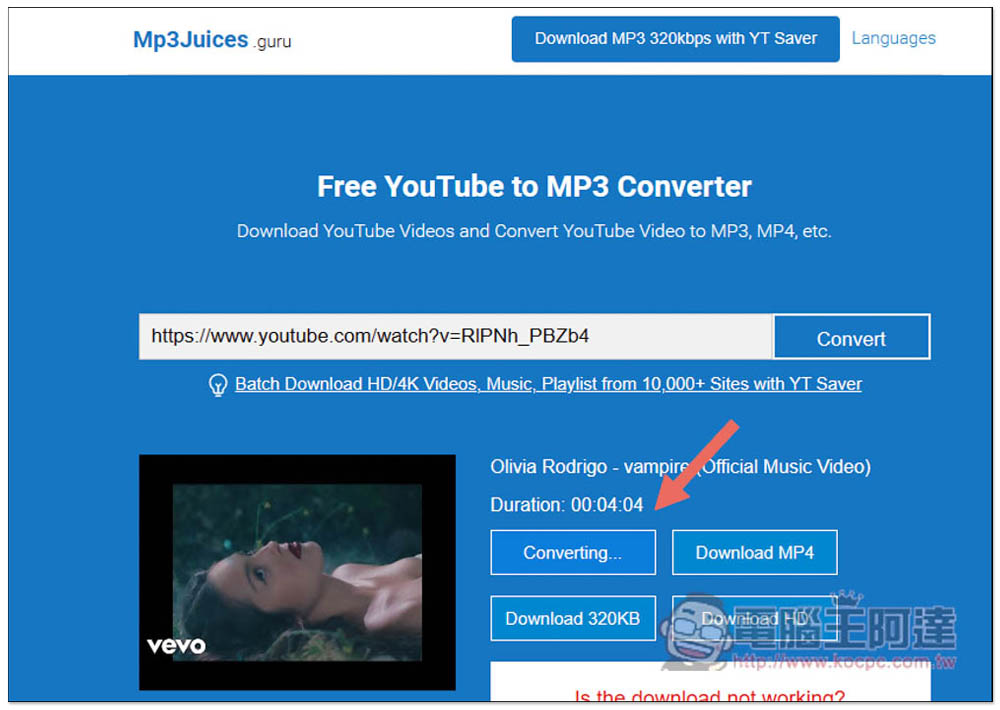
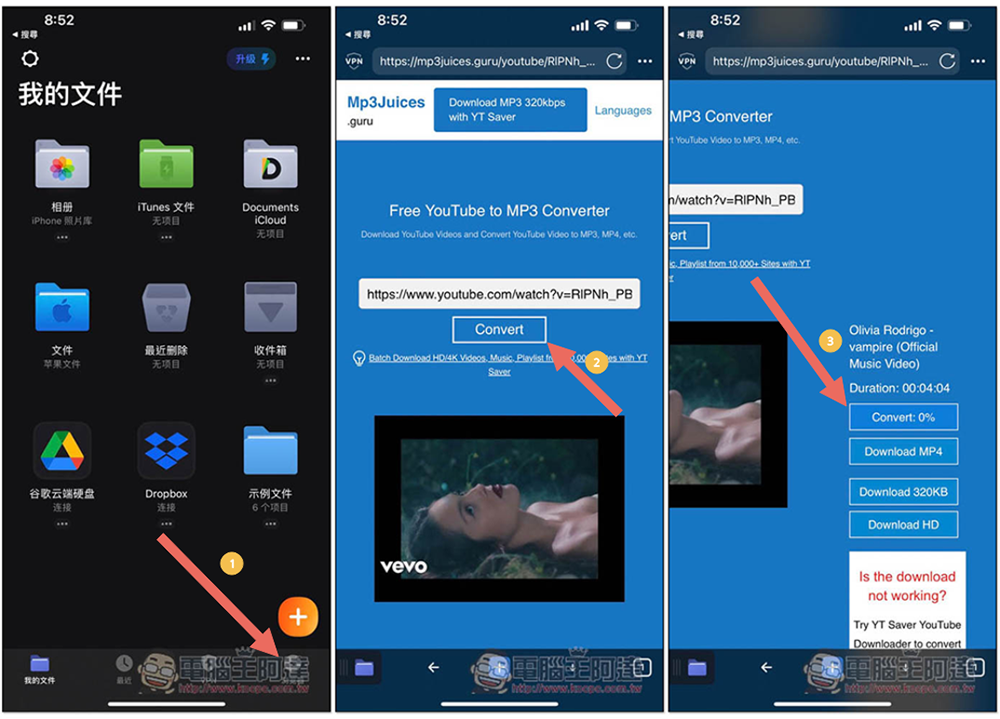
After the conversion is completed, it can be downloaded to the device. In addition, the iPhone cannot be downloaded directly due to iOS setting issues. You can use the following method instead:
First go to the App Store to download and install Documents App, which is a file management and PDF reader with a built-in browser function. You can download YouTube MP3 music or MP4 videos to iPhone from here.
After opening the Documents App, you will see the browser function in the lower right corner. Select the browser and open MP3Jucies.guru. As before, paste the YouTube URL you want to download, and then select the MP3 or MP4 format:
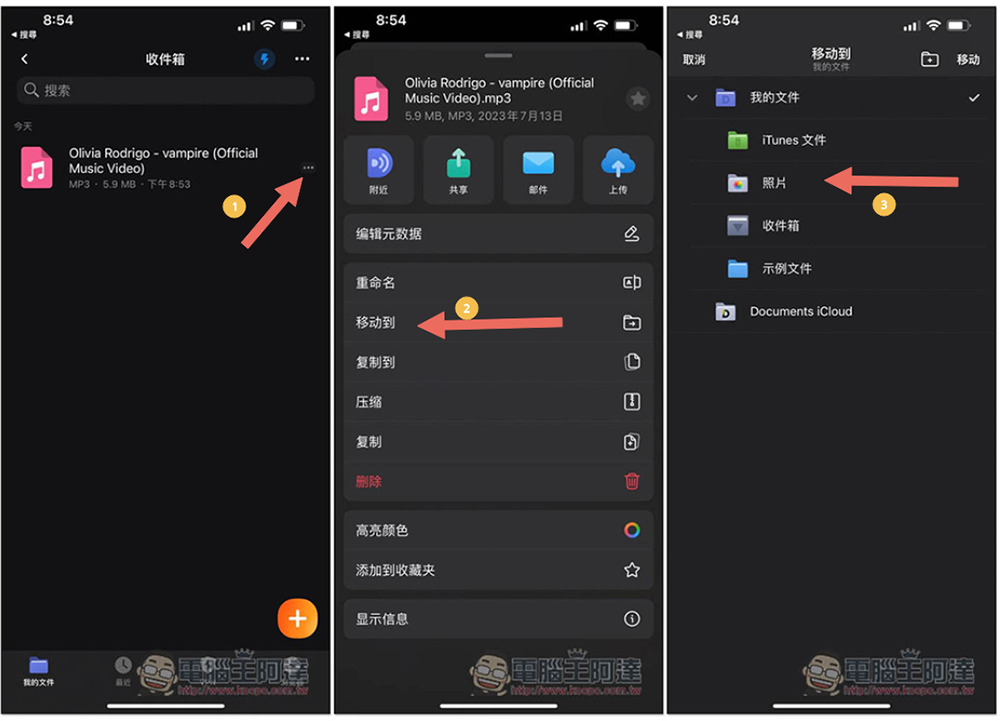
After downloading, it will be stored in the Documents inbox. If you want to move it to another folder, click the… icon on the right to find the move option, and you can move it to another folder or iPhone Photos App:
3. YouTube to MP3 app | Available for download on Android phones
People with Android phones, except for the above MP3Jucies.guru, you can also consider installing iTubeGo YouTube Downloder, which is a YouTube video MP3 downloading app designed specifically for Android. It can download videos up to 4K quality and 320kbps, which is easier to use than the web version.
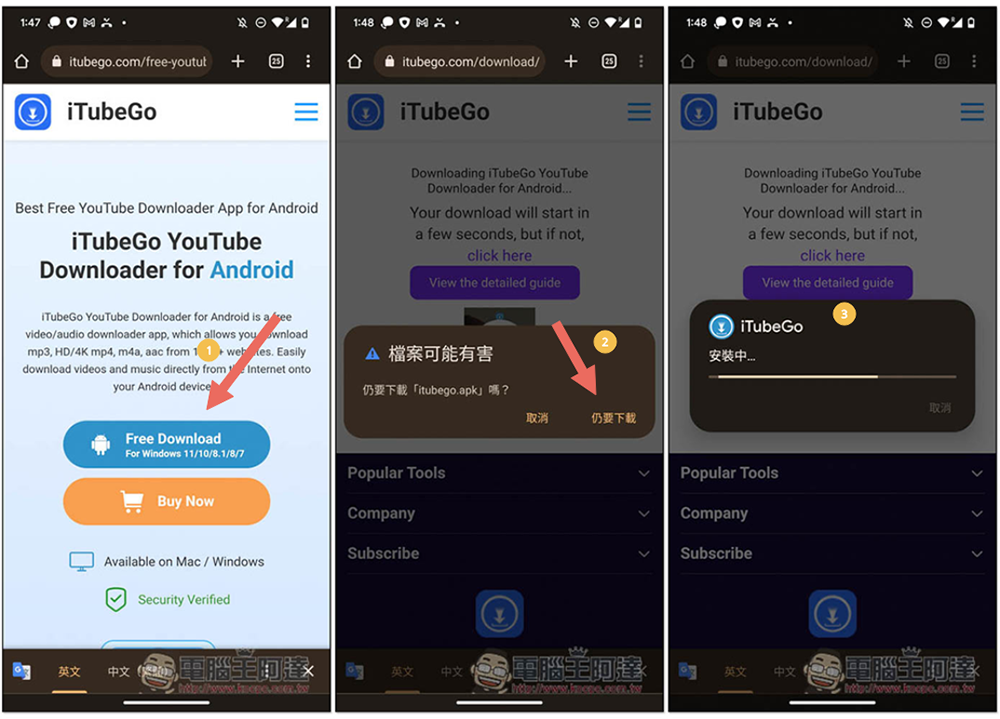
Google will not allow tools such as YouTube downloads to be put on the Play Store, so you need to manually install the APK file. Remember to download it from the official website:
After installation, open it and paste the YouTube URL you want to download, or click on the YouTube icon to search. After entering the video page, you will see a download icon in the lower right corner. Click it to select the format and quality you want to download:
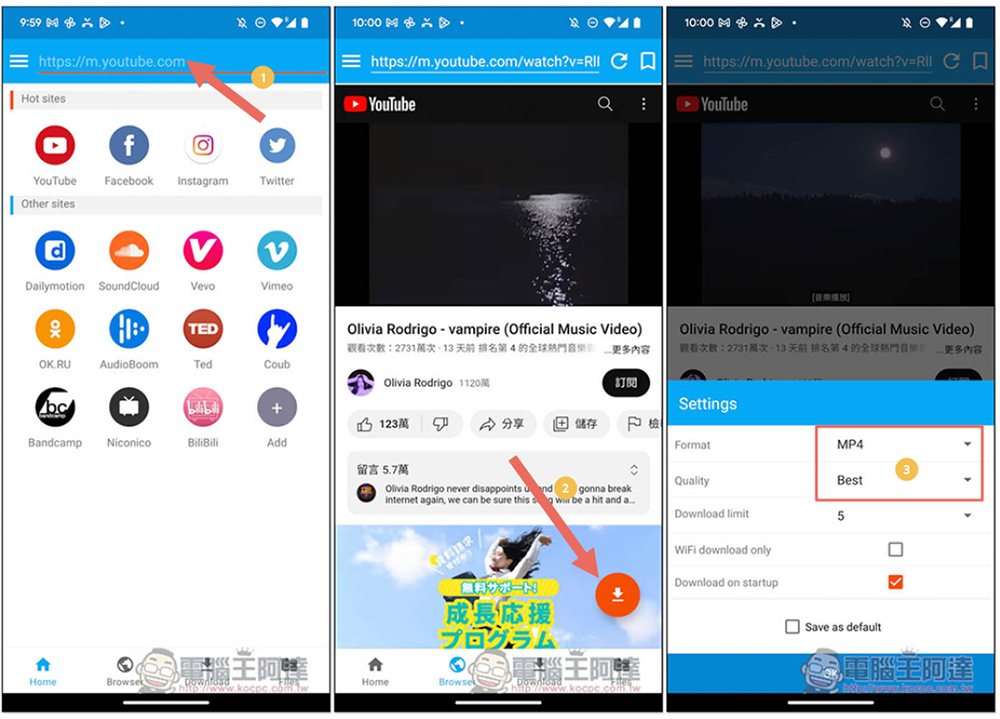
Select MP3 as the format. You can set the sound quality to Best or 320kbps. Then press OK and the download will start:
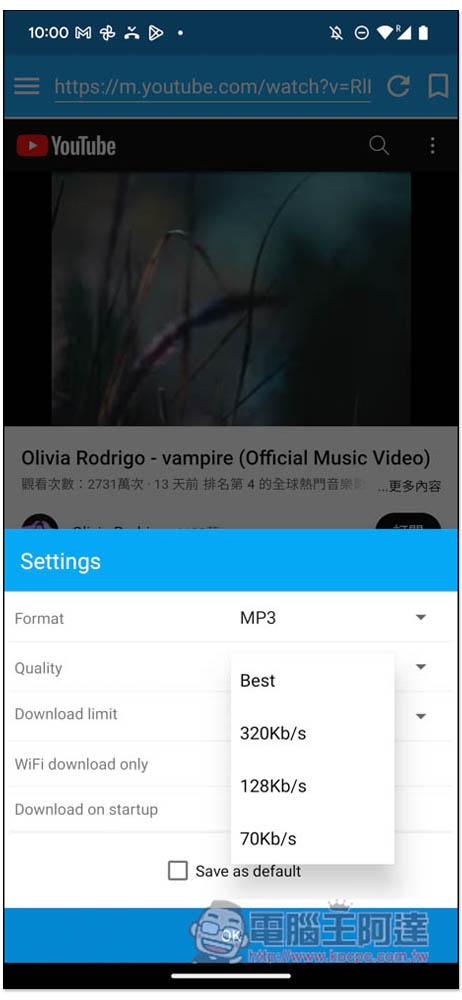
iTubeGo YouTube Downloder supports downloading from not only YouTube, but also Facebook, Twitter, TikTok, SoundCloud, Instagram, and more than 1,000 websites. It is a very powerful video downloading app, and I highly recommend you try it.
YouTube MP3 download software vs web download tool, which one should I choose?
This is a question that many people have. For those who have computers at home, I would recommend using YouTube download software, because for a long time, the stability of web download tools has not been very good, and they often encounter failures. The user experience is not very good. It is possible that you can download it this time, but not the next time, and then you don’t know what to do.
Software like the YT Saver recommended in this article does not have this problem. You can basically download it at any time. Even if you encounter a problem, the official support customer service can help you at any time and you can get a solution quickly. Unlike web tools, there is no one to ask. It is worth considering for people who often download online videos.
In addition, YT Save’s download speed is much faster than web tools, supports downloading of the highest quality videos and highest sound quality music, can choose from a variety of formats, and even has built-in editing functions that allow you to specify the clips to be downloaded, as well as audio and video conversion functions, making it very flexible to use.
Summarize
The above are the current methods for downloading YouTube MP3 music on various devices. Each has its own advantages and disadvantages. It depends on your needs. For your reference, I almost always use software.
Source: KOCPC Chinese