


LM Studio, a local AI application that many people love to use, released version 0.4.16 on June 4 and officially joined the iPhone and iPad exclusive Locally app, with the new LM Link Remote connection technology. It allows users to remotely call large-scale local AI models running on Mac or Windows hosts at home through their mobile phones when they are out. The entire process is end-to-end encrypted, and chat records are not uploaded to any cloud server.
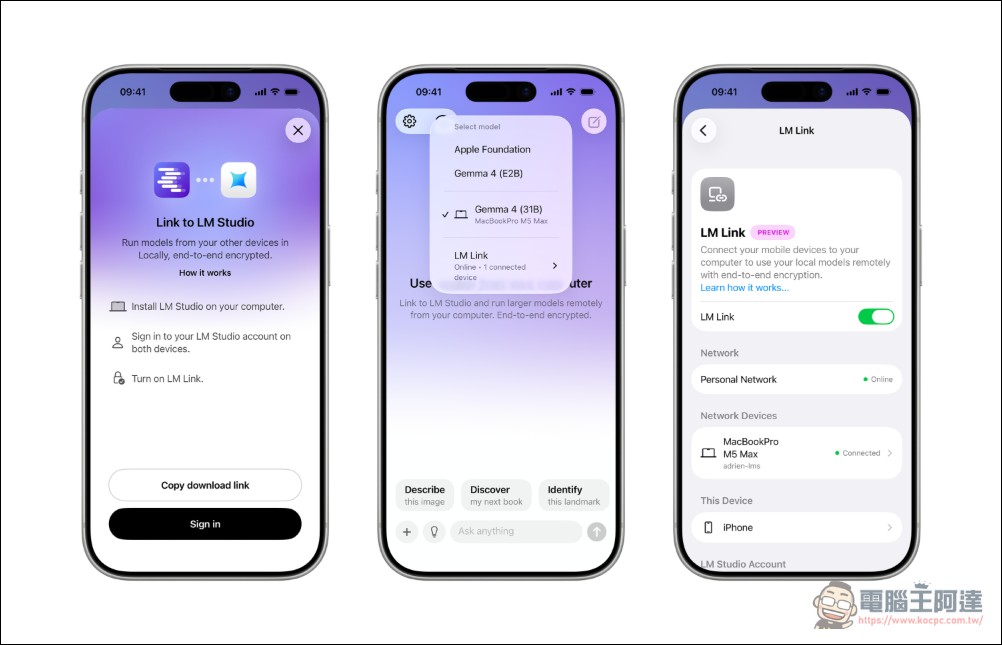
LM Studio launches iPhone remote access feature
The background of this release is that LM Studio acquired the Locally AI application of independent developer Adrien Grondin on April 8, 2026. Grondin himself joined the LM Studio team full-time and was responsible for the development of native AI experiences for each platform. Locally + LM Link is the first result after the merger of the two.
Locally and LM Link: two products, each doing its job
The most common place to get confused is to think of Locally and LM Link as the same thing. In fact they are two separate products:
- Locally: The iPhone/iPad native application downloaded from the App Store is the interface for users to operate on the phone.
- LM Link: Remote connection protocol that allows Locally (or other tools) to connect to the LM Studio instance running on the remote computer. It is reusable infrastructure and is not limited to mobile phone scenarios
The bottom layer of LM Link adopts Tailscale tsnet Function library, which is a user space program written in Go language with embedded Mesh VPN based on WireGuard. After the two devices are authenticated, they will automatically discover each other and establish an end-to-end encrypted connection without exposing the public network port. Encryption uses the ChaCha20-Poly1305 algorithm with Curve25519 key exchange, which is an industry-standard modern encryption primitive.
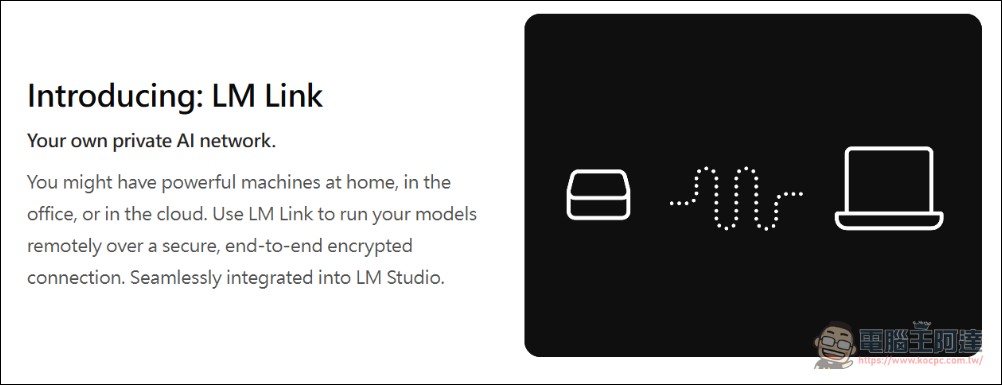
In terms of privacy, LM Studio makes it clear that the only data touching its central server is the “device discovery list”, which is used to allow two devices to find each other. Once the connection is established, all prompt words, inference results, model data, hardware information and other traffic are transmitted directly between the two devices and cannot be read by the back-end servers of Tailscale and LM Studio. Chat history is stored on the respective local device.
Why can’t iPhone run models by itself? Memory bandwidth is key
A natural question is: Why not run large models directly on the iPhone? The answer is the physical limitations of memory bandwidth.
LLM’s token generation speed is limited by memory bandwidth. The high-end iPhone (A17/A18 Pro) has a unified memory of about 8GB and a bandwidth of about 50 to 90 GB/s. In comparison, a Mac Studio equipped with M4 Ultra has a bandwidth of up to 800 GB/s, a gap of nearly an order of magnitude. This represents the same 7B parameter model that can be conversationally smooth on a Mac, but can be unbearably slow on an iPhone.
At present, the practical upper limit of iPhone native inference is a 4-bit quantized model with less than 3B parameters. Independent analysis points out that the 125M parameter model can reach approximately 50 tokens per second on the current iPhone, and the 1B model is suitable for short context tasks. It’s good enough for auto-completion or small summaries, but the 7B to 30B models that people really want to talk to are currently not possible on mobile phone chips. LM Link is designed to resolve this contradiction: the user’s local computer is responsible for calculations, and the iPhone is just an encrypted input and output terminal. This is not an arbitrary design choice, but is currently the only way to bring desktop-class native models to mobile phones.
A comparison of three paths to mobile AI
Mobile AI has long been simplified to the binary opposition of “cloud vs. local”. LM Link provides a third way:
- Cloud AI (ChatGPT, Claude, etc.): The most powerful, but the prompt words and conversation records are sent through a third-party server, and the privacy cost is the highest. The subscription fee is approximately US$20 (approximately NT$650) per month, and the annual fee is approximately NT$7,800 to NT$15,600.
- Native local AI (running on mobile phone): Completely offline, with the highest privacy, but limited by the mobile phone chip, it can only run small models
- LM Link: Conversation records remain on the device, inference work is performed on the Mac at home, large models can be run, and the privacy level is close to native local. The price is that the Mac must be turned on and connected to the Internet, and it is free during the Preview period.
Developer Ecosystem: OpenAI Compatible API
One of the technical highlights of LM Link is API level compatibility. LM Studio provides an OpenAI compatible API in the localhost:1234 port of the local machine. Any tool or SDK that supports custom base URLs can be connected directly. LM Link remotely exposes the same API endpoint, which means that development tools such as Claude Code, Codex CLI, and OpenCode can remotely use the Mac at home through LM Link without any modification.
LM Link also supports connecting to the headless version of LM Studio llmster, so the computing end is not limited to a Mac or Windows computer with a screen, it can also be a Linux server or a cloud VM. The mobile phone is just an “encrypted terminal” design, making the entire architecture highly flexible.
Community plan first, included in the official version
LM Link is not the first solution to try to solve the problem of “mobile phone connection local model”. Prior to this, third-party applications such as Off Grid and LM Mini had appeared in the community, each of which implemented the connection function from iPhone to LM Studio. The significance of LM Link is to provide a first-party implementation with official maintenance, end-to-end encryption, and no third-party relays.
LM Studio itself supports mainstream open source models such as Gemma, Qwen, Llama, DeepSeek, Mistral, and Phi, and hundreds of community fine-tuned versions can be downloaded through Hugging Face integration. There are two inference engines: llama.cpp (GGUF format, cross-platform) and Apple MLX (for Apple Silicon). Community reports indicate that MLX’s execution speed on Metal is about 30% to 50% faster than llama.cpp.
Notes and limitations
Several points need special attention:
- LM Studio is not open source software: Free for personal and commercial use, but the licensing terms are stricter than free software. If an organization has a hard need for open source licensing, it should evaluate LM Studio as a “free tool” rather than an “open source tool”
- Free during the Preview period, not necessarily in the future: LM Link is currently in the application-based Preview stage and is free to use, but the official version will have free and paid tiers. App Store pricing not yet confirmed
- iPhone and iPad only: The Android version has not been announced yet
- Mac or computer must be powered on and connected to the Internet: If your Mac or Windows computer at home goes to sleep or is disconnected from the Internet, the mobile phone cannot connect
LM Studio continues to enhance its reasoning capabilities in recent versions: 0.4.13 updates the MLX engine to v1.8.1, 0.4.14 stabilizes MTP speculative decoding, and 0.4.15 adds CUDA tensor parallel computing to support multi-GPU loading. Locally and LM Link are the main features of 0.4.16, built on a gradually mature inference basis.
Source: KOCPC Chinese