

• About Us
King of Computer Media
  • Home
  • Tech News
  • AI News
  • Apps & Tutorials
  • Mobile & Telecom
  • Lifestyle
  • About Us
No Result
View All Result
  • Home
  • Tech News
  • AI News
  • Apps & Tutorials
  • Mobile & Telecom
  • Lifestyle
  • About Us
No Result
View All Result
King of Computer Media
No Result
View All Result

Home - AI News and Tutorials - Pika launches 16 new Pikaffects video effects, letting you transform into iconic characters like princesses, heroes, and captains.

Pika launches 16 new Pikaffects video effects, letting you transform into iconic characters like princesses, heroes, and captains.

KOCPC Editor by KOCPC Editor
March 14, 2025 - Updated on August 4, 2026
in AI News and Tutorials, AI Tools and Tutorials

The incredible AI tool Pika we introduced before, besides rolling out its physics-defying Pikaffects Besides special effects, they also launched seamless compositing capabilities. Pikadditions Features and the Pika mobile app. Pika recently launched new Pikaffects effects, adding various “Me” features that let you transform into styles like a baby, princess, Mona Lisa, captain, or martial arts hero. It’s also free to use—if you’re interested, keep reading!

Pika launches 16 new Pikaffects video effects, letting you transform into iconic characters like princesses, heroes, and captains.

Today, Pika has launched another 16 Pikaffects, letting you become iconic characters across various fields. These are the new Pikaffects released after Pika introduced version 1.5 last October. You can now experience the new Pikaffects on the Pika web version and mobile app.

New Pikaffects drop! Morph into iconic characters and alter egos with stunning precision and smooth transitions, available now at Pika dot art or on the iOS app. pic.twitter.com/LM0k6Sl4HO

— Pika (@pika_labs) March 13, 2025

Head to the Pika web version to experience the new Pikaffects effects.

Go to the Pika web version, then click the Pikaffects option at the bottom of the screen and choose from the 16 newly launched Pikaffects effects. After selecting an effect, upload the image you want to use, then click the logo to generate the video~
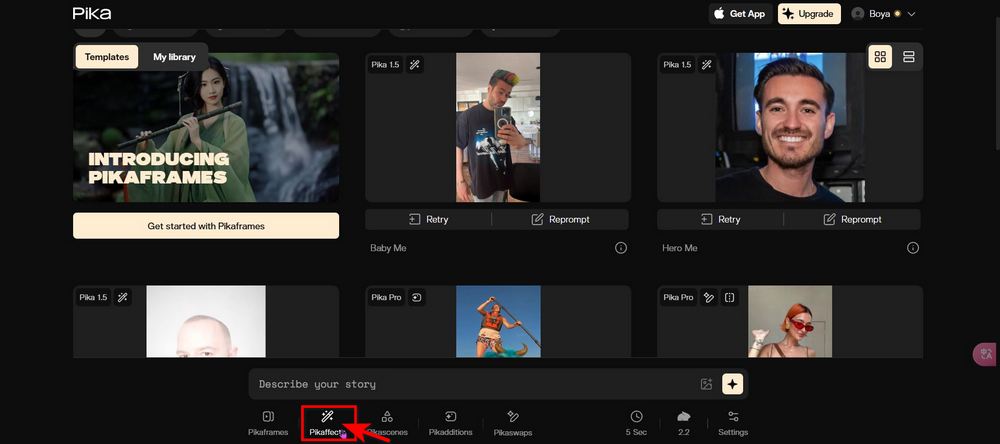
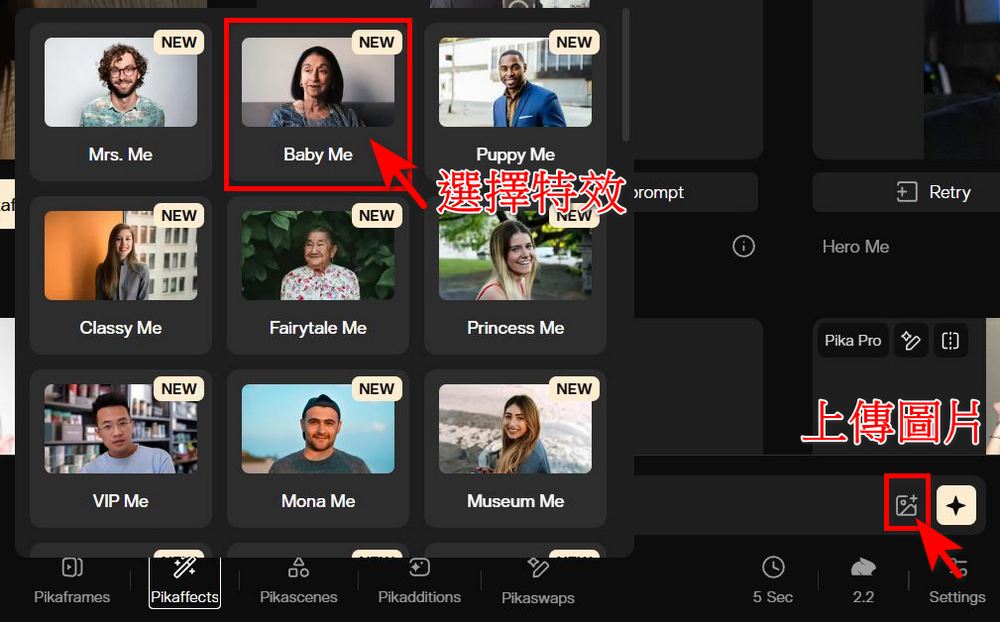
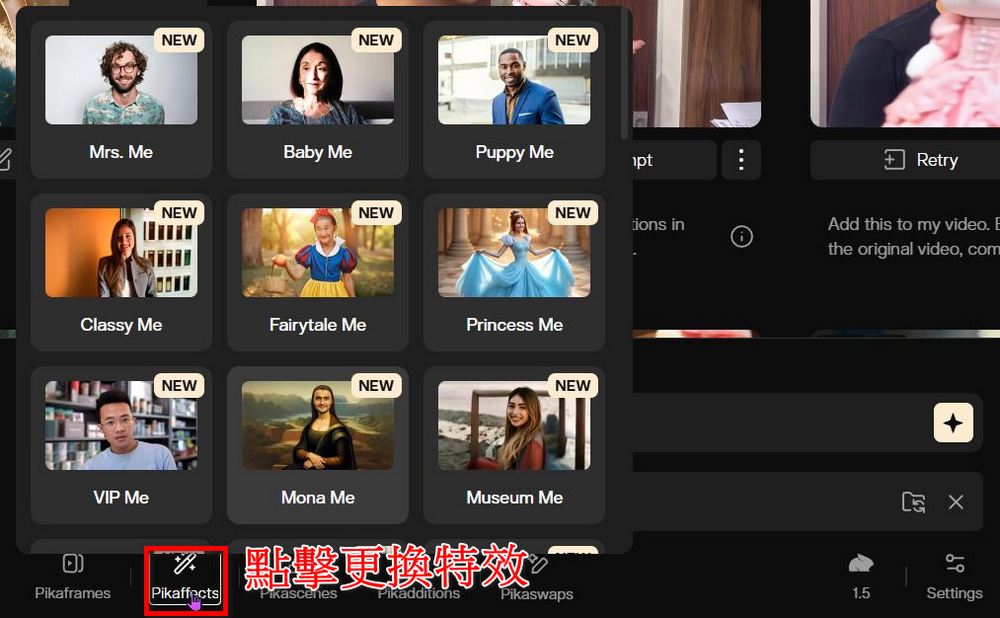
After testing, one account can generate up to 7 Pikaffects videos for free, so users can prioritize their favorite Pikaffects effects when generating videos. If you want to switch to a different Pikaffects effect, simply click the Pikaffects option again to change it.
Here is the video generated using the Princess Me, Baby Me, Museum Me, Captain Me, and Hero Me effects.

Those who are interested can go to Pika’s webpage or mobile app to generate videos. If you want to learn how to use Pika’s mobile app, click the link below to read:

Pika 正式推出手機版應用程式:手機上也能輕鬆生成 AI 影片

Source: KOCPC Chinese

Tags: aiImage generationImage-to-video generationPika

Recent Posts

  • The Xiaomi Pad 8S Pro has passed network access certification and will debut with the self-developed XRING O3 chip.
  • The entire Google Pixel 11 lineup has been leaked! Official promotional renders of the Pixel 11 Pro XL have also surfaced
  • Are Chinese phone battery capacities falsely labeled? A brief look at the “capacity locking” phenomenon in Chinese silicon-carbon batteries.
  • NCC is leaderless, recklessly sending out national-level alert messages!?
  • What does “QR” in QR Code mean?

Recent Comments

No comments to show.
  • About Us

We welcome partnership inquiries and product review opportunities from smartphone manufacturers, iPhone accessory brands, and app developers.koc kocpc.com.tw|Privacy Policy |Hosting & Maintenance: Fast Line Taiwan, A-Chang Digital Technology

No Result
View All Result
  • Home
  • Tech News
  • AI News
  • Apps & Tutorials
  • Mobile & Telecom
  • Lifestyle
  • About Us

We welcome partnership inquiries and product review opportunities from smartphone manufacturers, iPhone accessory brands, and app developers.koc kocpc.com.tw|Privacy Policy |Hosting & Maintenance: Fast Line Taiwan, A-Chang Digital Technology