


Although Google search has previously supported highlighting search keywords in the description part. However, for those who like to get more accurate results, Google now also hopes that its search tools can also meet the requirements for accuracy. Continue reading A new Google search tip: How to ensure that the results list shows the article paragraphs and report content where the search keyword appears.

▲Image source: Google
New Google Search Tips: How to Make sure the Results List Shows Article Paragraphs Where Your Search Keywords Appear
In addition to the fact that the Internet should be one of the necessary rights for human beings. Knowing how to search on Google is actually a survival skill for modern people, or maybe it’s just a reflex action? For people who frequently use Google to search for information, it is already a very common skill, such as using the advanced search tools, or simply remembering how to use symbols to enhance the accuracy of the search.
However, regarding how the content appearing in the search list will be presented, in addition to being able to freely switch between items including “webpages”, “news”, “maps”, “pictures”, “videos”, etc., it seems that they are more inclined to let the Google search engine play freely. Instead of displaying a simple description of the web page, the results may be displayed in various ways such as Snippets’ multi-functional blocks or lists.
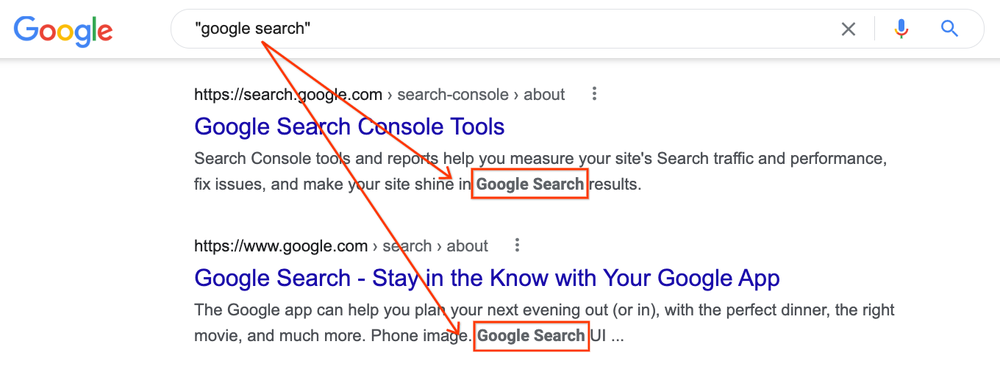
However, for users who simply want to search for specific keywords, these diverse presentation methods may make it difficult to grasp where the precise keywords searched appear in the context of the web page. In this regard, the Google search engine announced that after hearing feedback in this regard, it has decided to provide a small change in the search result list for the precise search function surrounded by ” ” symbols – but it may greatly help the workflow!
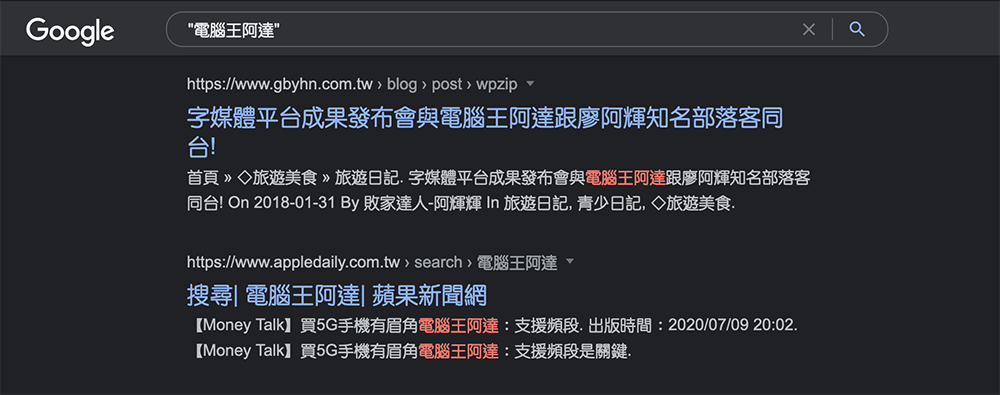
To put it simply, in the future, the string enclosed by quotation marks will not only be used to search for this word. For the search list, we will also fully use the description information column under the title to put quotation text that will be included in the context – keywords will still be displayed in different colors and bold.
Although this change does not feel like a big change. But for those who pursue precise search terms, you will be able to more easily grasp which part of the paragraph the search keywords may fall in the results of each web page search. Relatively speaking, it is easier to filter out whether there is any information worth digging into in this web page or this report article. This way, you don’t have to click through all the results or even search for keywords on the page. I believe it will make the search more efficient.

Google has also provided a lot of information about this feature change. Including sometimes you may find that after clicking on the page, you cannot directly see the keywords appearing on the page. At this time, you can consider switching to the developer mode of the browser, and you may be able to search for text hidden in the code project. For more improvements and usage tips specially designed for users who prefer precise search, you can read and learn more in the Google Keyword blog cited in the source.
Further reading:

Source: KOCPC Chinese