


The most popular free messaging apps in Taiwan are LINE and Facebook Messenger, and I am no exception. Although these two apps are not bad, after recently trying the Jello free messaging app, I really feel that it has full potential. It has almost all the advantages, such as no ads, all features are free (even stickers, no need to buy them), chats can be private and incognito, and even if you change to a different phone system, the messages will be retained, which is really great.
The transfer/receipt function is also available. What I think is the best thing is that with the New Year coming soon, it also has a built-in “sending red envelopes”, which means I can directly use this function to send red envelopes to other friends, which is very convenient.
Jello download location (iOS/Android)
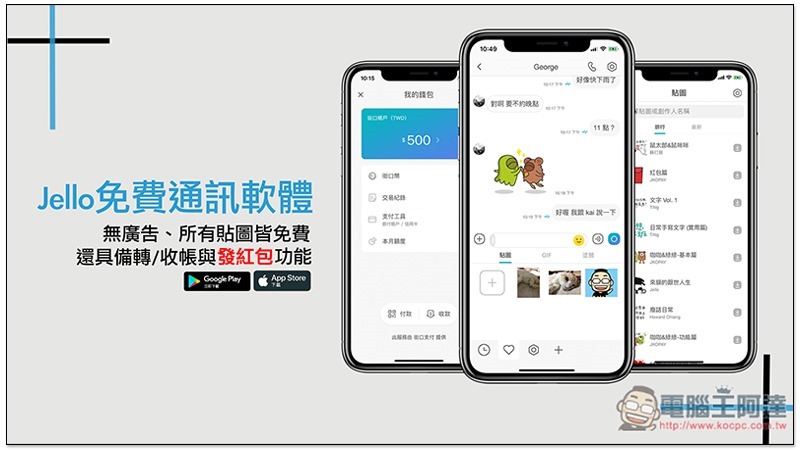
Introduction to Jello free messaging software
You only need your phone number to register
Very different from most messaging software on the market, whether registering or logging in, you only need to enter your phone number and do not need to set a password. I have to say that this is really convenient, especially in this era of overflowing accounts and passwords. You don’t have to remember a new password (and account number):
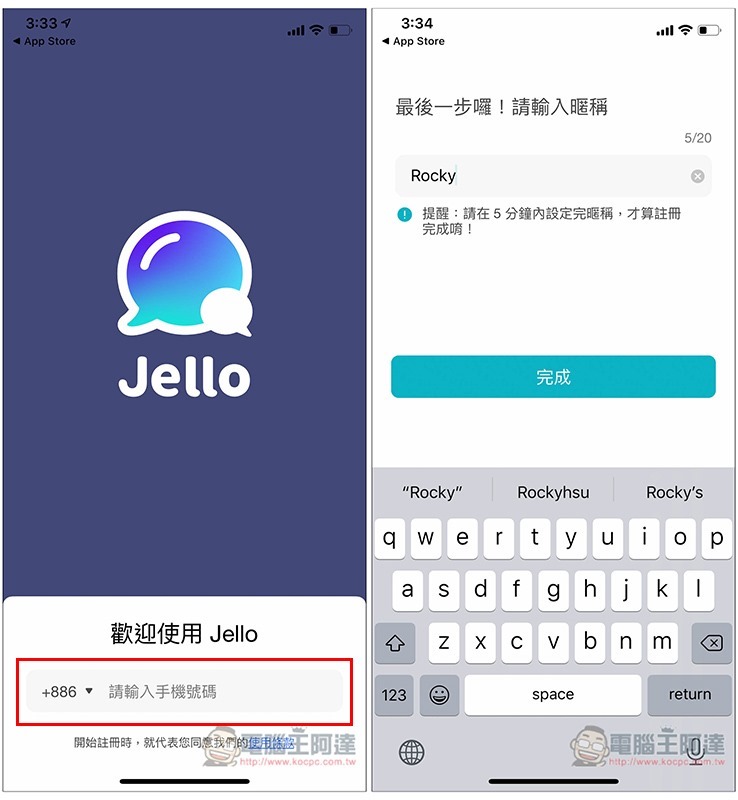
Of course, logging in is not just based on the phone number. You must also enter the SMS verification code. After filling in the phone number, the text message will be automatically sent to the phone number.
It also means that only you may receive this text message. I think this security design is very good. There is almost no need to worry about your account being stolen, unless a hacker steals your account number or captures your text message. However, this is less likely than having your account password stolen.
Not only is there no ads, all functions in the app are free of charge, even the stickers.
The interface of Jello is very clean and concise. Whether it is in the chat room, address book, or anywhere in the app, you will not be disturbed by advertisements. You can concentrate on chatting without fear of accidentally clicking on it. In this era when more and more chat software are beginning to include advertisements, this is really great. I feel that I have not used such an unburdened app for a long time. (The million red envelopes in the chat list below are the latest official activities, not advertisements):
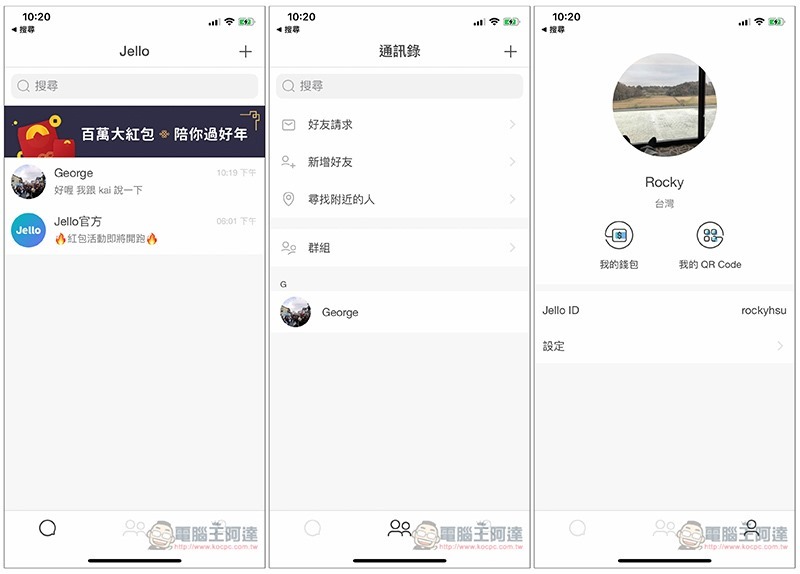
Not only is there no ads, even all other in-app features such as stickers are free, so you can use them as much as you like without having to worry about paying.
You may be thinking that since it’s free, there shouldn’t be too few sticker options, right?
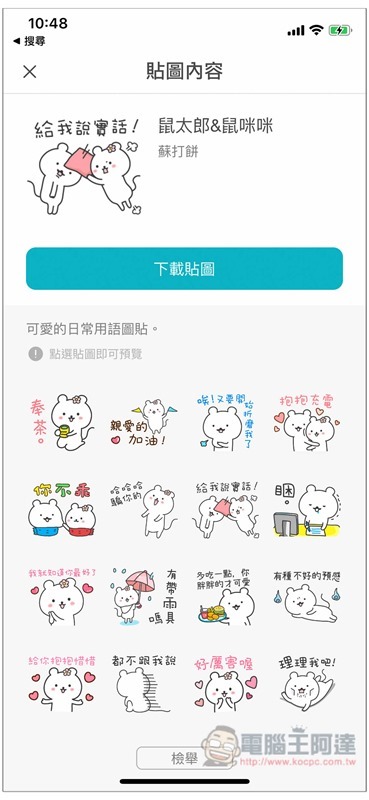
I originally thought this was the case, but after actually browsing, I didn’t expect that there were not only a lot of them, but many of them were very cute:
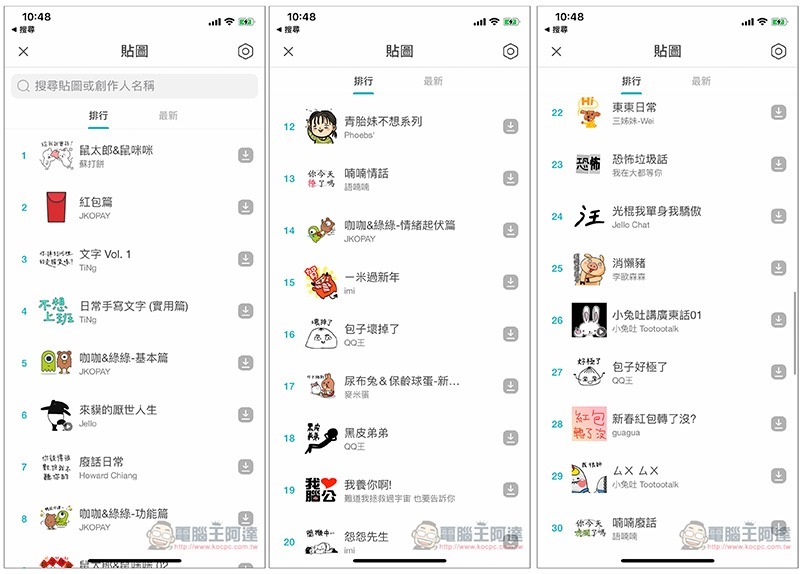
Like the Mouse Taro & Mouse Mimi in the picture below:
New stickers will be released at any time:
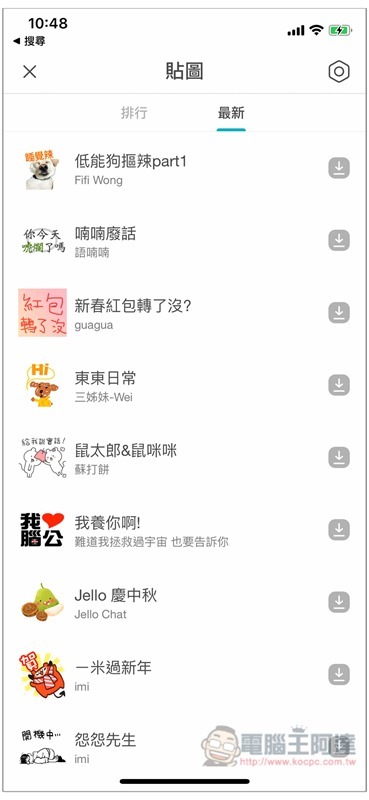
Various sticker functions
The sticker function provided by Jello not only downloads the creator, but also makes your own. There are two production methods: “turn photos into stickers” and “manual graffiti”.
Click + in the sticker field to select the photo you want to turn into a sticker from your phone’s photo album. I turned the photo of my cat at home into a sticker:
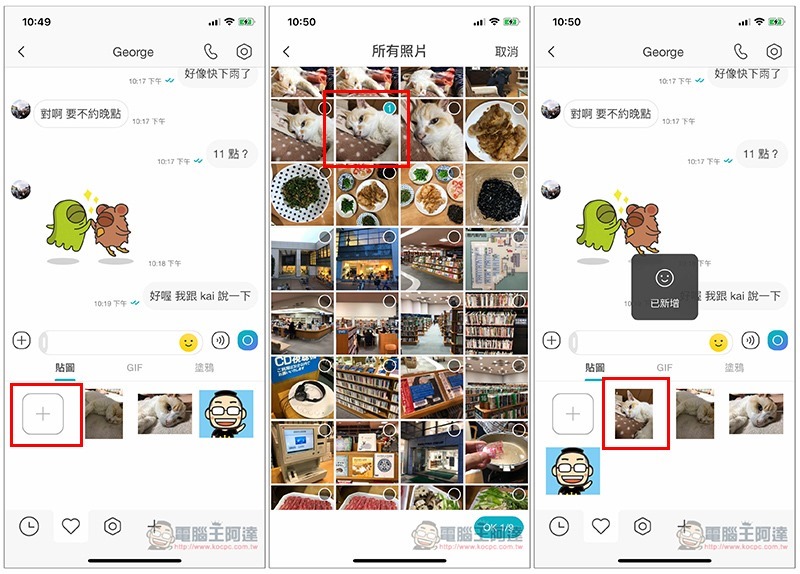
You might be thinking, this feels just like uploading a picture? Quite different actually. You have to go into the album to select each time you upload a picture, and you often take new pictures, so it may take some time to find the last used picture.
After saving it as a texture, you can directly see this image when you open the texture option in the future, and you can click and use it, which is very convenient.
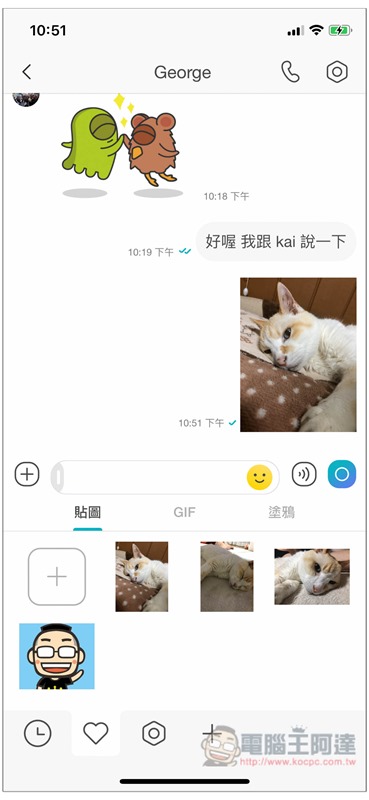
You can even add some words to the picture first, and then turn it into a sticker to make it more expressive:
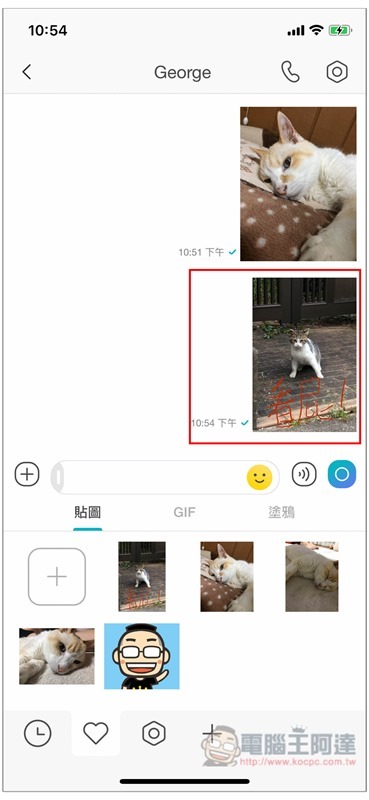
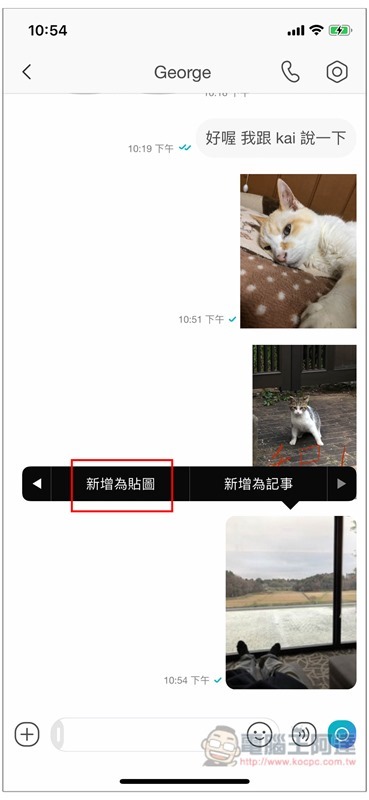
In addition, if a friend sends you a picture that you think is good and you want to make it into a sticker, you can just press it often and you will see the “Add as sticker” function:
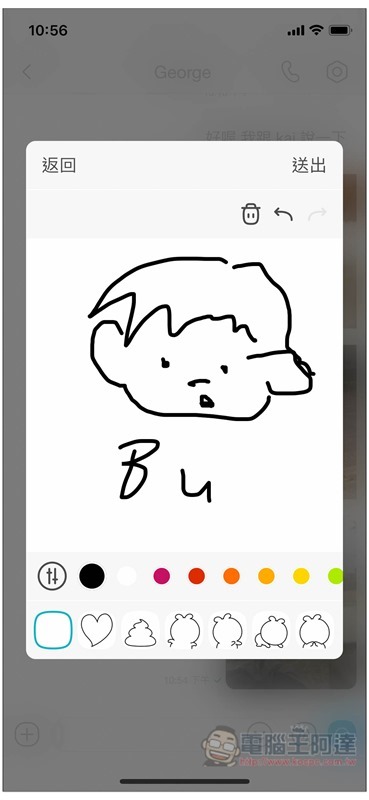
People who like to draw can also create their own unique textures through the built-in drawing function. The color, thickness and transparency of the pen can be changed according to your needs:
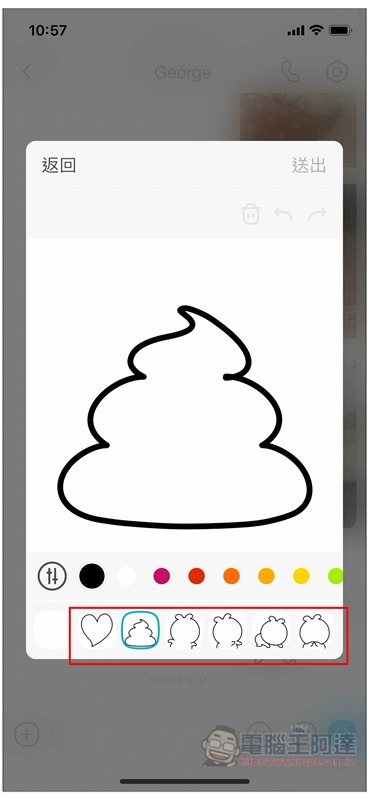
What I like very much is that there are many built-in outlines under the drawing function, such as cute excrement, love, a running back, kneeling, etc., and they will appear on the screen with a click, so that people who are not good at drawing can also experience the fun of creating their own graffiti stickers:
It also provides a lot of funny GIF images:
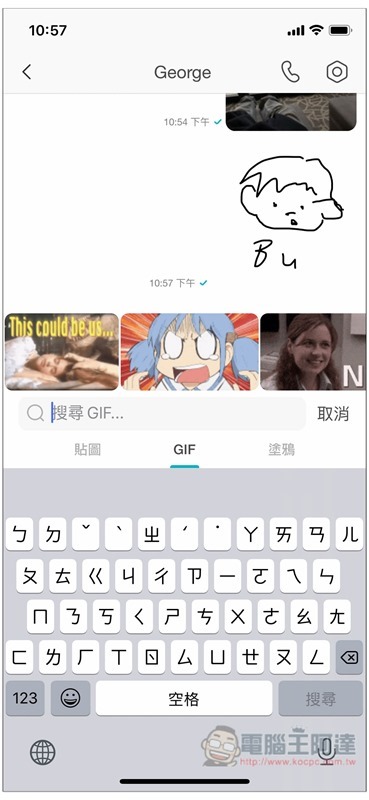
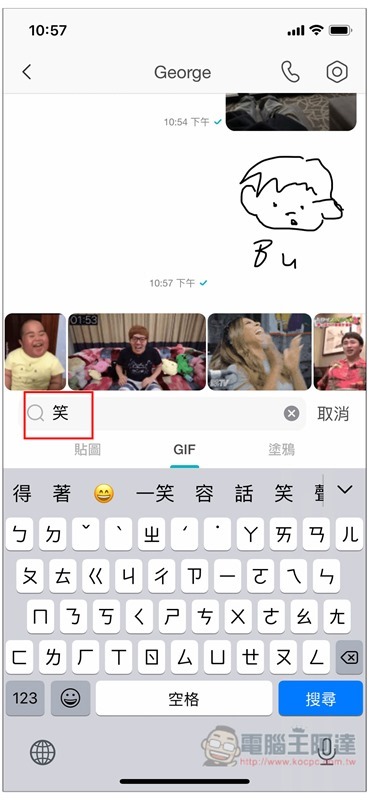
It also supports Chinese search. You only need to enter keywords such as: laugh, and the relevant GIF will appear above, which is very convenient:
Highly private whispers
In life, sometimes we talk trash to our best friends, colleagues speak ill of the boss, or confidential information. If we use normal chat methods, we run the risk of being seen by others, especially by another partner.
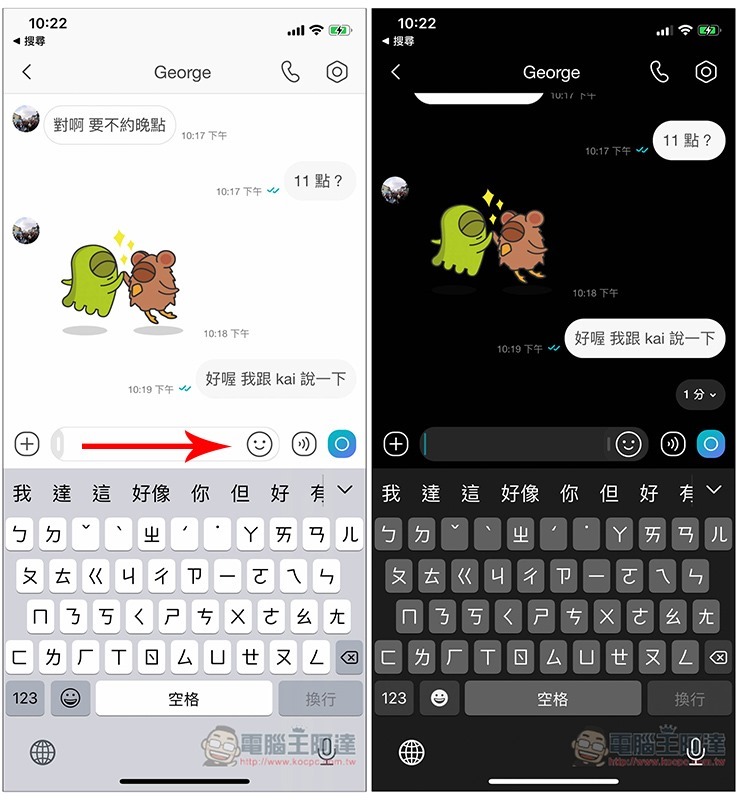
Regarding this point, Jello provides a great private messaging mode. Once turned on, all conversations will be automatically destroyed within the time you set. No manual operation is required, and there is no need to worry about forgetting.
The private message mode can be turned on in the same chat window. Swipe right in the input field below to open it, and the background will instantly turn black. Any content entered next will be automatically deleted when the time is up as long as the other party opens it for viewing:
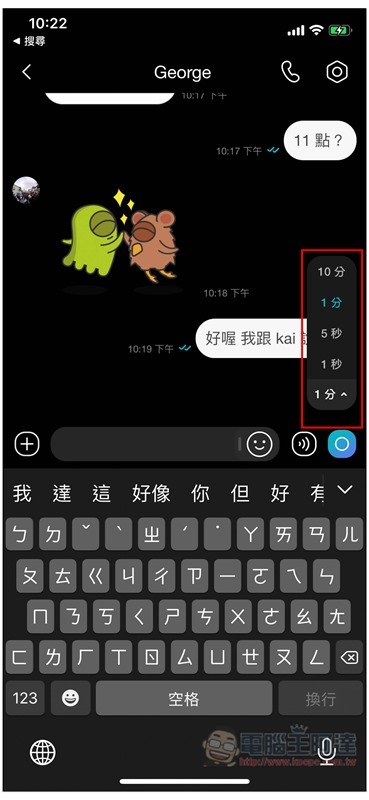
There is a function menu in the lower right corner where you can set the time, with a minimum of 1 second and a maximum of 10 minutes:
Conversations sent in private message mode will have a lock in the upper left corner:
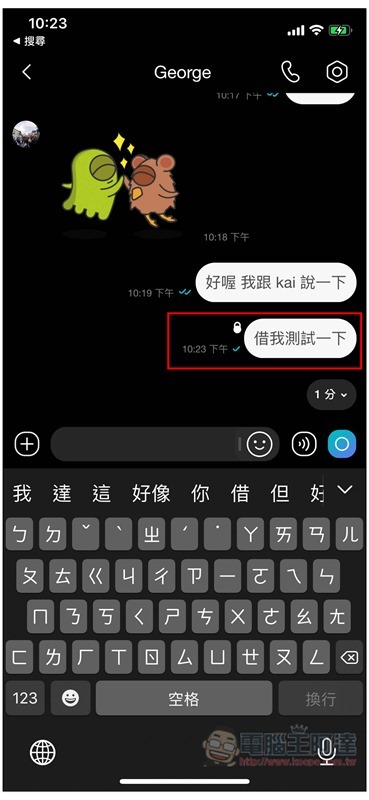
When the other party has not clicked on it, only the private message will be displayed:
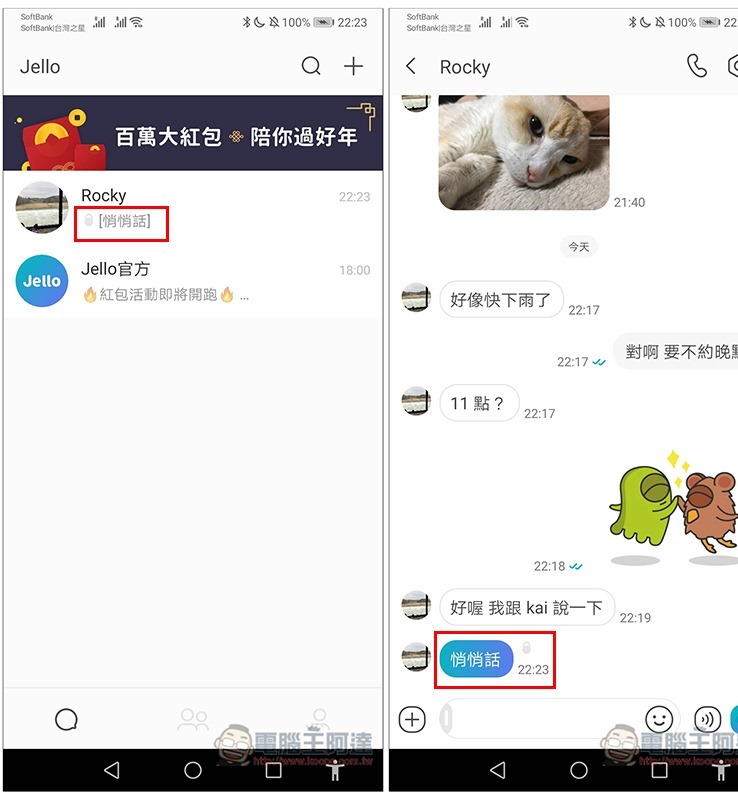
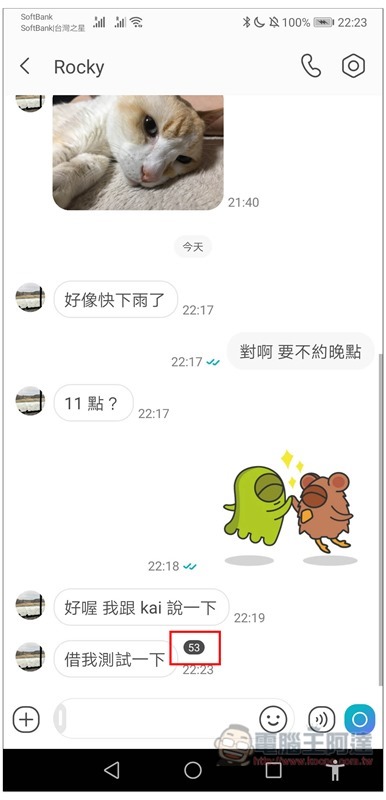
Clicking it will display the conversation, and a countdown will start in the upper right corner. I set it to 1 minute. After the countdown ends, the message will disappear automatically:
Traceless recovery and traceless withdrawal without leaving any trace
I believe everyone has experienced mistransmission of messages. Many communication software on the market now also provide recall functions. However, many of them will tell the other party that you have recycled a message after retracting it. This feels like saying that you mistransmitted something.
It’s okay if the other person doesn’t care, but if you meet some curious friends or even another partner, you may ask more questions, and in the end you may have to tell a white lie.
Jello’s recall function is quite good. It is completely invisible, which means that nothing will be displayed after it is recovered. If the other party does not see it, they will not know it at all:
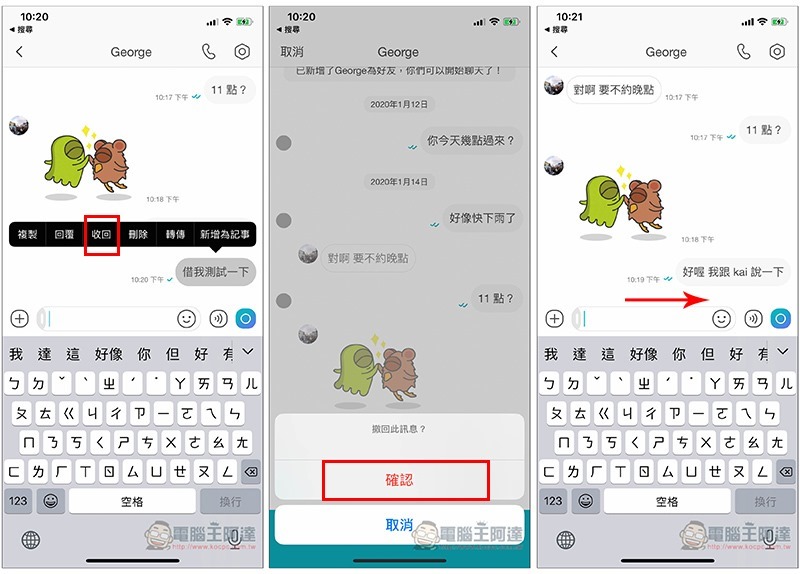
There is no time limit, you can retract messages as long as you want.
The group section also provides a way to leave the group without trace. When you no longer want to stay in a group, after pressing Exit, the chat window of the group will not display anything unless you check it in the member list, so there is no need to worry about embarrassment.
No ads at all, clean interface
There are no ads in Jello’s menus, chat windows, or anywhere in the app, so the interface is very clean and you don’t have to worry about being disturbed when using it:
I have to say that when I opened Jello for the first time, I was a little stunned. The screen was too pure and clean. It had been a long time since I had used such a simple and unburdened communication software. It was easy to find any functions, friends, and chat windows.
Provides transfer/receipt functions with no handling fees
Like LINE, Jello also has transfer/receipt functions, and is paired with Jiekou payment. People who have a Jiekou payment account can use it immediately. People who don’t have it can apply directly in the app. The process is very simple.
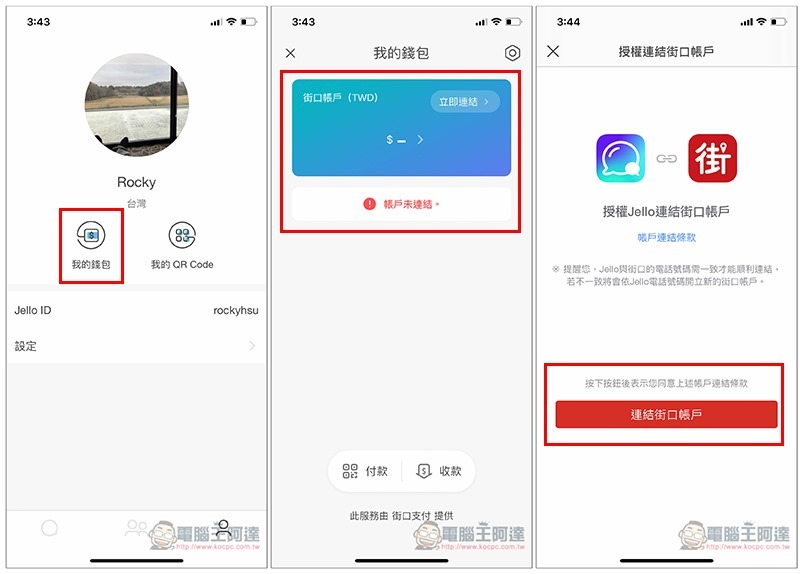
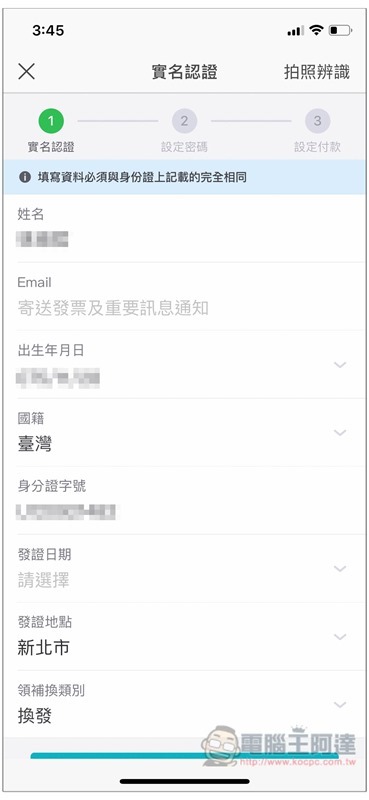
This is about financial business. When applying, you need information about your ID card or residence permit. Use your mobile phone camera to identify it, and all the information will be filled in automatically. You only need to manually select the date of issuance:
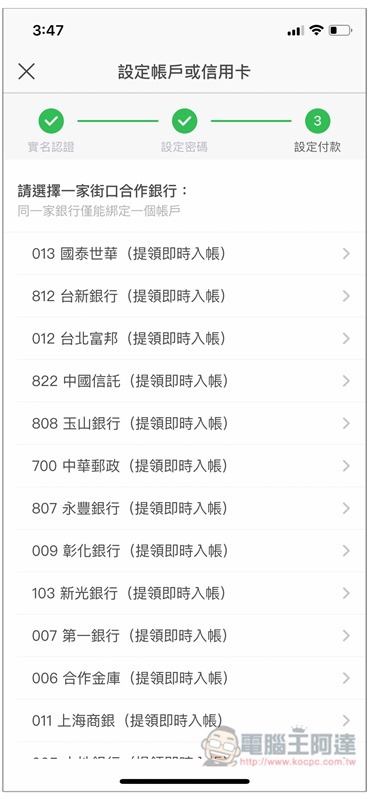
You can choose to link to a bank or credit card. Almost all banks in Taiwan support it. Please provide detailed instructions.Refer to Jiekou Payment official website:
After completing the series connection and depositing the amount, you can perform payment (transfer)/receipt functions in my wallet:
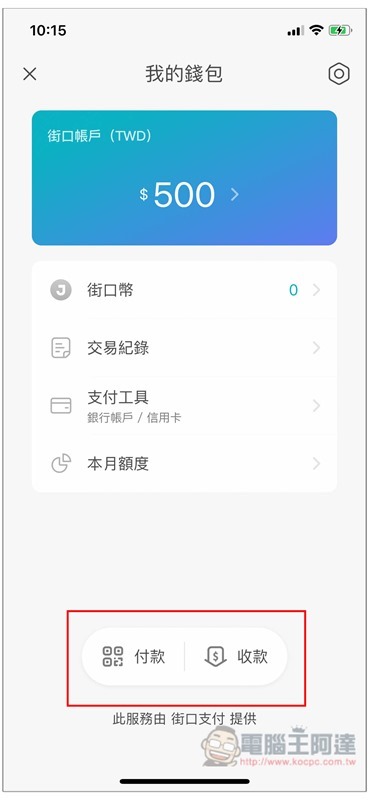
As for the so-called good amount of stored value, those who have never used Guojiekou Pay will quickly explain it here. Simply put, it means transferring money from your bank to Jiekou Payment account. You can think of it as a virtual account.
Also, because both parties use Jiekou accounts, not across banks, the process does not require any handling fees. If necessary after the transfer, you can immediately withdraw it back to your bank account.
No matter whether you store value or withdraw money when paying at Jiekou, there is no handling fee.
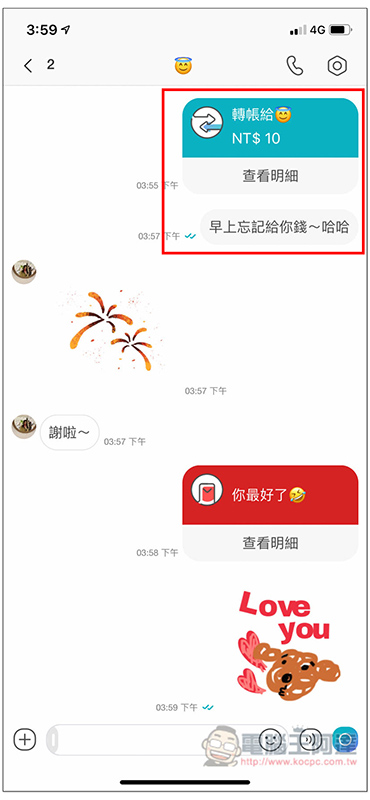
I think this is very useful, especially when a group of people go out to eat. If everyone has Jello and street payment, you pay first, and others will directly transfer money to you through Jello’s payment/receipt. You don’t have to worry about collecting a bunch of cash or change, and you don’t have to worry about handling fees:
Messages are automatically backed up and follow the phone number.
In addition to whether the communication software is easy to use, how to back up the chat content is also a very important thing. I believe everyone should pay attention to this.
Jello’s chat content records follow the phone number, that is, after logging in to the phone number on any mobile phone, you will see all your past chat content, even across systems. For example, if you used Android before, it will appear now if you switch to iPhone.
The backup part is completely automatic, you don’t need to do anything.
Easily send New Year red envelopes to others
Although it is more thoughtful to give red envelopes face to face, not everyone you want to give red envelopes to will meet during the Chinese New Year, so you can use Jello’s red envelope sending function to achieve this.
I have a few close friends. Since the Chinese New Year is here, it would be nice to give a small red envelope to suit the occasion. The amount does not need to be large, just auspicious numbers such as 66 or 88. Enter the chat room and click the + function, and you will see the red envelope function. You can fill in any amount you want (of course, your Jiekou account must have enough money):
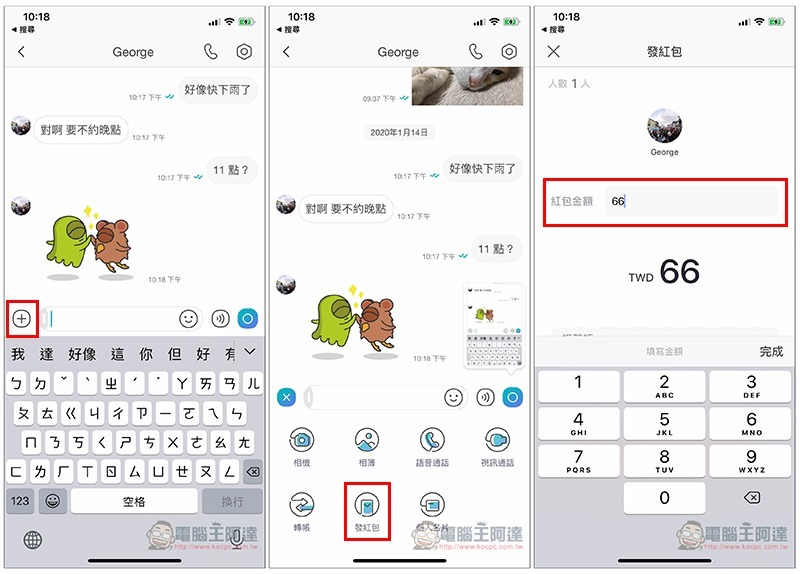
For those who happen to be working abroad, or who are unable to go home for the New Year, they can also use this function to send red envelopes to their parents, nephews, nieces, or another partner. Personally, I feel that compared to transferring money, Jello’s red envelopes seem to be more thoughtful. You can also send your recorded New Year greeting videos, photos, or text to the other party:
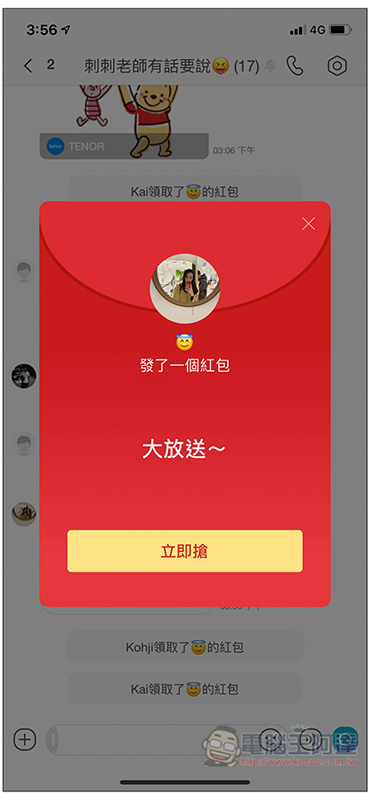
Not only individuals, but also groups can send red envelopes, and the amount can be divided equally or randomly by the system:
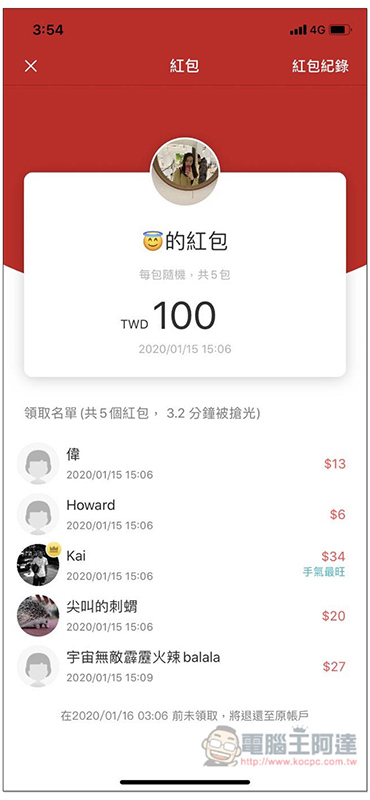
Jello’s New Year Red Envelope Crazy Giving Event
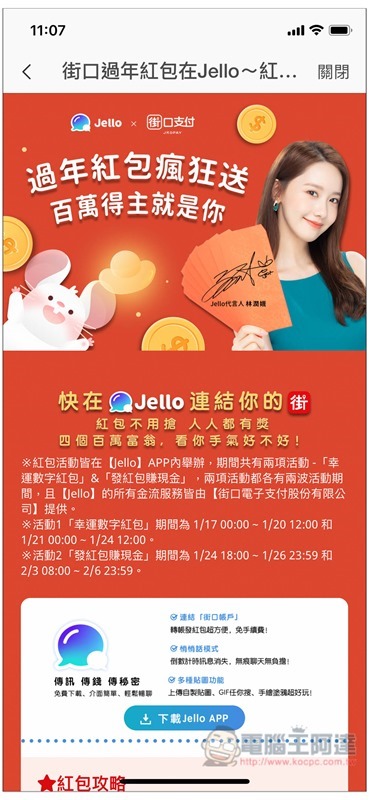
In addition to sending red envelopes to others, Jello also launched a “New Year’s Red Envelope Crazy Sending Event” during this year’s New Year to send red envelopes to every user.
There are two parts: “Lucky Number Red Envelope” and “Earn Cash by Sending Red Envelopes”. The maximum prize is 1 million, which can be said to be a huge red envelope. The following is a brief description of the activity. For more details, you can enter the Jello App to view:
[Red envelope activity 1 group selection activity: you can choose lucky numbers 1~9 or bet on millions of red envelopes! 】
- Movement period: First wave 1/17 (Friday) ~ 1/20 (Monday), second wave 1/21 (Tuesday) ~ 1/24 (Friday)
Activities:
- Click on the event page in the [Jello] chat room list banner, and each person can choose a lucky number from 1 to 10, and everyone will win a prize. If you select numbers 1 to 9, the “corresponding red envelope amount” of the selected number will be equally divided among users who select the same number. If you select number 10, a lottery will be used, and only one lucky winner will be selected to win 1 million.
(Example: The total amount of number one is 1 million, the total amount of number two is 2 million… until the total amount of number nine is 9 million, it will be equally divided, and the number ten will draw one user to get a red envelope of 1 million.)
[Red Envelope Activity 2 Friend Activity: “Earn Cash by Sending Red Envelopes” and have a chance to randomly receive millions of red envelopes]
- Movement period: First wave 1/24 (Friday) ~ 1/26 (Sunday), second wave 2/3 (Monday) ~ 2/6 (Thursday)
Activities:
- Use [Jello] to send red envelopes to friends, and you and your friends will receive a red envelope of random amount. The amount of the red envelope will be divided equally between both parties, and you may have a chance to receive a red envelope of up to NT$1 million!
*Detailed event information is subject to the announcement on Jello’s official fan page.
Summarize
Jello is really a very good communication software. Not only does it have almost all the functions that are used for chatting, but it also has payment functions. The operation process is also designed to be simple and easy to use, which surprised me.
Usually, this kind of cash flow function generally takes a while to get familiar with and understand, but Jello’s payment is almost immediately accessible as soon as you use it. It is very intuitive, and there is no advertising interference, so it is completely hassle-free to use, and you can find any function you want immediately. Highly recommend everyone to try it.
Source: KOCPC Chinese